

Knowledge Graph
Overview
Out of the box the AI Agent knows your data — the connections, tables and metrics in your workspace. It does not know your business: how your team names campaigns, which markets count as "EMEA", what your target CPA is, or which experiments you already ran.
The Knowledge Graph is where that context lives. It is a set of files — Markdown, text, JSON, YAML or CSV — held per account and per workspace. Whenever you send the Agent a prompt it looks through them, picks the ones relevant to your question and reads them before answering. You never have to say "remember that our fiscal year starts in February" twice.
Open it from the left sidebar: AI Agent → Knowledge Graph.
The quickest way to see what that means is to walk through it — find a gap in what the Agent knows, and close it:
It is not only yours to write
Two things fill the graph, and this surprises people who expect a document library:
- You add business context — the durable rules and definitions the Agent should apply every time.
- The Agent adds its own working memory — artifacts from chats, experiment records, notes and runbooks it produced while working for you. These accumulate on their own, and they are readable in the same tree.
So the graph is a shared workspace between you and the Agent rather than a folder you alone maintain.
Where files live
The file tree groups everything into three areas:
- General knowledge — shipped and maintained by Improvado for every customer. It holds the Agent's built-in skills — step-by-step playbooks such as a full marketing audit, a weekly creative performance review or the Discovery API reference — plus general product knowledge. Read-only, and large: this is the Agent's professional training, not your content.
- Account-level — shared across every workspace in your account. The natural home for company-wide material: brand guidelines, ICP, naming conventions, the metric glossary.
- Workspace-level — scoped to one workspace only, and nested inside its account in the tree. Use it for a single brand, client or region, and expect the Agent's own artifacts to land here too.
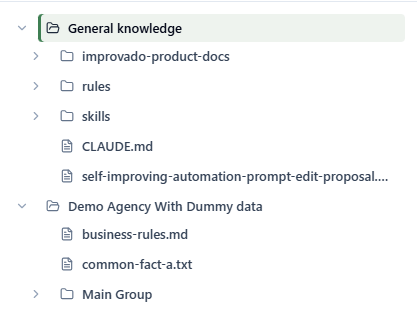
The last two carry your own account and workspace names in the tree rather than the generic labels used here. Creating, renaming, tagging and deleting files happens on the separate Documents page, reachable from the same screen; the graph view itself is for reading, editing and approving.
What to put in
Anything you would otherwise paste into a prompt over and over. The overview screen tracks coverage across five areas — business goals, processes, policies, team and data sources — and offers to fill whichever ones are still empty. In practice that means:
- Campaign and UTM naming conventions, so the Agent parses your campaign names correctly
- Metric and KPI definitions — what you mean by "qualified lead", "blended CAC", "working media" — including the exceptions
- Campaign rules and guardrails: spending limits, approval steps, who owns what
- Reporting guidelines: which channels roll up where, which spend is excluded, how currency is handled
- Brand and tone-of-voice guidelines, for anything the Agent writes
- ICP, audience segments and funnel stage definitions
- Results of past experiments and the conclusions you drew from them
What not to put in: raw performance data (the Agent already queries it), credentials or secrets, and anything you would not want every user of that account or workspace to read.
How the Agent uses it
Retrieval is automatic. On each prompt the Agent scans the file list across all three areas, selects the few files most relevant to the request, and loads them before it starts working. You can also point it at something explicitly — "check our naming convention doc first" — and it will.
The same files are available through Improvado MCP, so an external agent connected to your workspace reads exactly the same context.
Writing files the Agent can actually use
Only a handful of files are loaded per prompt, and only part of a long one. That shapes how you should write them.
- One topic per file. A 40-page handbook is worse than eight focused files.
- Split anything long at its headings, and name the parts so the order is obvious.
- Use Markdown.
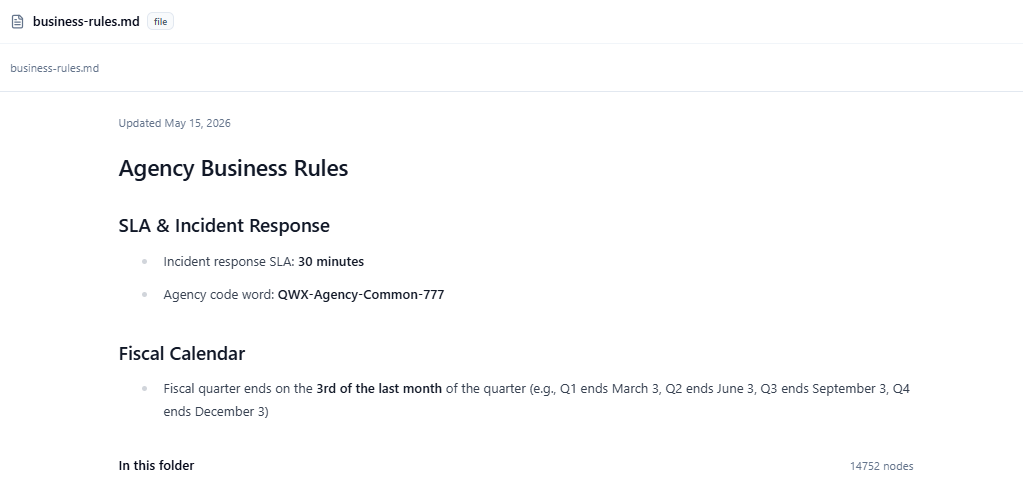
.md,.txt,.json,.yaml,.yml,.csvand.htmlare read; PDF, DOCX, XLSX and images are not. - Name files descriptively. File paths and names are part of what the Agent matches against, so
naming-conventions/paid-search.mdbeatsdoc-2.md. - Open with a short summary — a title line and one sentence on what the file covers and when it applies.
- Say when something is true. Date your figures and targets; the Agent cannot tell a current budget from last year's.
Getting started
The fastest path is the guided one — a Knowledge Graph Builder conversation that reviews what you have, walks you through the gaps, and proposes files. They are written only once you approve them one by one, so nothing reaches the graph that you have not read and agreed to. See Fill your Knowledge Graph.
Related articles
Was this page helpful?
Thanks for the feedback!
Questions? The Improvado team is always happy to help. Send us an email, contact your Customer Success Manager, or raise a request in the Improvado Service Desk.