

What is Creative Analytics Intelligence?
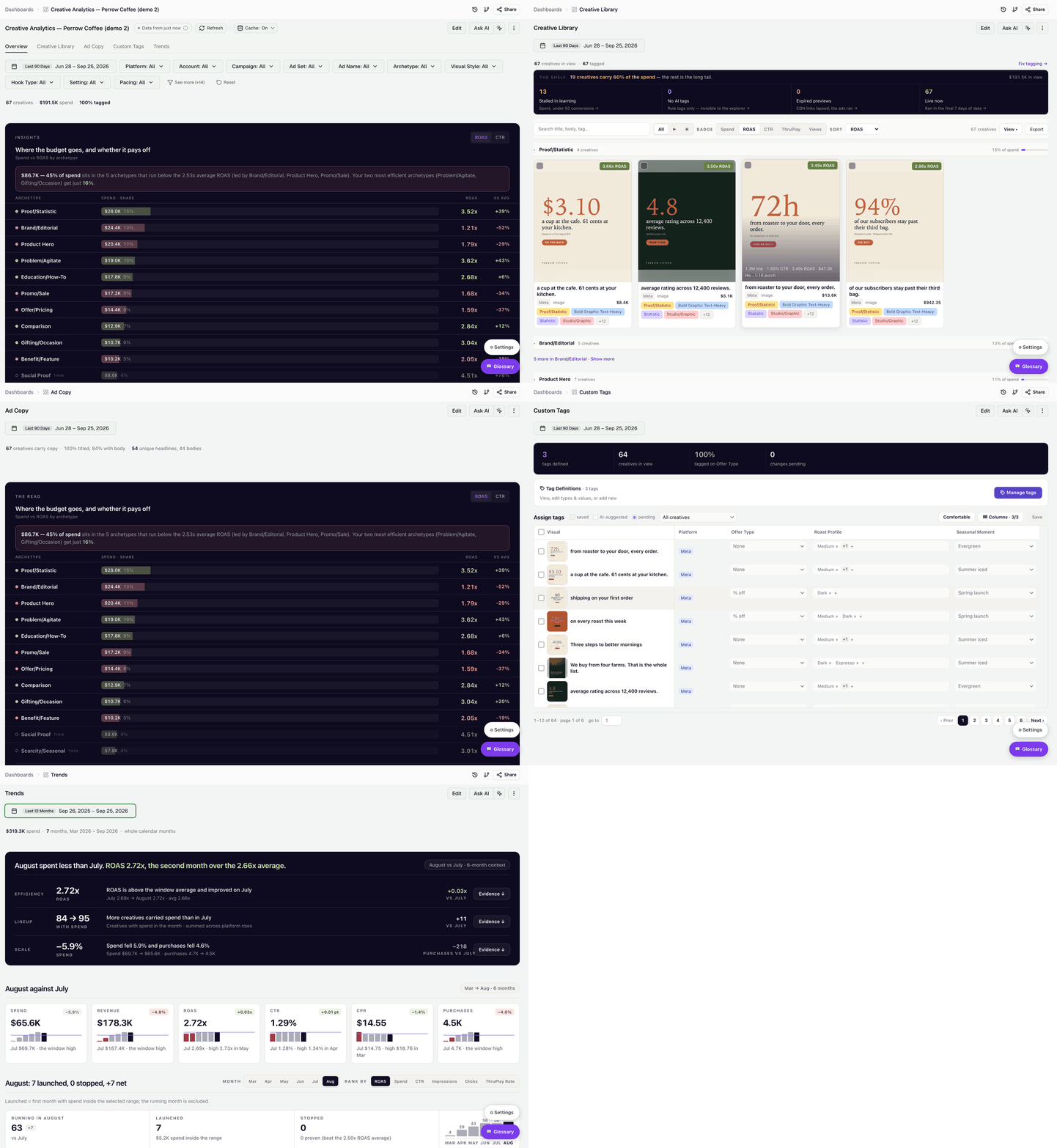
Creative Analytics Intelligence turns every paid social ad into a tagged data point — archetype, hook, visual style, pacing, emotional tone, color palette — and matches those attributes against actual ROAS, CTR, and purchase volume. The result is a dashboard that answers questions standard ad reporting can't: Which creative formats drive our best ROAS? Which hook style is losing us money? What does our top quartile of ads have in common?
What this dashboard is for
Creative Analytics Intelligence is built for marketers and agencies who want to:
- Identify which creative attributes correlate with revenue, not just clicks.
- Compare performance across archetypes, visual styles, and tones in one view.
- Spot underperforming spend pockets that deserve a creative refresh.
- Brief design teams with evidence-backed recommendations ("scale Proof/Statistic and Problem/Agitate, rework Brand/Editorial").
The dashboard works on top of any Improvado workspace where paid social creative data is connected. Taxonomy is generated automatically by an AI classifier, and you can extend it with your own custom tags at any time.
What it looks like
The dashboard has five tabs: Overview, Creative Library, Ad Copy, Custom Tags, and Trends. Each tab reads top to bottom like a briefing. It opens with the Insights widget — one sentence that says how much spend sits behind the account average and which archetypes carry the account — followed by the breakdowns, the creative gallery, and the trend history. You never start from a blank chart: you start from the conclusion and drill down. See Dashboard and stats.
How the taxonomy works
Two layers of tags power every chart:
- AI taxonomy (automatic). An AI classifier reads each creative — image or video — and assigns universal attributes: archetype, visual style, hook type, setting, pacing, emotional tone, color palette, characters, products shown, and more. Tagging runs automatically once your account is onboarded.
- Custom tags (yours). Add brand-specific dimensions the universal taxonomy can't know — campaign theme, product line, persona, funnel stage, seasonality. Fill them in by hand, or give a tag an AI prompt so the pipeline classifies your creatives for you. See Custom tags management.
For how tagging and re-tagging work in detail, see How your creatives get tagged.
Before you start
You need:
- At least one ad platform connected in Improvado. Any ad source Improvado extracts works, including Google Ads, Meta Ads, and Reddit Ads, as long as it provides the creative visuals.
- Creatives auto-tagged by the AI classifier. Tagging happens automatically once your account is onboarded, with no setup on your side.
- Workspace access to the dashboard. Your Customer Success Manager shares the link; it opens inside your Improvado workspace under Dashboards.
Was this page helpful?
Thanks for the feedback!
Questions? The Improvado team is always happy to help. Send us an email, contact your Customer Success Manager, or raise a request in the Improvado Service Desk.