

Improvado MCP
The Concept
Closed-Loop Marketing Execution
Your marketing team plans in decks. Launches in platform UIs. Measures in spreadsheets. Reports in yet another tool. Every handoff costs days. Context disappears between steps.
Closed-loop execution fixes that. Your AI agent runs the entire cycle — from hypothesis to better-performing campaign — across every channel, with every metric unified and every action governed. No handoffs. No context lost. And it gets smarter each cycle.
The Product
What Is Improvado MCP
MCP is the open standard for connecting AI to external tools. Anthropic built it. OpenAI and Google adopted it. 97 million SDK downloads a month — it's the way AI talks to the outside world now.
Improvado's MCP server exposes your entire marketing data platform — 1,400+ connectors, governed transformations, real-time analytics — to any AI agent through one secure interface. Ask a question, get real numbers. Not estimates. Not hallucinations. Numbers.
What Your Team Can Do — Mapped to the Loop
Getting Started
Connect Improvado MCP to Your AI Agent
Customer MCP uses OAuth — your existing Improvado credentials, no new tokens to manage. Eight methods depending on your environment. Most take under five minutes; Microsoft Copilot first needs a one-time OAuth application from Improvado.
https://<your-domain>/experimental/agent/api/mcp-customer/v1/invoke<your-domain> — your Improvado domain. For a standard account use report.improvado.io, so the full endpoint URL is:https://report.improvado.io/experimental/agent/api/mcp-customer/v1/invokeacme.improvado.io). On a whitelabel domain, report.improvado.io will not authenticate you.<your-domain> with report.improvado.io (standard accounts) or your organization's whitelabel domain, e.g. acme.improvado.io.<your-domain> with report.improvado.io (standard accounts) or your organization's whitelabel domain, e.g. acme.improvado.io..mcp.json<your-domain> with report.improvado.io (standard accounts) or your organization's whitelabel domain, e.g. acme.improvado.io.tekliner/improvado-agentic-frameworks-and-skillsmaster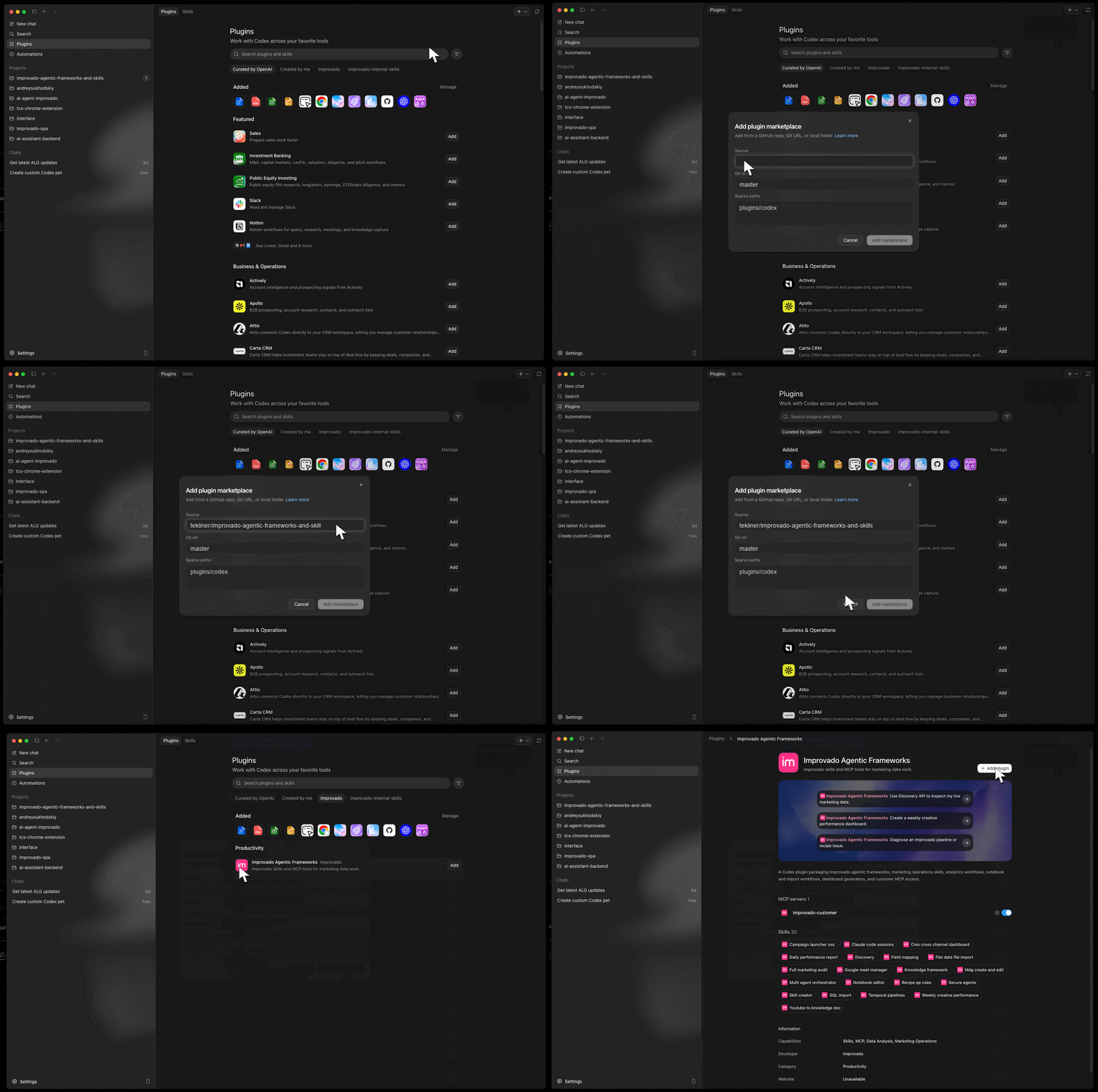
~/.gemini/settings.json and paste this into your mcpServers section. Reliable OAuth-scope configuration.<your-domain> with report.improvado.io (standard accounts) or your organization's whitelabel domain, e.g. acme.improvado.io.~/.gemini/settings.json and append the OAuth scopes to the new improvado entry.<your-domain> with report.improvado.io (standard accounts) or your organization's whitelabel domain, e.g. acme.improvado.io./mcp auth improvado to start the browser-based OAuth flow and connect your Improvado account.<your-domain> with report.improvado.io (standard accounts) or your organization's whitelabel domain, e.g. acme.improvado.io.improvado should appear as connected.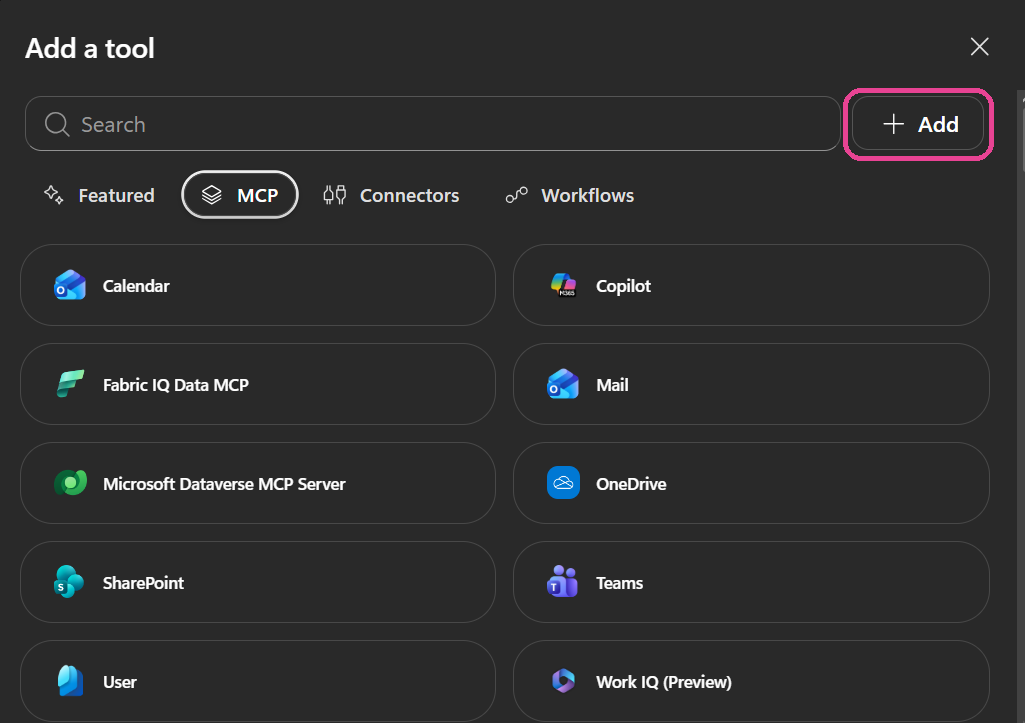
https://report.improvado.io/experimental/agent/api/mcp-customer/v1/invoke/https://report.improvado.io/api/dts/v2/oauth/o/authorize/?resource=https%3A%2F%2Freport.improvado.io%2Fexperimental%2Fagent%2Fapi%2Fmcp-customer%2Fv1%2Finvoke%2F&client_id=<client_id>&x=https://report.improvado.io/api/dts/v2/oauth/o/token/mcp:customer<client_id> with your Client ID and keep the trailing &x= exactly as shown: Copilot appends its own parameters after it.report.improvado.io with your domain in every URL, including the encoded copy inside resource=.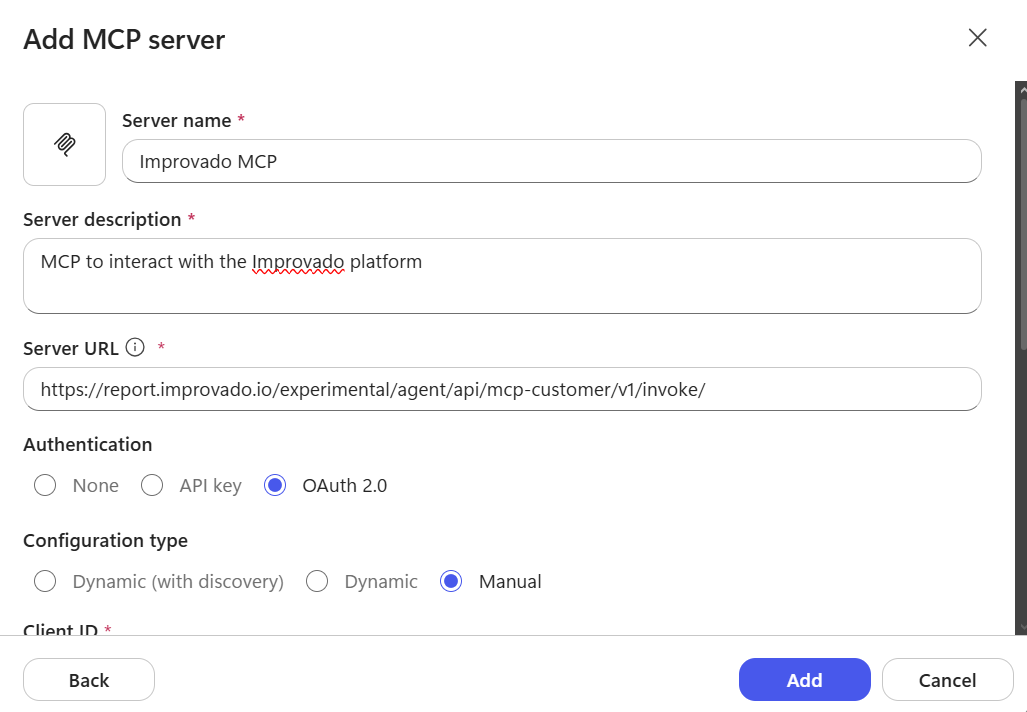
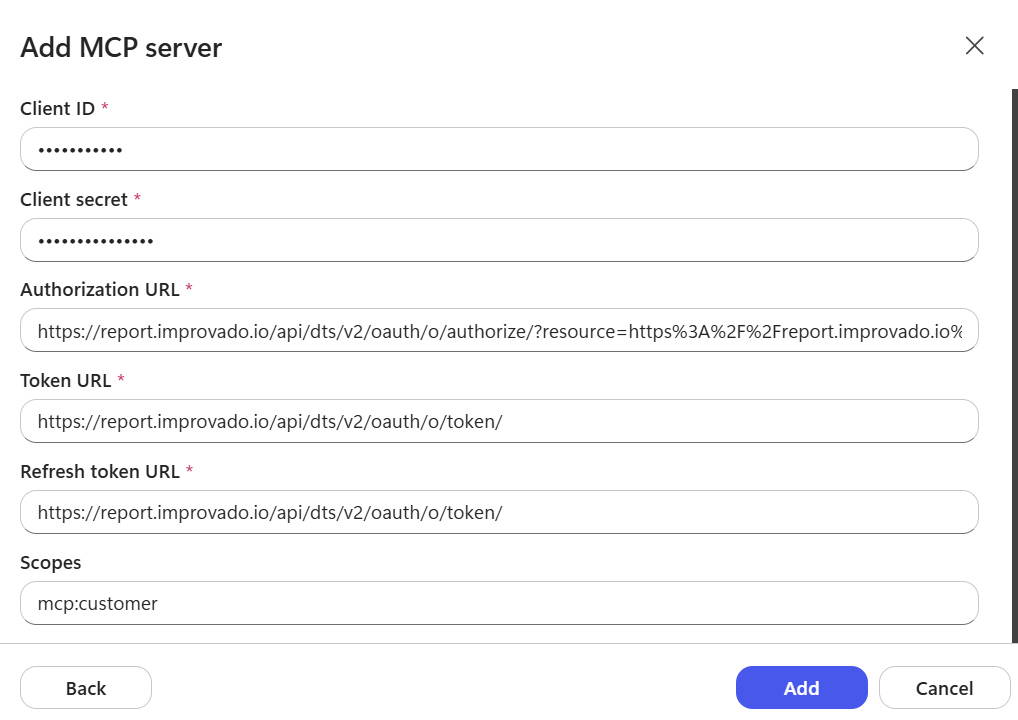
https://report.improvado.iohttps://report.improvado.io/api/dts/v2/oauth/o/authorize/?resource=https%3A%2F%2Freport.improvado.io%2Fexperimental%2Fagent%2Fapi%2Fmcp-customer%2Fv1%2Finvoke%2F&client_id=<client_id>&x=https://report.improvado.io/api/dts/v2/oauth/o/token/mcp:customer<client_id> with your Client ID and keep the trailing &x= exactly as shown: Copilot appends its own parameters after it.report.improvado.io with your domain in every URL, including the encoded copy inside resource=.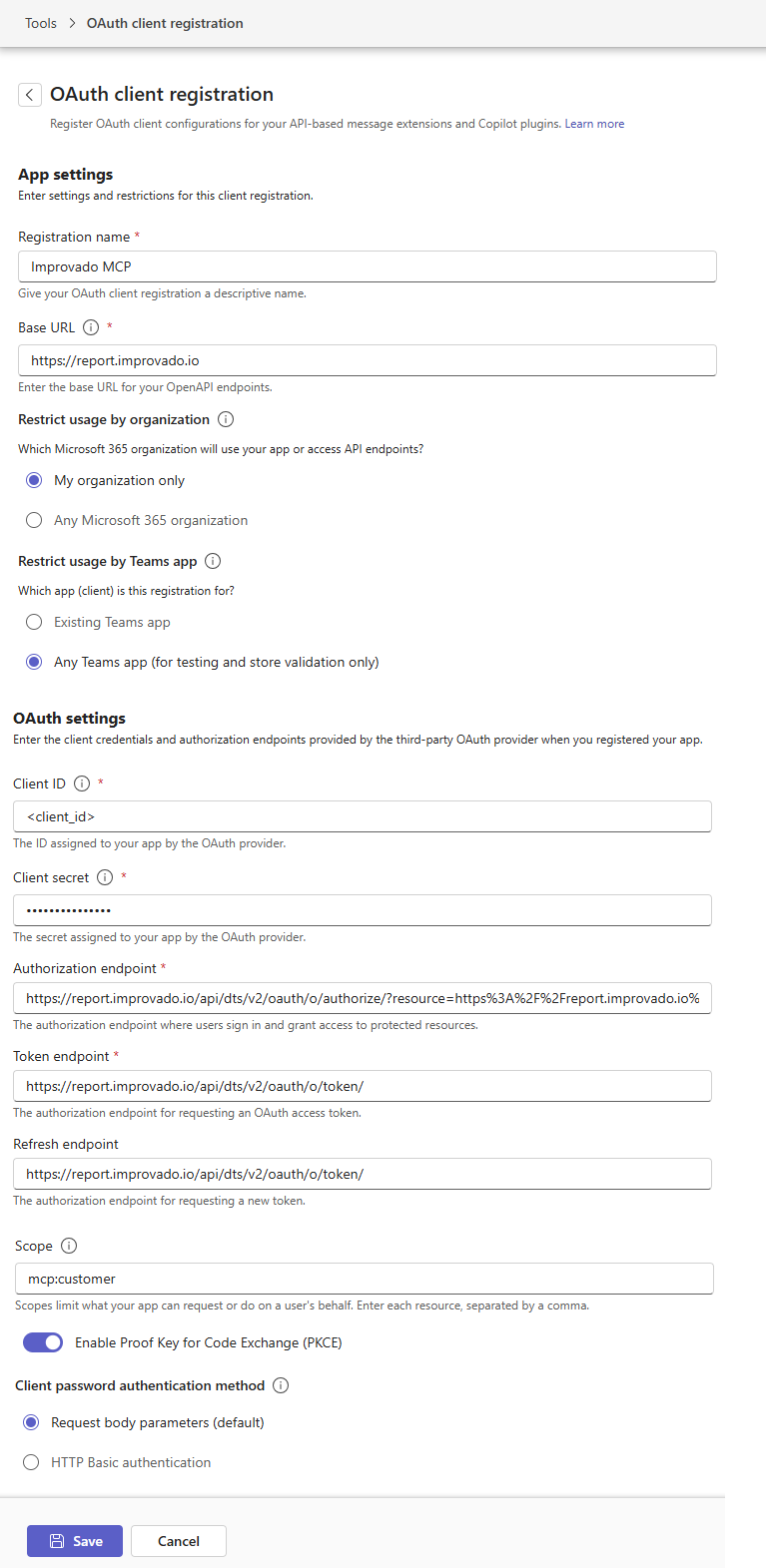
https://report.improvado.io/experimental/agent/api/mcp-customer/v1/invoke/Use Case
MCP + Knowledge Graph: Full Campaign in 1 Prompt
Connect Improvado MCP to your AI agent and point it at your Knowledge Graph. A two-sentence prompt becomes a live multichannel campaign.
Who Benefits & How It Fits
Brand Roles That Benefit
One platform. Every marketing function accelerated.
Inside the Platform
Where MCP fits in Improvado's stack.
Enterprise Security
Appendix A
16 Use Cases
Marketing capabilities unlocked with Improvado MCP — common use cases across enterprise brands, agencies, and data teams.
Appendix B — For Engineering, Data, & InfoSec Teams
Architectural Highlights
4 Improvado MCP design decisions that map directly to enterprise infrastructure constraints — AI gateway integration, data warehouse destination, security review process, and intraday data needs.
queryDestinationTool queries your own warehouse tables natively in the same session as MCDM data — enabling the spend-to-conversion join, with zero new IAM access required.queryDestinationTool for your own data warehouse. Your agents then own the analysis layer — which is exactly what most enterprises want.Appendix C — Public Endpoint
MCP Tool Reference
Complete tool inventory for Improvado MCP public endpoint. Every tool is accessible via JSON-RPC 2.0 after OAuth authentication — no per-tool setup required. Tool categories below match the use cases in Appendix A.
Was this page helpful?
Thanks for the feedback!
Questions? The Improvado team is always happy to help. Send us an email, contact your Customer Success Manager, or raise a request in the Improvado Service Desk.