
Violation Fix Actions
Purpose
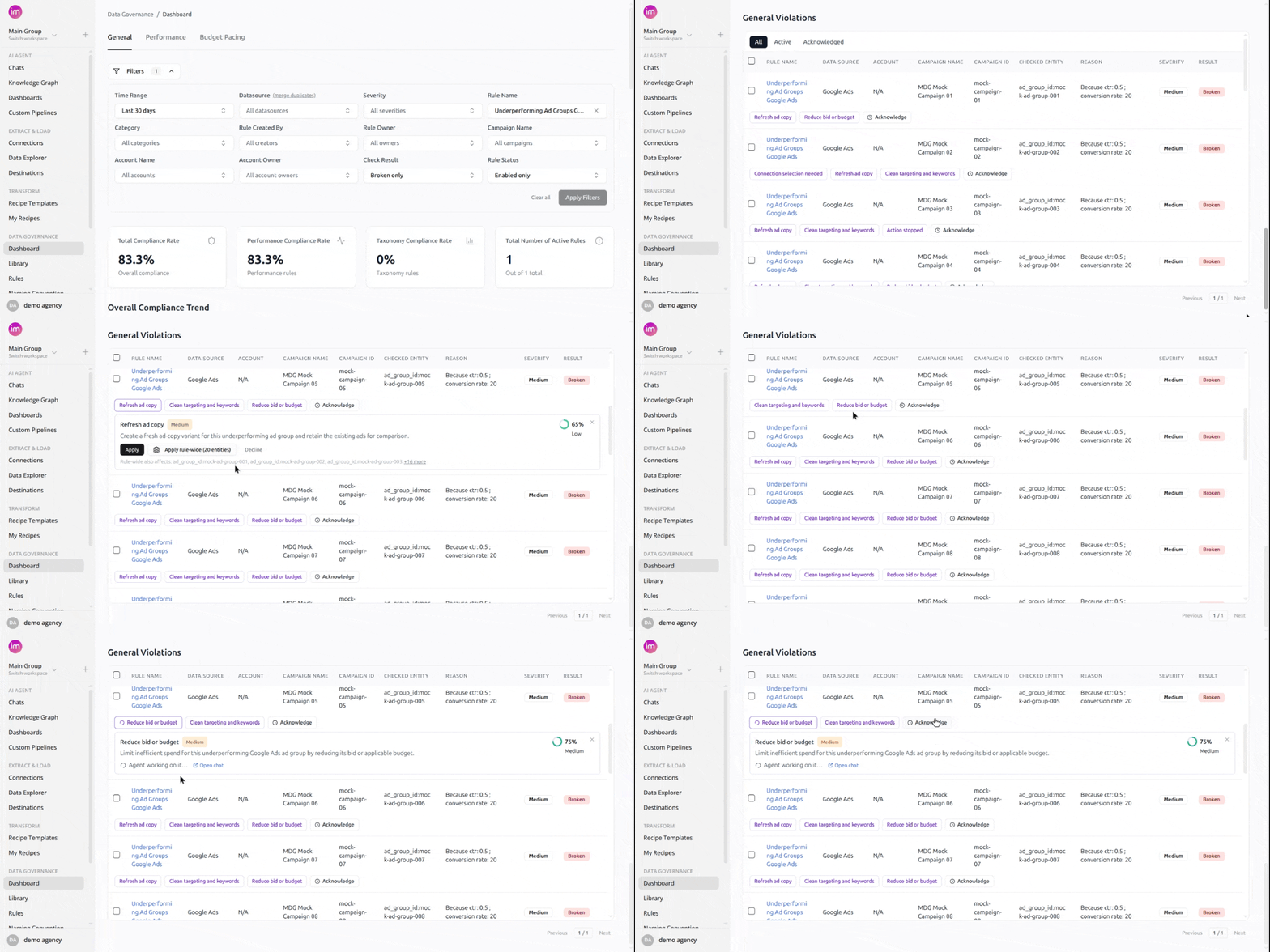
Fix data governance violations directly from the dashboard. When a rule detects violations, the violations table shows action buttons next to each affected entity — one click launches an AI agent that applies the fix, verifies the rule afterwards, and reports the outcome back onto the same card. You no longer need to leave the dashboard, look up the affected campaigns, and correct them by hand.
Key Characteristics
The rule's "Action Required" field drives what fixes are offered. Every rule has an Action Required field — the remediation you want performed when the rule breaks. When it is filled in, the fix buttons implement exactly what it says: each independently applicable change in the field becomes its own action. Only when the field is empty (or none of its operations apply) does the AI derive a fix from the rule's logic on its own. To change a rule's actions, edit the rule with the AI agent — its actions are then re-evaluated from scratch.
Coverage stays current automatically. A daily refresh re-checks each rule's violating entities and adds fix buttons for entities that started violating after the rule was set up. An entity whose fix just succeeded is left alone for 24 hours, so a correction that is still syncing does not immediately resurface as a new button.
Each action shows its confidence and priority. Expanding an action card shows a description of what the fix will do, along with the AI's confidence and the action's priority, before you apply anything.
Every run is a chat you can open. Each applied fix runs in its own agent chat. The card shows an "Open chat" link during and after the run, so you can watch the agent work, review exactly what it changed, or answer its questions.
Entities under one rule can receive different fixes. Most violations of a rule share the same remedy, but they don't have to: entities can break a rule for different reasons, and each entity only gets the actions that address its own violation. The Action Required field can express this directly — for example, "when spend exceeds the threshold more than 2x, pause the campaign; when it is below 0.5x, raise the budget" produces two different actions, each offered only to the entities it applies to. A rule carries at most 5 distinct action types.
Fix actions and violation acknowledgements are separate. Acknowledging hides a violation alert for a period without changing any data; a fix action actually corrects the underlying data. Both appear on the same row and work independently — see Acknowledge Violations.
Workspaces never see or affect each other's actions. Actions, runs, and results are private to the workspace they belong to.
How to Use
Apply a fix to one entity
- Open Data Governance and go to the violations table.
- Find the violating entity — its row shows a button for each available fix.
- Click the button to expand the action card. Review the title, description, confidence, and priority.
- Click Apply. The card shows "Launching agent…", then "Agent working on it…" while the fix runs.
- When the run finishes the card shows the outcome: "Fixed ✓" with a summary, "Partial", "Needs input", or "Failed". A recommended next step appears when there is one.
Apply a fix rule-wide
- Expand an action card. If the same fix applies to several entities, an Apply rule-wide button appears next to Apply.
- The button loads the rule's current list of violating entities and shows the real count — for example "Apply rule-wide (4 entities)". The card footer lists the affected entities ("Rule-wide also affects: …"). The button stays disabled until the list is loaded, so you always see the exact scope before committing.
- Click it. One agent run fixes exactly the entities you saw — the scope never widens during the run.
- After a verified rule-wide success, the individual entity cards for that fix show "Covered by the rule-wide run of this action." instead of offering the same fix again.
Decline an action
- Expand the action card and click Decline.
- The button disappears for that entity and is not offered again, even after daily refreshes. Declining one entity's action does not affect the same fix on other entities.
Answer an agent's question
- If a run ends with "Needs input", the agent needs information or a confirmation before it can complete the fix — for example, approval before changing a data source setting.
- Click Open chat, read the agent's question, and reply. The run resumes and the dashboard card returns to the in-progress state, then shows the final outcome.
Where Fix Actions Appear
- Data Governance violations table — the only place fix actions are offered. They are deliberately kept out of the general agent-suggestions inbox so the same fix is never offered from two places at once.
- Agent chats — every run has its own chat, linked from the action card during and after the run.
- Automations page — the daily coverage refresh for each rule appears in your automations list with its run history.
Notes and Limits
- Availability: the feature is enabled per account by the Improvado team as part of a gradual rollout.
- Only concrete, automatable fixes become buttons. A remediation that ends in a judgment rather than a change the agent can apply itself (for example "review the results") is not offered as an action, even if the Action Required field asks for it.
- Editing a rule with the AI agent resets its actions. The edited rule is re-evaluated from scratch and new actions are prepared for its current violations. Declined actions stay declined, and a fix that succeeded within the last 24 hours is not re-offered. A run that was still in progress when the rule was edited is cancelled, since it targeted the rule's old definition.
- Deleting a rule removes its actions. The run chats remain available for reference.
- When an entity violates again after a successful fix, a fresh action replaces the old "Fixed ✓" card — the earlier outcome stays available in its linked chat.
Was this page helpful?
Thanks for the feedback!
Questions? The Improvado team is always happy to help. Send us an email, contact your Customer Success Manager, or raise a request in the Improvado Service Desk.