

Creative Analytics Intelligence — Dashboard & Stats
The dashboard has five tabs. Each one reads like a briefing: it opens with the Insights widget — a one-sentence summary — then gives you the breakdowns behind it. This page walks through Overview, Creative Library, Ad Copy, and Trends. The Custom Tags tab has its own article: Custom tags management.
Overview — what's working right now
💡 Why use this tab: weekly check-ins, prep for client meetings, or a quick answer to "what's working right now?" It is designed to be read top to bottom in under a minute.
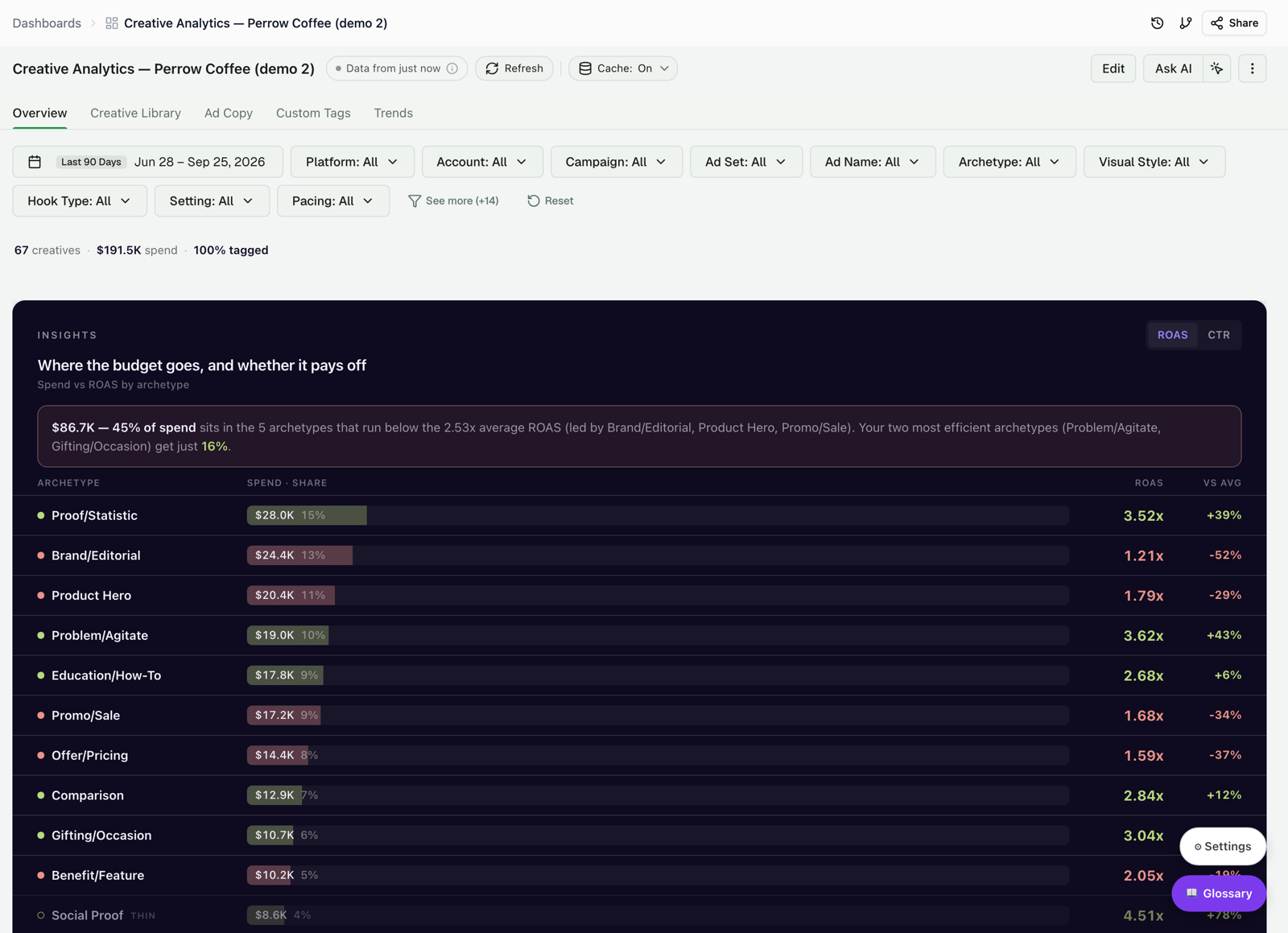
Insights — where the budget goes, and whether it pays off
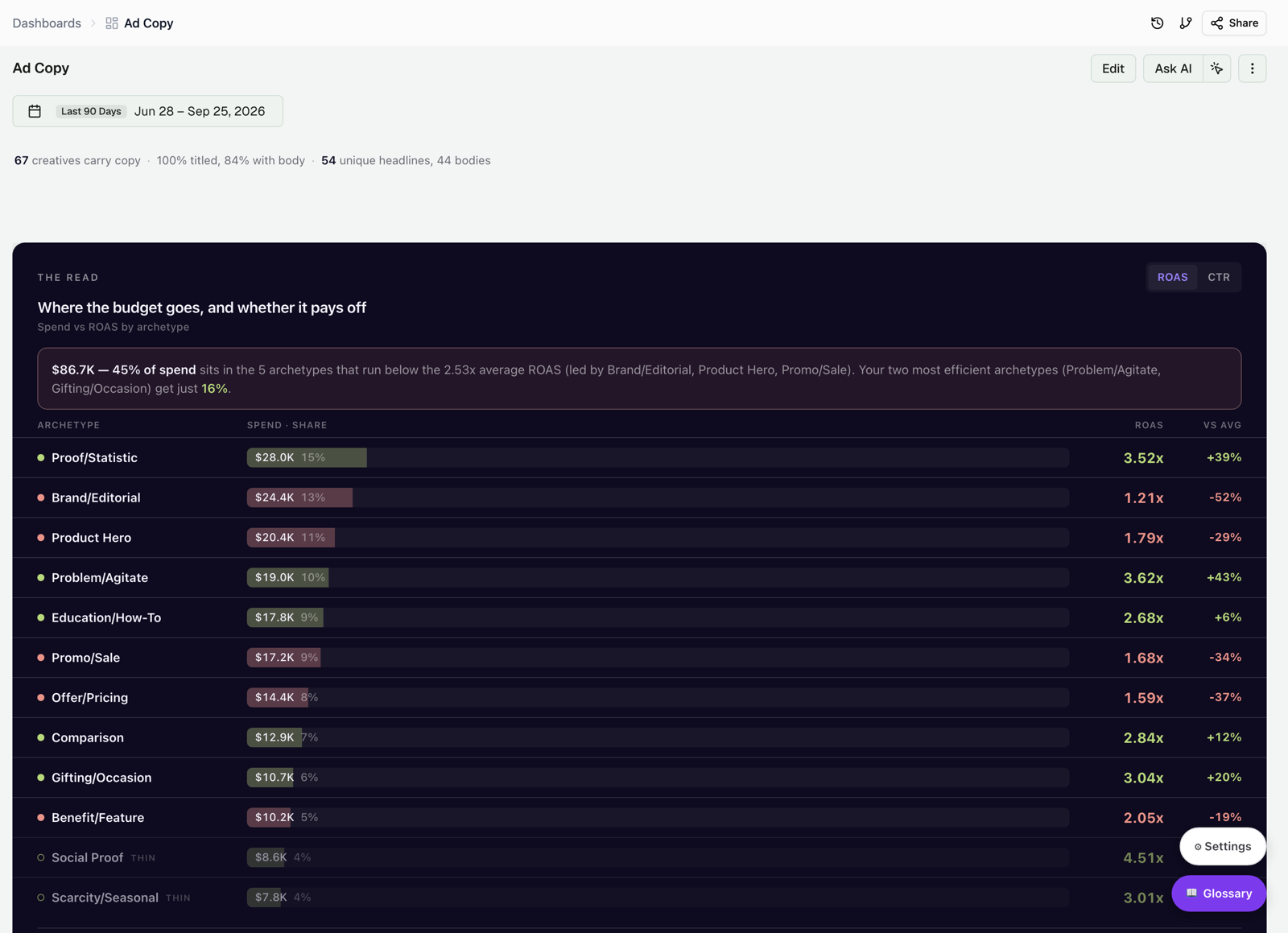
The lead widget states the headline in plain English, then ranks every archetype by spend share, ROAS, and distance from the account average. Green dots and bars beat the average; red ones trail it. Use the ROAS / CTR toggle to color the rows by either metric. A row marked THIN (hollow dot) has too little spend or too few conversions to act on — it's shown for context, not as a cue to move budget.
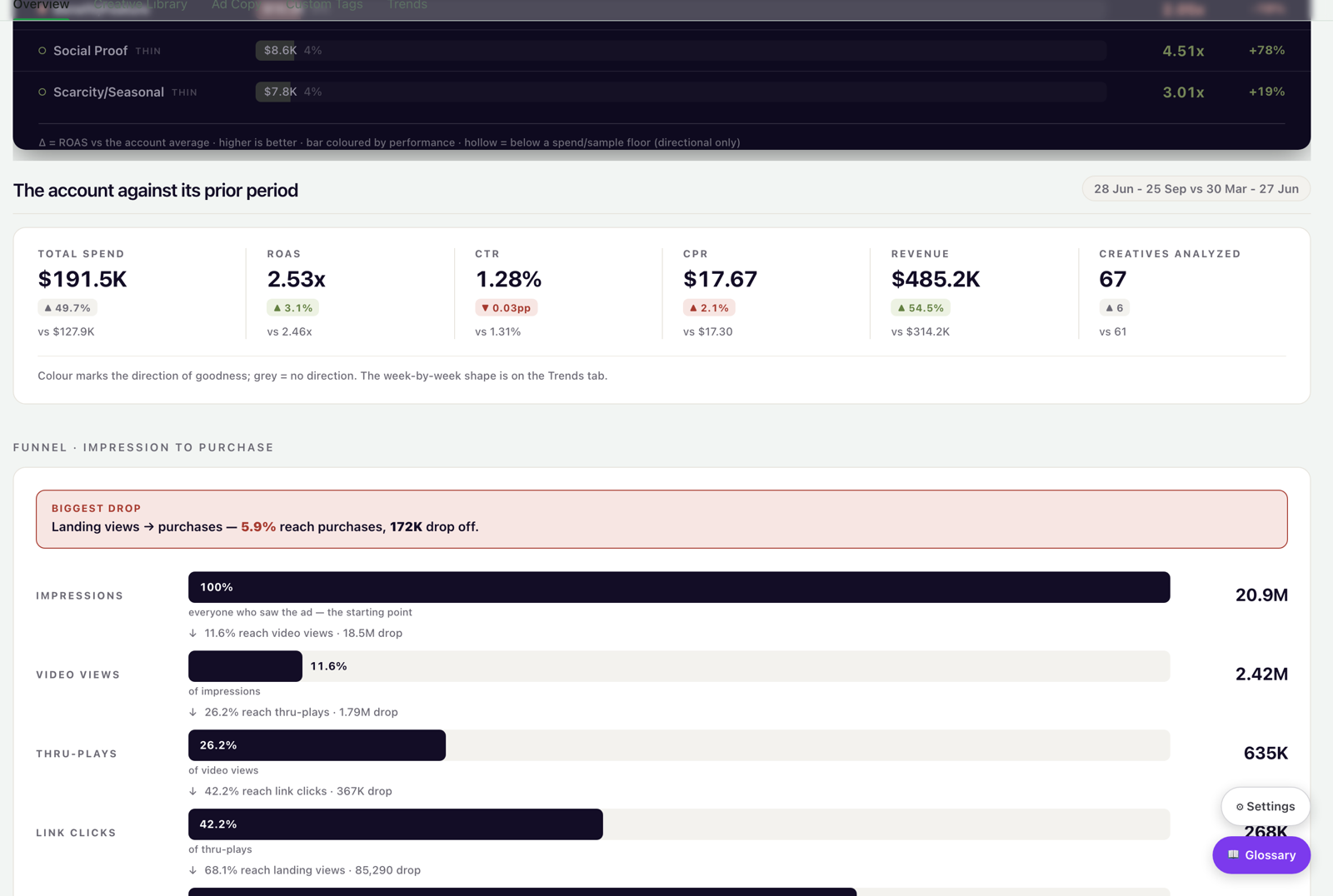
The account against its prior period
A compact strip compares the current window with the preceding one of equal length: Total Spend, ROAS, CTR, CPR, Revenue, and Creatives Analyzed, each with its direction of change. Color shows whether the change is good (a lower CPR is green); grey means no change.
Impression-to-purchase funnel
The funnel shows how audiences move from impressions through video views, thru-plays, link clicks, and landing views to purchases. Each bar is the share kept from the step above it, and the biggest drop-off is called out in red, so you know where the leak is.
AI Deep Analysis
Under the funnel, the AI Deep Analysis panel writes a strategic read of the current view — patterns, correlations, and recommendations — powered by the Improvado AI Agent. Click Ask Agent to generate it, then keep refining it in chat.
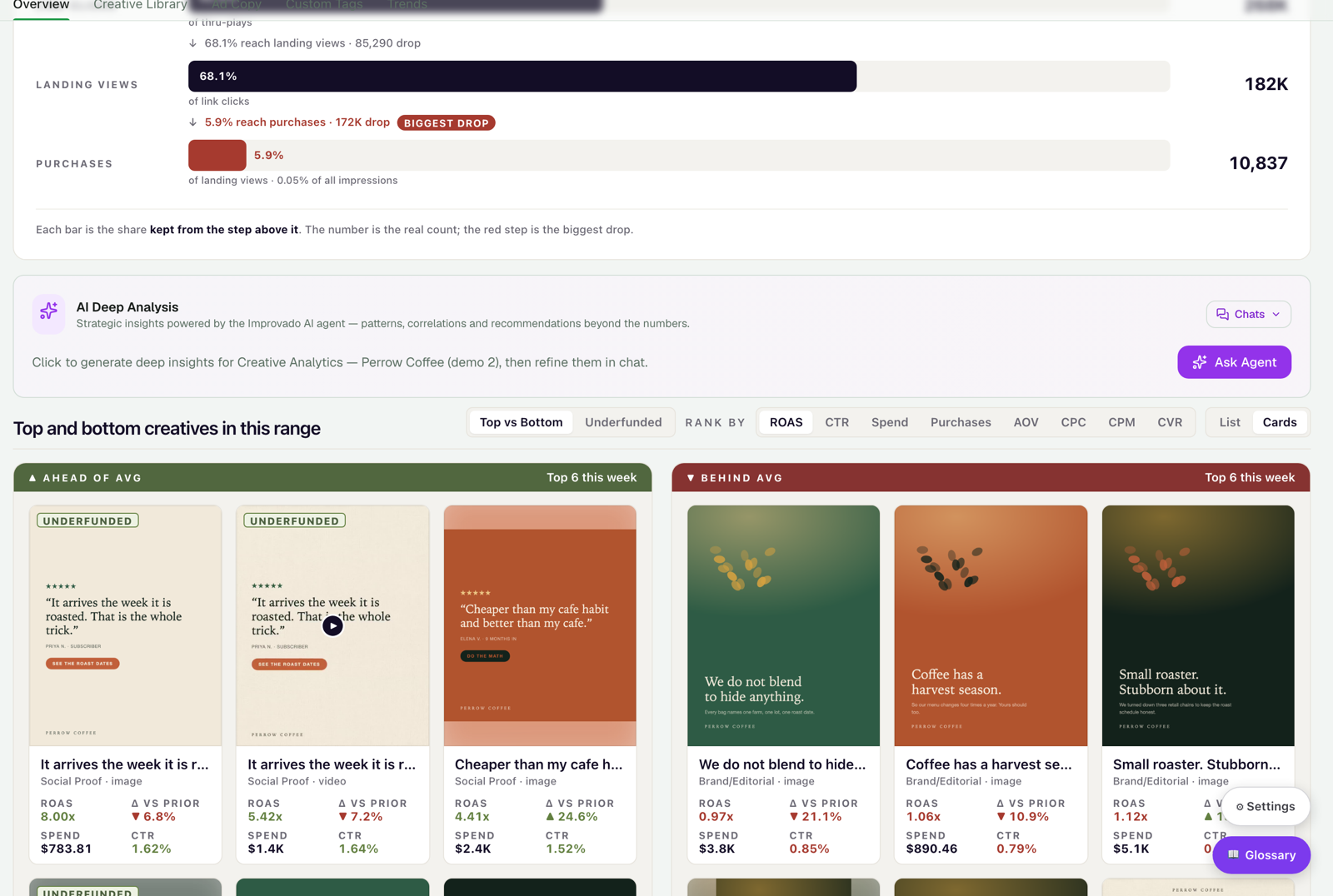
Top and bottom creatives in this range
A ribbon of creative cards splits into Ahead of avg and Behind avg, each card with its thumbnail, archetype, ROAS, spend, and CTR. Cards tagged UNDERFUNDED are strong performers that don't get enough budget — the hidden gems worth scaling. Rank by ROAS, CTR, Spend, Purchases, AOV, CPC, CPM, or CVR, and switch between List and Cards.
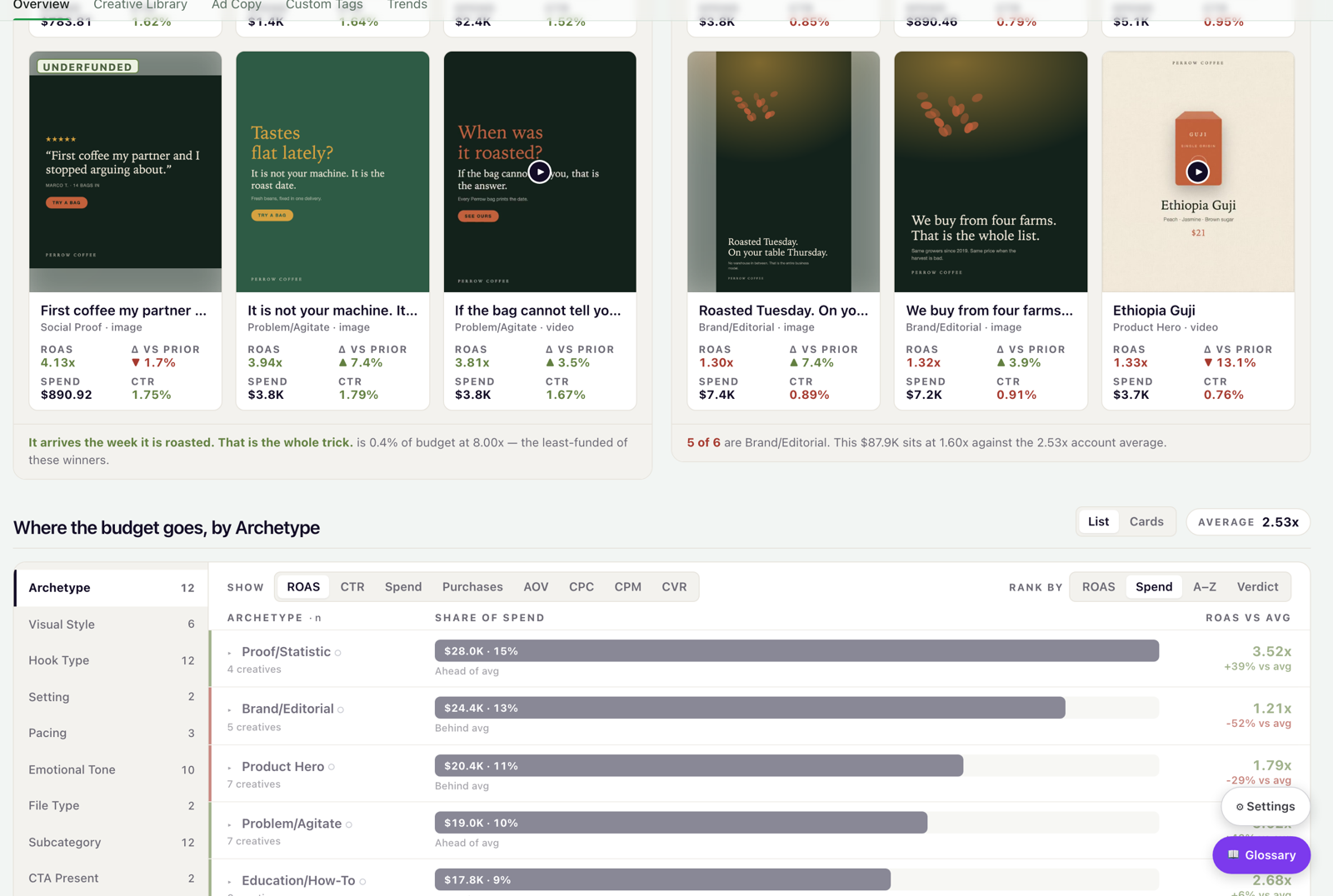
Attribute Explorer — where the budget goes, by any dimension
Pick any taxonomy dimension on the left (Archetype, Visual Style, Hook Type, Emotional Tone, and more), and the panel breaks spend and performance down by its values. Each value gets a plain-English verdict: Ahead of avg, Around avg, or Behind avg, with a "low spend" qualifier where it applies. The number next to each dimension is how many distinct values it has.
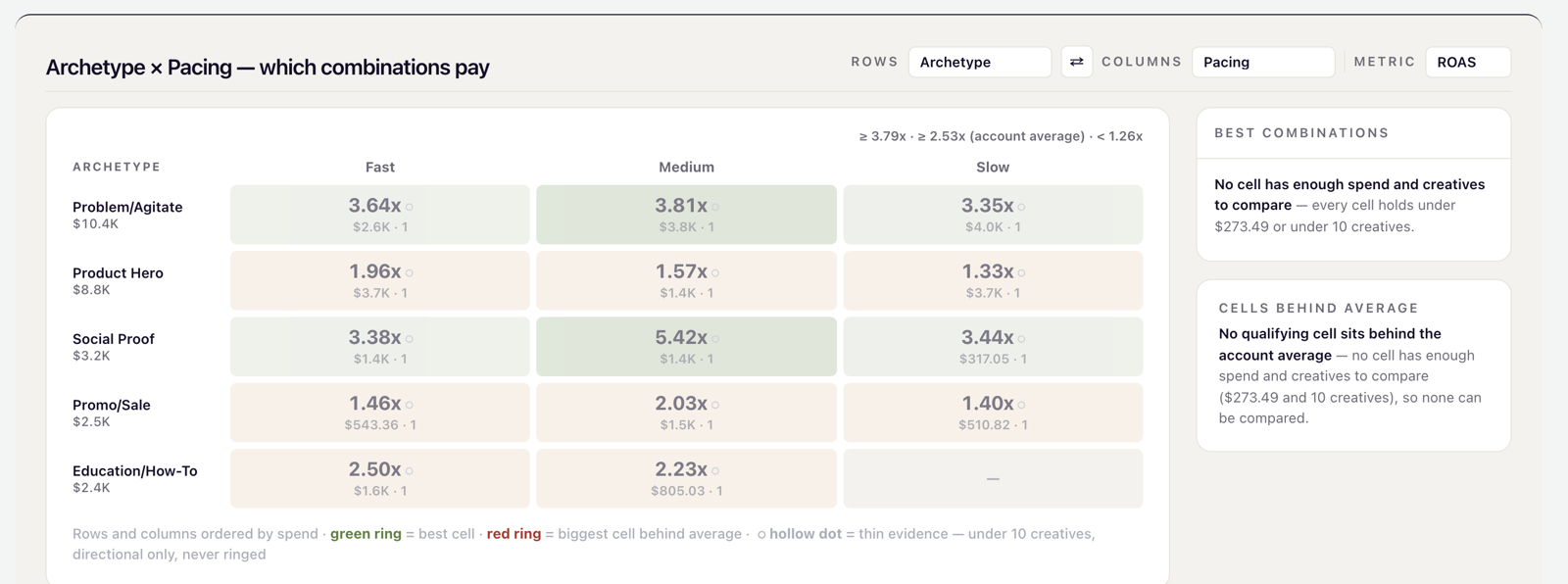
Combination Matrix — which pairings pay
Cross-tabulate any two taxonomy dimensions and color the cells by ROAS, CTR, or Spend. Use the Rows and Columns selectors to compare, for example, Archetype × Pacing or Archetype × Visual Style. The matrix marks a best cell (green ring) or a worst cell (red ring) only when it has enough spend and creatives to compare. Thin cells are shown but never ringed, so a combination of two creatives can't mislead you.
Creative Library — every ad with full attribution
💡 Why use this tab: to find a specific ad, brief a designer with concrete examples, or explore why an archetype is winning. The Library is your searchable creative archive: every ad is a card with its thumbnail, KPIs, and taxonomy badges.
The Shelf — what to trust before you browse
The Library opens with a summary strip called THE SHELF. It tells you how concentrated your spend is (for example, "19 creatives carry 60% of the spend — the rest is the long tail") and counts the creatives you should know about before drawing conclusions:
- Stalled in learning — spent, but under the conversion threshold to judge.
- No AI tags — tagged by rules only, so the taxonomy breakdowns can't see them.
- Expired previews — the ad ran, but its thumbnail link has expired.
- Live now — ran in the last 7 days of data.
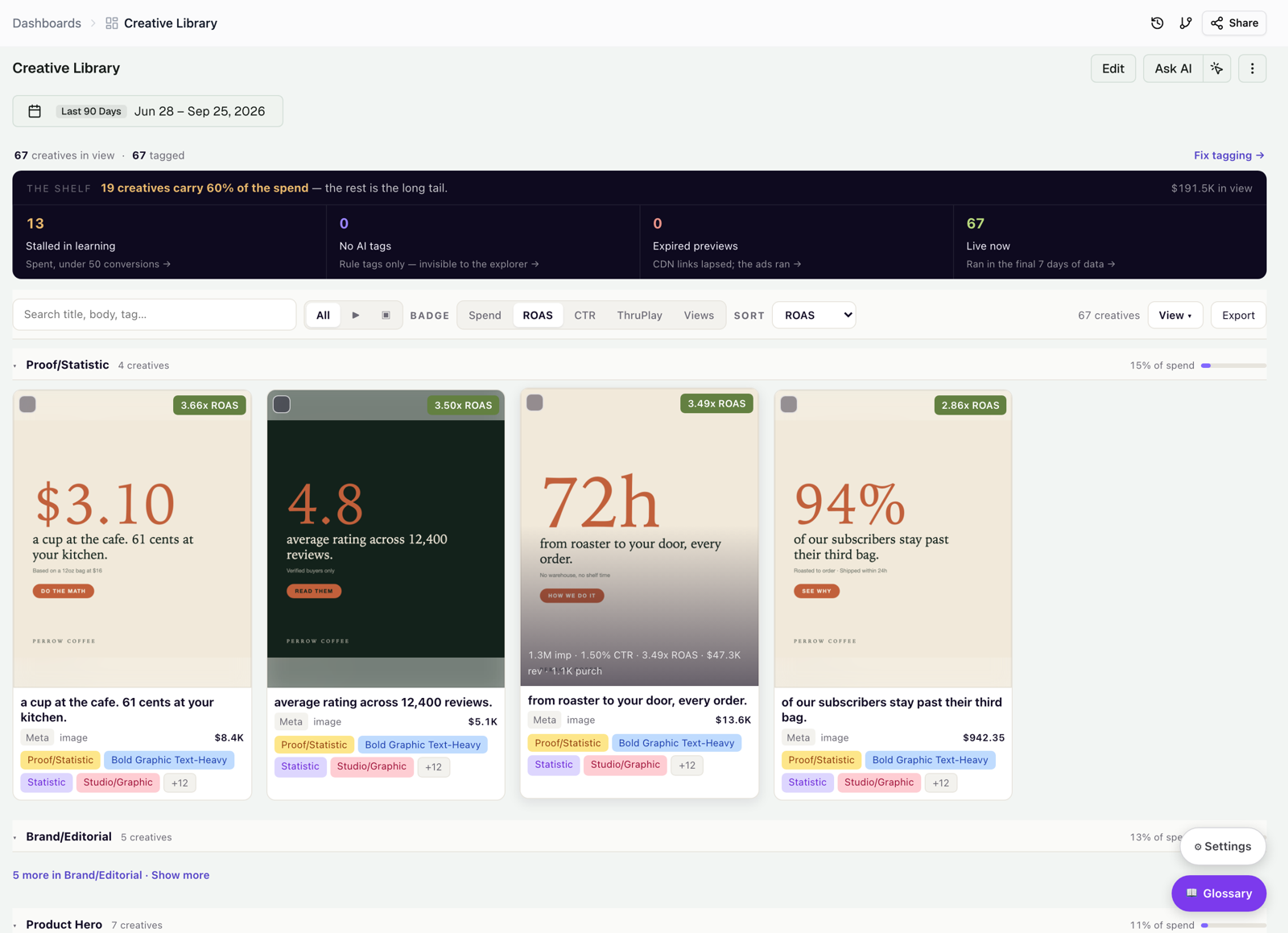
Filters, badges, and cards
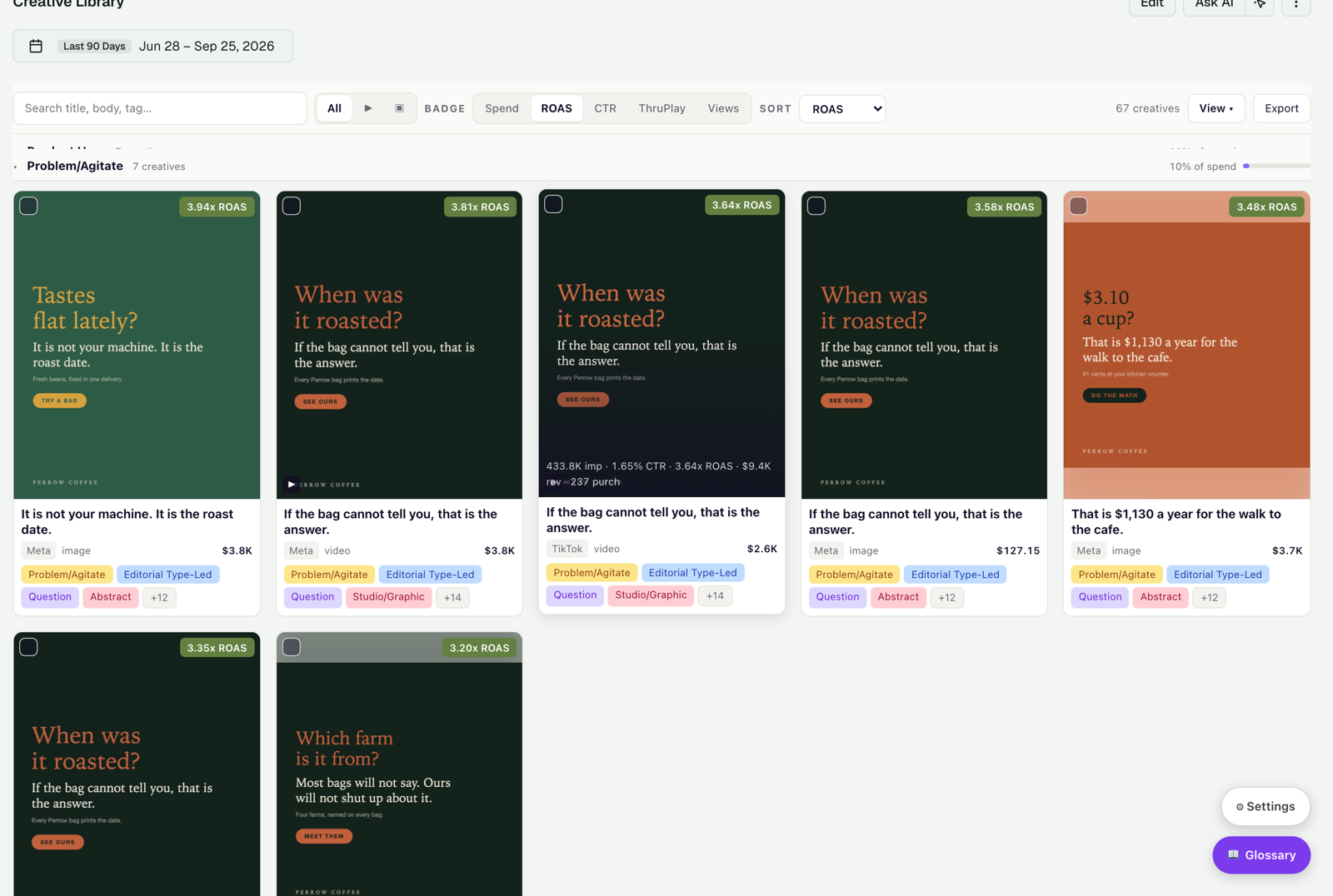
Search titles, body text, and tags; switch between All, Videos, and Images; and choose which metric the corner badge shows (Spend, ROAS, CTR, ThruPlay, or Views). Cards are grouped by archetype, and each group shows its share of spend. Each card has a thumbnail (image or video preview), its ROAS, spend, CTR, and purchases, its taxonomy badges (with +N for the rest), and any custom tags you've assigned. Hover over a card to see impressions, CTR, ROAS, revenue, and purchases at a glance.
Ad Copy — what messaging actually works
💡 Why use this tab: before writing a new batch of ad copy, when reviewing copy performance with a copywriter, or when investigating why certain headlines convert. The tab analyzes the text of your headlines and body copy: message type, tone, length, and rank by ROAS.
A line under the header shows your copy coverage (for example, "67 creatives carry copy · 100% titled, 84% with body · 54 unique headlines, 44 bodies"), and the tab opens with the same Insights widget, so copy analysis starts from the money.
Does length matter?
Headlines and body copy are split into short, medium, and long thirds of the current window (not fixed character counts) and ranked by performance, with a one-line verdict such as Long wins or Medium wins and the margin. It tells you quickly whether your audience prefers short or detailed copy.
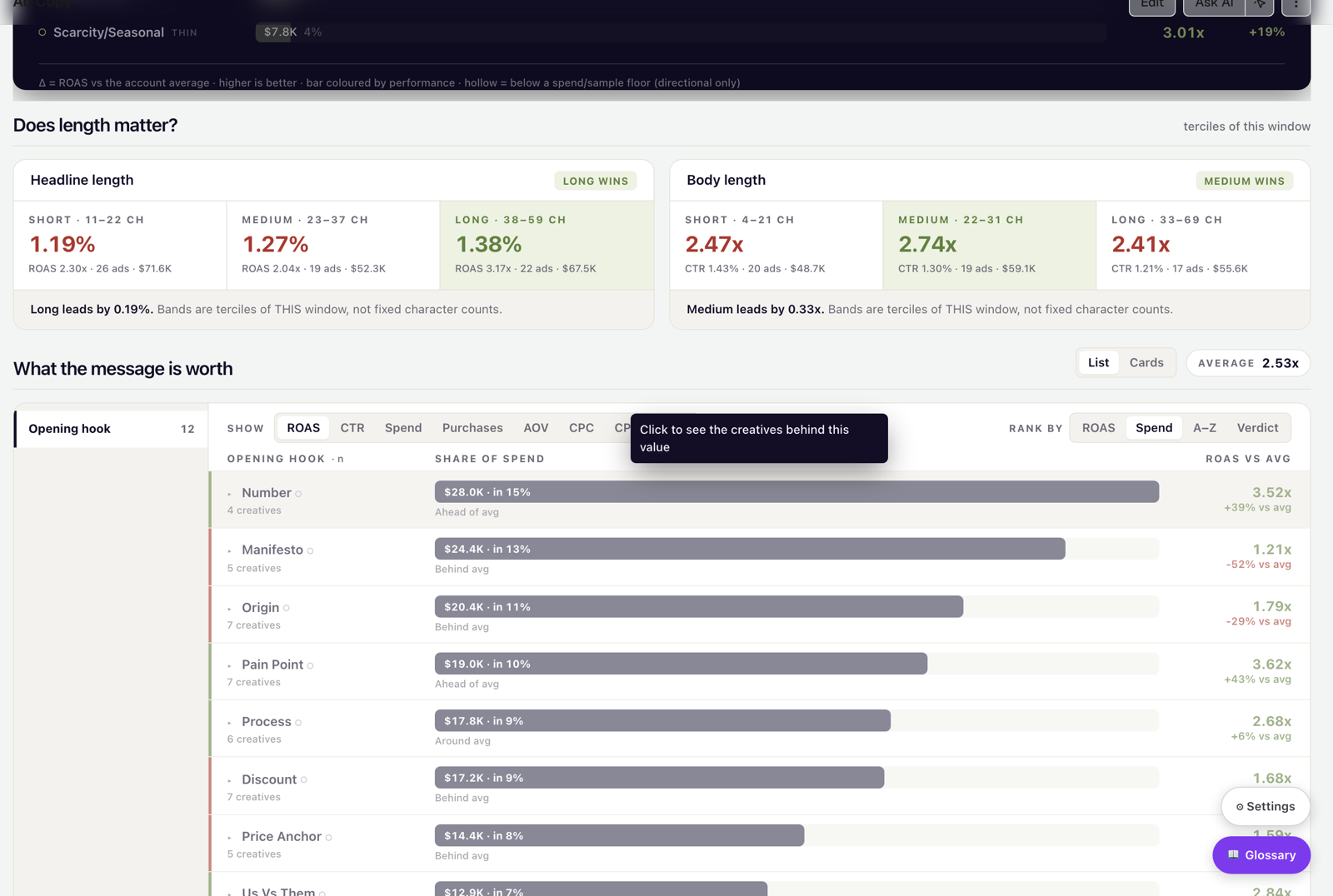
What the message is worth
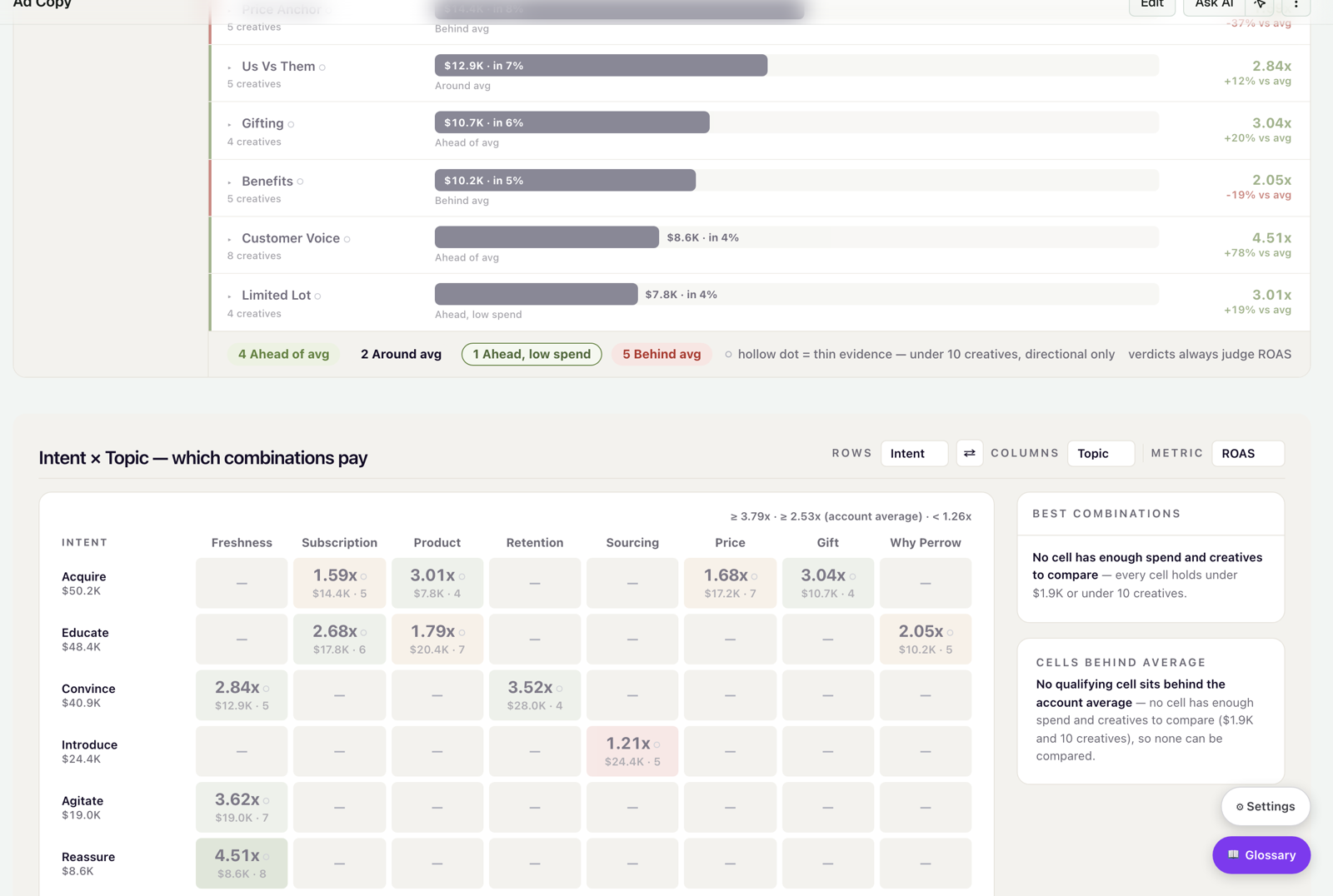
Every headline is classified by its opening hook, or message type (Number, Manifesto, Origin, Pain Point, Process, Discount, Social proof, and more), and ranked with a verdict: Ahead of avg, Around avg, Behind avg, or Ahead, low spend. Rank by ROAS, CTR, Spend, Purchases, AOV, or CPC. A hollow dot marks thin evidence (fewer than 10 creatives). Below it, the Intent × Topic matrix shows which message intents pay on which topics.
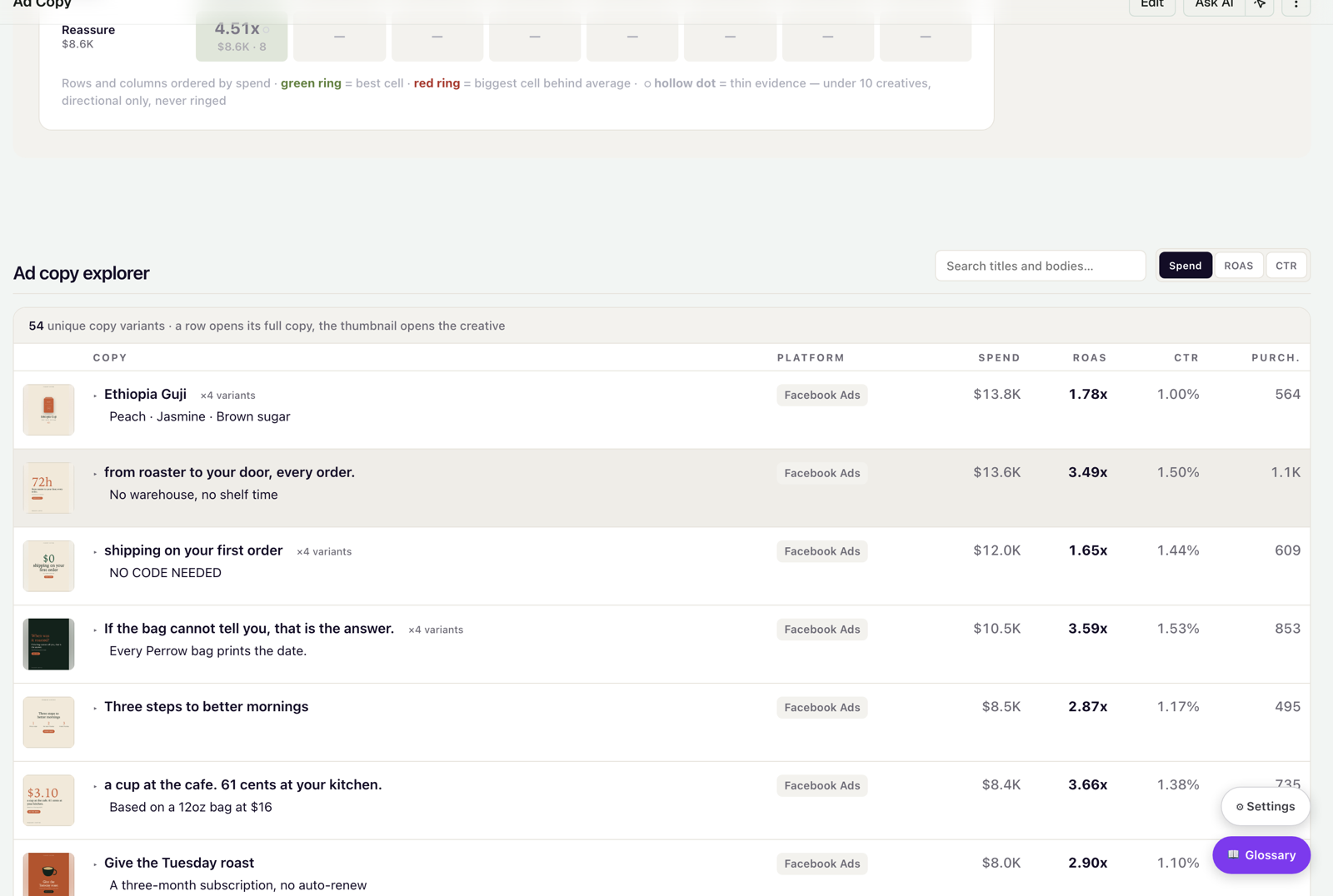
Ad copy explorer
Search and sort every headline and body in your library by Spend, ROAS, or CTR. Copy that runs on more than one creative is grouped under a ×N variants badge. Click a row to open the full copy, or its thumbnail to open the creative.
Trends — performance over time
💡 Why use this tab: to answer "are we trending up or down?", build QBRs, or investigate a sudden swing in spend or ROAS. Overview gives you one snapshot; Trends gives you the timeline.
The month verdict
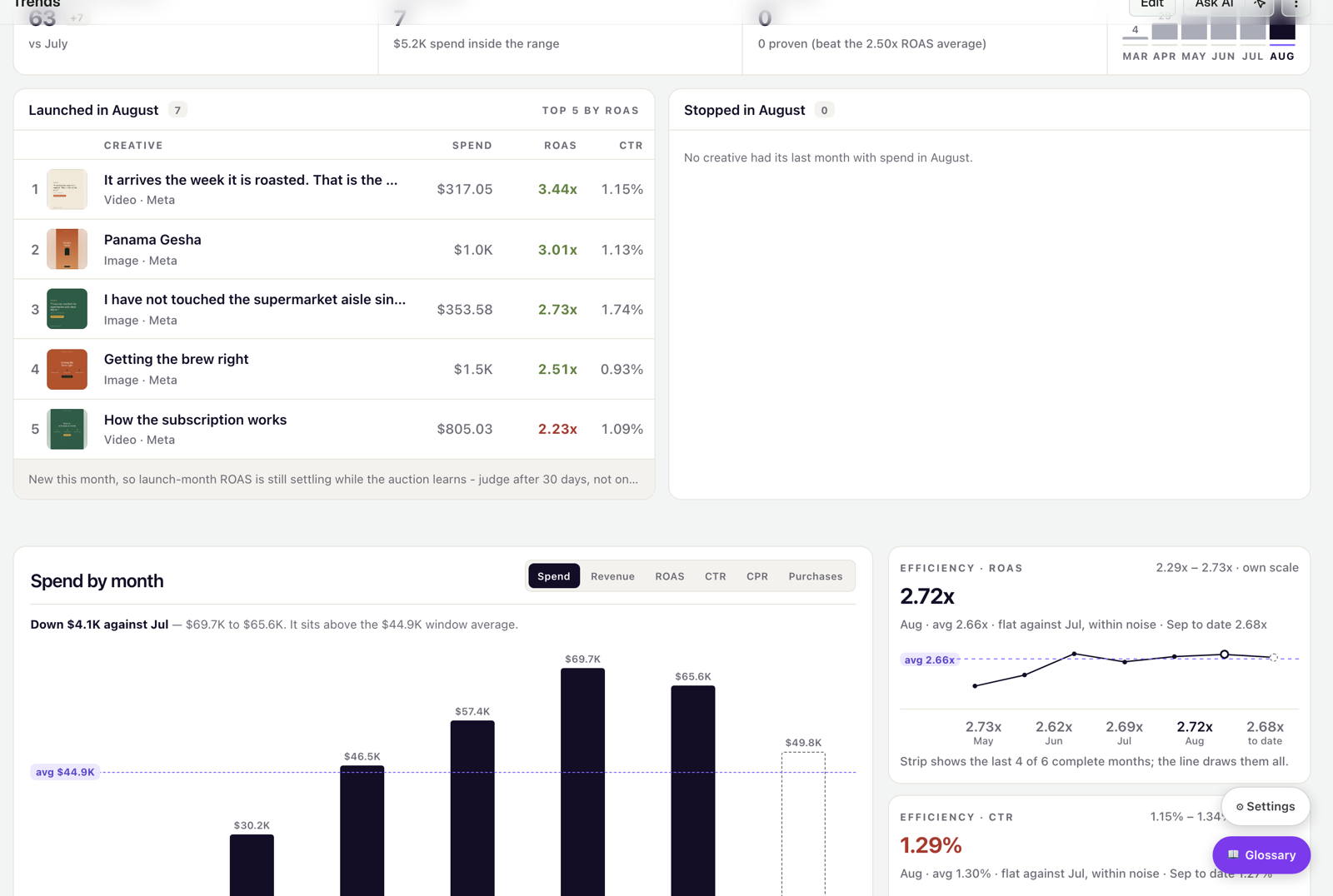
Trends opens with a banner that compares the latest complete month with the previous one on three lenses: Efficiency (ROAS), Lineup (creatives with spend), and Scale (spend and purchases). Click Evidence on any lens to see what's behind it. Below the banner, six KPI cards show the change against the previous period and a small history chart.
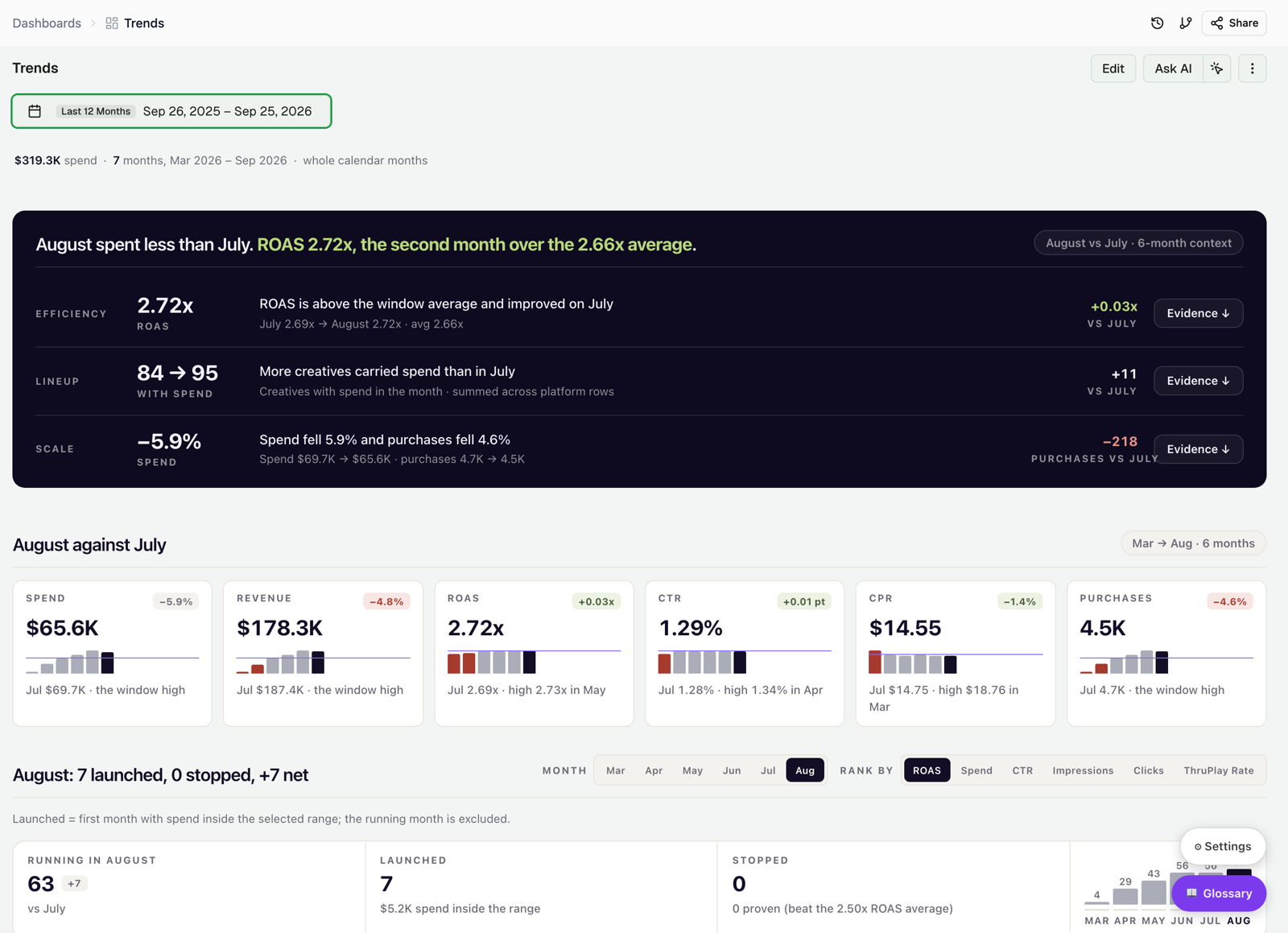
Performance over time
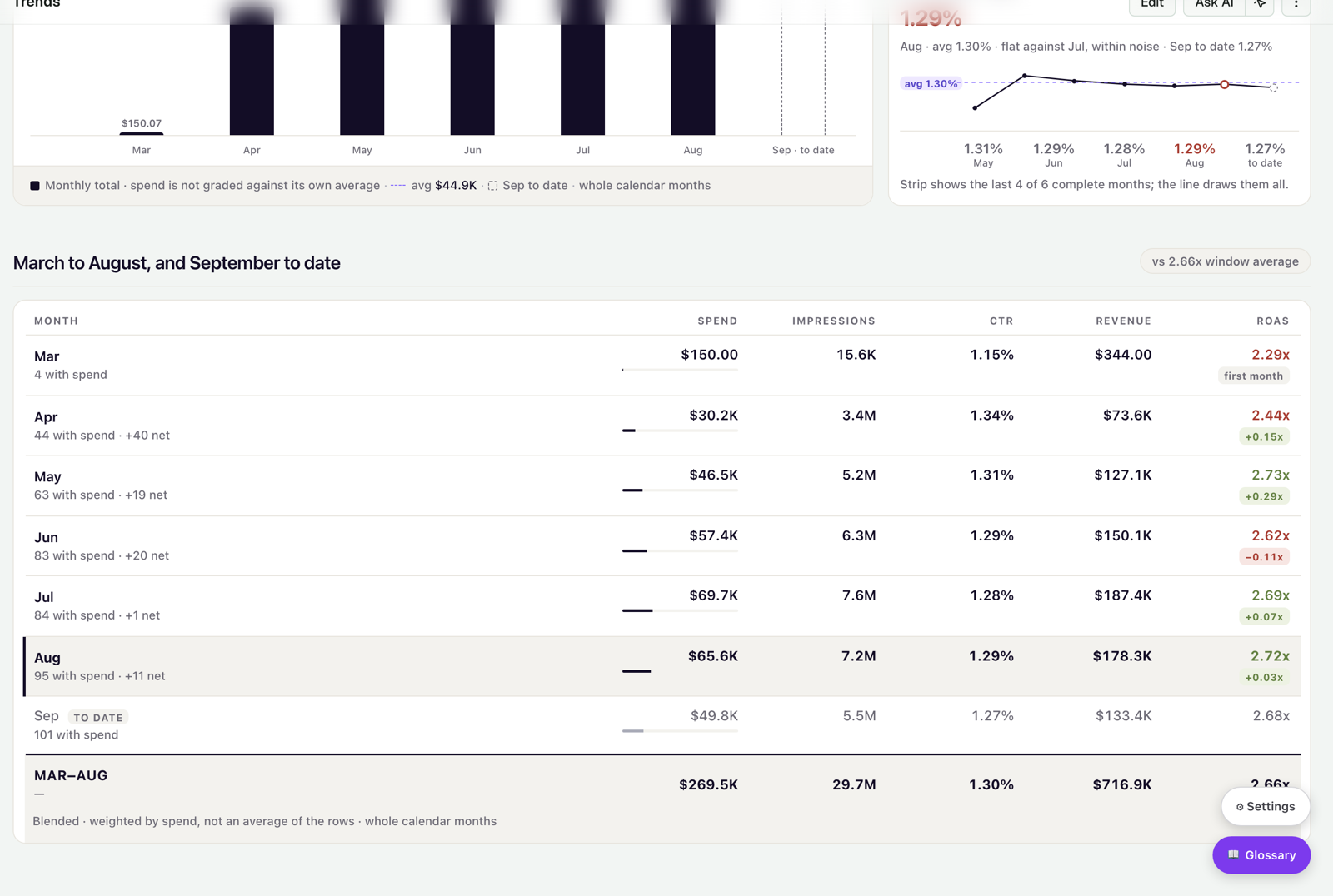
See spend, revenue, ROAS, CTR, CPR, or purchases by month, with a line for the account average and the current month drawn as a dashed bar. The ROAS and CTR line charts show every complete month, so you read the real trend, not just the last few weeks.
Monthly performance summary
A table with one row per month — creatives with spend, Spend, Impressions, CTR, Revenue, and ROAS — and a Total row weighted by spend. Use the total as a check: it should match the Overview numbers for the same filters.
When the dashboard holds back
Throughout the dashboard you'll see "not enough to compare" messages, hollow dots, and THIN flags. They are deliberate: the dashboard won't rank a cell, a headline, or an archetype that lacks the spend or the sample to be trustworthy. Read them as "explore further", not as an error.
Was this page helpful?
Thanks for the feedback!
Questions? The Improvado team is always happy to help. Send us an email, contact your Customer Success Manager, or raise a request in the Improvado Service Desk.