

AI Agent Usage & Billing
Overview
The Improvado AI Agent now gives you a single, clear place to see how much of your plan you're using and the rules that govern that usage. Everything related to consumption lives under one Usage tab in Settings, alongside a dedicated Usage rules tab.
Previously, some workspaces could see two different usage views at once. That's now consolidated into one experience so there's a single source of truth for your consumption.
Where to find it
- Open Settings.
- Select the Usage tab to see your consumption overview.
- Select the Usage rules tab to review the rules that apply to your workspace.
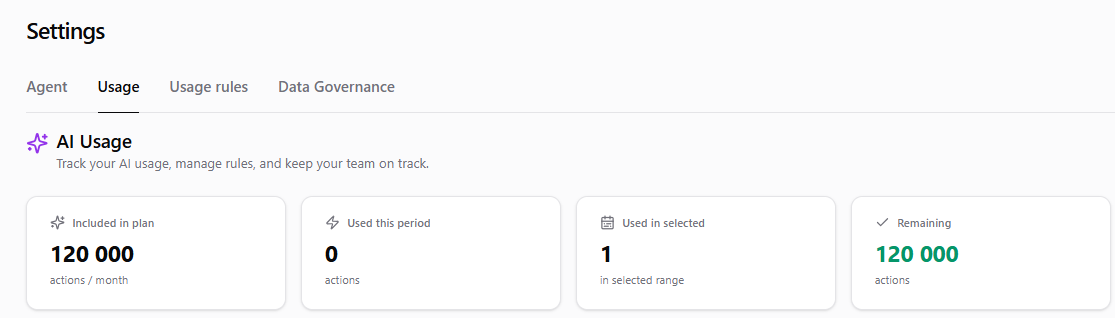
The Usage tab
The Usage tab shows your current consumption against your plan so you can:
- See how much you've used in the current period.
- Understand what's counting toward your usage.
- Spot when you're approaching a limit before it affects your work.
Usage is measured in actions, tracked against your plan's allotment for the current billing period.
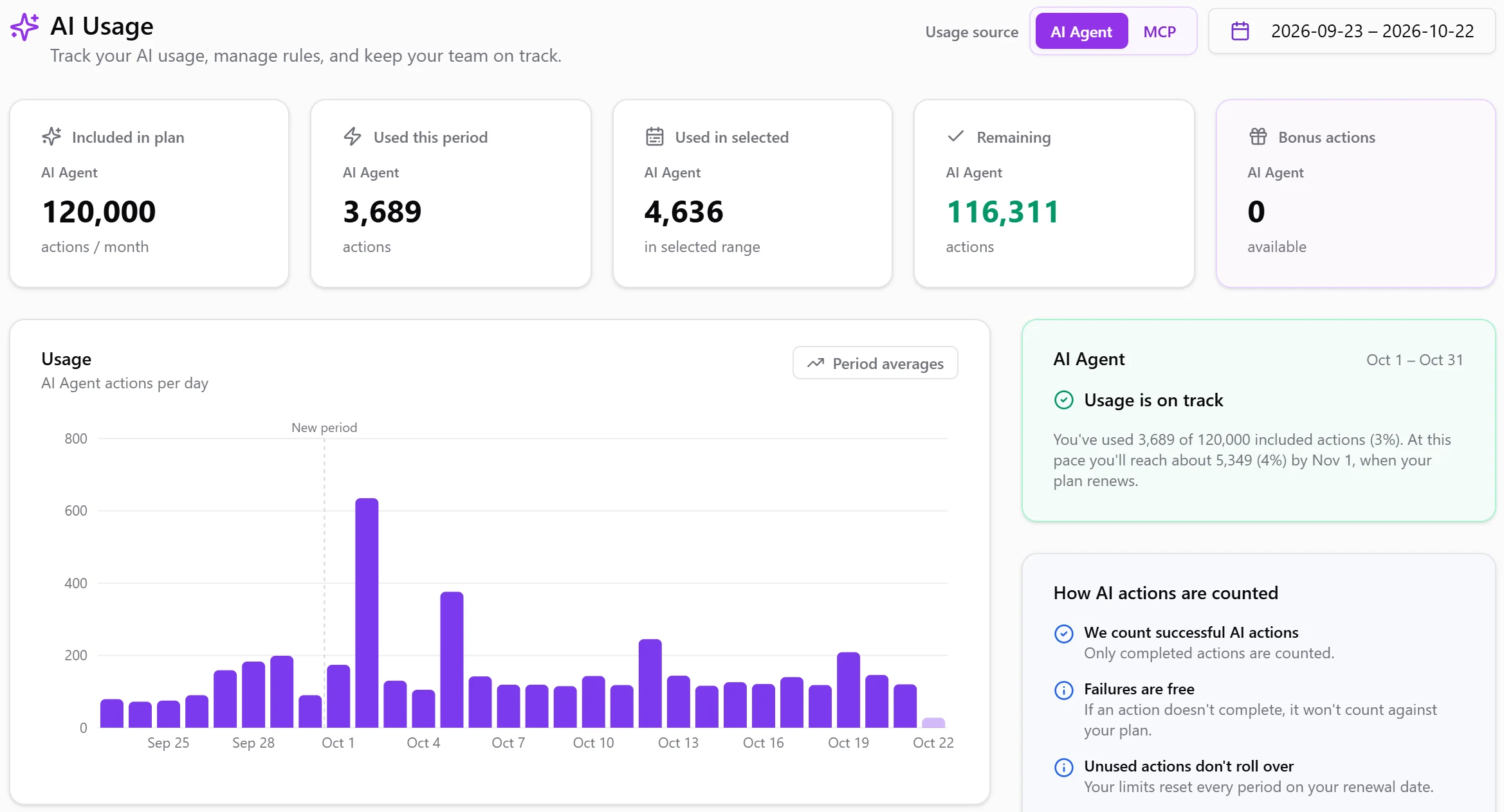
Will your plan last until renewal?
The status card forecasts whether your usage will last until your plan renews. It takes your average daily usage since the current billing period started and carries it forward to the renewal date. The card shows one of three states:
- On track (green) — at the current pace, your plan lasts until renewal.
- At risk (amber) — at the current pace, you'll run out before renewal, for example "On pace to run out by Oct 27… 5 days before your plan renews on Nov 1". If bonus actions will cover the overflow, the card says so.
- Plan limit reached (red) — the plan for this period is used up.
When usage is at risk or the limit is reached, the card also charts the current billing period: cumulative usage, the projected usage until renewal, your plan line, and the day you're expected to run out.
The Usage chart
The Usage chart shows a bar for each day. Dotted lines mark where billing periods start, and today's bar is lighter because the day isn't over yet.
If the selected range covers two or more billing periods, turn on Period averages to see each period's average actions per day and how it changed from the previous period, for example "36/day · +11%". The toggle is off by default.
To change the range, click a start date and then an end date in the date picker, in either order, or use a preset: last 7, 30 or 90 days or the current billing period.
The Usage rules tab
Usage rules describes the limits and policies that apply to your workspace — the boundaries the AI Agent enforces when you run actions and tools.
These include usage limits (how much you can consume in a period) and workspace policy rules that can allow or block specific actions.

Separate limits for automations
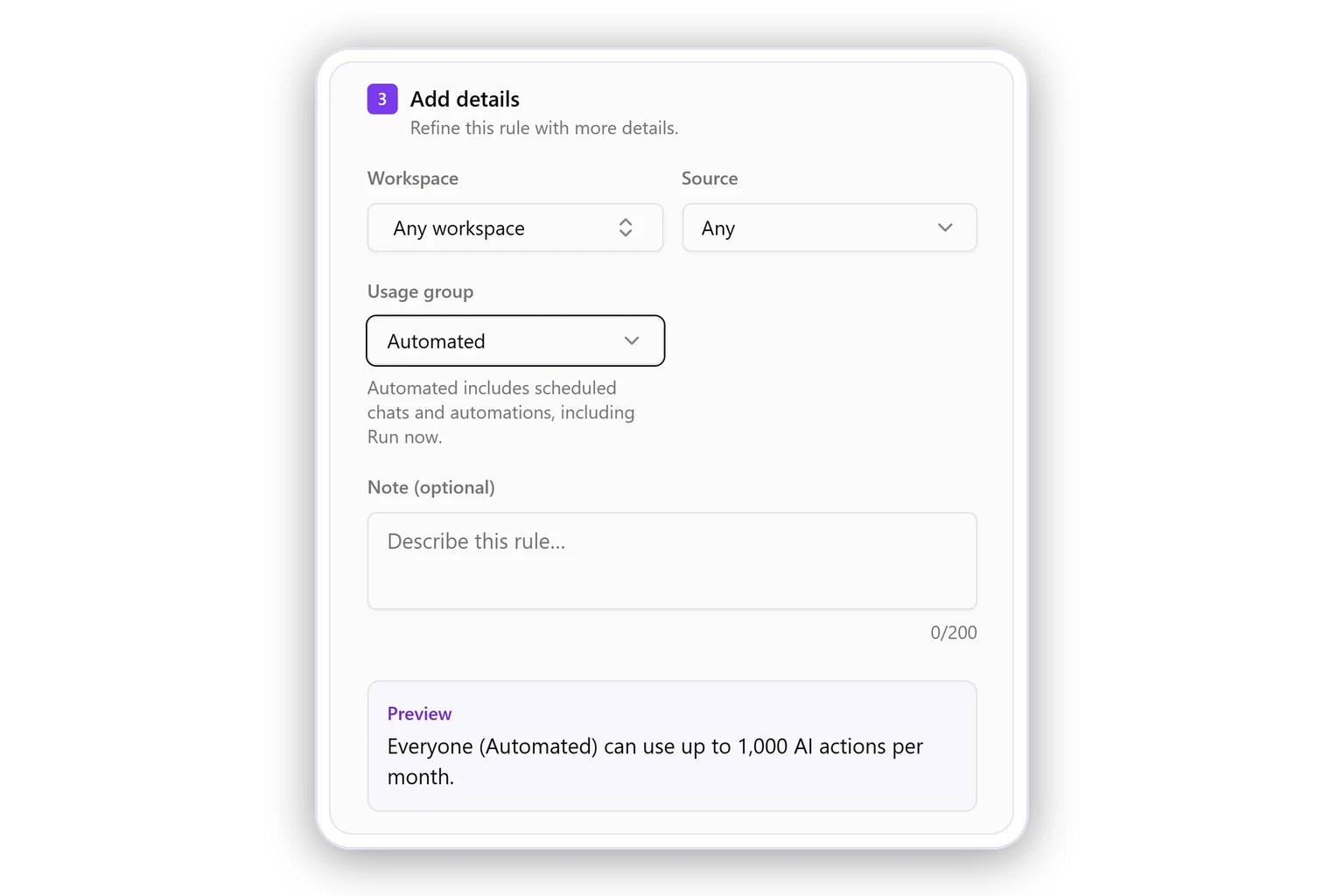
A rule can apply to all usage or only to one kind of it. When you create a rule (Usage rules → Create rule), set Usage group under Add details:
- All (default) — every AI action counts toward the rule.
- Interactive — only actions from chats that people run themselves.
- Automated — only actions from scheduled chats and automations, including runs started with Run now.
If you continue a chat that an automation started, those messages count as Interactive.
Use this to keep interactive work from using up the actions your scheduled reports need: for example, limit Interactive usage so that part of your plan stays available for automations, or cap Automated usage so automations can't take more than their share.
What happens when you reach a limit
If an action would exceed a usage limit or isn't allowed by a policy, the AI Agent now handles it gracefully: instead of showing a technical error, it returns a clear, plain-language message explaining why the action couldn't run. There are two situations:
- Usage limit reached — you've hit a consumption limit for the current period. The Agent replies: "You've reached your usage limit for this period. Please contact your administrator to increase it."
- Policy restriction — a workspace policy doesn't permit that action. The Agent replies: "This action isn't allowed by your workspace's usage policy."
Scheduled runs that are blocked for these reasons are skipped and automatically retried on their next scheduled iteration, rather than failing outright.
FAQ
Where did the old usage screen go?
It's been merged into the single Usage tab. You now have one place for consumption instead of two separate views.
Will I lose work if I hit a limit mid-task?
No. The Agent returns a clear message explaining the limit or policy; it doesn't crash the session. Scheduled runs are retried automatically on the next iteration.
How do I know what counts toward my usage?
The Usage tab shows your current consumption, and Usage rules lists the limits and policies that apply.
Who can see the Usage tab?
Users with the Usage permission in your workspace.
Was this page helpful?
Thanks for the feedback!
Questions? The Improvado team is always happy to help. Send us an email, contact your Customer Success Manager, or raise a request in the Improvado Service Desk.