
Agent Usage & Credits
All pricing is based on credits, and every credit corresponds to one tool call.
The Agent works by calling different internal tools to complete a user’s request. Each tool performs one action — like querying data, generating a visualization, or searching the web.
- 1 tool call = 1 credit
- A typical question may trigger 3 to 5 tool calls, depending on complexity.
Type of tools
| Tool Type | Description | Examples |
|---|---|---|
| Query Data | Fetching and transforming internal data | Metrics, breakdowns, comparisons |
| Visualization | Generating charts or plots | Bar, line, scatter, pie, etc. |
| Web Search | Benchmarking or live competitive research | Pricing pages, CPM averages, market trends |
| Image Analysis | Evaluating creative assets | Emotional tone, contrast, layout classification |
| Custom Tools | Anything built specifically for your workspace | Proprietary logic, external APIs, workflows |
Examples
Example №1
Prompt: “Show me ROAS by campaign type over the last 90 days, and visualize it.”
This would typically include:
- Tool Call 1: Query data
- Tool Call 2: Transform data
- Tool Call 3: Generate a chart
Total: 3 credits
Example №2
Prompt: “Find average CPM for B2B SaaS in the US and compare to my campaigns.”
- Tool Call 1: Web search for CPM benchmark
- Tool Call 2: Query internal campaign data
- Tool Call 3: Merge and compare datasets
- Tool Call 4: Visualize comparison
Total: 4 credits
Example №3
Prompt: “Which Facebook creatives had the highest CTR last month?”
- Tool Call 1: Query ad performance data
- Tool Call 2: Filter by platform and date
- Tool Call 3: Rank by CTR
- Tool Call 4: Visualize Data
Total: 4 credits
Tracking Usage
You can track and audit your usage at any time in the Settings → Usage section of the platform. This dashboard shows how many credits have been consumed, broken down by date range, tool type, and workspace.
For each workspace, you’ll see visual charts that reflect how usage is trending over time. You can also identify which users are generating the most tool calls, and which types of prompts are driving credit consumption.
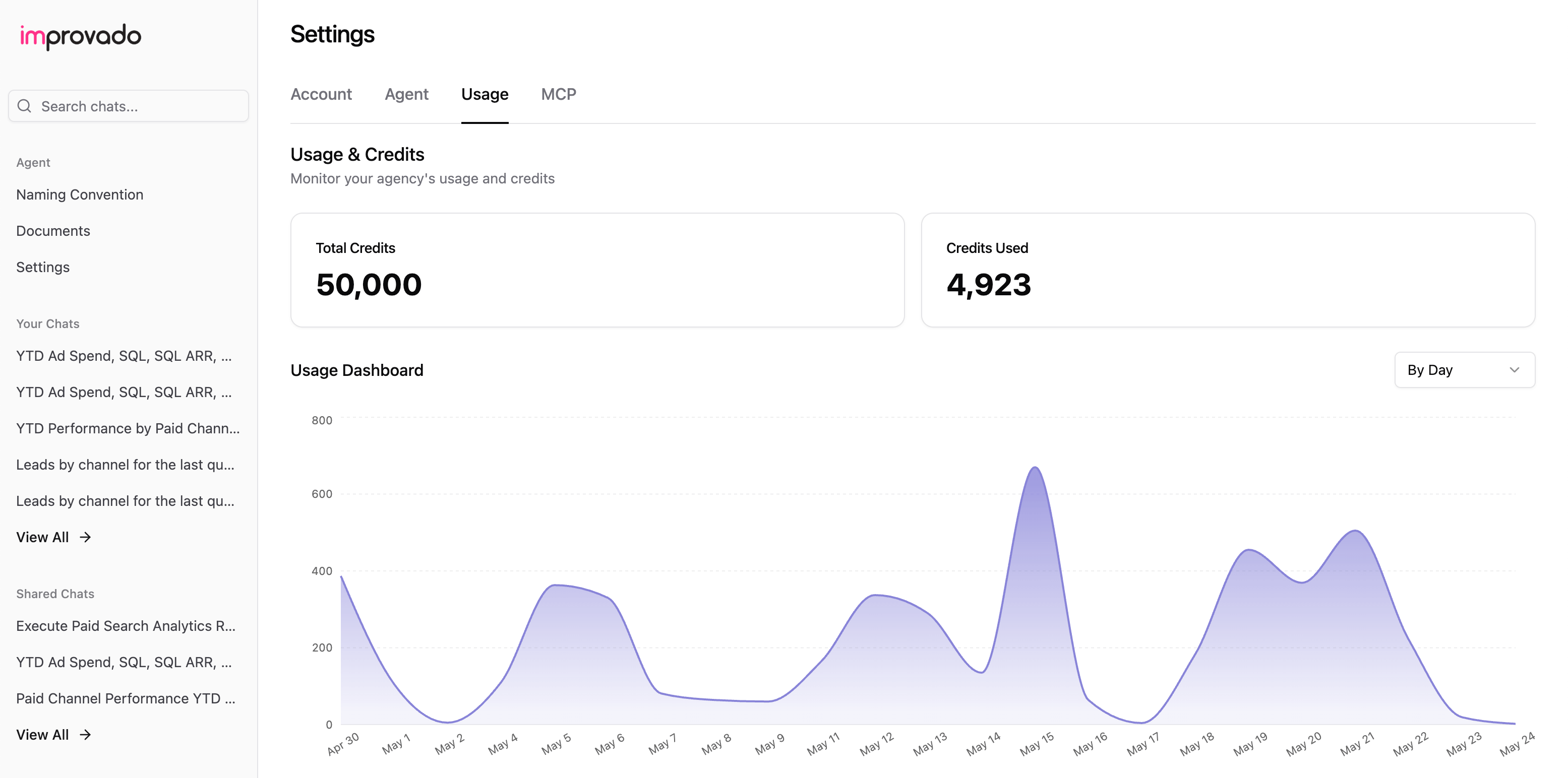
The AI Agent’s usage model is simple: every tool call equals one credit. Most real-world questions involve multiple steps — querying data, transforming it, visualizing it, or enriching it with external context — and typically consume between 3 and 5 credits.
Was this page helpful?
Thanks for the feedback!
Questions? The Improvado team is always happy to help. Send us an email, contact your Customer Success Manager, or raise a request in the Improvado Service Desk.