
Schedule Chats
Overview
With Schedule Chats, you can turn any conversation with the AI Agent into a recurring report. The Agent will re-run the query on live data and email you the results at the frequency you define.
This transforms one-off analyses into automated reporting flows — no need to repeat requests manually.
How to Use
When scheduling a chat, you’ll be asked to define:
- Email recipient: Choose which address will receive the report.
- Frequency: One-time, daily, weekly, or monthly delivery.
- Timing: Set the exact delivery time (with time zone).
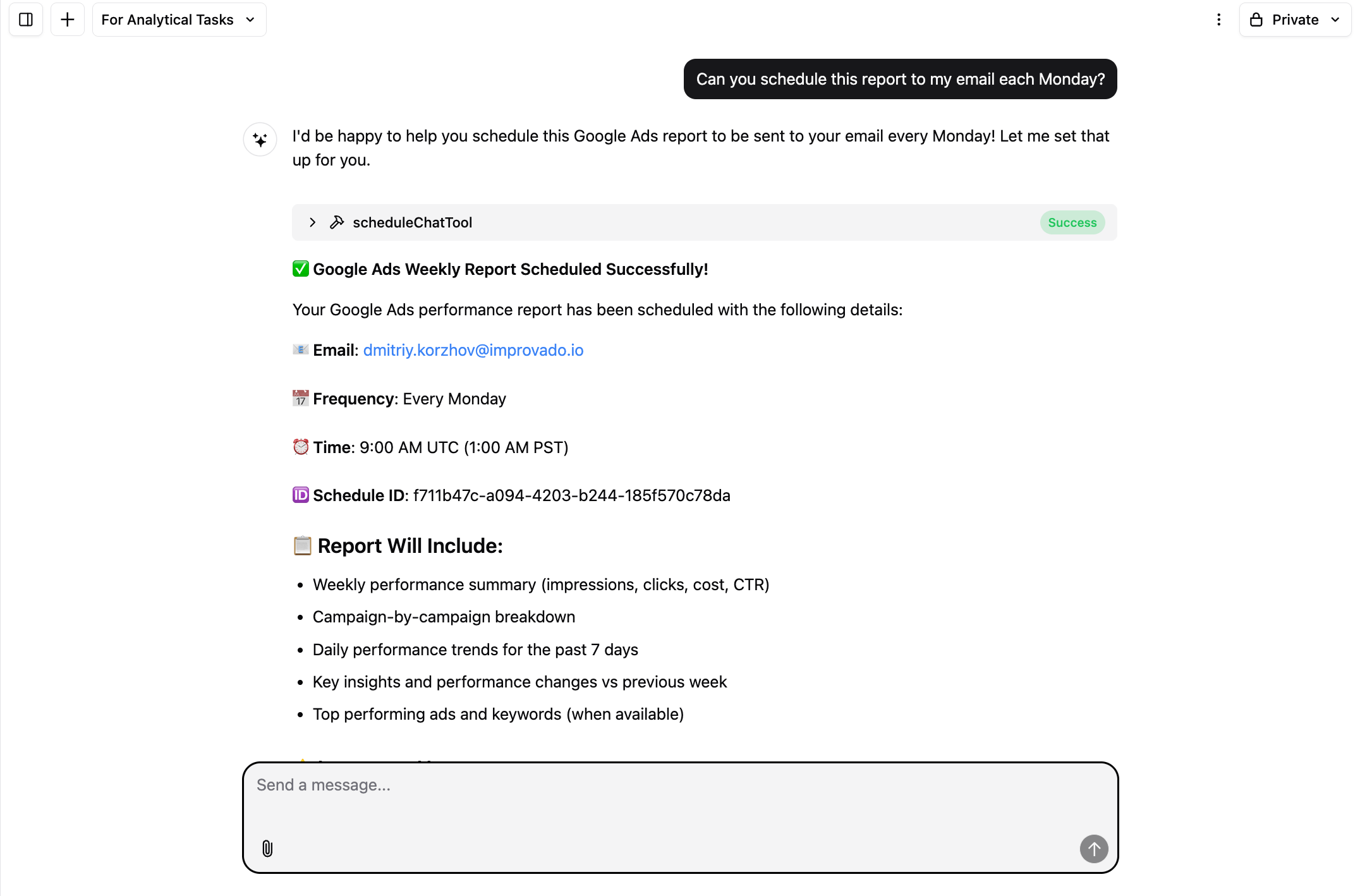
Examples:
- “Send this Google Ads report to my email every Monday at 9 AM.”
- “Schedule a one-time performance summary for tomorrow morning.”
- “Deliver a monthly cost breakdown to finance@company.com on the 1st of each month.”
- “Email the leadership team a cross-channel report every Friday at 5 PM PST.”
Schedule Types
You can schedule reports in several formats and frequencies:
- One-time reports: Perfect for ad-hoc requests or executive briefings.
- Daily reports: Get updated spend, ROI, or KPI tracking every morning.
- Weekly reports: Standard performance digests for campaigns, clients, or leadership.
- Monthly reports: Strategic summaries with trends, pacing, and comparisons vs. previous month.
Each report type can include campaign metrics, channel breakdowns, anomalies, and AI-generated insights based on your data.
Manage Scheduled Chats
To update or delete a scheduled report, simply ask the Agent in the same chat — just like when you first created it.
- “Change the delivery time to 3 PM PST.”
- “Switch this from weekly to daily.”
- “Delete this scheduled report.”
The Agent will confirm the update or removal instantly.
Use Cases
Automated Performance Reports
Keep your inbox updated with recurring reports on campaign health.
Examples:
- Weekly Google Ads performance report (impressions, clicks, cost, CTR).
- Daily Meta campaign spend and ROI summary.
- Monthly cross-channel performance overview for executives.
- Weekly anomaly detection report highlighting unusual spend or CTR drops.
Client Reporting
Automate client-facing reporting with branded, AI-generated reports.
Examples:
- Weekly performance report emailed directly to client stakeholders.
- Monthly ROI and CPA breakdown with campaign-level insights.
- Scheduled competitive benchmarking report delivered at the start of each quarter.
- Weekly “Top Wins & Risks” email summarizing key account changes.
Where to Find Scheduled Chats
Scheduled reports live in the sidebar under Chats → Scheduled Chats.
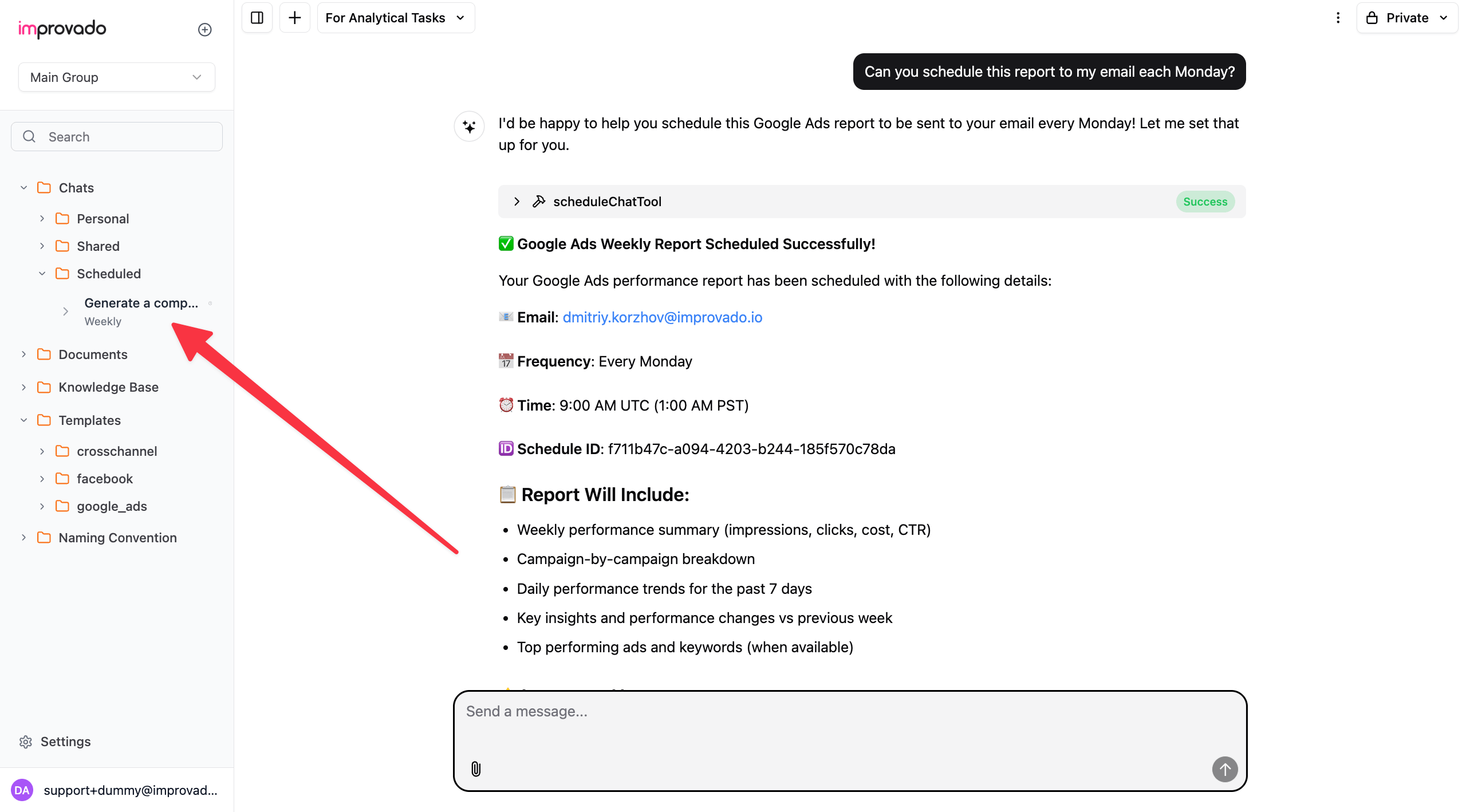
From there you can:
- View all active schedules
- Edit frequency or time zone
- Pause or delete schedules
Conclusion
Schedule Chats turns one-time analysis into ongoing intelligence. By making chats recurring, you ensure your team and clients always have the latest performance data, insights, and context — delivered automatically to the right inbox.
Was this page helpful?
Thanks for the feedback!