

Field Hashing in Extraction
Overview
Field hashing allows you to irreversibly encrypt sensitive field values before they are stored in your data warehouse. This is useful for fields that contain personally identifiable information (PII) — such as email addresses or user IDs — that you need as join keys but don't want stored in plain text.
Once a value is hashed, the original value cannot be recovered.
Which Fields Support Hashing?
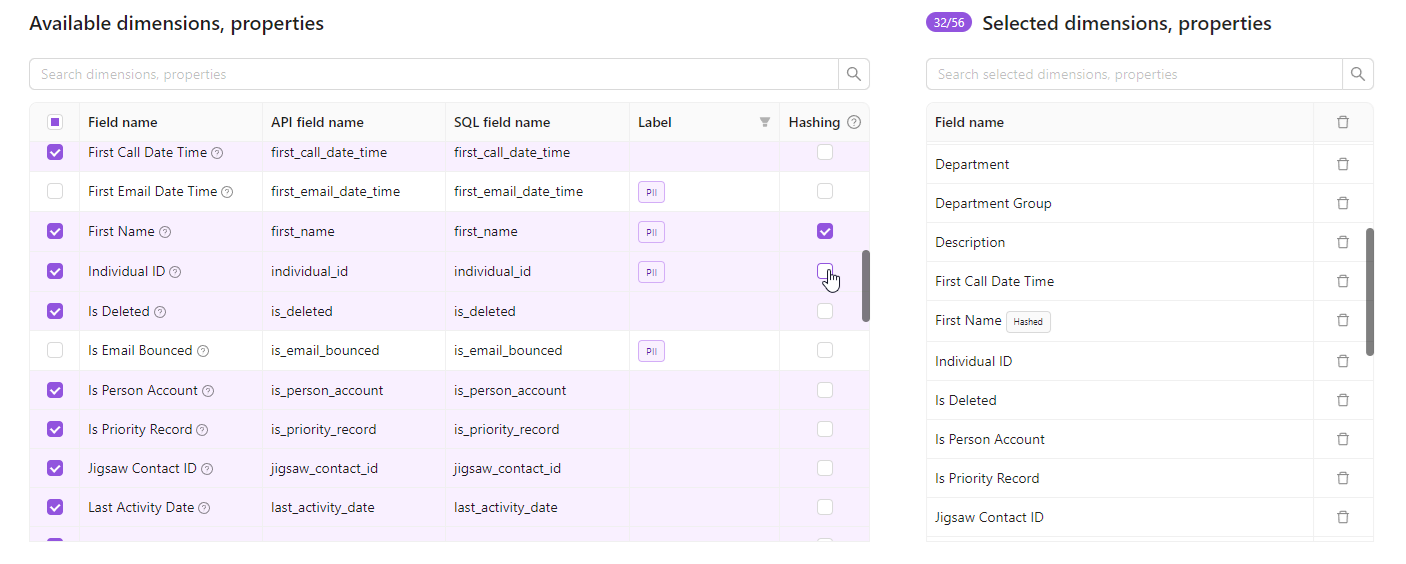
Only string property fields can be hashed. The Hashing column appears in the Available Dimensions table when editing an extraction order.
Fields that cannot be hashed:
- Metrics — numeric aggregation values where hashing would be meaningless
- Dimensions — categorical grouping keys
- Non-string properties (numbers, dates, booleans)
How to Enable Field Hashing
- Open an extraction order's settings page. This is also available when creating new extracts or when using Bulk Edit to change several existing extracts in bulk.
- In the Available dimensions & properties section, locate the Hashing column
- Check the box next to any string property field you want to hash
- Save the extraction order
- All future extractions will hash those field values using SHA-256 before writing data to Improvado Storage
Important Notes
- One-way encryption — Hashing is irreversible. Once a field value is hashed, the original value cannot be recovered.
- Consistent hashes — Two identical input values always produce the same hash output. This means hashed fields can still be used for joins and deduplication across datasets.
- Future runs only — Hashing applies to all future extraction runs. Previously extracted data is not retroactively hashed.
Was this article helpful?
Thanks for the feedback!
Questions? The Improvado team is always happy to help. Send us an email, contact your Customer Success Manager, or raise a request in the Improvado Service Desk.