

Creative Analytics (Creative DNA Intelligence)
What is Creative Analytics?
AI-powered creative analysis that watches your video ads, extracts visual attributes, and shows which creative patterns drive results — all in one interactive dashboard.
Upload your video creatives, and AI analyzes each one, extracting 14 taxonomy attributes such as archetype, hook type, visual style, pacing, and emotional tone. Results are displayed in an interactive dashboard with performance correlation.
How to Access
Log in to your Improvado account and make sure you're in the correct workspace.
Open the Creative Analytics dashboard URL.
The dashboard loads your data automatically. You're ready to start exploring your creatives.
Sidebar Tabs
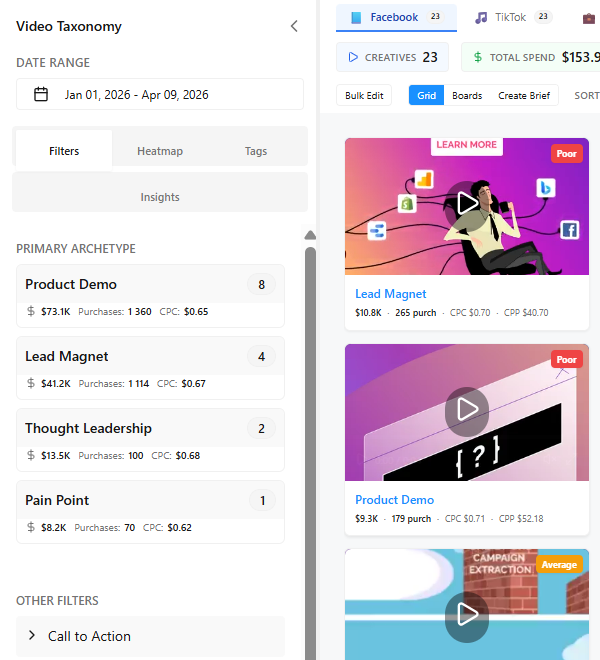
| Tab | What it does |
|---|---|
| Filters | Filter creatives by taxonomy attributes (archetype, hook type, visual style, etc.) + custom tags |
| Heatmap | Cross-dimensional performance matrix. Choose X and Y axes from any taxonomy or demographic field |
| Tags | Define custom tags, run Quick Tag to auto-fill, export CSV. See distribution of tag values |
| Insights | AI-generated prescriptive recommendations based on current data and filters |
| Brief | Generate video creative brief from champion archetype profile using Gemini AI |
Main Area
Grid view (default): Cards with video preview, archetype, spend, purchases, CPC, CPP. Custom tag badges visible on cards.
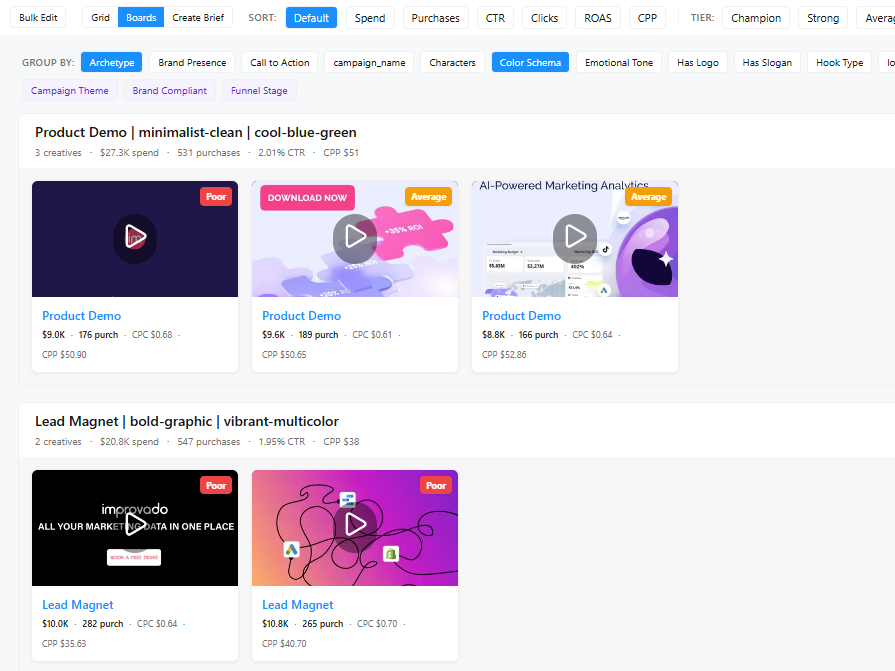
Boards view: Toggle via [Grid/Boards] button. Creatives grouped into rows by taxonomy signature. Each board shows aggregated metrics. Creatives scroll horizontally inside each board.
Was this article helpful?
Thanks for the feedback!
Questions? The Improvado team is always happy to help. Send us an email, contact your Customer Success Manager, or raise a request in the Improvado Service Desk.