

Improvado MCP
What is Improvado MCP
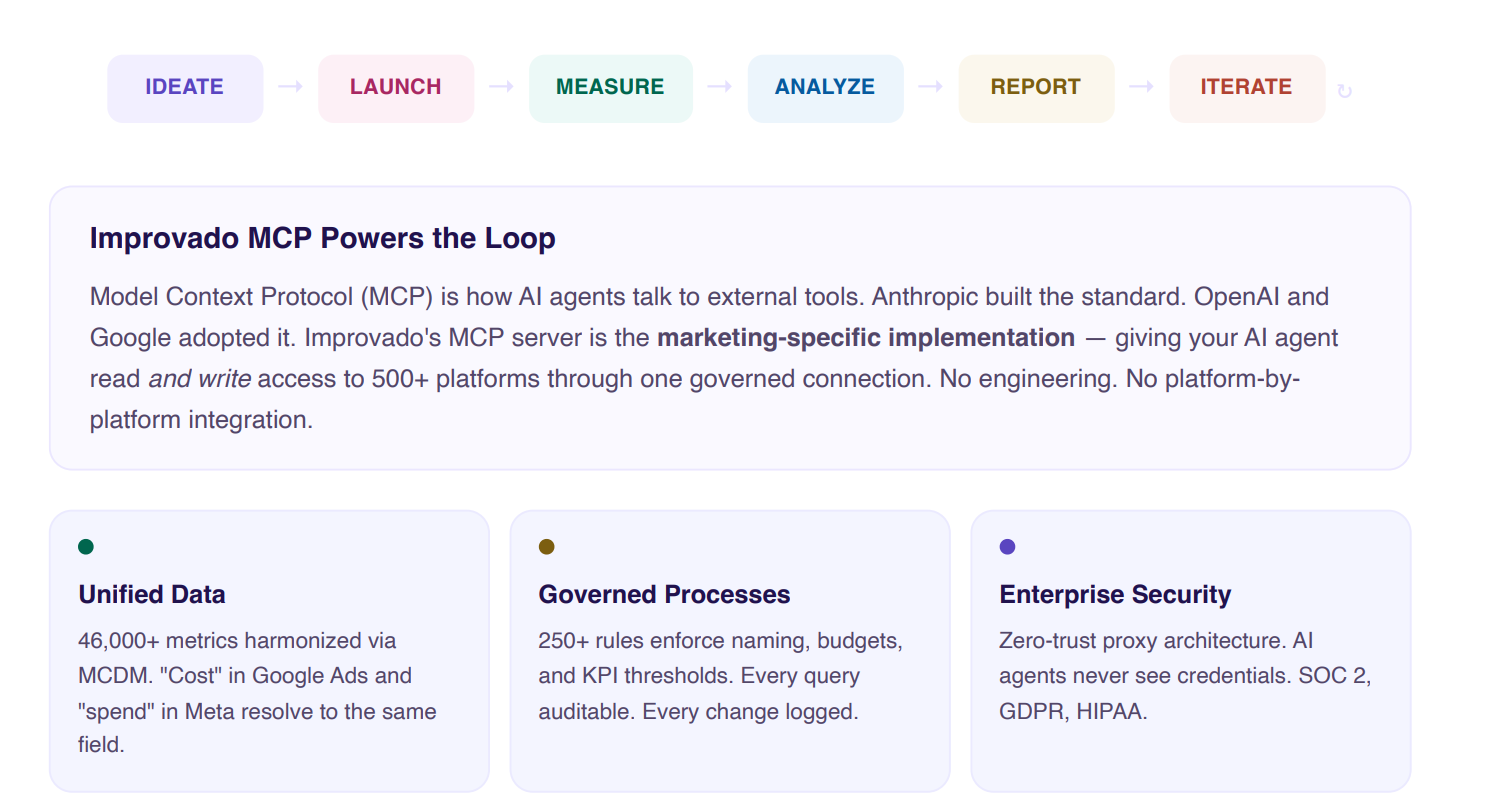
Improvado's MCP server gives your AI agent access to your entire marketing data platform — 1,400+ connectors, 46,000+ unified metrics, and 84 tools — through one secure connection. No engineering or platform-by-platform integration required. Ask a question in plain language and get accurate, real-time results.
MCP uses OAuth authentication with your existing Improvado credentials. No separate API keys needed.

Setup guide
Follow our setup guide to connect Improvado MCP to your AI agent. Both methods take under five minutes.
Prerequisites
Before you start, make sure you have access to your Improvado account. MCP uses OAuth — no separate API key is needed.
MCP endpoint: https://report.improvado.io/experimental/agent/api/mcp-customer/v1/invoke
Best for individual use.Method 1: Claude Desktop App
Best for teams and programmatic access. Option A: Add via CLI Run this command in your terminal: Option B: Add to .mcp.json On first use, authorize with your Improvado account. All subsequent calls are automatic.Method 2: Claude Code / Config File
claude mcp add --transport http improvado https://report.improvado.io/experimental/agent/api/mcp-customer/v1/invoke/ {
"improvado": {
"type": "http",
"url": "https://report.improvado.io/experimental/agent/api/mcp-customer/v1/invoke/"
}
}
Who Benefits
Improvado MCP serves every role in the marketing organization through one platform.
| Role | What You Get |
|---|---|
| CMO / VP Marketing | Cross-channel ROI in seconds, budget optimization, and data-driven board reports. |
| Marketing Analyst | Self-serve cross-platform queries, attribution modeling, and no manual data wrangling. |
| Marketing Ops Manager | Automated pipeline management, naming convention governance, and campaign QA before launch. |
| Performance Manager | Real-time budget pacing, creative fatigue detection, and autonomous optimization. |
| Data / BI Engineer | No connector maintenance, standard JSON-RPC protocol, and compatibility with any MCP client. |
Where MCP Fits in Improvado's Stack
| Layer | What It Includes |
|---|---|
| AI Agent + MCP | 84 tools, compatible with any AI client |
| Dashboards & Reporting | 15+ templates, native and BI integrations |
| Marketing Data Governance | 250+ rules for campaign health |
| Transform & Model | MCDM with 46,000+ unified metrics |
| Extract & Load | 1,400+ connectors, 20+ destinations |
Enterprise Security
| Feature | Details |
|---|---|
| Zero credential exposure | AI agents never see OAuth tokens or API keys. All credentials are encrypted in a secure vault. |
| Secure proxy architecture | MCP acts as an authenticated intermediary. No direct API access from the AI layer. |
| Prompt injection immunity | Even if injection succeeds, there's nothing to exfiltrate — credentials are never in the agent context. |
| Privacy-first LLM usage | Only metadata is shared with AI models. Raw data never leaves your environment. |
| Compliance | SOC 2, GDPR, HIPAA, ISO 27001 at every layer. |
Use Cases
Marketing capabilities unlocked with Improvado MCP — common use cases across enterprise brands, agencies, and data teams.
Creative Analytics
1. Creative Image & Tag Data Direct to Data Warehouse
Top priority for enterprise teams: get raw creative image URLs, performance metrics, and AI-generated tags (archetype, tone, CTA type) from every ad platform directly into your data warehouse — no manual dashboard exports, no copy-paste between platforms.
Tools: discoveryRequestTool · createExtractTool · queryDestinationTool
2. Cross-Channel Creative Performance in Native Format
Many enterprises prefer raw, per-platform data over forced normalization due to very different ad units across platforms. MCP delivers channel-native creative performance — your own data warehouse models handle internal mapping, preserving existing architecture.
Tools: discoveryRequestTool · discoveryListConnectorsTool · clickhouseTool
3. Marketing Executive Dashboard with Custom Visualizations
Build interactive dashboards that combine cross-channel performance data with custom visualizations — heatmaps, funnel charts, trend analysis. CMO gets strategic KPIs, analysts get drill-down capability. One prompt, full dashboard.
Tools: clickhouseTool · visualizationTool · heatmapVisualizationTool
MCP as Agent Data Layer
4. Native MCP Endpoint for Your Internal Agents
Building multi-tenant AI agents in-house? MCP provides the marketing data retrieval endpoint those agents need — no Improvado agent required. Your agents call MCP tools through your AI gateway after a single security review.
Tools: getCurrentWorkspaceTool · switchWorkspaceTool · mcpListToolsTool
5. Live Spend Data for Budget Management Automation
Use MCP data for budget management. Discovery API delivers today's spend vs. budget from all active channels without ETL lag — giving your internal budget agents real-time data to act on, not yesterday's batch report.
Tools: discoveryRequestTool · clickhouseTool · discoveryListConnectorsTool
6. Self-Serve Marketing Queries — No Data Engineer Bottleneck
When only a few data engineers have platform access, marketers pull data from native platform UIs. MCP exposes unified marketing data to your agent layer — enabling natural-language marketing queries without creating a ticket to the data team.
Tools: clickhouseTool · visualizationTool · findChat
Data Extraction
7. Extract Data from 1,400+ Marketing Platforms
Connect to any marketing data source — ad platforms, analytics tools, CRM systems, email providers. Improvado's 1,400+ pre-built connectors handle authentication, pagination, rate limiting, and schema mapping automatically. One API, unified access.
Tools: discoveryListConnectorsTool · createExtractTool · createConnectionTool
Data Quality
8. Clean Marketing Data Inputs for ML Models
Enterprises deploying ML models at scale need clean inputs. Stale or corrupted marketing channel data silently degrades recommendation quality and conversion rates. MCP's MDG layer monitors data freshness and schema integrity at the connector level before it reaches the model pipeline.
Tools: createMdgViewTool · getMdgRuleLibraryExampleTool · listAllExtractsTool
9. Campaign Naming Governance for Data Warehouse Join Integrity
Malformed UTMs and inconsistent naming break attribution lookups when you join Improvado data with internal data warehouse tables. MDG enforces naming at ingestion — every ad campaign record reliably joinable to your conversion event data.
Tools: createMdgViewTool · getMdgRuleLibraryExampleTool · testMdgNotificationTool
10. Quality Gate for New Ad Network Onboarding
Actively adding new ad networks? Each new connector introduces schema formats that can corrupt existing attribution joins. MCP validates new source data against your taxonomy before it lands in your data warehouse.
Tools: createConnectionTool · createExtractTool · createMdgViewTool
Security & Infrastructure
11. MCP Through Your AI Gateway — Single Security Review
Enterprise security teams require review for every new AI integration. Improvado MCP's workspace-scoped OAuth session model is designed to pass security review cleanly — no direct IAM, no credential exposure. One review unlocks all 84 tools, not one per platform.
Tools: getCurrentWorkspaceTool · getConnectionsTool · switchWorkspaceTool
12. Native Data Warehouse Access Avoids IAM Security Reviews
Many enterprises route destinations through their data warehouse to avoid direct IAM access triggering multiple security reviews. MCP's queryDestinationTool queries your BigQuery/Snowflake natively — no direct IAM, no new credentials, no additional security review.
Tools: queryDestinationTool · getDestinationConnectionsTool · clickhouseTool
Operational Efficiency
13. Discovery API Reduces Unnecessary Extraction Volume
Many enterprises don't use their full annual row contract. Discovery API enables real-time ad-hoc queries against live platform APIs — reducing scheduled extraction volume while providing fresher data for time-sensitive queries. Fewer rows consumed, better data quality.
Tools: discoveryRequestTool · pauseExtractTool · listAllExtractsTool
Attribution & Measurement
14. Paid Spend → Conversion Attribution Loop
Query paid media spend (Improvado MCDM) and join with conversion events from your data warehouse in one MCP session. This is the core measurement problem every performance marketing team needs to solve — revenue traced back to campaign impression.
Tools: clickhouseTool · queryDestinationTool · visualizationTool
15. 90-Day Multi-Touch Attribution for High-Consideration Products
High-consideration purchase decisions take 30–90 days. A prospect sees an ad in January and converts in March. MCP's 90+ day MCDM history enables multi-touch attribution across the full consideration window — connecting the January impression to the March conversion.
Tools: clickhouseTool · queryDestinationTool · createRecipeTool
16. Revenue Yield Optimization by Channel & Creative
High-value conversions drive revenue. MCP enables revenue-per-impression analysis by channel, daypart, creative archetype, and audience segment — shifting optimization from click rate to conversion rate, the metric that actually drives revenue.
Tools: clickhouseTool · queryDestinationTool · visualizationTool
MCP Tool Reference — Public Endpoint
84 tools total. Every tool isaccessible via JSON-RPC 2.0 after OAuth authentication — no per-tool setuprequired. Tools are organized by functional category below.
Data Query & Visualization (5tools)
clickhouseTool Execute SQL against ClickHouse warehouse — customer workspacescope
queryDestinationTool Query downstream destinations directly (BigQuery, Snowflake,Redshift)
visualizationTool Generate charts — line, bar, area, pie, scatter, table
heatmapVisualizationTool Create heatmaps for time-based metric analysis
sendEmailTool Send reports and visualizations via email
Discovery API — Live Platform Access (5 tools)
discoveryListDataSourcesTool List all data sources available in the workspace
discoveryListConnectorsTool List connectors/integrations by data source name
discoveryListAccountsTool List ad accounts within a specific connector
discoveryRequestTool Execute live query against any of 1,400+ platforms (Google AdsGAQL, Meta, etc.)
discoveryWebSearchTool Search documentation and support resources for a data source
Connections & Accounts (3 tools)
getConnectionsTool Get all connections for a datasource in current workspace
getConnectionAccountsTool Get ad accounts associated with a specific connection
getDestinationConnectionsTool List destination connections (where data lands)
ETL — Extract Management (9 tools)
createExtractTool Create a new scheduled data extraction from a source
updateExtractTool Update extract schedule, accounts, or field selection
getExtractByIdTool Get details of a specific extract by ID
getExtractTemplatesTool List available extract templates
getExtractTemplateByIdTool Get a specific extract template by ID
listAllExtractsTool List all extracts in the workspace with status
pauseExtractTool Pause a running extract (stops scheduled pulls)
unpauseExtractTool Resume a paused extract
discoverFileFieldsTool Discover available fields for a file-based data source
ETL — Load Management (8 tools)
createLoadTool Create a new load to push data to a destination
updateLoadTool Update load destination or schedule settings
getLoadTool Get details of a specific load by ID
getLoadsTool List loads with filtering options
listLoadsTool List all loads in the workspace
deleteLoadTool Delete a load permanently
pauseLoadTool Pause a running load
unpauseLoadTool Resume a paused load
ETL — Run Management (4 tools)
runLoadTool Manually trigger a load run immediately
getPipelineRunsTool Get run history for a pipeline
getPipelineRunResultTool Get detailed results of a specific pipeline run
generateFlatDataSampleTool Generate a data sample from a flat file source
Pipelines (6 tools)
createCustomPipelineTool Create a custom SQL/Python transformation pipeline
updateCustomPipelineTool Update pipeline logic or schedule
deleteCustomPipelineTool Delete a pipeline
listCustomPipelinesTool List all pipelines in workspace
executeCustomPipelineTool Execute a pipeline immediately
runCustomPipelineCodeTool Run pipeline code with custom parameters
Marketing Data Governance / MDG (7tools)
createMdgViewTool Create a governance rule/view (naming, budget, classification)
getMdgRuleLibraryExampleTool Get examples from the 250+ pre-built MDG rule library
testMdgNotificationTool Test MDG alert and notification configuration
previewEmailImportAddressTool Preview email import address for data ingestion
uploadFlatDataFileTool Upload CSV or Excel file for processing
uploadNewFileToExtractTool Upload a new file version to an existing extract
createFlatDataExtractTool Create an extract pipeline from flat file data
AI Recipes / Notebooks (13 tools)
createRecipeTool Create a new composable AI analysis notebook
updateRecipeTool Update recipe settings, cells, or parameters
getRecipeTool Retrieve a recipe by ID
getRecipeTemplatesTool List available recipe templates (attribution, reporting, etc.)
createRecipeStepTool Add a SQL or Python step to an existing recipe
getRecipeStepTool Get a specific step within a recipe
listRecipesTool List all recipes in the current workspace
activateRecipeTool Activate and run a recipe
nameRecipeTool Set or update the display name of a recipe
createLesIntegrationChatTool Create a LES integration chat session for guided setup
createAgentAutomationTool Schedule the agent to run a prompt once or on a recurring schedule (an agent automation)
getAgentAutomationsTool List agent automations with their latest run status
deleteAgentAutomationTool Delete an agent automation and stop its future runs
Dashboards (3 tools)
getDashboardTool Retrieve a dashboard by ID
listDashboardsTool List all dashboards in the workspace
getCustomDashboardsAndDecksPromptTool Get context prompt for custom dashboards and decks
Documents (5 tools)
createDocument Create a new document in the workspace
editDocument Edit content of an existing document
getDocument Retrieve a document by ID
deleteDocument Delete a document permanently
listDocuments List all documents in the workspace
Chat & History (3 tools)
findChat Search past AI conversations by query
getChat Get full conversation context and history by ID
getManagedConnectionCredentialsTool Get connection credential metadata (IDs/status — never rawsecrets)
Knowledge Base & Docs (2 tools)
documentationTool Query Improvado product documentation
retrieveDocumentationTool Retrieve specific documentation files by path
Data Tables (1 tool)
listDataTablesTool List all data tables available in current workspace
Workspace Management (3 tools)
getCurrentWorkspaceTool Get current workspace context — agency, workspace ID, name
switchWorkspaceTool Switch to a different workspace within allowed agencies
getWorkspacesTool List all workspaces available to the authenticated user
Meta / MCP Protocol (4 tools)
mcpListToolsTool Dynamically list all available MCP tools at runtime
mcpCallToolTool Call any MCP tool by name (meta-wrapper for agents)
mcpListResourcesTool List MCP resources available in current context
mcpReadResourceTool Read a specific MCP resource by URI
Connection Setup (2 tools)
createConnectionTool Create a new data source connection in the workspace
customConnectorFormTool Access custom connector configuration form
Was this page helpful?
Thanks for the feedback!
Questions? The Improvado team is always happy to help. Send us an email, contact your Customer Success Manager, or raise a request in the Improvado Service Desk.