

Pipeline Secrets
Overview
Most pipelines reach your data through the connections already in your workspace. When a pipeline needs a service that has no Improvado connection — a public API with its own key, an internal endpoint, an SFTP password — you store that credential as a secret. The pipeline reads it by name when it runs; the value never appears in the pipeline code, in chat or in run logs.
Pipeline secrets and workspace secrets
| Secret | Who can read it | Where you manage it |
|---|---|---|
| Pipeline secret | Runs of that one pipeline | The pipeline's Secrets tab |
| Workspace secret | Every pipeline in the workspace | Automations → Workspace secrets |
Use a workspace secret for a key several pipelines share, and a pipeline secret for everything else. If a pipeline has its own secret with the same name as a workspace secret, the pipeline's value wins for that pipeline.
Adding a secret
Ask the AI Agent to build or change the pipeline and say which service it
needs a key for. The Agent writes the pipeline to read the secret by name — for example
SLACK_WEBHOOK_URL. It will not ask you to paste the value into chat.
Open the pipeline and go to the Secrets tab. A secret the code needs but that has no value yet is listed as Required by code, no value set.
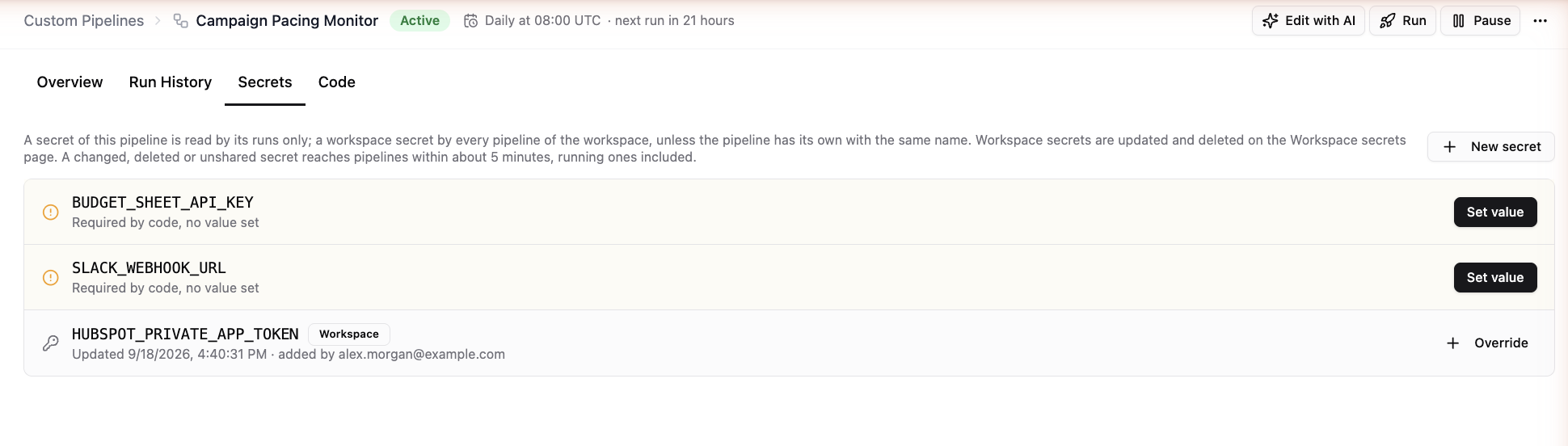
Click Set value on that row — or New secret and enter the name exactly as listed — then paste the value.
Under Available to, choose This pipeline only or Every pipeline of the workspace, then click Add secret.
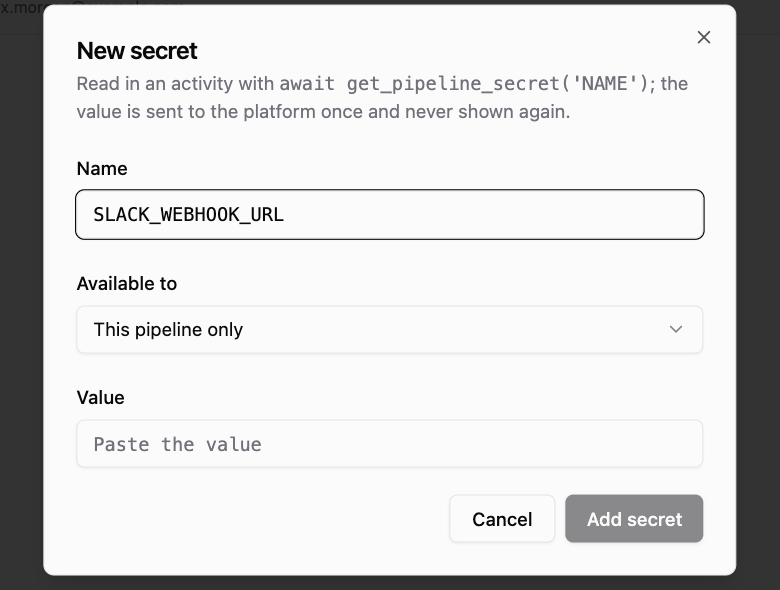
Run the pipeline to check that it can reach the service.
Once saved, a value is never shown again — not in the UI, not to the Agent. To change it, use Update secret and paste the new value.
Changing or removing a secret
Update or delete a pipeline secret on the pipeline's Secrets tab, and a workspace secret on the Workspace secrets page. A changed or deleted secret reaches pipelines within about 5 minutes, including runs that are already going — so rotating a key does not require editing or restarting the pipeline.
Secret names use capital letters, digits and underscores and start with a letter, for example
HUBSPOT_PRIVATE_APP_TOKEN.
Troubleshooting
| Symptom | Usual cause |
|---|---|
| Run fails because a secret is missing | The Secrets tab lists it as Required by code, no value set — add the value, then rerun |
| Run fails with an authorization error from the service | The key expired or was revoked on the service's side — update the secret; the next run uses the new value |
| You can't see New secret | Your role doesn't include managing pipeline secrets — ask a workspace admin |
Related articles
Was this article helpful?
Thanks for the feedback!
Questions? The Improvado team is always happy to help. Send us an email, contact your Customer Success Manager, or raise a request in the Improvado Service Desk.