

Describe your SEO Marketing Dashboard.Your AI agent builds it in minutes.
Track your SEO metrics in one place, including sessions, visits and all necessary content marketing data.
- Deploy in days, not months
- 1,400+ data sources
- SOC 2 · GDPR · HIPAA
Want me to add competitor ranking comparisons or content gap analysis?
What the agent renders
Every view is live, editable, and connected to your real data.
SEO data scattered across tools. Rankings disconnected from revenue.
Content marketers face similar problems
In order to increase PageRank, it's necessary to track how different pages perform in search engine results and quickly identify categories or single pages with declining or rising trends.
SEO dashboard
This dashboard will allow you to:
- Understand which keywords you need to double down on
- Check if certain pages need to get more backlinks to improve results
- Monitor how different SEO pages perform
- Identify whether any page/category has a declining or rising trend
The combination of data from Google Analytics and Google Search Console in one dashboard allows you to better analyze marketing performance and increase the speed with which you make marketing decisions.
Key metrics to track
- Sessions. A session is the collective actions of a user during a set period of time on your site. It begins when they arrive and ends when they either completely leave the site or if they remain inactive for 30 minutes. One person can have many sessions on your site within one reporting period. It’s important to note that sessions do not represent how many unique users have visited the website
- Unique visits. Unique visits represents the total number of distinct individuals who access your site during a given reporting period
- Pages Per Visit shows you the average number of pages visitors viewed on your site within a session
- Average Visit Duration shows you the average amount of time visitors spend on your website within a session
- Time Spent Per Visit is the average time a user spends per session
With these metrics, you’ll be able to:
- Identify topics that lead to a higher number of pages per visit, so you can produce more similar content
- Improve stickiness and fix up underperforming keywords
Track SEO keywords ranking
%252520(1).png "SEO marketing dashboard example")
This graph allows you to analyze the number of clicks and average position of your search keywords.
Analyze pages by category
%252520(1).png "SEO marketing dashboard example")
If you have many landing pages on your website, group them and analyze visits and goal-related data. This approach will help goal-related analyze the dynamics of key metrics at a glance, all in one diagram.
You’ll see which groups get higher traffic and the conversion rate by different goals, which will allow you to evaluate the quality of the traffic a landing page gets.
Track backlink pages ratio
A backlink is the link created when one website links to another. Backlinks are also called "inbound links" or "incoming links." Backlinks are important for SEO.
Evaluate the number of external links in one spreadsheet.
%252520(1).png "SEO marketing dashboard example")
Analyze trends by category
%252520(1).png "SEO marketing dashboard example")
Analyze the dynamics of traffic by different groups of content. Monitor visits to different parts of your website's pages.
How to build this dashboard without Improvado
- Extract sales data from Google Analytics and Google Search Console
- Bring all data together in a single, unified format
- Get a log of actions from your Google Analytics
- Load data to your warehouse
- Build dashboards, graphs, and reports in your BI platform
The Improvado way!
Connect your business to Improvado and we will do everything for you on a turn-key basis. You need only book a demo-call with our manager.
Don't limit your analytics to SEO. Explore these 25 best marketing dashboard templates to build a holistic picture of your marketing performance.
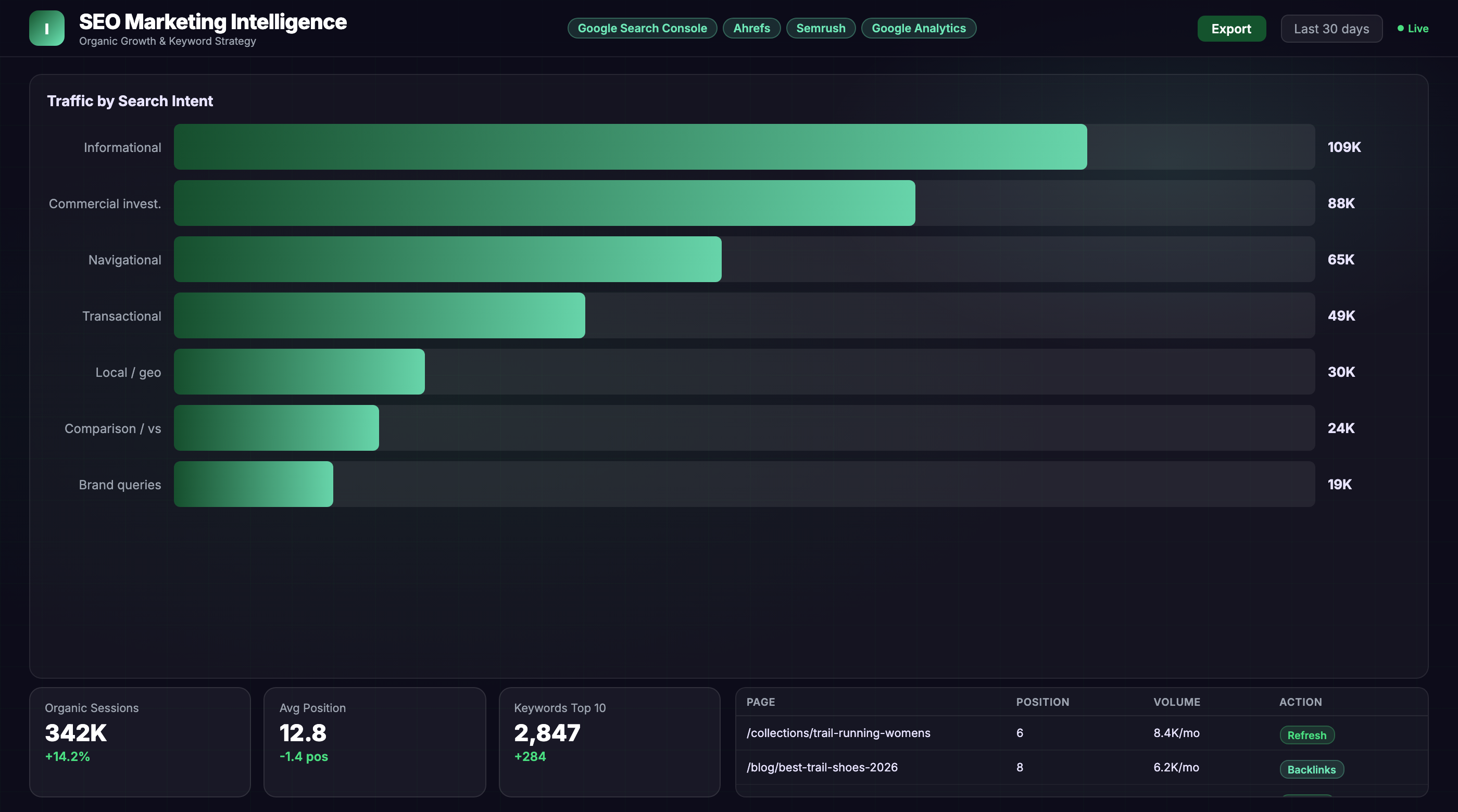
From prompt to live dashboard in minutes.
No SQL, no data engineering tickets, no waiting. Describe what you need — the agent does the rest.
Connect your stack
Authorize your data sources via OAuth — ad platforms, CRM, email, analytics. The agent gets live read access in minutes, no engineering required.
Describe the dashboard
Type what you need in plain English: "SEO Marketing Dashboard, last 90 days, broken out by channel." The agent writes the queries, reconciles attribution across tools, and normalizes currencies.
Dashboard goes live
A fully interactive dashboard renders in your BI tool — Tableau, Looker, Power BI, or the Improvado UI. It refreshes automatically and stays current without re-prompting.
Great at answering questions. Not built to own a live dashboard.
| Claude / ChatGPT alone | Improvado AI Agent | |
|---|---|---|
| Data access | ✗ Manual CSV export | ✓ Live API connections |
| Data volume | ✗ ~25K row context limit | ✓ Unlimited warehouse queries |
| Output format | ✗ Text summary in chat | ✓ Interactive live dashboard |
| Auto-refresh | ✗ Re-prompt every session | ✓ Automatic, configurable schedule |
| Attribution model | ✗ None — trusts your CSVs | ✓ Cross-channel normalization built-in |
| Compliance | ✗ Data leaves your stack | ✓ SOC 2 · GDPR · HIPAA · your warehouse |
| Audit trail | ✗ No query log | ✓ Every query logged, replayable |
| Useful for exploration | Get your demo → |
Plugs into the stack your team already uses
Don't see yours? Explore all 1,400+ integrations →
Everything else you might ask
What SEO tools can I connect to this dashboard?
How long does it take to set up an SEO marketing dashboard?
Can I customize the SEO metrics and segments in my dashboard?
Other templates your agent can spin up
ABM Dashboard
Account-based marketing dashboard tracking engagement, pipeline influence, and deal velocity across target accounts.
View template →Amazon Performance Dashboard
All marketing performance data in one place for Amazon marketers.
View template →B2B Inbound Marketing Dashboard
Inbound marketing dashboard for executives and marketing departments of B2B companies.
View template →Ship your SEO Marketing Dashboard this week.
Talk to an Improvado expert to see how our AI agent builds production-ready SEO dashboards from your live data. Get a custom demo tailored to your SEO stack and reporting needs.