

Transfer Dashboard Ownership
Business Intelligence
August 21, 2026 A dashboard's owner used to be whoever created it, permanently. Only the owner can switch a dashboard between workspace-wide and restricted access, so a dashboard in the wrong hands was a dashboard nobody else could set access on — most visibly for the ones the AI Agent builds, where the creator is the Agent rather than a person.
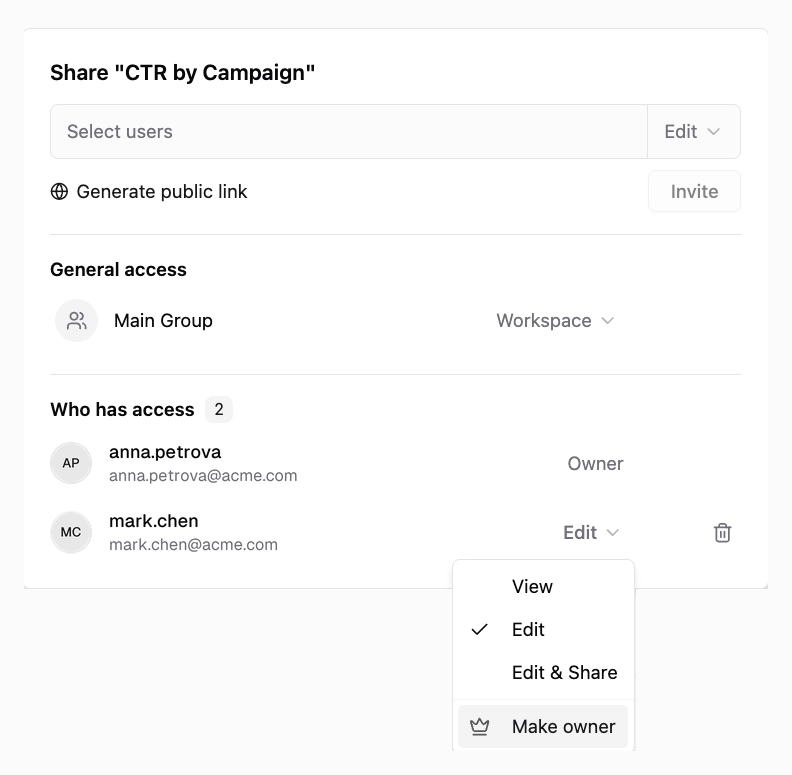
Ownership now moves. Open Share, find the person under Who has access, and choose Make owner in their permission dropdown.
What to expect
- The new owner takes over what only an owner can do — switching the dashboard between workspace-wide and restricted access, and transferring it again.
- You keep Edit & Share, so you can still edit the dashboard, invite people to it, and manage its public link.
- Only the new owner can transfer it again, so the confirmation spells out what you are giving up before anything changes.
- Dashboards the AI Agent built are owned by the Agent — ask it in the chat to make you the owner, and it hands the dashboard over.
See Sharing Dashboards for the full picture.
Was this page helpful?
Thanks for the feedback!
Questions? The Improvado team is always happy to help. Send us an email, contact your Customer Success Manager, or raise a request in the Improvado Service Desk.