
Share a Connection with Specific Users
Data Extraction
June 30, 2026 You can now share a private connection with specific people in your workspace — no longer an all-or-nothing choice between keeping it fully private and opening it to everyone.
How it works
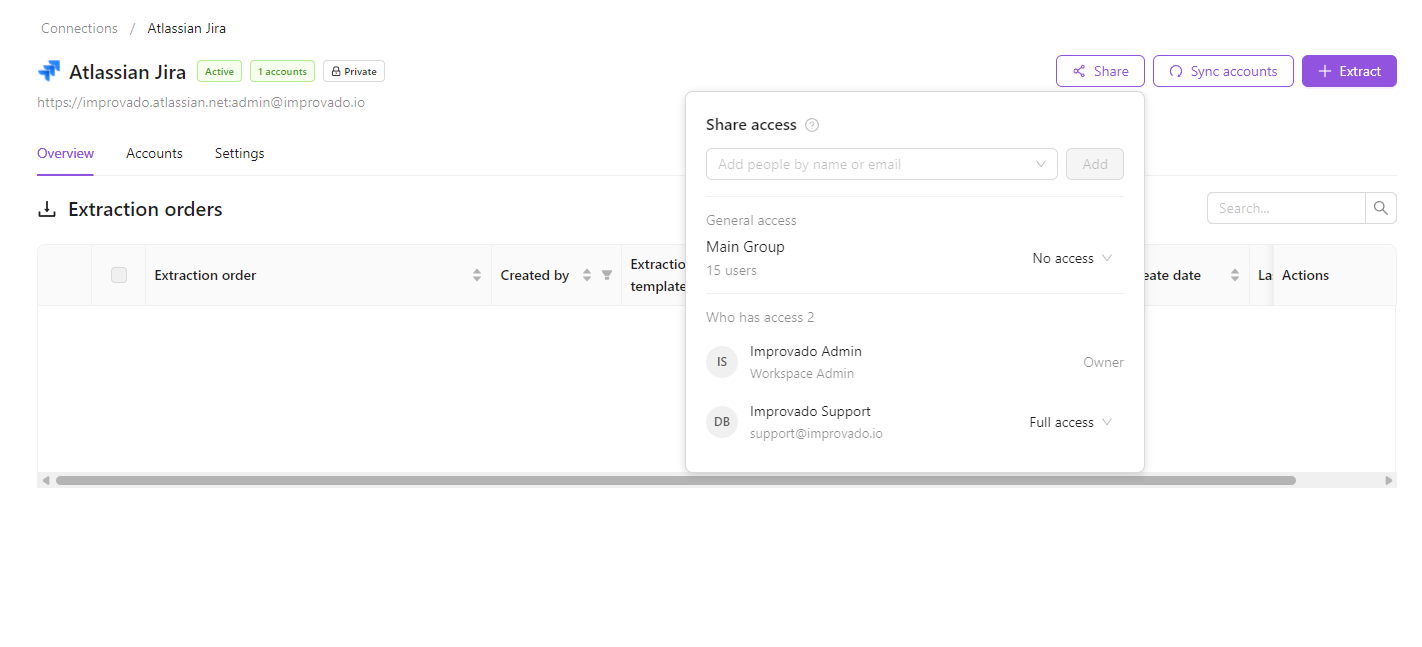
- Open a connection and click Share in the top-right corner.
- Under General access, choose No access to make the connection private, or Full access to share it with the whole workspace.
- While it is private, add specific people by name or email. They get the same owner-level access and can use, re-share, and manage the connection.
Good to know
- You can share with existing workspace members and agency owners — no invitations are sent.
- Sharing settings are saved even while the connection has Full access, and apply again whenever you switch it back to No access.
- The owner, the last person to authorize the connection, and anyone it's shared with can manage who has access.
Was this page helpful?
Thanks for the feedback!
Questions? The Improvado team is always happy to help. Send us an email, contact your Customer Success Manager, or raise a request in the Improvado Service Desk.