

Choose a rolling range for historical data
For supported extraction reports, you can now choose a rolling historical range in Sync historical data during extraction setup, in an order's Settings, and in bulk edit. Use the last N days of history instead of maintaining a start date by hand.
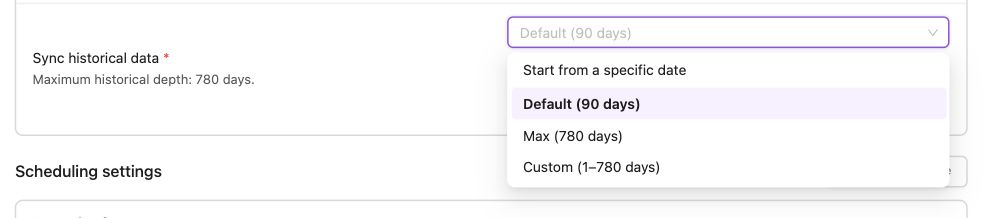
- Default follows the report's current default historical depth.
- Max follows its current maximum allowed history.
- Custom lets you choose a depth in a separate field. The range moves forward over time while your chosen depth stays the same when the report default changes.
- Start from a specific date keeps a fixed calendar date. Existing extractions keep their dates until you change them.
Review changes shows the current and new settings and warns when applying them will reload history. In Extract automation, you can also see the history setting inherited from the selected template.
Available depths vary by report and data source. The lookback window continues to control regular scheduled updates.
Was this page helpful?
Thanks for the feedback!
Questions? The Improvado team is always happy to help. Send us an email, contact your Customer Success Manager, or raise a request in the Improvado Service Desk.