

See What a Flat-Data Run Decided
Every flat-data run reads your file and settles the details it finds there. Those decisions are now reported back to you, one card each, so what landed in the table can be traced to what the run did with the column it came from.
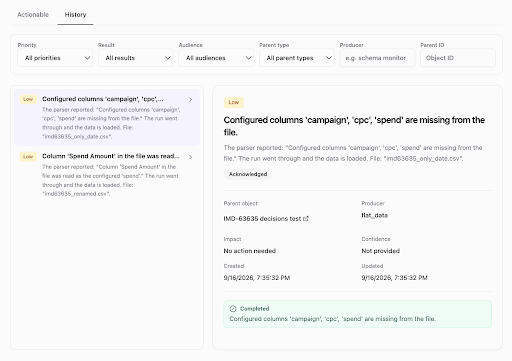
What the run decided
Each card names one decision and the column it applies to: a column taken from the file that the configuration did not mention, a renamed column mapped back onto the one you configured, a parsing setting chosen by reading the file, or a value flagged as unparseable. Open one and it names the file, the impact, and whether anything is expected of you - most say no action needed. Filter the list by priority, result, audience or producer when a run has a lot to report.
Fields that come back
When a platform begins exposing a field it had stopped returning, that field is selected again automatically. Data resumes on its own, without anyone having to spot the change and act on it.
Was this page helpful?
Thanks for the feedback!
Questions? The Improvado team is always happy to help. Send us an email, contact your Customer Success Manager, or raise a request in the Improvado Service Desk.