

Export data to CSV — straight from the preview
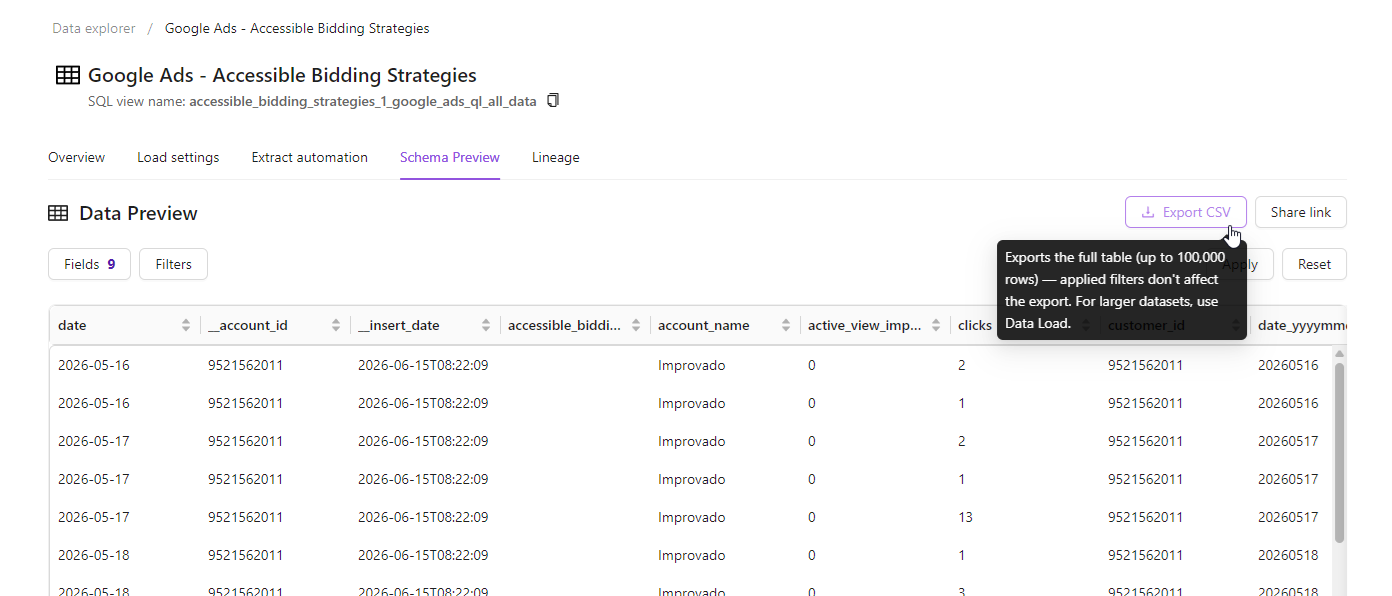
Need your data in a spreadsheet? Now you can grab it the moment you see it. Export any data table to CSV directly from the Data Preview — no separate tools, no extra steps.
- One-click export — click Export CSV right in the Data Preview header
- Full table, every time — download up to 100,000 rows in standard CSV format
- Spreadsheet-ready — open instantly in Excel, Google Sheets, or wherever you work
Why it matters: ad-hoc analysis shouldn't mean a detour. Pull a clean CSV from exactly where you're already exploring your data, and get to work in seconds.
Good to know: the export always contains the full table (up to 100,000 rows). On-screen filters and grouping shape only the preview — they don't change the file. For larger or filtered deliveries, use Data Load to send data to your destinations.
Learn more in Export to CSV documentation.
Was this page helpful?
Thanks for the feedback!
Questions? The Improvado team is always happy to help. Send us an email, contact your Customer Success Manager, or raise a request in the Improvado Service Desk.