

Domain-Restricted Dashboard Links
Sharing a dashboard with a client used to mean one thing: a link anyone could open. Good enough to send a chart to a colleague, uncomfortable for a client report — a forwarded URL was all it took for the numbers to travel further than intended.
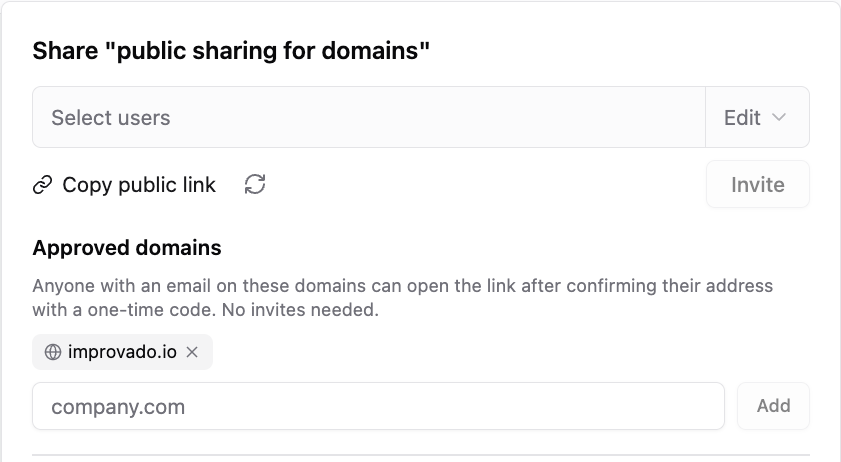
Now a shared link can be restricted to the domains you approve, and every viewer confirms their work email before the dashboard opens.
How it works
- You approve the domains. Open Share, add your client's domain under Approved domains. Free email providers are rejected — a domain anyone can sign up for would not restrict anything.
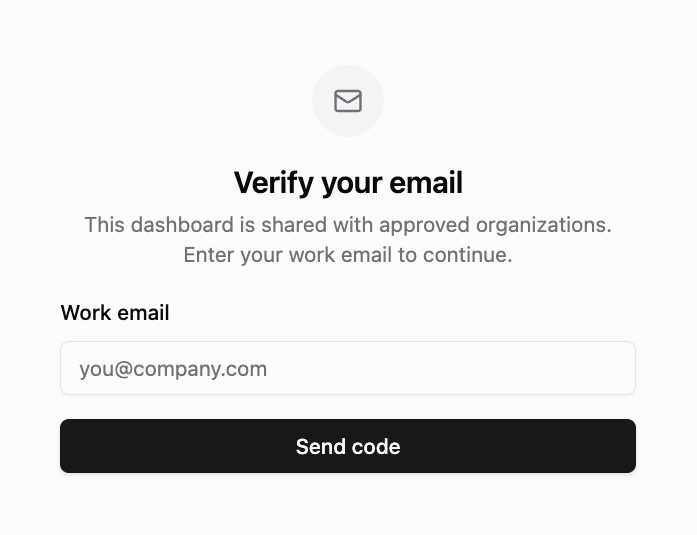
- The viewer proves the address. They enter a work email, get a six-digit code branded with your whitelabel, and the dashboard opens. No Improvado account, no invite, no seat.
- They are remembered for 14 days on that device, so a weekly report does not turn into a weekly code.
You can see who opened it
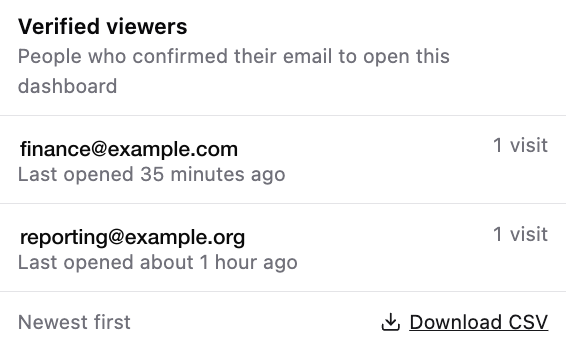
A restricted link keeps a record: who verified, when they last opened the dashboard, how many times. The ten most recent are one hover away in the share panel, and the full list downloads as CSV — the answer to "who has seen this report" is now a fact rather than a guess.
And you can take it back
Remove a domain and everyone who verified with it stops getting in, including the tabs already open — they cannot re-verify either. Regenerate the link and every viewer is out at once. Access that can be granted without a seat can now be withdrawn without one.
Nothing changes for links you already sent
An existing shared link keeps behaving exactly as before, because a link with no approved domains is still a public link. Restriction begins the moment you add the first domain — and ends when you remove the last one.
See Sharing Dashboards for the full setup.
Was this page helpful?
Thanks for the feedback!
Questions? The Improvado team is always happy to help. Send us an email, contact your Customer Success Manager, or raise a request in the Improvado Service Desk.