

A Page for Every Data Source
Data Extraction
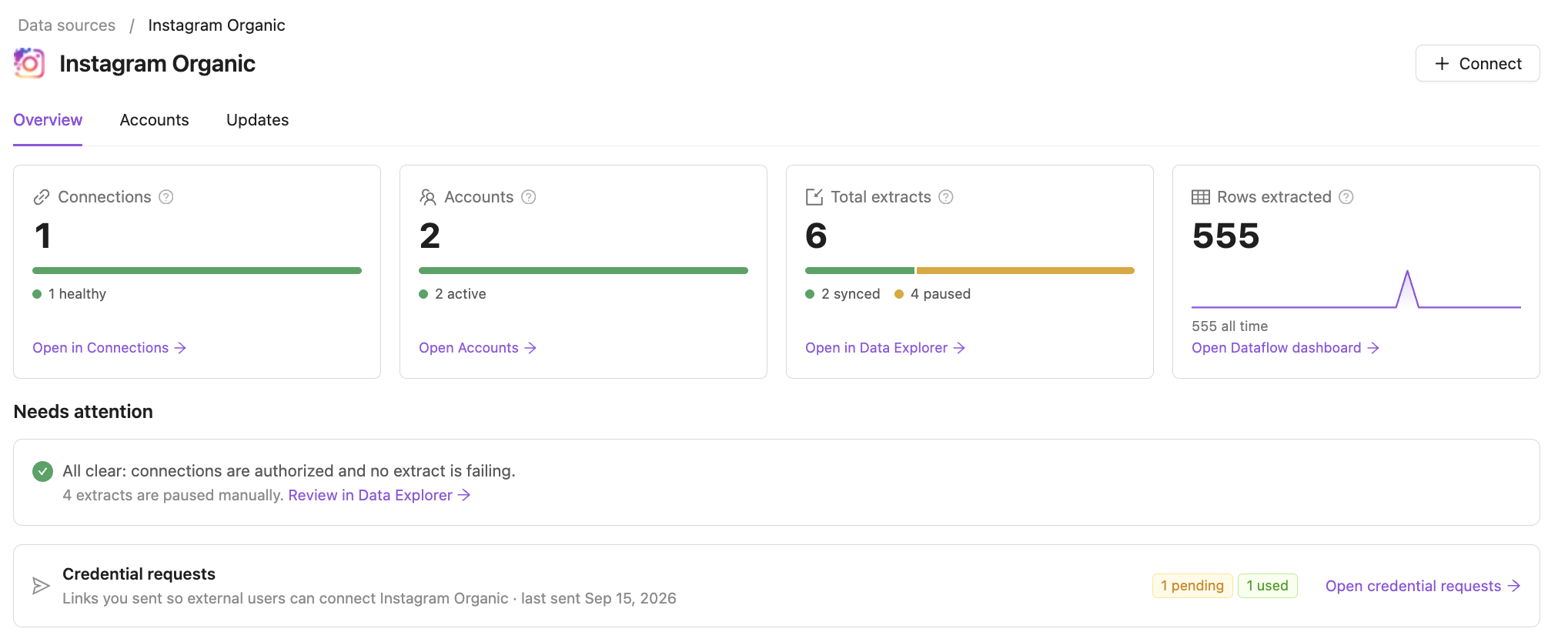
September 25, 2026 Every data source in your workspace now has its own page. Open it from the Data source column in Connections or Data Explorer, or from the breadcrumbs on a connection's page, to see how that source is doing and what needs fixing — without collecting it from several lists.
What you get
- The source at a glance — connections, accounts, extracts and rows extracted in the last 30 days, each split by status, with a link to the full list already filtered to this source.
- Needs attention — connections to re-authorize, credentials about to expire, failing extracts grouped by error, and extracts paused after failing. Or All clear.
- Accounts — every account of the source, listed once even when it comes through several connections.
- Updates — the setup guide, the API guide in your Knowledge Graph, and upcoming changes to the source's API.
- Ask AI Agent — ask about the source; the agent already knows which one you are looking at.
Also new
- Connections, Data Explorer and Credential requests can open filtered to one data source, from the links on its page.
- Data source names in Connections and Data Explorer link to the source's page, and the grouped views have an Open hub link on each data source.
Was this page helpful?
Thanks for the feedback!
Questions? The Improvado team is always happy to help. Send us an email, contact your Customer Success Manager, or raise a request in the Improvado Service Desk.