

Dashboard Sharing: View-Only Workspace Access and Sharing with Roles
Business Intelligence AI Agent
September 30, 2026 Until now, opening a dashboard to the workspace meant everyone whose role could edit dashboards could edit it too, and sharing with a group meant inviting people one by one. The Share dialog now covers both.
What you can do
- Choose what the workspace gets - General access is now Can edit, Can view or No access. Can view opens the dashboard read-only to the whole workspace, even to people whose role could edit.
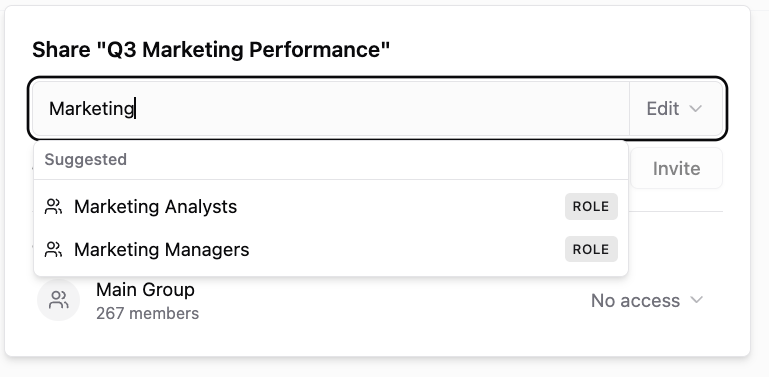
- Share with a role - start typing in the Share dialog and workspace roles, custom ones included, show up next to people. Everyone who holds the role gets the level you pick: View, Edit or Edit & Share.
- Get the strongest access - when someone has access through General access, a personal invite and a role, the strongest one applies.
- See who is in the workspace - the General access row shows how many members the workspace has.
Existing dashboards keep their access: the old Workspace setting is now Can edit, and Restricted is now No access.
Was this page helpful?
Thanks for the feedback!
Questions? The Improvado team is always happy to help. Send us an email, contact your Customer Success Manager, or raise a request in the Improvado Service Desk.