

Your favorite dashboards, one click away
Business Intelligence
October 27, 2026 Save the dashboards and folders you return to every day as personal favorites. Hover over a title in the dashboard list and click the star, or star an open dashboard from its header. Your favorites appear in the sidebar so you can open them from anywhere in Improvado.
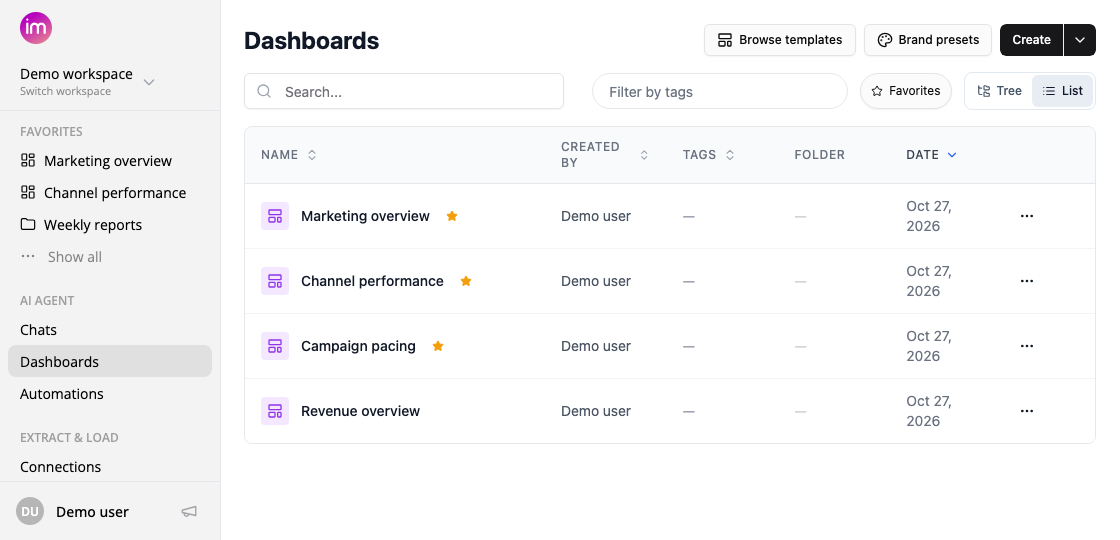
- Find your regular dashboards faster — use the Favorites filter beside Filter by tags.
- Put shortcuts in your own order — drag favorites in the sidebar, with an insertion line showing where each item will land.
- Keep the sidebar compact — see three favorites by default and choose Show all for the rest. Collapse any menu section; your choice is remembered in this browser.
- Manage shortcuts in place — hover and use the ⋯ menu to open here, open in a new tab, or remove from favorites.
Favorites are just for you. They do not change anyone else's favorites or grant access to a dashboard or folder.
Was this page helpful?
Thanks for the feedback!
Questions? The Improvado team is always happy to help. Send us an email, contact your Customer Success Manager, or raise a request in the Improvado Service Desk.