

Chat with the AI Agent Right on Your Dashboard
Business Intelligence
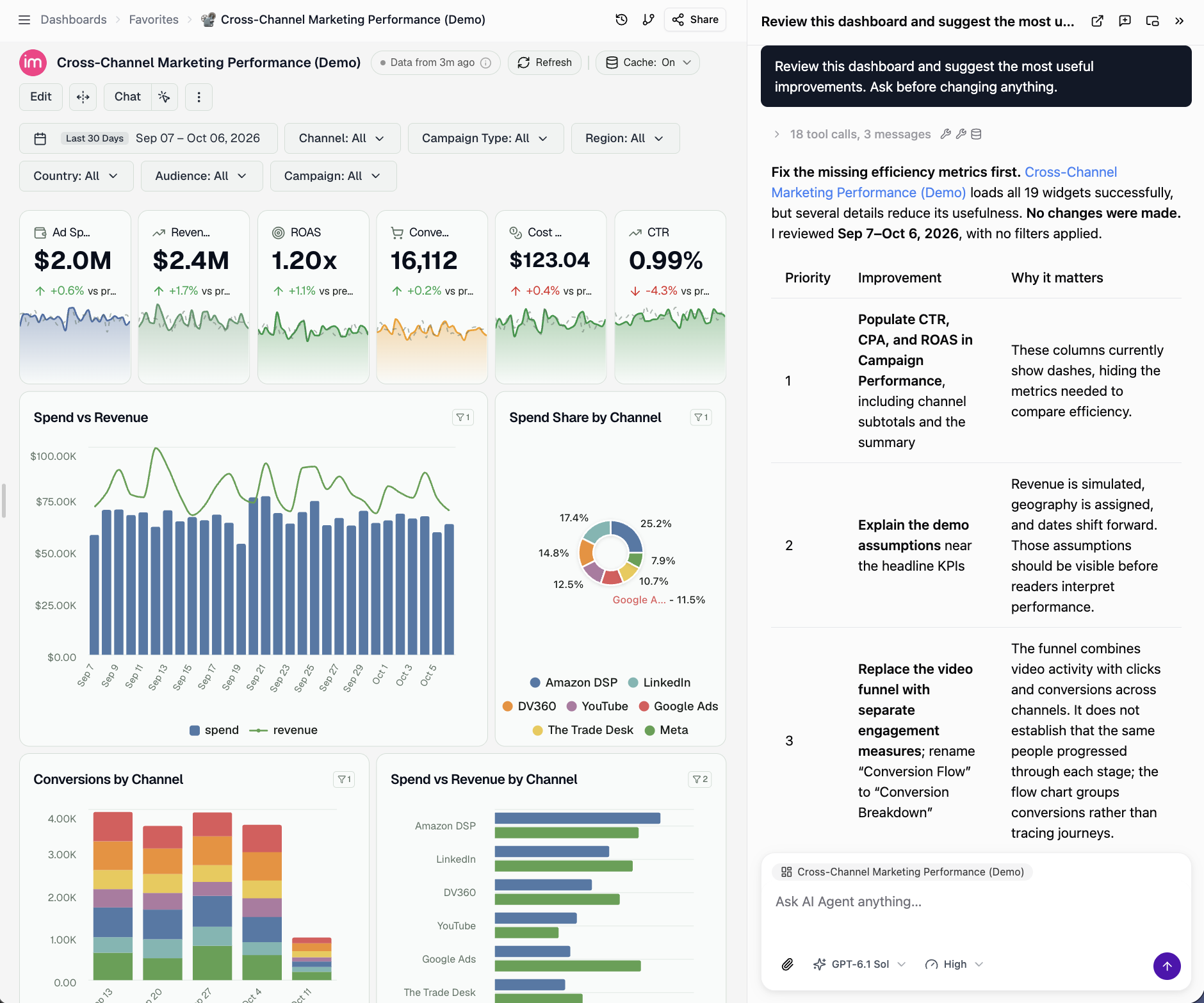
September 28, 2026 Asking the AI Agent about a dashboard no longer takes you away from it. Click Chat in the dashboard header, or press Cmd+J (Ctrl+J on Windows), and the Agent opens in a panel on the right. The dashboard stays in view, and the Agent already knows which dashboard and page you are on, its data table and your filters.
What's new
- Changes appear as they happen. When the Agent adds a widget or edits a chart, the dashboard refreshes in place, no page reload. Unsaved edits in Edit Mode are never overwritten.
- Annotate a widget. The button formerly called Pin is now Annotate: click it, click a widget, and ask your question. It lands in the chat panel with the widget's context attached.
- Your chat is still there. The panel reopens your last conversation for the dashboard, and you can continue it as a full chat in the AI Agent.
- Fits your screen. Resize the panel by dragging its edge, or pop it out into a floating window.
Was this page helpful?
Thanks for the feedback!
Questions? The Improvado team is always happy to help. Send us an email, contact your Customer Success Manager, or raise a request in the Improvado Service Desk.