

Budget Pacing
Marketing Data Governance
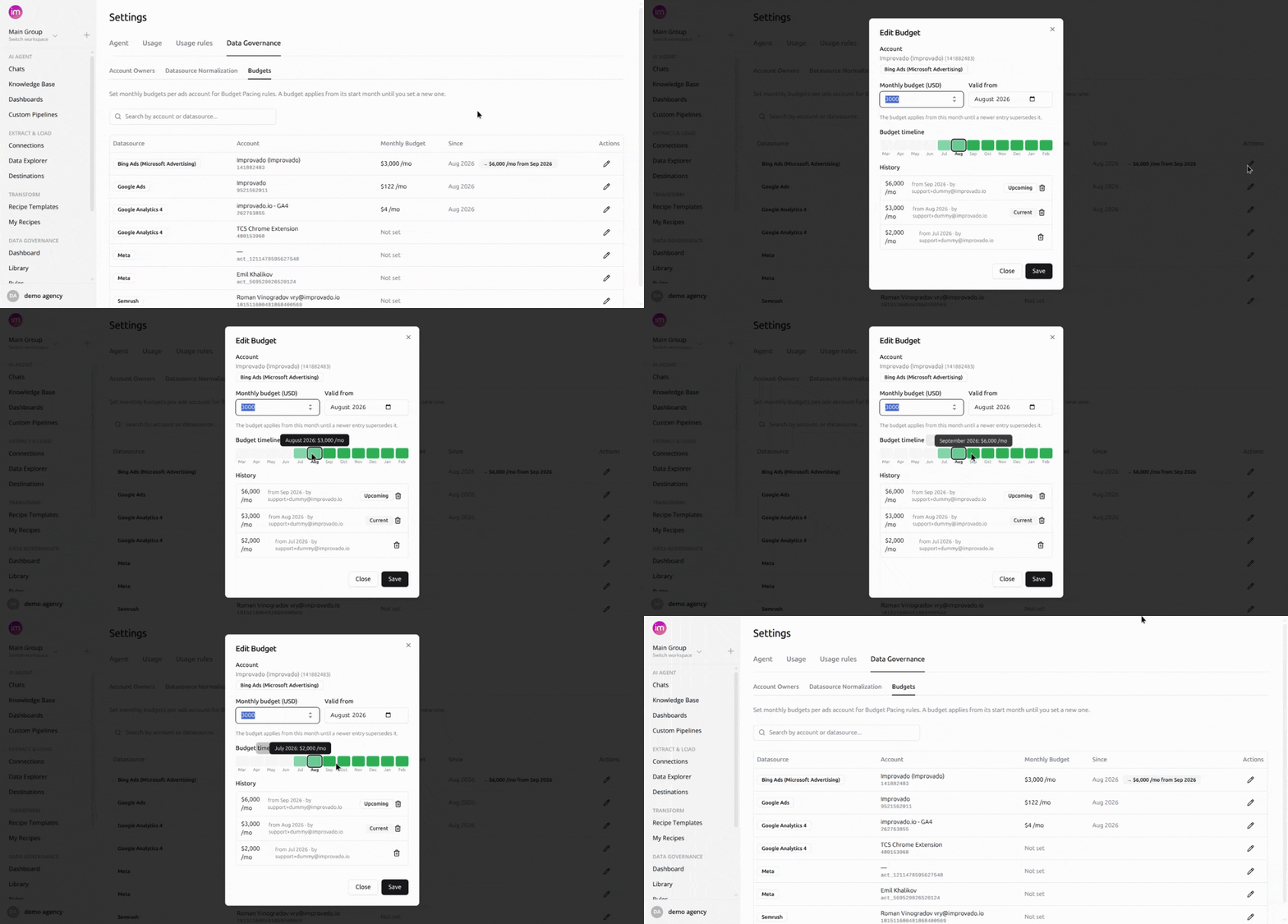
September 15, 2026 Plan monthly budgets per ads account in Improvado, and Budget Pacing rules do the comparison for you: on every run they resolve the budget in force for that month, check it against actual spend, and raise a violation when the account goes over.
What you can do
- Plan per account, per month - a budget carries forward until a newer entry replaces it.
- Schedule ahead - pick a future start month; the current budget applies until then.
- Keep the history - every entry records its amount, start month, and who set it.
- See the results in context - on the Budget Pacing tab of the Data Governance Dashboard and in your digest emails.
Budgets are account-level, monthly, in USD, and workspace-scoped. An account appears once a rule has run against it, and deleting an entry is permanent.
Find them under Settings → Data Governance → Budgets.
Was this page helpful?
Thanks for the feedback!
Questions? The Improvado team is always happy to help. Send us an email, contact your Customer Success Manager, or raise a request in the Improvado Service Desk.