
Account-Specific Custom Extraction Settings
Data Extraction
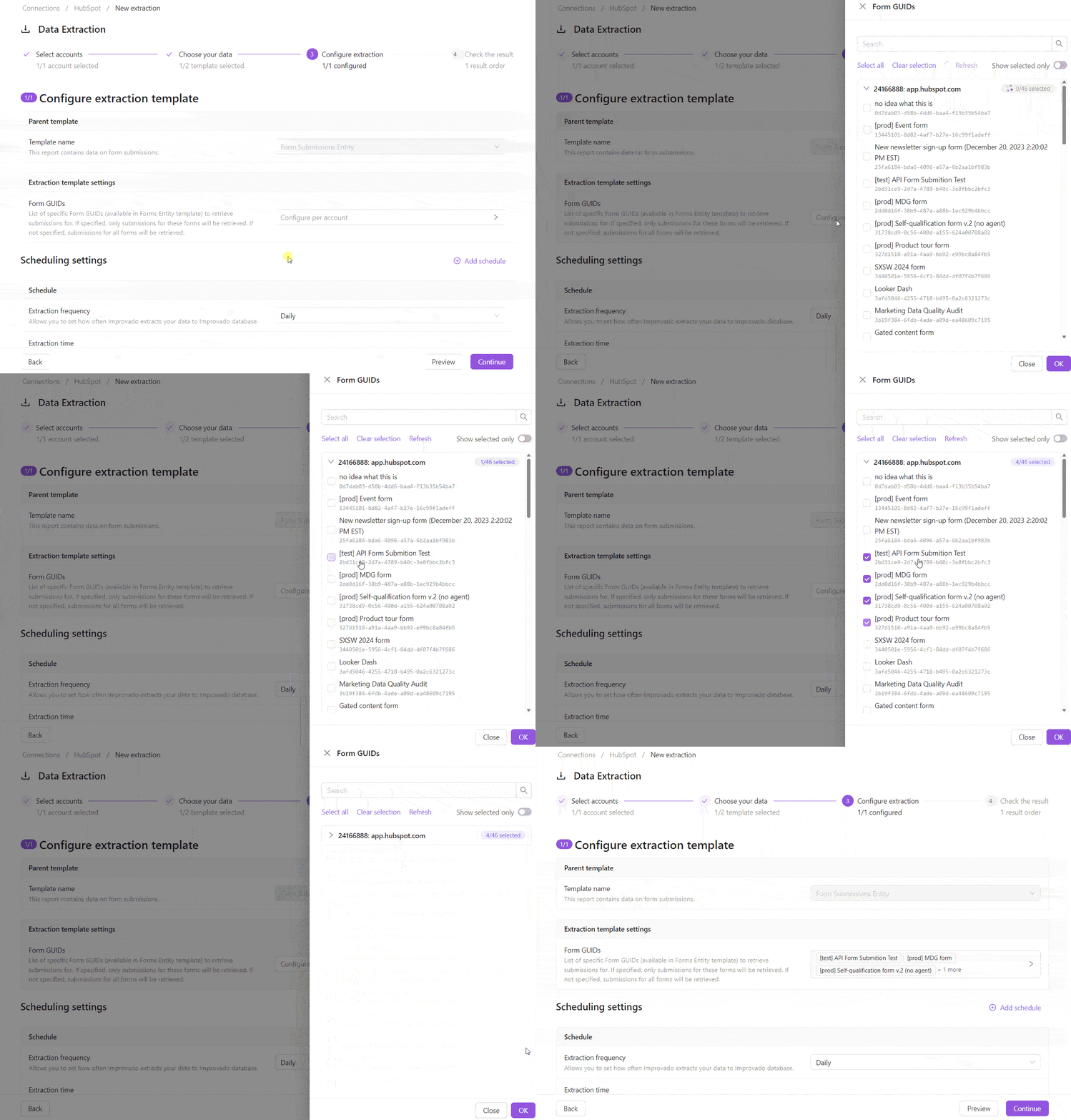
July 1, 2026 Custom extraction settings whose values depend on your connected account — like dataset IDs, custom conversions, or custom segments — can now be selected from a picker that loads the available options directly from your account, instead of being typed in by hand.
How it works
- For settings with account-specific options, the extraction template step now shows a picker — open it, search, and select one or more values loaded from your account.
- Multi-account setups are configured per account: expand an account to load its options, and a badge shows how many values are selected out of the total.
- Can't find a value, or the list can't be fully loaded? Add it manually — the manual-entry field is always available, even when an account fails to load.
- Your selections are saved into the extraction configuration and restored when you reopen the order.
Why it matters
Removes tedious, error-prone manual entry and keeps extraction configurations accurate to each data source.
Was this page helpful?
Thanks for the feedback!
Questions? The Improvado team is always happy to help. Send us an email, contact your Customer Success Manager, or raise a request in the Improvado Service Desk.