

Notification Center: Send Pipeline Alerts to Slack
Notification Center
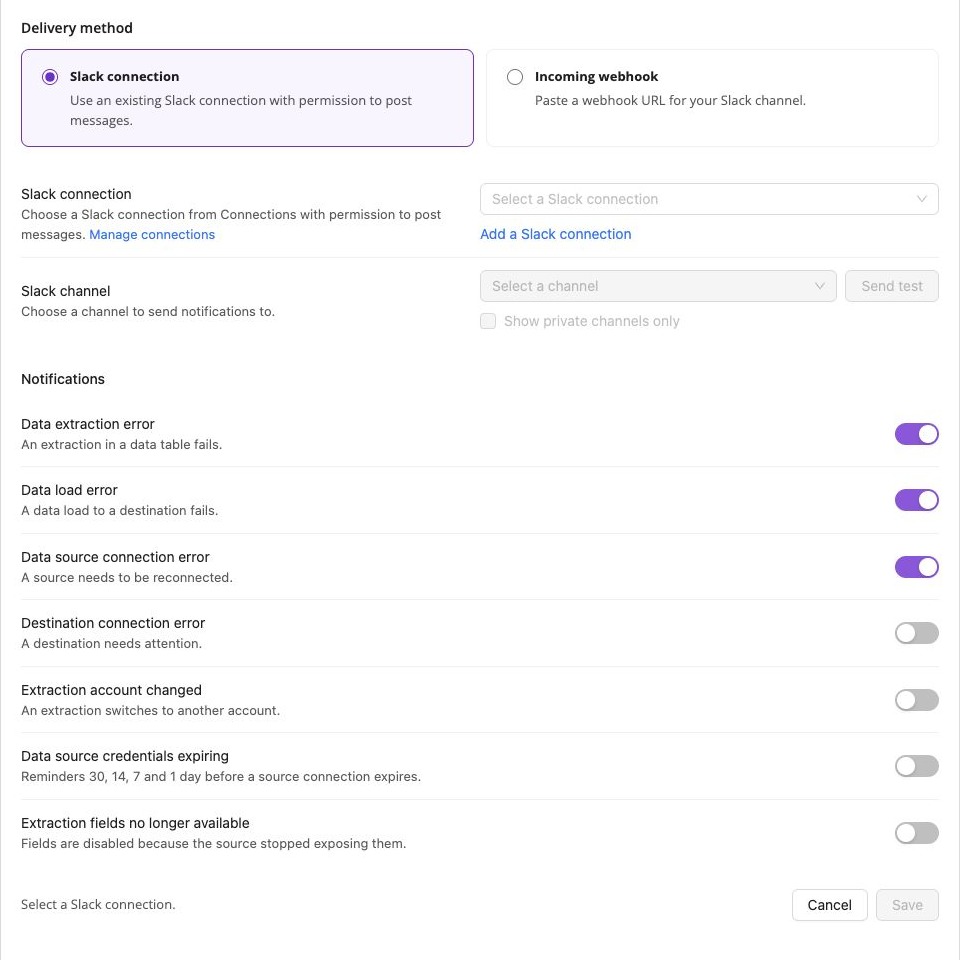
November 5, 2026 You can now receive Notification Center alerts directly in Slack, alongside your team's conversations. Add a channel, choose the alerts it should receive and test delivery before enabling it.
What's new
- Two ways to connect. Use an existing Slack connection with permission to post messages, or paste a Slack incoming webhook URL.
- Different alerts for different channels. Add multiple destinations and select extraction errors, load errors, connection problems, credential expiration, account changes or unavailable fields for each one.
- Details you can act on. Alerts include available error details and links to the affected objects. Connection alerts include reconnect actions, and Fix with AI Agent is available where AI Agent is enabled.
- Manage delivery in one place. Pause or resume a Slack channel, edit its settings or remove it from Notification Center. Your email preferences are separate.
Open your profile menu, select Notifications, expand Slack under Delivery channels and click Add Slack channel. Notifications are grouped and processed in batches; delivery is not instant.
Was this page helpful?
Thanks for the feedback!
Questions? The Improvado team is always happy to help. Send us an email, contact your Customer Success Manager, or raise a request in the Improvado Service Desk.