
Extract & Load Improvements
Redesigned File Path Configuration
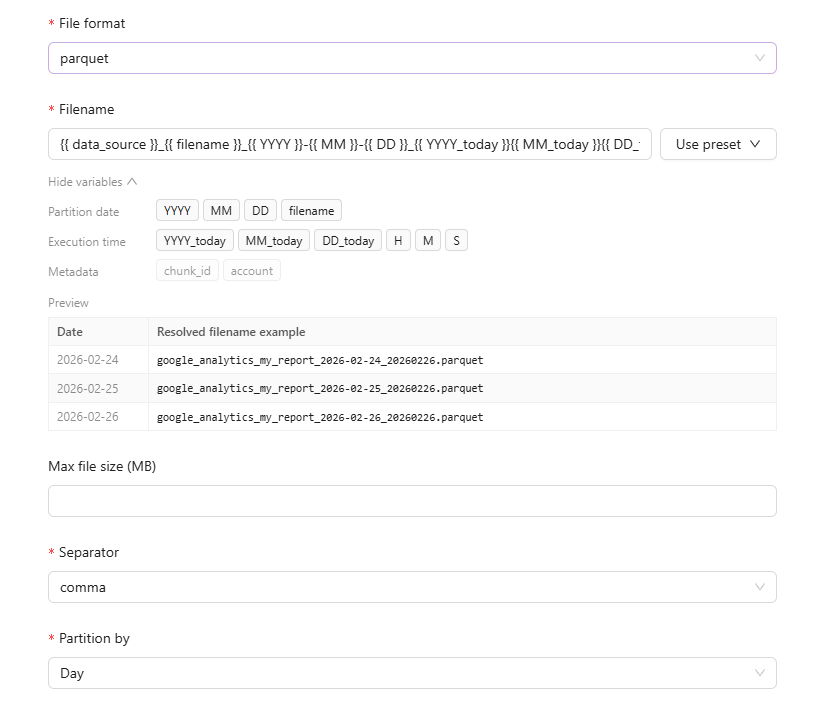
We've redesigned how you configure filenames and folder paths for file destinations. The new interface includes a live preview of the generated path pattern, an interactive template builder with variables, and improved validation with clear visual feedback.
In-Context Field & Template Descriptions
Extraction templates and individual fields now display description tooltips directly in the setup wizard. When selecting a template or configuring dimensions and metrics, hover over the ℹ️ icon to view detailed descriptions without leaving the workflow.
Flat Data Extracts via AI Agent
You can now create extracts for Email, File Import, Managed SFTP, and Managed S3 integrations directly through the AI Agent. Simply upload a file or specify a remote path, and the Agent will configure the extraction automatically.
Was this page helpful?
Thanks for the feedback!
Questions? The Improvado team is always happy to help. Send us an email, contact your Customer Success Manager, or raise a request in the Improvado Service Desk.