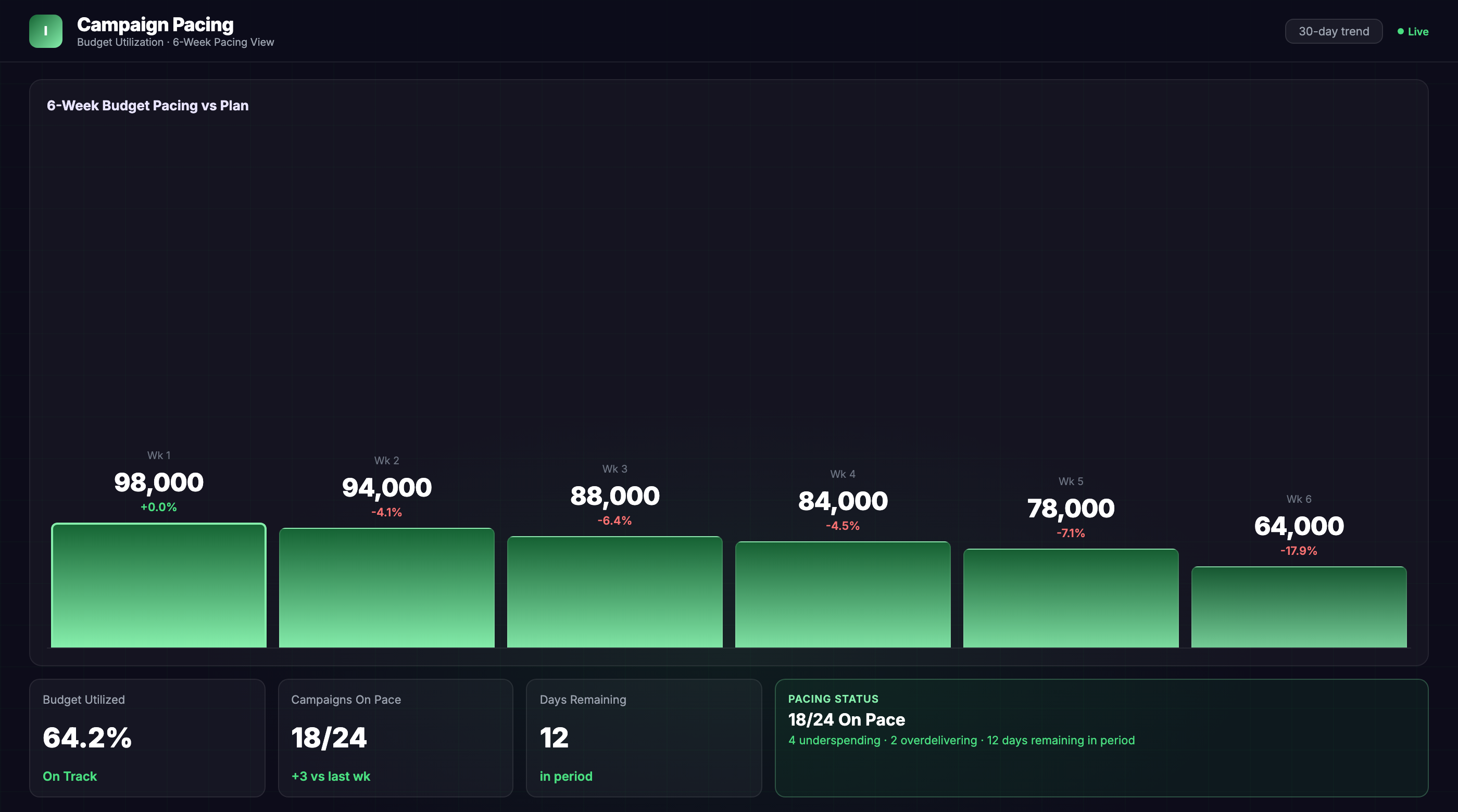
Campaign Pacing Dashboard

Describe your campaign pacing dashboard.Your AI agent builds it in minutes.

Real-time budget pacing dashboard to monitor spend rate, flight delivery, and forecast end-of-period performance.

Deploy in days, not months 1,000+ data sources SOC 2 · GDPR · HIPAA
im
Improvado agent
Live
Build me a campaign pacing dashboard that shows spend rate, budget utilization, and projected delivery for all active flights.
Connected your ad platforms and pulled active campaign data across paid search, paid social, and display. I've built pacing curves for each flight, flagged over/under-delivery, and added end-of-period forecasts. Want me to add day-parting analysis or break out pacing by geo?
✓ Connecting Google Ads → 47 campaigns
✓ Connecting Meta Ads → 32 campaigns
✓ Connecting LinkedIn Ads → 18 campaigns
✓ Building budget pacing curves
✓ Building delivery forecast model
✓ Adding spend velocity widgets
✓ Dashboard ready
Budget Utilization
68.2%
+4.3pp MoM
Projected EOC Spend
$487K
−8% vs plan
Avg Daily Burn Rate
$18.4K
+11% MoM
Live preview

What the agent renders

Every view is live, editable, and connected to your real data.

Campaign Pacing Dashboard · Overview
Built by Improvado AI Agent →
im
Improvado AI Agent
Live · last refreshed 2 min ago
Total Reach
2.4M
+11% MoM vs last period
Conversions
18.2K
+9% vs last period
Conv. Rate
3.1%
+0.4pp vs last period
Revenue
$940K
+14% vs last period
Reach by channel
Paid search8.4M
Email284K
Organic5.1M
Social14.2M
Attribution
Multi
Paid search50%
Email27%
Organic14%
The challenge

Marketing data is scattered across tools that don't talk to each other.

🗂
Marketing data is siloed across platforms
Every channel reports in its own interface with its own metric definitions. There's no authoritative cross-channel view.
Assembling reports takes longer than acting on them
The work of pulling, merging, and cleaning data consumes more time than the decisions it actually informs.
🔗
Can't connect spend to outcomes
Without a unified attribution model, you don't know which marketing activities actually drive revenue.
See how Improvado AI Agent solves this →
What you'll track
Total Reach Conversions Conversion Rate Revenue Influenced ROI Cost per Acquisition Channel Mix MoM Growth
And 1,000+ more metrics from any source If the data exists in your stack, the agent can pull it.
How it gets built

From prompt to live dashboard in under 10 minutes.

No SQL, no data engineering tickets, no waiting. Describe what you need — the agent does the rest.

01
01

Connect your stack

Authorize your data sources via OAuth — ad platforms, CRM, email, analytics. The agent gets live read access in minutes, no engineering required.

~5 minutes
02
02

Describe the dashboard

Type what you need in plain English: "Campaign Pacing Dashboard, last 90 days, broken out by channel." The agent writes the queries, reconciles attribution across tools, and normalizes currencies.

~30 seconds
03
03

Dashboard goes live

A fully interactive dashboard renders in your BI tool — Tableau, Looker, Power BI, or the Improvado UI. It refreshes automatically and stays current without re-prompting.

~2 minutes
Answers in under 10 seconds
Ask any analytics question in plain English
🔔
Anomaly detection
Automatic alerts when data changes unexpectedly
📈
Forecasting built in
Predict spend, ROAS, and trends from historical data
📅
Automated delivery
Reports sent on any schedule, to any format
Want a guided walkthrough?
An Improvado engineer will build the first version of your Campaign Pacing Dashboard with you live on a call.
Book a 20-min demo
Why not just use Claude or ChatGPT?

Great at answering questions. Not built to own a live dashboard.

Claude / ChatGPT alone
Improvado AI Agent
Data access
Manual CSV export
Live API connections
Data volume
~25K row context limit
Unlimited warehouse queries
Output format
Text summary in chat
Interactive live dashboard
Auto-refresh
Re-prompt every session
Automatic, configurable schedule
Attribution model
None — trusts your CSVs
Cross-channel normalization built-in
Compliance
Data leaves your stack
SOC 2 · GDPR · HIPAA · your warehouse
Audit trail
No query log
Every query logged, replayable
Useful for exploration
Connectors for this dashboard

Plugs into the stack your team already uses

Don't see yours? Explore all 1,000+ integrations →

Common questions

Everything else you might ask

What data sources does the Campaign Pacing Dashboard support? +
Improvado connects to 1,000+ data sources including Google Ads, Meta Ads, LinkedIn Ads, TikTok Ads, DV360, Amazon Ads, and all major DSPs. You can also pull budget and flight data from Google Sheets, project management tools, or your media planning software to compare planned vs. actual spend.
How long does it take to set up a Campaign Pacing Dashboard? +
Improvado's AI Agent builds your dashboard in under 10 minutes by connecting your ad platforms and automatically mapping budget, spend, and flight dates. There's no SQL, no engineering required—just tell the agent what you want to track and it handles the rest.
Can I customize pacing thresholds and add my own segments? +
Yes. You can set custom pacing thresholds (e.g., flag campaigns that are ±10% off target), add custom date ranges for non-standard flight periods, and segment by campaign type, geo, audience, or product line. The AI agent can also build custom calculated fields like daily recommended spend or days remaining to hit target.

Ship your Campaign Pacing Dashboard this week.

Talk to an Improvado expert and see how our AI agent builds a live campaign pacing dashboard from your ad platform data. Get real-time spend visibility and end-of-period forecasts without engineering lift.

Talk to an expert