Where would AI actually help your marketing team?
Your team has a campaign to launch. The copywriter is turning a brief into emails and ads, the social team needs a video, and sales wants the new inquiries in the CRM. Once the campaign is running, someone has to explain which activity brought in customers.
Each of those tasks can lead you to an “AI marketing tool,” but the buying decision changes with the problem. If drafts are holding up the launch, look at writing and editing tools. If inquiries sit unanswered, look at conversation handling and follow-up. If the team cannot connect campaign spending with sales, start with data access and reporting.
It also helps to follow one task from beginning to end. A draft still needs someone to check the product claims. An interested reply needs a sales owner. A revenue report needs records that can be matched and a calculation the team agrees on. Those handoffs tell you which features will matter in everyday use.
What will the tool need to work with?
The starting material
For content, gather the brief, product facts, and brand guidance. For a conversation, identify the message and relevant CRM history. For analysis, check which campaign and sales records are available.
The finished job
Be specific: an email ready for an editor, an inquiry routed to sales, or a report with a calculation you can check. A convincing chat response is only useful if it helps finish that job.
The person responsible
Decide who approves the output and handles mistakes. Include that person’s review and maintenance work when comparing the cost of each tool.
For example, a campaign team might use Jasper for first drafts, Synthesia for a presenter-led explainer, Sprout Social for publishing, and Improvado for cross-channel reporting. That is an illustrative division of work, not a claim that the four products come preconnected.
Create and edit
Turn an approved brief into an asset. Keep product facts, brand guidance, and final approval with an owner.
Publish and engage
Schedule work, respond to messages, and pass an inquiry to the right person.
Analyze and adjust
Connect eligible records, calculate the metric, and decide what the evidence supports.
All 21 tools, organized by the job
Use the primary role to narrow the list. The reviews below explain the workflow, AI functions, costs, and tradeoffs behind each name.
Compare the tools for the work on your desk
Jasper and Copy.ai are worth comparing for a writing workflow. A video creator or a reporting platform solves a different problem. Start with a work area below, then read what each product does and what your team still owns.
| Tool | The job it handles | Where AI helps | Work and cost to plan for |
|---|---|---|---|
 Improvado AI AgentAnalyze |
Cross-channel marketing reporting | Natural-language analysis, visual answers, and reporting workflows sit on top of connected data. |
Source access, history, join keys, and business definitions still determine which
questions can be answered. A confident explanation cannot fill a missing budget or
identify an unrecorded sale.
Cost basis: Plan and data scope, support, implementation, and the work needed to maintain the reporting model. |
 ChatGPTAnalyze |
Exploring files and testing an analysis | The assistant can work with files, code, and visual explanations. |
A file analysis does not automatically become a maintained data pipeline. Keep
permissions, refresh ownership, and sensitive-data handling explicit.
Cost basis: Seats or workspace plan, any separate API usage, and the analyst time needed to verify and maintain the work. |
 CallRail Conversation IntelligenceAnalyze |
Understanding calls generated by marketing | Conversation summaries, qualification signals, and suggested next steps can reduce the amount of audio a team needs to review. |
Transcript access through the API has its own subscription requirements. A recording
visible in the application does not guarantee that every transcript field is
available to an integration.
Cost basis: Call tracking subscription, conversation intelligence tier, numbers, minutes, and the export access required for reporting. |
 JasperCreate |
A repeatable content workflow for a marketing team | Marketing agents and content workflows help carry brand guidance into repeated production tasks. |
The team still owns factual accuracy, originality, positioning, and approval. More
drafts are only useful if the review process can handle them.
Cost basis: Seats, workspace features, workflow access, and editing time. |
 SynthesiaCreate |
Presenter-led explainers and localized video | Avatar presentation, voice generation, and localization support the production process. |
An avatar cannot supply product evidence. Real interface footage, reviewed claims,
voice rights, and accessibility remain part of the job.
Cost basis: Video allowance, seats, localization, custom assets, and the time spent reviewing each version. |
 Async (formerly Podcastle)Create |
Editing and repurposing audio or video | Audio enhancement, voice tools, and repurposing features support the editing workflow. |
Automatic clips can omit a qualification or split a sentence at the wrong point.
Someone needs to approve the final narrative and confirm voice permissions.
Cost basis: Production plan, export allowances, voice features, storage, and editor time. |
|
|
Editing copy where the team already writes | Writing assistance can suggest alternative wording and adapt tone to the task. |
A smoother sentence can still be wrong. Verify facts, numbers, quotations, and legal
wording separately.
Cost basis: User plan, administrative controls, and the overlap with writing features already included in other software. |
 Magnific (formerly Freepik)Create |
Producing and adapting creative assets | Generation, editing, and connected creative workflows help turn an idea into several usable assets. |
Do not treat generated product interfaces or invented customer scenes as evidence.
Keep creative illustration separate from screenshots of an actual tool.
Cost basis: Plan, generation credits, model-specific consumption, team access, and design review. |
 SurferCreate |
Writing and revising search-focused content | Drafting, optimization, and outline assistance support the content editor. |
A high optimization score is not evidence of accuracy, originality, or ranking lift.
The article still needs a clear point and information the reader can use.
Cost basis: Content allowance, users, optional AI features, and research and editorial time. |
 Copy.aiCreate |
Repeatable go-to-market content tasks | Workflow-based generation helps standardize repeated tasks instead of relying on a different prompt every time. |
Bad source information can be repeated at scale. Inspect a sample of outputs and
make the approval step part of the workflow.
Cost basis: Workflow usage, seats, enrichment or model access, and maintenance of the inputs and instructions. |
 ManychatEngage |
Handling inbound messages and routine replies | AI-assisted conversation features complement rule-based automation; the available channels and features depend on the plan. |
A response is not a qualified lead. Messaging rules, consent, routing, and the
quality of the human handoff matter as much as the bot copy.
Cost basis: Contacts, channel and plan limits, messaging charges where applicable, and staff coverage. |
|
|
Coordinating outbound prospecting | AI-assisted prospecting and message generation can support a repeatable outbound workflow. |
Automation does not resolve data quality, deliverability, consent, or relevance.
Review who is contacted and stop sequences when a person replies or opts out.
Cost basis: Seats, contact or enrichment access, sending infrastructure, and any agent usage. |
|
|
Following up with leads through conversations | Conversational agents interpret replies and continue a defined engagement workflow. |
An inferred positive reply is not a closed sale. Review ambiguous responses,
suppression rules, and the path back to a person.
Cost basis: Contract scope, agent or conversation allowance, integration, and sales follow-up capacity. |
 Sprout SocialPublish |
Publishing, inbox management, and social reporting | AI assistance supports writing, conversation handling, and analysis within the social workflow. |
Network permissions and available API fields constrain reporting. Check which
listening, analytics, and AI functions belong to the proposed package.
Cost basis: Seats, account coverage, add-ons, and the time needed for moderation and approvals. |
|
|
Planning and scheduling a recurring social calendar | Writing and planning assistance can help develop variations and maintain a publishing cadence. |
Check support for each network, account type, and publishing format. A scheduling
prediction is not a guarantee of reach or engagement.
Cost basis: Workspace plan, social accounts, collaborators, and review time. |
 TrellisOptimize |
Marketplace advertising and commercial optimization | Automation supports advertising and pricing decisions within the platform's supported commerce workflows. |
Check the marketplace, account eligibility, permissions, and scope of any autonomous
changes. Keep a clear owner for spend and pricing decisions.
Cost basis: Contract scope, connected stores or accounts, implementation, and oversight of automated changes. |
| Evolv AIOptimize | Experimentation and experience optimization | The published product positioning includes AI-assisted experience optimization. |
The official product site could not be retrieved during this review. This entry is
retained from the published shortlist; current availability, features, and pricing
remain unverified.
Cost basis: Confirm the current product, usage basis, implementation requirements, and ongoing experiment ownership. |
 Seventh SenseOptimize |
Email send-time and frequency optimization | Behavior-based timing and frequency recommendations help tailor delivery to recipients. |
Confirm compatibility with the specific HubSpot or Marketo setup. Open tracking can
be affected by mailbox privacy features, so timing performance needs more than an
open-rate headline.
Cost basis: Contact allowance, supported integration, contract terms, and the existing email platform. |
 FullstoryOptimize |
Investigating digital journeys and friction | AI-assisted exploration and summaries can help a team navigate behavioral evidence. |
A replay shows recorded behavior, not a person's motivation. Privacy settings,
capture coverage, consent, and sampling affect what can be inspected.
Cost basis: Captured usage, retention, users, privacy configuration, and analyst time. |
 HubSpot BreezeOrchestrate |
AI assistance inside a CRM-centered workflow | Assistants and agents work across HubSpot's customer-facing functions, with availability tied to the purchased products and credits. |
Incomplete CRM records remain incomplete. Review what the agent can read, change,
and send, and who owns an exception.
Cost basis: Hub subscriptions, seats, credits, setup, and ongoing CRM data maintenance. |
|
|
Connecting the steps between applications | AI-powered workflows, agents, and chatbot features can connect language tasks with app actions. |
An agent needs the same permission and recovery discipline as another integration.
Check task consumption, polling or webhook behavior, and replay rules for the actual
workflow.
Cost basis: Tasks or other purchased usage, premium features, connected applications, and maintenance. |
How this comparison will be scored
These columns summarize the reviews below. They are not feature scores. A percentage would suggest a level of product and plan verification that this draft does not yet have.
The scorecard will use a shared six-to-eight-criterion pack for each comparable job: Yes = 2 points, Partial = 1, No = 0. Each category bar will show earned and maximum points. Unknown evidence stays unresolved and appears as a range. Every bar must open its criterion definitions, product/plan limits, sources and review date.
Before adding percentages, define the exact workflow and compare the same requirements across offerings. Do not rank all tools in this article as interchangeable products, count the same feature twice or convert the number of source claims into a capability score. Pricing and total cost remain separate from feature coverage.
Source dates and scope are in the individual reviews. Chorus’s current package details remain unverified. The comparison uses the saved November 3 research; this page is a local review draft.
Where each tool earns its place
Improvado is our product. This is a documentation-based review, not a hands-on benchmark. Pricing depends on plan, usage, and contract; the cost basis in each profile identifies what to compare.
Improvado AI Agent
Cross-channel marketing reporting
Improvado belongs in the data layer of an AI marketing stack. It connects and prepares marketing inputs, then lets the team ask questions, build reports, and investigate performance through an AI interface. That makes it relevant when the answer depends on several advertising, analytics, and CRM systems.
How it fits the work
A paid media analyst can bring spend and CRM outcomes into a common reporting model, then ask for a monthly breakdown by channel. The useful output is a traceable table or visualization with a defined period and metric, rather than a persuasive paragraph on its own.
Where AI helps
Natural-language analysis, visual answers, and reporting workflows sit on top of connected data. Dashboards can be built in Improvado or consumed through the chosen BI workflow.
What to weigh before choosing it
Source access, history, join keys, and business definitions still determine which questions can be answered. A confident explanation cannot fill a missing budget or identify an unrecorded sale.
Cost basis: Plan and data scope, support, implementation, and the work needed to maintain the reporting model.
Official product or documentation source · Reviewed November 3, 2026. Product documentation, not hands-on testing.
Published pricing: MCP Only is $100/month for connecting your own AI assistant. Managed-data Starter starts at $20,000/year. These are different scopes; compare the included data and action allowances.
Vendor pricing · Checked November 3, 2026. Prices can change.
ChatGPT
Exploring files and testing an analysis
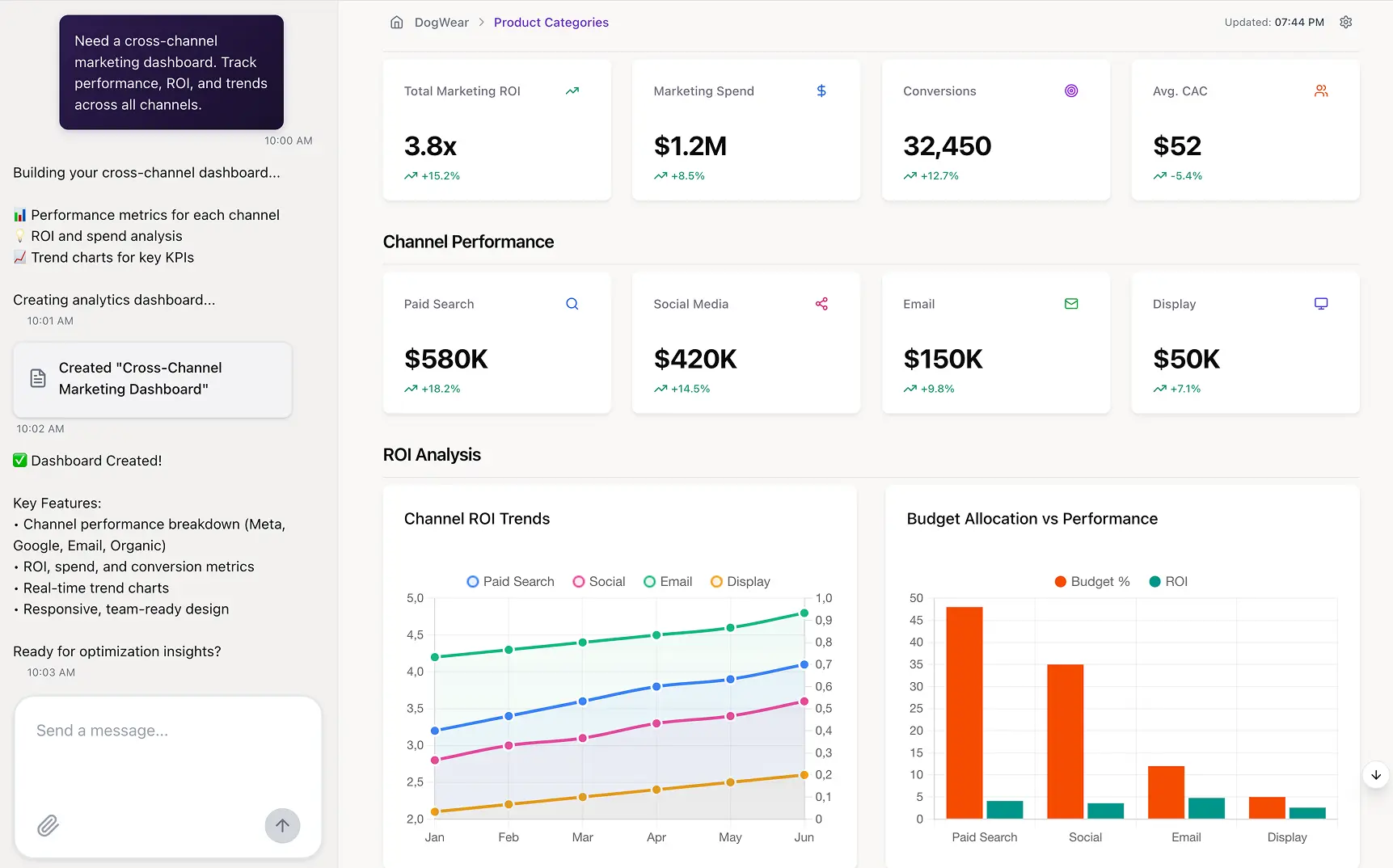
ChatGPT is useful when the starting point is a file, a research question, or a calculation that needs explanation. For a marketer with a campaign export, data analysis can help inspect columns, clean values, calculate a result, and create a chart without first building a dashboard.
How it fits the work
Upload an approved export, define the row grain and business metric, and ask for the calculation and checks alongside the answer. Review duplicate records, date coverage, and the generated code before using the output in a decision.
Where AI helps
The assistant can work with files, code, and visual explanations. Connected apps and reusable workflows depend on the account and workspace configuration.
What to weigh before choosing it
A file analysis does not automatically become a maintained data pipeline. Keep permissions, refresh ownership, and sensitive-data handling explicit.
Cost basis: Seats or workspace plan, any separate API usage, and the analyst time needed to verify and maintain the work.
Official product or documentation source · Reviewed November 3, 2026. Product documentation, not hands-on testing.
CallRail Conversation Intelligence
Understanding calls generated by marketing
CallRail combines source tracking with tools that summarize and classify phone conversations. It helps a team move from counting calls to reviewing what happened in them: a service request, a pricing question, a missed inquiry, or a conversation worth following up.
How it fits the work
Start with a tracked call, review its transcript and summary, then connect the outcome to the campaign and CRM record where those identifiers are available. A call count and a qualified inquiry count should remain separate.
Where AI helps
Conversation summaries, qualification signals, and suggested next steps can reduce the amount of audio a team needs to review.
What to weigh before choosing it
Transcript access through the API has its own subscription requirements. A recording visible in the application does not guarantee that every transcript field is available to an integration.
Cost basis: Call tracking subscription, conversation intelligence tier, numbers, minutes, and the export access required for reporting.
Official product or documentation source · Reviewed November 3, 2026. Product documentation, not hands-on testing.
Jasper
A repeatable content workflow for a marketing team
Jasper is aimed at marketing production rather than general conversation. Its appeal is the combination of brand context and repeatable workflows: a campaign brief can lead to several drafts that follow the same messaging and style.
How it fits the work
Give the team an approved brief, product facts, audience, and brand guidance. Use the generated variants as working drafts for an editor, then keep a record of which version was approved for each channel.
Where AI helps
Marketing agents and content workflows help carry brand guidance into repeated production tasks.
What to weigh before choosing it
The team still owns factual accuracy, originality, positioning, and approval. More drafts are only useful if the review process can handle them.
Cost basis: Seats, workspace features, workflow access, and editing time.
Official product or documentation source · Reviewed November 3, 2026. Product documentation, not hands-on testing.
Published pricing: Pro is $59 per seat/month billed yearly, or $69 billed monthly. Business uses custom pricing.
Vendor pricing · Checked November 3, 2026. Prices can change.
Synthesia
Presenter-led explainers and localized video
Synthesia turns scripts into presenter-led videos using AI avatars and voices. It fits explainers, onboarding, and recurring educational material where a conventional shoot would slow down frequent updates.
How it fits the work
Write and approve the script first. Build scenes around the message, add the product visuals, and review pronunciation and timing in each language before exporting.
Where AI helps
Avatar presentation, voice generation, and localization support the production process.
What to weigh before choosing it
An avatar cannot supply product evidence. Real interface footage, reviewed claims, voice rights, and accessibility remain part of the job.
Cost basis: Video allowance, seats, localization, custom assets, and the time spent reviewing each version.
Official product or documentation source · Reviewed November 3, 2026. Product documentation, not hands-on testing.
Published pricing: Basic is free. Starter is listed at $14/month, $168 billed yearly; monthly billing is $19 after any introductory offer. Check the shared-credit allowance and export rights.
Vendor pricing · Checked November 3, 2026. Prices can change.
Async (formerly Podcastle)
Editing and repurposing audio or video
Async is the current name of Podcastle. The product is relevant when the team already has a recording and needs to edit it, improve the audio, or turn a longer piece into shorter assets.
How it fits the work
Record the interview or walkthrough, edit the transcript and timeline, then review each short clip in context. Keep the source recording so an edit can be checked against what was actually said.
Where AI helps
Audio enhancement, voice tools, and repurposing features support the editing workflow.
What to weigh before choosing it
Automatic clips can omit a qualification or split a sentence at the wrong point. Someone needs to approve the final narrative and confirm voice permissions.
Cost basis: Production plan, export allowances, voice features, storage, and editor time.
Official product or documentation source · Reviewed November 3, 2026. Product documentation, not hands-on testing.
Grammarly
Editing copy where the team already writes
Grammarly helps with grammar, clarity, tone, and rewriting across everyday writing tasks. It is most useful as an editing layer over a draft, whether that draft started with a person or another AI tool.
How it fits the work
Use it to shorten a confusing paragraph or make an email easier to follow. Accept changes that preserve the intended meaning, and keep product terminology consistent with the team's approved language.
Where AI helps
Writing assistance can suggest alternative wording and adapt tone to the task.
What to weigh before choosing it
A smoother sentence can still be wrong. Verify facts, numbers, quotations, and legal wording separately.
Cost basis: User plan, administrative controls, and the overlap with writing features already included in other software.
Official product or documentation source · Reviewed November 3, 2026. Product documentation, not hands-on testing.
Magnific (formerly Freepik)
Producing and adapting creative assets
Magnific, formerly Freepik, combines image, video, audio, and editing workflows in a creative platform. It fits a team producing several kinds of campaign assets from an approved visual direction.
How it fits the work
Begin with an approved creative direction and reference assets. Generate or adapt the visual, then check the details that matter to the campaign: product appearance, brand consistency, rights, and the final channel format.
Where AI helps
Generation, editing, and connected creative workflows help turn an idea into several usable assets.
What to weigh before choosing it
Do not treat generated product interfaces or invented customer scenes as evidence. Keep creative illustration separate from screenshots of an actual tool.
Cost basis: Plan, generation credits, model-specific consumption, team access, and design review.
Official product or documentation source · Reviewed November 3, 2026. Product documentation, not hands-on testing.
Surfer
Writing and revising search-focused content
Surfer puts content guidance beside the draft. It helps an editor plan coverage, compare a page with the search context, and revise an article without keeping the brief in a separate document.
How it fits the work
Use the recommendations to find a missing explanation or an underdeveloped topic. Add useful examples and sources rather than repeating terms just to improve a content score.
Where AI helps
Drafting, optimization, and outline assistance support the content editor.
What to weigh before choosing it
A high optimization score is not evidence of accuracy, originality, or ranking lift. The article still needs a clear point and information the reader can use.
Cost basis: Content allowance, users, optional AI features, and research and editorial time.
Official product or documentation source · Reviewed November 3, 2026. Product documentation, not hands-on testing.

Copy.ai
Repeatable go-to-market content tasks
Copy.ai focuses on turning repeated go-to-market tasks into workflows. It is relevant when a team wants the same sequence of research, drafting, and formatting applied to many inputs.
How it fits the work
Define the approved input fields and desired output before building the workflow. A product launch brief, for example, can become a set of channel drafts that an owner reviews before release.
Where AI helps
Workflow-based generation helps standardize repeated tasks instead of relying on a different prompt every time.
What to weigh before choosing it
Bad source information can be repeated at scale. Inspect a sample of outputs and make the approval step part of the workflow.
Cost basis: Workflow usage, seats, enrichment or model access, and maintenance of the inputs and instructions.
Official product or documentation source · Reviewed November 3, 2026. Product documentation, not hands-on testing.
Manychat
Handling inbound messages and routine replies
Manychat is useful when social or messaging activity produces more inquiries than the team can handle manually. Its flows can respond to a trigger, collect information, and move the person toward the next step.
How it fits the work
Connect a specific entry point, such as a social reply, to a short conversation with a clear handoff. Ask for the minimum information needed and give people a way to reach a person.
Where AI helps
AI-assisted conversation features complement rule-based automation; the available channels and features depend on the plan.
What to weigh before choosing it
A response is not a qualified lead. Messaging rules, consent, routing, and the quality of the human handoff matter as much as the bot copy.
Cost basis: Contacts, channel and plan limits, messaging charges where applicable, and staff coverage.
Official product or documentation source · Reviewed November 3, 2026. Product documentation, not hands-on testing.
Reply.io
Coordinating outbound prospecting
Reply.io supports sales outreach and follow-up across a defined sequence. It fits teams that have a prospecting process and need help researching contacts, drafting messages, and managing repeated touches.
How it fits the work
Start with an eligible audience and an agreed reason to contact them. Use the tool to prepare and sequence outreach, then review replies and route interested contacts to the right owner.
Where AI helps
AI-assisted prospecting and message generation can support a repeatable outbound workflow.
What to weigh before choosing it
Automation does not resolve data quality, deliverability, consent, or relevance. Review who is contacted and stop sequences when a person replies or opts out.
Cost basis: Seats, contact or enrichment access, sending infrastructure, and any agent usage.
Official product or documentation source · Reviewed November 3, 2026. Product documentation, not hands-on testing.
Conversica
Following up with leads through conversations
Conversica focuses on automated two-way engagement. The use case is a lead pool that needs consistent follow-up and a reliable handoff when someone is ready to speak with sales.
How it fits the work
Define the eligible lead population, conversation purpose, and handoff criteria. Connect the responses to CRM records so an interested reply reaches an owner instead of starting a second disconnected conversation.
Where AI helps
Conversational agents interpret replies and continue a defined engagement workflow.
What to weigh before choosing it
An inferred positive reply is not a closed sale. Review ambiguous responses, suppression rules, and the path back to a person.
Cost basis: Contract scope, agent or conversation allowance, integration, and sales follow-up capacity.
Official product or documentation source · Reviewed November 3, 2026. Product documentation, not hands-on testing.
Sprout Social
Publishing, inbox management, and social reporting
Sprout Social brings publishing, social conversations, and performance reporting into a shared workspace. It suits a team that needs ownership and approvals across accounts, rather than just a way to generate a post.
How it fits the work
Plan and approve the post, route incoming messages to an owner, and review results by network and reporting period. Keep paid and organic definitions clear when combining the results.
Where AI helps
AI assistance supports writing, conversation handling, and analysis within the social workflow.
What to weigh before choosing it
Network permissions and available API fields constrain reporting. Check which listening, analytics, and AI functions belong to the proposed package.
Cost basis: Seats, account coverage, add-ons, and the time needed for moderation and approvals.
Official product or documentation source · Reviewed November 3, 2026. Product documentation, not hands-on testing.
FeedHive
Planning and scheduling a recurring social calendar
FeedHive is a lighter option for a team that mainly needs to organize, adapt, and schedule social content. The value is a manageable publishing routine rather than another source of unreviewed drafts.
How it fits the work
Build a small library of approved posts, adapt them to the network, and schedule them with enough room for a human check. Review results before automatically recycling content.
Where AI helps
Writing and planning assistance can help develop variations and maintain a publishing cadence.
What to weigh before choosing it
Check support for each network, account type, and publishing format. A scheduling prediction is not a guarantee of reach or engagement.
Cost basis: Workspace plan, social accounts, collaborators, and review time.
Official product or documentation source · Reviewed November 3, 2026. Product documentation, not hands-on testing.
Trellis
Marketplace advertising and commercial optimization
Trellis is focused on e-commerce operations, including advertising and pricing for marketplace sellers. It is a different purchase from a general writing assistant or social scheduler.
How it fits the work
Connect the relevant marketplace data, define margin and inventory constraints, and review how advertising and pricing recommendations fit the commercial goal. Sales volume alone is a poor target if the margin disappears.
Where AI helps
Automation supports advertising and pricing decisions within the platform's supported commerce workflows.
What to weigh before choosing it
Check the marketplace, account eligibility, permissions, and scope of any autonomous changes. Keep a clear owner for spend and pricing decisions.
Cost basis: Contract scope, connected stores or accounts, implementation, and oversight of automated changes.
Official product or documentation source · Reviewed November 3, 2026. Product documentation, not hands-on testing.
Evolv AI
Experimentation and experience optimization
Evolv AI occupies the experimentation part of the stack. Its role is to help teams develop and evaluate website changes, rather than to serve as a general campaign reporting system.
How it fits the work
Define a measurable intervention and the eligible audience before using AI-generated variations. Preserve an interpretable control, record assignment, and decide how an inconclusive result will be handled.
Where AI helps
The published product positioning includes AI-assisted experience optimization. Current package details require confirmation with the vendor.
What to weigh before choosing it
The official product site could not be retrieved during this review. This entry is retained from the published shortlist; current availability, features, and pricing remain unverified.
Cost basis: Confirm the current product, usage basis, implementation requirements, and ongoing experiment ownership.
Official product or documentation source · Current details not verified; see review note.
Seventh Sense
Email send-time and frequency optimization
Seventh Sense addresses when to send email and how often to contact a recipient. It complements the email platform rather than replacing campaign strategy, list management, or the underlying reporting definitions.
How it fits the work
Use engagement history from the supported email system to inform delivery timing. Compare outcomes for eligible recipients over complete periods, keeping list composition and campaign type visible.
Where AI helps
Behavior-based timing and frequency recommendations help tailor delivery to recipients.
What to weigh before choosing it
Confirm compatibility with the specific HubSpot or Marketo setup. Open tracking can be affected by mailbox privacy features, so timing performance needs more than an open-rate headline.
Cost basis: Contact allowance, supported integration, contract terms, and the existing email platform.
Official product or documentation source · Reviewed November 3, 2026. Product documentation, not hands-on testing.
Fullstory
Investigating digital journeys and friction
Fullstory helps a team inspect what people do on a website or application. Session replay and behavioral analysis are useful when a conversion trend needs a closer look at the experience behind it.
How it fits the work
Find the affected journey or segment, inspect relevant sessions, and compare the behavior with the funnel data. Turn a suspected problem into a defined change that can be evaluated.
Where AI helps
AI-assisted exploration and summaries can help a team navigate behavioral evidence.
What to weigh before choosing it
A replay shows recorded behavior, not a person's motivation. Privacy settings, capture coverage, consent, and sampling affect what can be inspected.
Cost basis: Captured usage, retention, users, privacy configuration, and analyst time.
Official product or documentation source · Reviewed November 3, 2026. Product documentation, not hands-on testing.
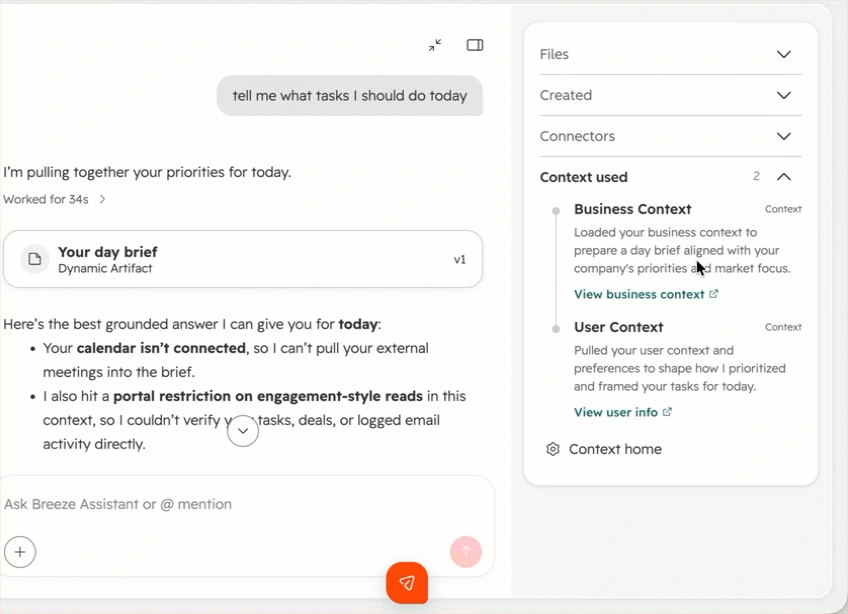
HubSpot Breeze
AI assistance inside a CRM-centered workflow
Breeze is most relevant when HubSpot already holds the records the team works from. AI assistance can support content, prospecting, service, and routine record work without sending every task to a separate application.
How it fits the work
Choose a specific CRM process, such as preparing an account brief or triaging an inquiry. Confirm the records, fields, permissions, and handoff before enabling an agent to act on them.
Where AI helps
Assistants and agents work across HubSpot's customer-facing functions, with availability tied to the purchased products and credits.
What to weigh before choosing it
Incomplete CRM records remain incomplete. Review what the agent can read, change, and send, and who owns an exception.
Cost basis: Hub subscriptions, seats, credits, setup, and ongoing CRM data maintenance.
Official product or documentation source · Reviewed November 3, 2026. Product documentation, not hands-on testing.
Zapier
Connecting the steps between applications
Zapier is useful when the task crosses application boundaries: a form arrives, a record needs updating, and someone needs a notification. AI features can add classification or drafting to that sequence.
How it fits the work
Begin with the trigger and the intended action, then specify what happens when a field is missing, a record already exists, or a step fails. Test the path with representative inputs before making it routine.
Where AI helps
AI-powered workflows, agents, and chatbot features can connect language tasks with app actions.
What to weigh before choosing it
An agent needs the same permission and recovery discipline as another integration. Check task consumption, polling or webhook behavior, and replay rules for the actual workflow.
Cost basis: Tasks or other purchased usage, premium features, connected applications, and maintenance.
Official product or documentation source · Reviewed November 3, 2026. Product documentation, not hands-on testing.
Published pricing: The Free plan includes 100 tasks/month. Professional starts at $19.99/month in the annual-billing view; select the task tier and check separate Agents or Chatbots add-ons.
Vendor pricing · Checked November 3, 2026. Prices can change.
Real use case: Make the email report calculate the rate you meant
A monthly email report sounds straightforward until two people use the same label for different calculations.
In a request reviewed for this article, a reporting owner specified the formulas they wanted: total sends, opens divided by sends, clicks divided by opens, and unsubscribes divided by sends. They also wanted commentary on the best-performing subject lines.
The detail that matters is how the campaigns are combined. Averaging campaign percentages gives a small send the same influence as a large one. Adding the counts first answers a different question: what share of all sends produced an open?
That is a useful requirement for an AI analytics tool. It needs to preserve the requested denominator, show the monthly calculation, and explain what the underlying counts represent before it writes the summary.
Agree on the calculation before asking AI to explain the result.
Same sends. Two different answers.
April example: 50 opens from 100 sends, plus 90 opens from 900 sends.
(50 + 90) ÷ (100 + 900) = 14%
(50% + 10%) ÷ 2 = 30%
See the fictional monthly inputs
| Month | A sends / opens | B sends / opens |
|---|---|---|
| April | 100 / 50 | 900 / 90 |
| May | 500 / 200 | 500 / 60 |
| June | 900 / 270 | 100 / 10 |
One example send per campaign in each month. Counts are invented for teaching. Holding April’s 10% / 90% send weights constant gives June 0.10 × 30% + 0.90 × 10% = 12%.
What the research establishes
The source establishes a real reporting request and explicit formulas. It does not establish a completed report, scheduled delivery, correct output, or improved performance. The figures above are a separate teaching example.
Before applying the formula, check duplicate send records, the meaning of "unique" within each send, missing tracking, and changes in definitions. Adding send-level unique opens does not count distinct people across a month. Mailbox privacy features can also affect open events. A subject-line ranking is descriptive unless a suitable experiment supports a causal claim.
Build around a workflow you can maintain
A small content team
Start with the writing and editing features already available. Add a specialist when the bottleneck is clear, such as video localization or a shared social inbox. Avoid paying twice for similar drafting tools.
A CRM-centered team
Use the CRM as the home for lead status and ownership. Add conversational or outreach tools where they improve a defined handoff. Keep opt-outs and human replies synchronized.
A multi-channel reporting team
Prioritize source access, consistent metrics, and a maintained data model. Then add AI analysis and visuals. Another drafting assistant will not resolve a broken campaign-to-revenue join.
Keep the first rollout bounded: one recurring task, an owner, and a sample of representative inputs. Compare the output with the current process. Record the editing, verification, and maintenance work as well as the time spent generating it.
Total cost of ownership
What will this AI stack cost to run?
Buying several inexpensive AI tools can still create an expensive workflow. Compare total cost of ownership (TCO) for the same jobs, users, and output volume. Include review time and integration work, and check what your existing subscriptions already cover.
Set it up
- Connect approved sources and configure access
- Build brand guidance, metric definitions, and workflow instructions
- Test outputs, train owners, and define approvals
Run it each month
- Software seats, subscriptions, and credits not already included
- Generation, enrichment, conversation, or API usage outside the plan
- Staff time to edit, verify, maintain, and handle exceptions
Change tools later
- Export usable records, configuration, and history where permitted
- Rebuild nonportable workflows and reconcile the replacement
- Include contract, parallel-running, or transfer costs that apply
Compare like with like. Use the same period and workload. Choose either the extra cost this workflow adds or a consistent share of the full setup cost. Count bundled services, included credits, and shared infrastructure once. A cheaper quote is not automatically a cheaper workflow.
Usage models differ by product and package. Check the current allowance, billable unit, and overage terms before entering a quote. Official usage and pricing information. Cost model checked November 3, 2026; no vendor prices are assumed below.
Planning formula: setup + months × monthly running cost + any planned switching cost.
Estimate your total cost
Enter your quotes and staff-time estimates in USD, using the same tax basis throughout. Annual software fees can be divided by 12. These are planning inputs, not a vendor quote, an invoice schedule, or measured savings. Entries stay on this page.
Use your quotes and estimates. No vendor prices or labor rates are prefilled.
Monthly cost projection
Setup is allocated to month 1. The remaining monthly inputs stay constant. A planned switch, if selected, is allocated to the final month. Adjust the assumptions if your workload changes.
A few details worth clearing up
Which AI marketing tool should a team buy first?
Start with the task that is repeatedly delayed or poorly supported. If the gap is writing, compare content workflows. If the gap is reporting, investigate source access, metric definitions, and analysis. A general ranking cannot decide that for every team.
Can one platform replace the whole marketing stack?
A broad platform may cover several jobs, but coverage does not guarantee equal depth. Review the actual task, input, output, and maintenance responsibility before removing an existing tool.
How should a B2B team use AI?
Use it for bounded work such as an account brief, a reviewed outreach draft, inquiry triage, or a cross-channel report. Connect the work to an accountable owner and inspect the underlying evidence.
Will an AI tool automatically improve ROI?
No universal ROI claim follows from the feature list. Establish the eligible population, baseline, implementation cost, and a suitable outcome series. A faster draft or more generated content is not itself a revenue improvement.
Sources and review scope
Product descriptions use official vendor material reviewed November 3, 2026. A linked screenshot illustrates its stated feature and version; it is not evidence of a research implementation. Current plan details can change. Entries with retrieval gaps are marked in their profiles.
Product and supporting sources
- Improvado AI Agent
- ChatGPT
- CallRail Conversation Intelligence
- Jasper
- Synthesia
- Async (formerly Podcastle)
- Grammarly
- Magnific (formerly Freepik)
- Surfer
- Copy.ai
- Manychat
- Reply.io
- Conversica
- Sprout Social
- FeedHive
- Trellis
- Evolv AI
- Seventh Sense
- Fullstory
- HubSpot Breeze
- Zapier
- Function Growth customer story
- University of San Francisco customer story
Research examples describe selected anonymized requests. They do not establish completed implementations or measured business results.