

Describe your How to Create a Facebook Engagement Dashboard.Your AI agent builds it in minutes.
This dashboard shows how your business’s Facebook page is working and what you can do to optimize it.
- Deploy in days, not months
- 1,350+ data sources
- SOC 2 · GDPR · HIPAA
What the agent renders
Every view is live, editable, and connected to your real data.
Facebook engagement data scattered. Performance insights invisible.
The problem
Insightful dashboards that help you:
- Track the success and engagement of your business's Facebook page
- Monitor how your business’s Facebook page is working and find ways to optimize it
Business outcomes
You will be able to control
Total engagement
%252520(1).png "Total engageent metric example")
Engagement on Facebook includes shares, reactions, comments, and clicks on images, posts, videos, and links. With the total engagement KPI, you can measure the effectiveness of your content and the connection you're building with your fanbase.
You can analyze and compare engagement over time, using your dashboard to see the total number of comments, likes, clicks, and shares that the page generates monthly, weekly, or daily.
Traffic
.png "Traffic metric")
This is an obvious metric to watch closely, as your business would probably want to see an upward growth trend on their account. But why is this important? Tracking audience growth helps you determine not only how many people you are reaching but also if you are reaching the right people.
Identify your most engaging posts
.png "most engaging Facebook posts example")
Key metrics to track
Key metrics to measure
.png "Key metrics or Facebook Enagement dashboard")
- Fans (Page Likes) - This is the total number of people who have liked your page's
- Page Views - This is the number of times your Page's profile has been viewed by both logged-in and logged-out users
- Total Actions - This is the total number of interactions your Facebook page has generated
How to build this dashboard without Improvado
How to build this dashboard without Improvado
- Extract data about all of your products
- Get data on expenses from Facebook Ads and Facebook Pages
- Bring all data together in a single, unified format
- Get a log of actions from your analytics platform. For example, Google Analytics
- Link data about expenses, income, and user actions together using transformation tools
- Load data to your warehouse
- Build dashboards, graphs, and reports in your BI platform
The Improvado way!
Connect your business to Improvado and we will do everything for you on a turn-key basis. You need only book a demo-call with our manager.
Let these 25 marketing dashboard templates be your engine for faster analytics
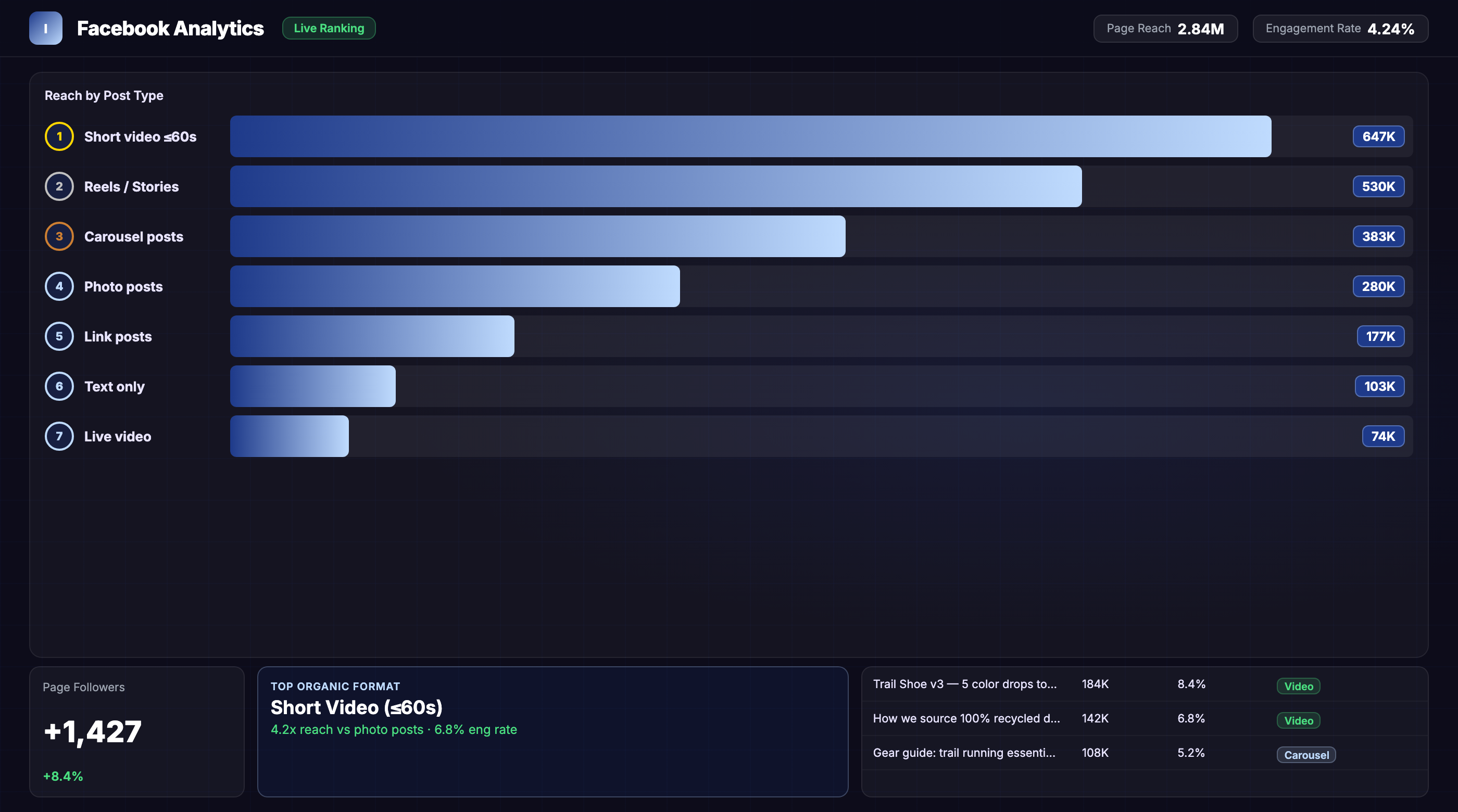
From prompt to live dashboard in minutes.
No SQL, no data engineering tickets, no waiting. Describe what you need — the agent does the rest.
Connect your stack
Authorize your data sources via OAuth — ad platforms, CRM, email, analytics. The agent gets live read access in minutes, no engineering required.
Describe the dashboard
Type what you need in plain English: "How to Create a Facebook Engagement Dashboard, last 90 days, broken out by channel." The agent writes the queries, reconciles attribution across tools, and normalizes currencies.
Dashboard goes live
A fully interactive dashboard renders in your BI tool — Tableau, Looker, Power BI, or the Improvado UI. It refreshes automatically and stays current without re-prompting.
Great at answering questions. Not built to own a live dashboard.
| Claude / ChatGPT alone | Improvado AI Agent | |
|---|---|---|
| Data access | ✗ Manual CSV export | ✓ Live API connections |
| Data volume | ✗ ~25K row context limit | ✓ Unlimited warehouse queries |
| Output format | ✗ Text summary in chat | ✓ Interactive live dashboard |
| Auto-refresh | ✗ Re-prompt every session | ✓ Automatic, configurable schedule |
| Attribution model | ✗ None — trusts your CSVs | ✓ Cross-channel normalization built-in |
| Compliance | ✗ Data leaves your stack | ✓ SOC 2 · GDPR · HIPAA · your warehouse |
| Audit trail | ✗ No query log | ✓ Every query logged, replayable |
| Useful for exploration | Get your demo → |
Plugs into the stack your team already uses
Don't see yours? Explore all 1,350+ integrations →
Everything else you might ask
What Facebook engagement metrics can I track in this dashboard?
How long does it take to set up a Facebook engagement dashboard?
Can I customize the dashboard to track specific post types or campaigns?
Other templates your agent can spin up
ABM Dashboard
Account-based marketing dashboard tracking engagement, pipeline influence, and deal velocity across target accounts.
View template →Amazon Performance Dashboard
All marketing performance data in one place for Amazon marketers.
View template →B2B Inbound Marketing Dashboard
Inbound marketing dashboard for executives and marketing departments of B2B companies.
View template →Ship your How to Create a Facebook Engagement Dashboard this week.
Talk to an Improvado expert to see how our AI agent builds custom dashboards from your live Facebook data. Get insights faster, without engineering bottlenecks.