

Describe your YouTube Marketing Dashboard.Your AI agent builds it in minutes.
All key metrics in one place, reducing reporting time for YouTube marketers.
- Deploy in days, not months
- 1,350+ data sources
- SOC 2 · GDPR · HIPAA
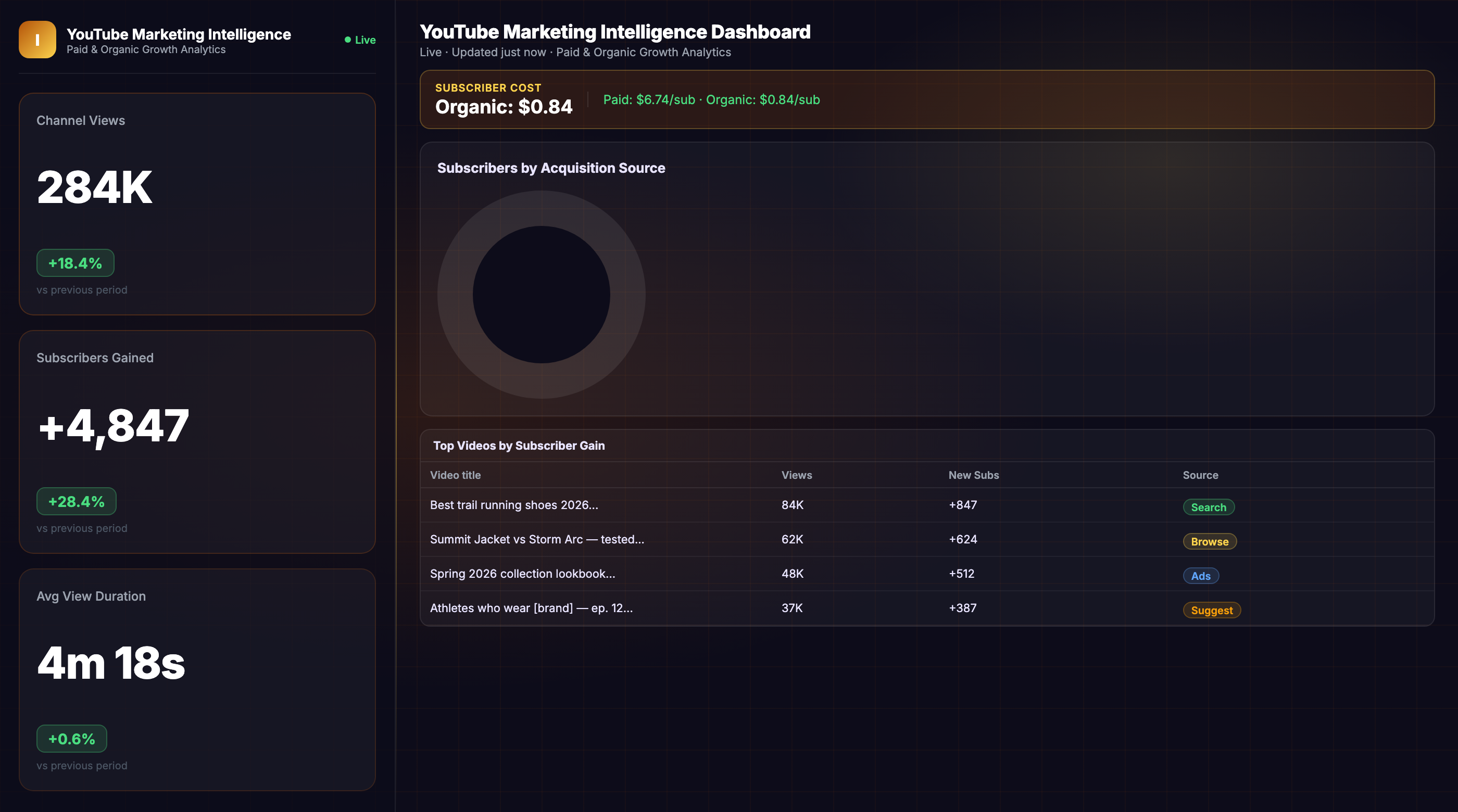
What the agent renders
Every view is live, editable, and connected to your real data.
YouTube data scattered across platforms slows decisions down.
The problem
Problem
Evaluating the efficiency of different videos and tracking the execution of the sales plan is not a simple task.
YouTube marketing dashboard
This dashboard will allow you to evaluate:
- The efficiency of engagement metrics
- How the sales plan is being executed for your collective video ad campaigns and individual videos
Key metrics to track
- Views
- Average watch time
- Video shares
- Likes added
- Subscriptions
- User comments
Improvado provides a graph for each metric showing the dynamics of the previous week or any specified time period. Wth this dashboard, you can also analyze the efficiency of each video and the dynamics of the conversion rate by last click and by impressions from month to month your YouTube channel reports more efficiently. You can also schedule the number of times you want the data to be updated in the dashboard to make sure its always current and correct.
How to build this dashboard without Improvado
- Extract sales data from YouTube Studio and Google Analytics
- Extract sales data from your CRM
- Get data on expenses from YouTube Ads, or sync it with other paid channels you use, such as Google Ads
- Bring all data together in a single, unified format
- Link data about expenses, income, and user actions together using transformation tools
- Load data to your warehouse
- Build dashboards, graphs, and reports in your BI platform
The Improvado way!
Connect your business data to Improvado easily and we will do everything for you on a turn-key basis. You will not only save the time you spend on reporting, but will be able to see your data clearly to make better decisions on your investments.
Book a live demo call with our managers to learn more.👇
Useful articles:
From prompt to live dashboard in minutes.
No SQL, no data engineering tickets, no waiting. Describe what you need — the agent does the rest.
Connect your stack
Authorize your data sources via OAuth — ad platforms, CRM, email, analytics. The agent gets live read access in minutes, no engineering required.
Describe the dashboard
Type what you need in plain English: "YouTube Marketing Dashboard, last 90 days, broken out by channel." The agent writes the queries, reconciles attribution across tools, and normalizes currencies.
Dashboard goes live
A fully interactive dashboard renders in your BI tool — Tableau, Looker, Power BI, or the Improvado UI. It refreshes automatically and stays current without re-prompting.
Great at answering questions. Not built to own a live dashboard.
| Claude / ChatGPT alone | Improvado AI Agent | |
|---|---|---|
| Data access | ✗ Manual CSV export | ✓ Live API connections |
| Data volume | ✗ ~25K row context limit | ✓ Unlimited warehouse queries |
| Output format | ✗ Text summary in chat | ✓ Interactive live dashboard |
| Auto-refresh | ✗ Re-prompt every session | ✓ Automatic, configurable schedule |
| Attribution model | ✗ None — trusts your CSVs | ✓ Cross-channel normalization built-in |
| Compliance | ✗ Data leaves your stack | ✓ SOC 2 · GDPR · HIPAA · your warehouse |
| Audit trail | ✗ No query log | ✓ Every query logged, replayable |
| Useful for exploration | Get your demo → |
Plugs into the stack your team already uses
Don't see yours? Explore all 1,350+ integrations →
Everything else you might ask
What data sources does the YouTube Marketing Dashboard connect?
How long does it take to set up this dashboard?
Can I customize metrics and add my own segments?
Other templates your agent can spin up
ABM Dashboard
Account-based marketing dashboard tracking engagement, pipeline influence, and deal velocity across target accounts.
View template →Amazon Performance Dashboard
All marketing performance data in one place for Amazon marketers.
View template →B2B Inbound Marketing Dashboard
Inbound marketing dashboard for executives and marketing departments of B2B companies.
View template →Ship your YouTube Marketing Dashboard this week.
Talk to an Improvado expert and watch the AI agent build your dashboard from live YouTube, Google Ads, and analytics data. Get from scattered reports to a single source of truth in one conversation.