

Describe your Revenue Dashboards for Comprehensive Sales & Marketing Insights.AI builds it from your live data.
Combine spend data with conversion analytics from your website to understand how your revenue varies from channel to channel.
- Deploy in days, not months
- 1,400+ data sources
- SOC 2 · GDPR · HIPAA
Want me to add pipeline velocity or segment by product line?
What the agent renders
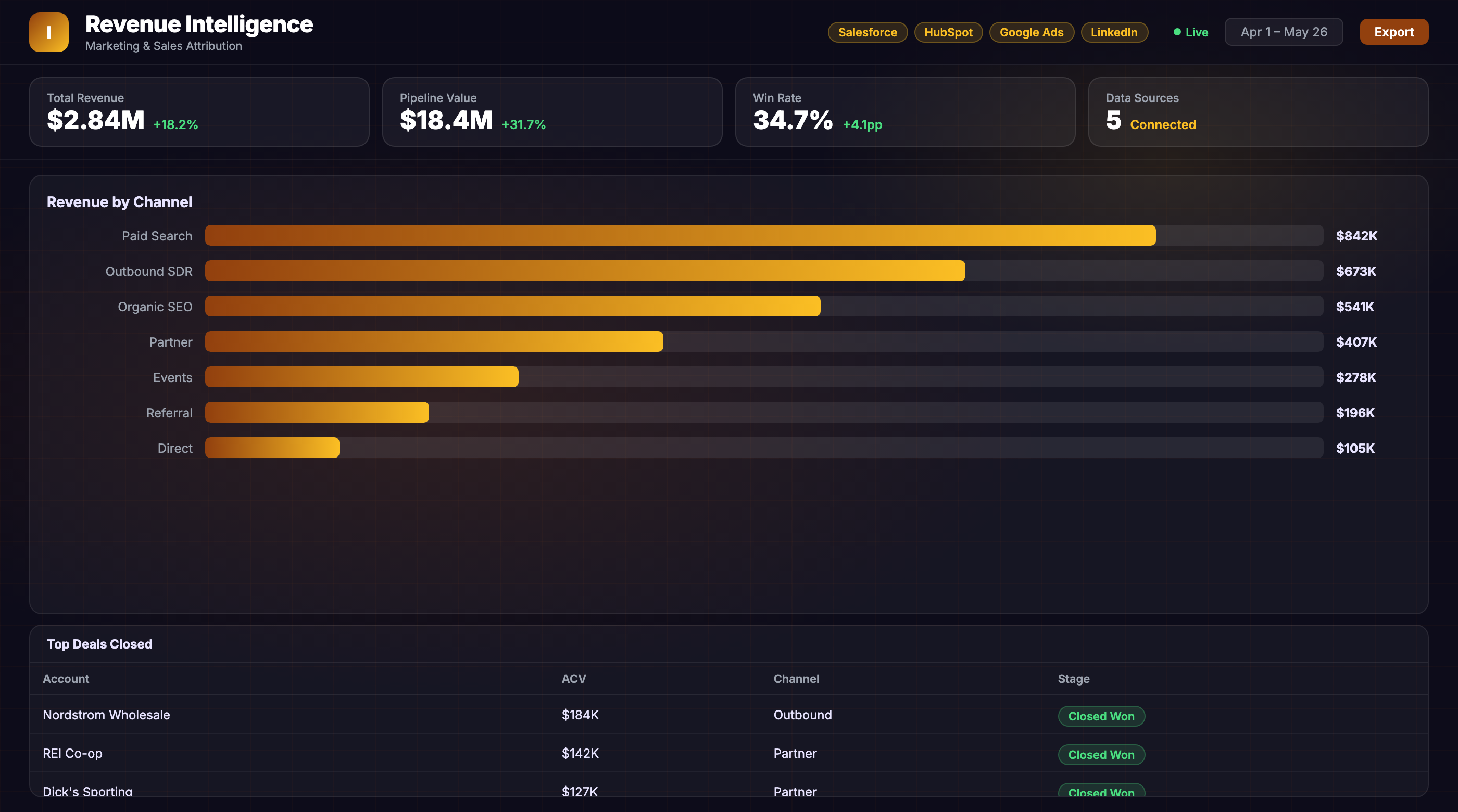
Every view is live, editable, and connected to your real data.
Revenue data scattered across platforms. Attribution breaks down.
The problem
What are revenue dashboards?
A revenue dashboard is a live-updating report of revenue and revenue metrics that tie back to the revenue attribution model.
The revenue attribution model assigns value to each touchpoint in a purchase journey, from the very first visit all the way through post-conversion. When applied, an attribution model will give you valuable insight into how your revenue varies from channel to channel. At its most basic level, revenue dashboards are tools that can take revenue data and output valuable insights based on the revenue attribution model.
Discover 25 more marketing dashboard templates to accelerate your analytics.
Business outcomes
Purpose of Revenue Dashboards
You may have heard the advice to "know your revenue". But for many marketers, revenue is a blind spot. They can see revenue down to the very last detail, but they don't know how revenue breaks down along channels or channels vs. individual customers.
This revenue blind spot is a significant problem. It can lead companies to focus on revenue at the wrong level, such as revenue by product instead of revenue by channel, and it can cause them to allocate resources inefficiently.
This blind spot often emerges because different people in an organization see revenue very differently: salespeople may see revenue down to the transaction, while marketers may see revenue down to the lead. Managers generally have a bird's-eye view of revenue across the entire customer base, but they don't always communicate easily with sales and marketing teams or know how revenue is distributed along channels or customers.
Key metrics to track
What metrics are used to build a revenue dashboard?
Revenue dashboards can be customized to the needs of the business. The metrics displayed depend on the requirements. A few examples of what metrics from the marketing perspective are:
- user engagement,
- acquisition sources,
- LTV, CAC,
- churn rate, and more.
From the sales & finance perspective:
- revenue,
- revenue growth rate,
- revenue per user,
- revenue distribution by channel, and revenue retention.
How to build this dashboard without Improvado
Tools to create a revenue dashboard
While smaller team can build custom revenue dashboards in Excel spreadsheet, or even use Hubspot, SalesForce or other CRM or ERP systems' default dashboards, teams working with large marketing, sales, and customer success data sets, usually require professional tools to build dashboards.
Some great examples of such tools are Google Data Studio, Tableau, Looker, and Power BI.
The Improvado way
How to build the most accurate revenue dashboards
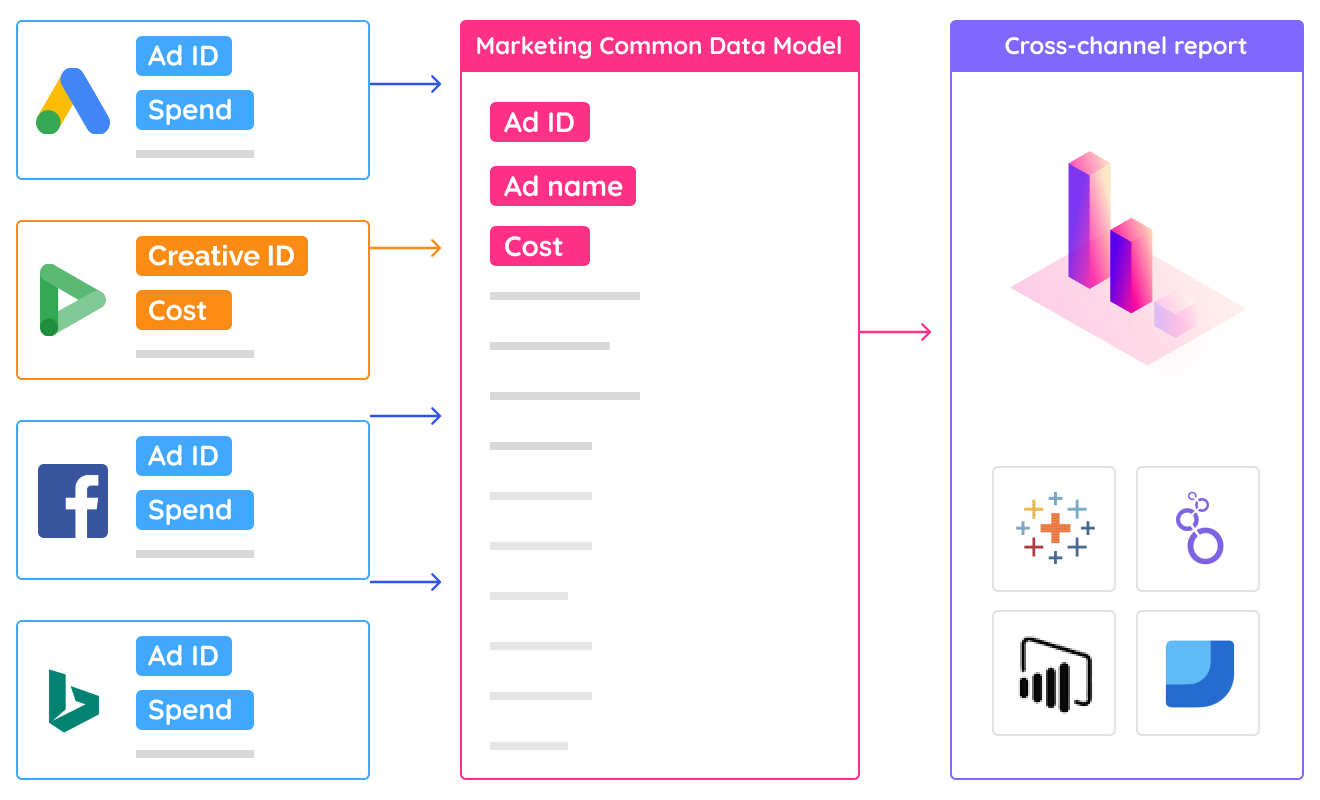
In order to create a single source for truth of data across multiple departments and not miss any data along the way, marketing analysts use ETL software that helps them consolidate siloed data from multiple data sources, clean and normalize it and streamline to their dashboards automatically.
From prompt to live dashboard in minutes.
No SQL, no data engineering tickets, no waiting. Describe what you need — the agent does the rest.
Connect your stack
Authorize your data sources via OAuth — ad platforms, CRM, email, analytics. The agent gets live read access in minutes, no engineering required.
Describe the dashboard
Type what you need in plain English: "Revenue Dashboards for Comprehensive Sales & Marketing Insights, last 90 days, broken out by channel." The agent writes the queries, reconciles attribution across tools, and normalizes currencies.
Dashboard goes live
A fully interactive dashboard renders in your BI tool — Tableau, Looker, Power BI, or the Improvado UI. It refreshes automatically and stays current without re-prompting.
Great at answering questions. Not built to own a live dashboard.
| Claude / ChatGPT alone | Improvado AI Agent | |
|---|---|---|
| Data access | ✗ Manual CSV export | ✓ Live API connections |
| Data volume | ✗ ~25K row context limit | ✓ Unlimited warehouse queries |
| Output format | ✗ Text summary in chat | ✓ Interactive live dashboard |
| Auto-refresh | ✗ Re-prompt every session | ✓ Automatic, configurable schedule |
| Attribution model | ✗ None — trusts your CSVs | ✓ Cross-channel normalization built-in |
| Compliance | ✗ Data leaves your stack | ✓ SOC 2 · GDPR · HIPAA · your warehouse |
| Audit trail | ✗ No query log | ✓ Every query logged, replayable |
| Useful for exploration | Get your demo → |
Plugs into the stack your team already uses
Don't see yours? Explore all 1,400+ integrations →
Everything else you might ask
What data sources can I connect to a revenue dashboard?
How long does it take to set up a revenue dashboard?
Can I customize revenue attribution models and segments?
Other templates your agent can spin up
ABM Dashboard
Account-based marketing dashboard tracking engagement, pipeline influence, and deal velocity across target accounts.
View template →Amazon Performance Dashboard
All marketing performance data in one place for Amazon marketers.
View template →B2B Inbound Marketing Dashboard
Inbound marketing dashboard for executives and marketing departments of B2B companies.
View template →Ship your Revenue Dashboards for Comprehensive Sales & Marketing Insights this week.
Talk to an Improvado expert and see how our AI agent builds dashboards from your live marketing and sales data. Get full revenue attribution up and running in days, not months.