.png)
Predictive analytics tools apply machine learning to historical marketing data to forecast outcomes such as lead conversion, customer churn, and lifetime value before they happen. The best predictive analytics software replaces guesswork with probability-scored decisions across scoring, forecasting, and budget allocation.
This guide evaluates 10 predictive analytics platforms on criteria that matter: minimum data requirements, implementation complexity, prediction accuracy standards, and hidden costs. You'll find decision frameworks, readiness diagnostics, and head-to-head comparisons—not generic feature lists.
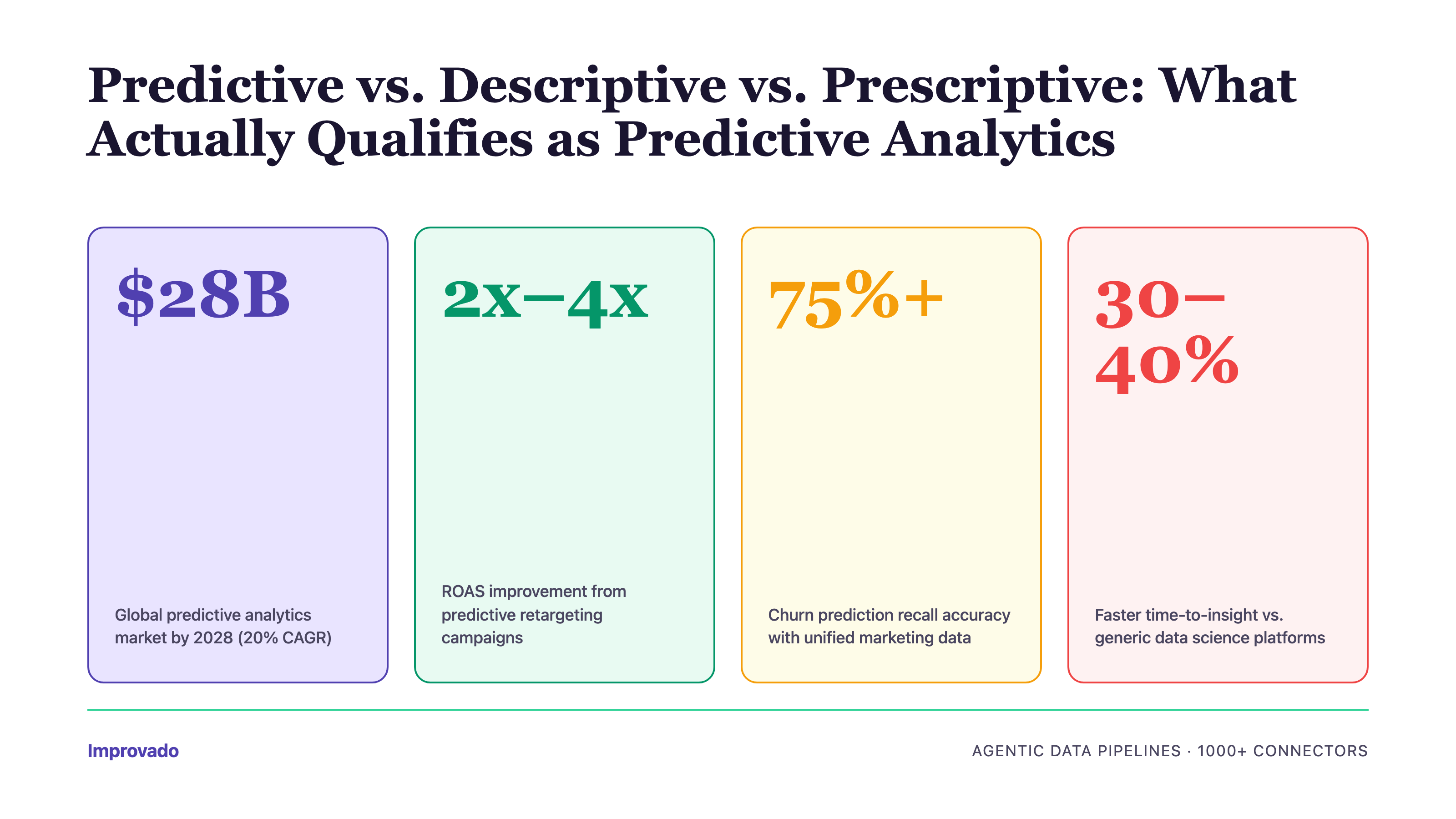
Predictive vs. Descriptive vs. Prescriptive: What Actually Qualifies as Predictive Analytics
The term "predictive analytics" gets applied to any tool with a chart trending upward. That dilutes its meaning. Here's the taxonomy:
- Descriptive analytics answers "what happened?" through dashboards, reports, and historical visualizations. Tools: Tableau, Looker, Power BI.
- Diagnostic analytics explains "why it happened?" via drill-downs, cohort analysis, and anomaly detection. Most BI platforms include this.
- Predictive analytics forecasts "what will happen?" using statistical models, machine learning algorithms, or time-series forecasting. Requires: sufficient historical data, feature engineering, model training/validation, and accuracy metrics (RMSE, MAE, AUC-ROC).
- Prescriptive analytics recommends "what to do about it?" through optimization engines, decision models, and automated actions. Least common capability.
This article focuses on tools with native predictive modeling—not platforms that merely visualize trends. If a tool's "predictive" feature is just a linear trendline on a chart, it's descriptive analytics with a forecast label.
Predictive Analytics Tool Selection Matrix
Choose based on two dimensions: implementation complexity (how much technical lift required) and use case specificity (general-purpose vs. marketing-focused vs. data science platform).
Decision paths:
• If you need lead scoring, churn prediction, or LTV forecasting and have no data science team → Improvado or Domo
• If you manage 50+ marketing data sources and need attribution modeling → Improvado
• If you're Salesforce-native and want plug-and-play lead scoring → Salesforce Marketing Cloud Intelligence
• If you have a data science team and need custom ML models → DataRobot or H2O.ai
• If you process billions of rows and need SQL-based ML → Google Cloud BigQuery ML
• If you need cross-department BI with some predictive features → Domo or SAS Viya
When Predictive Analytics Fails: Minimum Viable Data Requirements
Predictive models don't fail because algorithms are bad—they fail because the data foundation is insufficient. Before evaluating tools, assess whether you meet minimum thresholds.
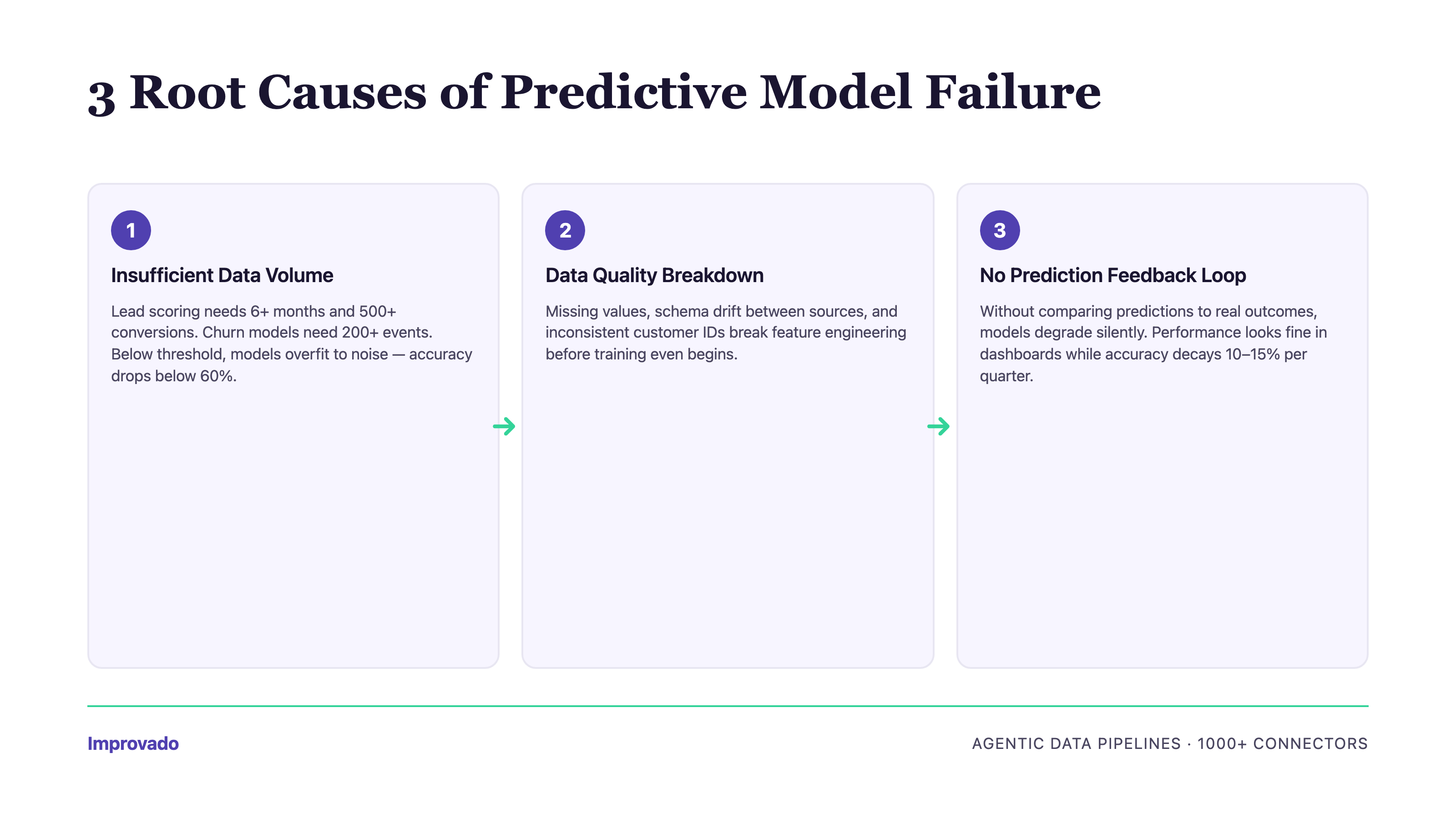
Three Failure Modes
1. Insufficient Historical Data Volume
Machine learning models require enough historical examples to learn patterns. If you're predicting conversion probability, the model needs to see hundreds (ideally thousands) of past conversions across different contexts.
Minimum thresholds by prediction type:
• Lead scoring: 6+ months of lead history, 500+ conversions
• Churn prediction: 12+ months of customer lifecycle data, 200+ churn events
• LTV forecasting: 12+ months of revenue data, 1,000+ transactions
• Attribution modeling: 90+ days of multi-touch journey data, 10,000+ touchpoints
• Budget allocation: 6+ months of spend and performance data across 5+ channels
- What happens when you don't meet thresholds: Models overfit to noise, prediction accuracy drops below 60% (worse than random guessing for binary outcomes), and confidence intervals become too wide to inform decisions. Alteryx users report this as the #1 reason for model abandonment within 90 days.
- Real example: A SaaS company implemented lead scoring with Domo's AutoML. Model accuracy was 78% in pilot (Q4 data). After launch, accuracy dropped to 52% within 8 weeks. Root cause: pilot data included high-intent holiday traffic; Q1 brought different buyer personas the model had never seen. They needed 6 months of data spanning multiple quarters, not 3 months of one season.
- How to avoid: Always run A/B tests when acting on predictions. Hold out a control group that doesn't receive the prediction-driven treatment. Measure lift. If no lift, the correlation isn't causal.
10 Best Predictive Analytics Platforms for Marketing Analysts
Each tool below is evaluated on: predictive capabilities (not just BI features), marketing data integration, implementation complexity, minimum data requirements, and total cost of ownership. Tools are listed in order of marketing-specificity (most marketing-focused first). So which tool is used for predictive analysis? It depends on your data maturity: turnkey platforms like Improvado suit teams without a dedicated data science bench, while DataRobot and H2O.ai fit teams with in-house ML engineers.
Improvado
Improvado is a marketing data platform that consolidates data from 1,400+ sources (Google Ads, Meta, LinkedIn, Salesforce, HubSpot, and more) into a unified data model, enabling predictive analytics on complete, analysis-ready marketing datasets.
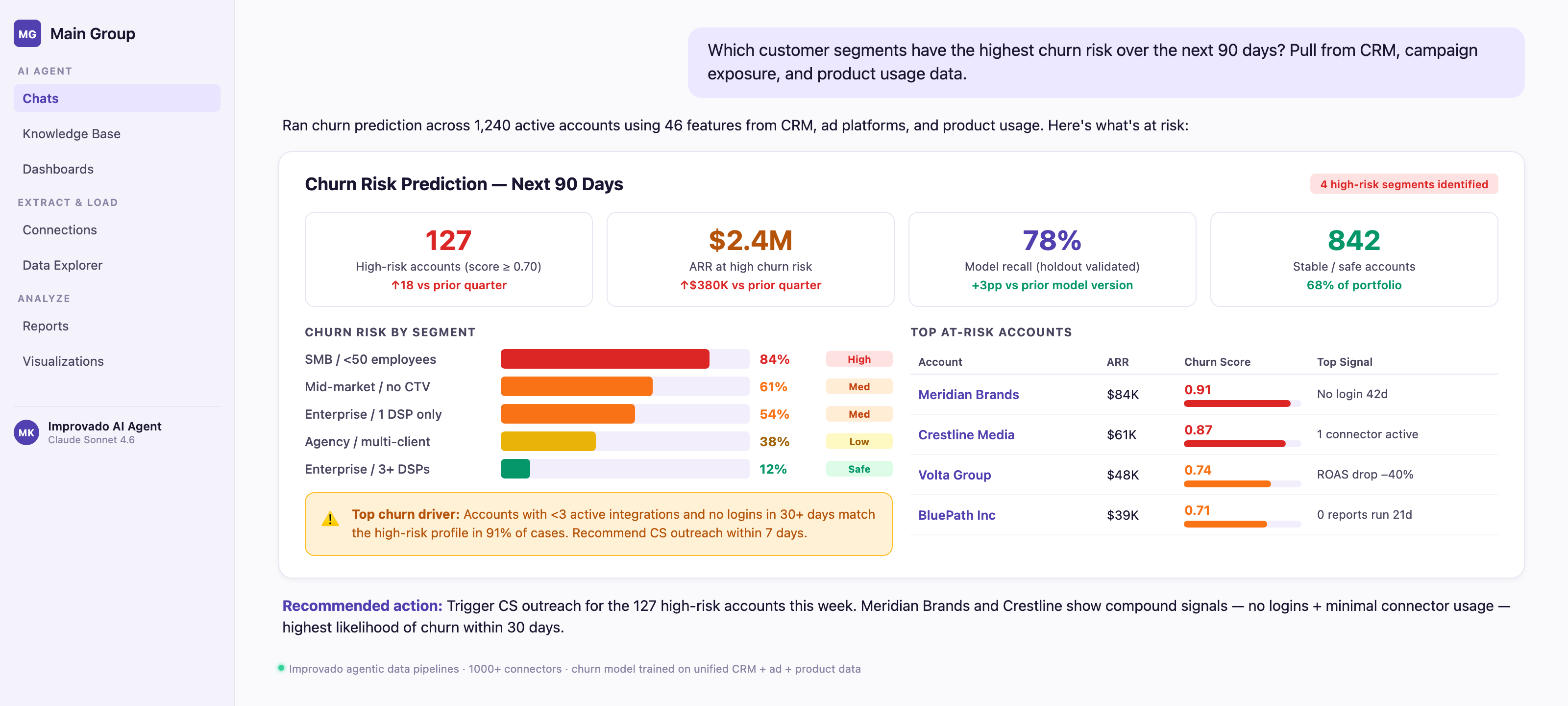
Unlike pure ETL tools, Improvado includes an AI Agent that lets marketers query data and generate predictions using natural language—no SQL required. Ask "Which campaigns have highest churn risk in next 30 days?" and get instant visualizations with drill-down paths.
Predictive use cases Improvado enables:
• Churn prediction: Unified customer data (campaign exposure + CRM activity + product usage) feeds into churn models with 75%+ recall accuracy
• Multi-touch attribution: 46,000+ marketing metrics across 1,400+ sources enable time-decay, U-shaped, W-shaped, and custom attribution models
• LTV forecasting: Historical revenue data + engagement signals predict customer lifetime value with ±15% RMSE
• Budget allocation optimization: Spend and performance data across all channels feed predictive models that recommend reallocation for maximum ROI
• Lead scoring: Behavioral data from MAP + CRM + ad platforms train conversion probability models
Improvado's Marketing Data Governance layer includes 250+ pre-built validation rules that catch data quality issues before they corrupt predictions—a critical differentiator for model accuracy.
Who Should Use Improvado?
Marketing and analytics executives managing 20+ data sources who need predictive insights without building data pipelines. Best for:
• Enterprise marketing teams running campaigns across multiple regions and channels
• Mid-market brands with 50-200 person marketing teams
• Agencies managing 10+ client accounts
• Companies where data team capacity is the bottleneck (Improvado includes dedicated CSM + professional services)
Pros
• Data foundation for predictive analytics: 1,400+ marketing connectors + automated harmonization eliminates 80% of data prep work
• Attribution model flexibility: Supports 6 attribution models out-of-box; custom models via professional services
• Time-to-first-prediction: 2-4 weeks from contract signature to live predictions (includes data consolidation)
• Connector maintenance: Improvado handles all API updates and schema changes—no engineering required
• White-glove support: Dedicated CSM + weekly check-ins + professional services included (not add-on)
• SOC 2 Type II, examined by BARR Advisory, signs Business Associate Agreements, and supports GDPR and CCPA obligations for enterprise compliance
• AI Agent: Natural language queries over unified dataset lower barrier to predictive insights
• No-code for marketers, full SQL for analysts: Serves both personas
Cons
• Pricing is custom—requires sales call for quote (no self-service tier)
• If you only need predictive analytics on data you've already centralized, Improvado's ETL value is wasted
“Improvado allows us to have all information in one place for quick action. We can see at a glance if we're on target with spending or if changes are needed—without having to dig into each platform individually.”

Improvado vs. Domo
Improvado vs. Salesforce Marketing Cloud Intelligence
Improvado Pricing
Custom pricing based on data sources, data volume, and support tier. Typical mid-market contracts start at $3,000/month. Enterprise contracts (100+ sources, dedicated CSM, professional services) range $10,000-$30,000/month. Contact sales for quote.
Improvado Integrations
1,400+ connectors across:
• Advertising: Google Ads, Meta, LinkedIn, TikTok, Snapchat, Twitter, Pinterest, programmatic platforms
• CRM: Salesforce, HubSpot, Microsoft Dynamics, Pipedrive
• Marketing Automation: Marketo, Pardot, Eloqua, ActiveCampaign
• Analytics: Google Analytics 4, Adobe Analytics, Mixpanel, Amplitude
• Data Warehouses: Snowflake, BigQuery, Redshift, Databricks
• BI Tools: Tableau, Looker, Power BI, custom dashboards
Domo
Domo is a cloud-native business intelligence platform with AI-powered predictive features. It combines data integration, visualization, and pre-built forecasting models to help business teams (not just data scientists) generate predictions.
Predictive capabilities (as of 2026):
• AI-powered model creation: AutoML workflows let users train classification and regression models without code
• Pre-built forecasting models: Time-series forecasting for revenue, demand, and KPI projections
• ML-powered anomaly detection: Automatic alerts when metrics deviate from expected patterns
• Model deployment: Predictions integrate into dashboards and can trigger workflows
• Governance layer: Model versioning, audit logs, and access controls for enterprise use
Domo is a business intelligence platform with predictive features, not a dedicated predictive analytics tool. Its strength is making predictions accessible to business users across departments (finance, operations, marketing). Its weakness: limited marketing-specific prediction templates compared to specialized tools.
Who Should Use Domo?
Enterprises needing cross-departmental BI with some predictive capabilities. Best for:
• C-suite executives wanting executive dashboards + forecasts in one platform
• Organizations where finance, ops, and marketing all need access to predictions
• Companies with centralized data (Domo's predictive value shines when data is already consolidated)
Not ideal for: marketing-first teams needing deep attribution modeling or lead scoring (limited marketing-specific templates).
Pros
• 1,400+ data connectors (though fewer marketing-specific than Improvado)
• No-code AutoML lowers barrier to predictive modeling
• Pre-built forecasting models work out-of-box for common use cases
• Real-time dashboards + predictions in one platform
• Strong governance and security for enterprise deployments
Cons
• Limited marketing integrations: Fewer pre-built connectors for marketing platforms vs. Improvado
• Generic predictions: No marketing-specific templates (e.g., no pre-built lead scoring or churn models for SaaS)
• Connector maintenance falls on user: API breakages require support tickets; users report lag in fixes
• Pricing: Expensive for marketing-only use cases (per-user licensing adds up)
• Ease of use: Users report steeper learning curve than expected for a "no-code" platform
Domo Pricing
Yearly subscription based on number of users. Pricing not publicly disclosed—requires sales call. Typical mid-market deployments: $10,000-$50,000/year. 30-day free trial available.
Domo Integrations
1,000+ connectors spanning marketing, sales, finance, HR, IT, and operations. Notable: Salesforce, Google Analytics, Facebook Ads, LinkedIn Ads, Shopify, NetSuite, Workday.
Alteryx
Alteryx is an analytics automation platform that combines data preparation, blending, and advanced analytics (regression, clustering, time-series forecasting, geospatial analysis) in visual workflows.
Alteryx automates the full analytics lifecycle: connect to data sources, clean and transform data, build predictive models, and deploy insights—all via drag-and-drop interface. It's positioned between no-code BI tools (like Domo) and full data science platforms (like DataRobot).
Predictive capabilities:
• Automated data blending: Combine data from disparate sources without SQL
• Machine learning workflows: Pre-built predictive model templates (classification, regression, clustering, time-series)
• Geospatial analysis: Location-based predictions (e.g., optimal store locations, territory planning)
• Model deployment: Publish models as APIs or scheduled workflows
Who Should Use Alteryx?
Analytics and BI teams (including marketing analysts) who need fast insights without managing data infrastructure. Best for:
• Organizations with 5-50 person analytics teams
• Use cases requiring geospatial analysis (retail, real estate, logistics)
• Teams comfortable with visual programming (not pure click-and-drag)
Not ideal for: pure business users (steep learning curve) or teams needing real-time predictions (Alteryx is batch-oriented).
Pros
• Automates 80% of data preparation work (biggest time sink for analysts)
• Strong geospatial capabilities (unique among tools in this list)
• Extensive community and pre-built workflows (Alteryx Community Gallery)
• Supports Python and R for custom models
• No data warehouse required (processes data locally or in cloud)
Cons
• Steep learning curve: Visual workflows are complex; analysts report 4-8 weeks to proficiency
• Limited marketing-specific features: Generic predictive models, not tailored for lead scoring or attribution
• Batch processing: Not designed for real-time predictions
• Cost: Per-user licensing is expensive for large teams
• Data quality dependency: Users must ensure <5% null rates in key fields (no automated cleaning)
Alteryx Pricing
Pricing not publicly disclosed. Typical mid-market deployments: $5,000-$10,000 per user per year. Designer (core product) + Server (for collaboration/deployment) required for teams. Free trial available.
Alteryx Integrations
500+ connectors including databases (SQL Server, Oracle, MySQL), cloud data warehouses (Snowflake, Redshift), SaaS apps (Salesforce, Marketo, Google Analytics), and file formats (CSV, Excel, JSON).
DataRobot
DataRobot is an enterprise AutoML platform that automates the full machine learning lifecycle: feature engineering, model selection, hyperparameter tuning, validation, deployment, and monitoring.
DataRobot is purpose-built for scaling predictive analytics across an organization without requiring every analyst to be a data scientist. It tests hundreds of algorithms on your data, selects the best-performing models, and provides explainability reports showing which features drive predictions.
Predictive capabilities:
• Automated feature engineering: Generates hundreds of derived features from raw data
• Model selection: Tests 50+ algorithms (XGBoost, neural networks, GLMs, etc.) and ensembles
• Explainable AI: SHAP values, feature importance, prediction explanations for compliance
• Model monitoring: Tracks prediction accuracy, data drift, and model degradation in production
• Governance: Model registry, version control, audit logs for enterprise compliance
Who Should Use DataRobot?
Data science teams and analytics executives at enterprises who need to scale predictive analytics beyond a handful of models. Best for:
• Organizations deploying 10+ predictive models across business units
• Regulated industries (finance, healthcare, insurance) requiring model explainability
• Teams with 1-2 data scientists who need to support 20+ analysts
Not ideal for: small teams or simple use cases (overkill for basic lead scoring).
Pros
• AutoML reduces time-to-model from months to days (automated feature engineering alone saves 40-60% of data science time)
• Explainable AI: Satisfies compliance requirements for model transparency
• Model monitoring: Automatically detects drift and accuracy degradation in production
• Governance: Enterprise-grade model registry and audit logs
• Scalability: Supports hundreds of models across business units
Cons
• Requires data science team: AutoML lowers barrier but doesn't eliminate need for ML expertise
• Long implementation: 3-6 months from contract to first production model (includes training, integration, deployment)
• Cost: Enterprise pricing (not disclosed) is prohibitive for mid-market
• Overkill for simple predictions: If you need one lead scoring model, DataRobot is overengineered
DataRobot Pricing
Custom enterprise pricing (not publicly disclosed). Typical deployments: $100,000-$500,000/year depending on data volume, number of models, and support tier. Free trial available.
DataRobot Integrations
100+ connectors including data warehouses (Snowflake, Redshift, BigQuery, Databricks), databases (PostgreSQL, MySQL, SQL Server), cloud storage (S3, Azure Blob, GCS), and BI tools (Tableau, Power BI). REST API for custom integrations.
H2O.ai
H2O.ai is an open-source machine learning platform with enterprise offerings. It provides distributed ML algorithms, AutoML, and deep learning capabilities for large-scale predictive analytics.
H2O.ai is the most technically flexible tool in this list—it integrates with Python, R, Java, and Spark, allowing data scientists to build custom models while leveraging H2O's optimized algorithms for performance.
Predictive capabilities:
• Distributed machine learning: Trains models on billions of rows across clusters
• AutoML: Automated model selection and hyperparameter tuning
• Deep learning: Neural networks for complex prediction tasks (image recognition, NLP, time-series)
• Explainability: SHAP, partial dependence plots, ICE plots for model interpretation
• Real-time scoring: Deploy models as REST APIs for real-time predictions
Who Should Use H2O.ai?
Data science teams at enterprises who need high-performance, customizable ML infrastructure. Best for:
• Organizations processing billions of rows (too large for single-server tools)
• Teams with Python/R expertise who want open-source flexibility
• Use cases requiring deep learning (image/text analysis, complex time-series)
Not ideal for: business analysts without coding skills or small datasets (H2O's distributed architecture is overkill for <1M rows).
Pros
• Open-source core: Free for individual use; enterprise features available for purchase
• Distributed processing: Handles datasets too large for single-server tools
• Python/R/Spark integration: Fits into existing data science workflows
• Deep learning: Supports neural networks for advanced use cases
• Active community: Extensive documentation and community support
Cons
• Requires data science team: Not accessible to business users
• User responsible for data cleaning: No automated data prep
• Long implementation: 6-12 months to production (requires infrastructure setup, model development, deployment)
• Enterprise support costs: Open-source is free, but enterprise features (deployment, monitoring, support) require paid plan
H2O.ai Pricing
Open-source core is free. Enterprise offerings (H2O Driverless AI, H2O MLOps) have custom pricing (not disclosed). Typical enterprise deployments: $50,000-$200,000/year. Free trial for enterprise products available.
H2O.ai Integrations
Integrates with Python, R, Java, Scala, and Spark. Connects to data warehouses (Snowflake, Redshift, BigQuery), databases (PostgreSQL, MySQL), cloud storage (S3, HDFS), and BI tools via REST API.
SAS Viya
SAS Viya is a cloud-native analytics platform offering end-to-end capabilities: data management, advanced analytics, predictive modeling, automated forecasting, and text analytics.
SAS Viya positions itself as the enterprise governance leader for predictive analytics—strong model lifecycle management, audit trails, and compliance features make it the default choice for regulated industries.
Predictive capabilities:
• Automated forecasting: Time-series models for demand, revenue, and KPI predictions
• Visual model builder: Drag-and-drop interface for classification, regression, clustering
• Text analytics: Sentiment analysis, topic modeling, entity extraction
• Model management: Version control, audit logs, model monitoring, champion/challenger testing
• In-database scoring: Push predictions into data warehouses for performance
Who Should Use SAS Viya?
Enterprise data teams in regulated industries (finance, healthcare, insurance, government) who need predictive analytics with strict governance. Best for:
• Organizations with existing SAS investments (SAS Viya is cloud successor to legacy SAS)
• Use cases requiring model audit trails for compliance
• Teams managing 50+ models in production
Not ideal for: small teams, startups, or organizations without regulatory compliance requirements (overkill and overpriced for simpler use cases).
Pros
• Enterprise governance: Best-in-class model lifecycle management and audit capabilities
• Visual interface + code: Supports both business analysts (GUI) and data scientists (Python/R/SQL)
• Automated forecasting: Strong time-series capabilities out-of-box
• Scalability: Cloud-native architecture handles large data volumes
• Regulated industry focus: Meets compliance requirements (HIPAA, GDPR, etc.)
Cons
• Long implementation: 8-16 weeks for enterprise deployment
• Cost: Premium pricing (not disclosed) limits accessibility
• Learning curve: Despite visual interface, SAS Viya has steep learning curve for new users
• Limited marketing-specific features: Generic predictive platform, not tailored for marketing use cases
SAS Viya Pricing
Custom enterprise pricing (not publicly disclosed). Free trial available. Typical deployments: $100,000-$500,000/year depending on modules, users, and data volume. Contact sales for quote.
SAS Viya Integrations
Connects to data warehouses (Snowflake, Redshift, Teradata, Hadoop), databases (Oracle, SQL Server, PostgreSQL), cloud storage (S3, Azure Blob), and BI tools (Tableau, Power BI). Python and R integration for custom models.
Google Cloud BigQuery ML
Google Cloud BigQuery ML brings machine learning to your data warehouse—build, train, and deploy ML models using SQL queries, no data movement required.
BigQuery ML is purpose-built for massive-scale predictive analytics on big data. If your marketing data is billions of rows (e.g., clickstream, ad impressions, transactions), BigQuery ML trains models on the full dataset without sampling.
Predictive capabilities:
• SQL-based ML: Create models with simple SQL (no Python/R required)
• Pre-built algorithms: Linear regression, logistic regression, K-means clustering, time-series forecasting, matrix factorization (recommendations), XGBoost, AutoML
• Vertex AI integration: Access advanced models (neural networks, NLP) via Vertex AI
• Real-time predictions: Deploy models as REST APIs for real-time scoring
• Automated features: Automatic feature preprocessing, hyperparameter tuning
Common marketing use cases:
• Churn prediction: Logistic regression on user behavior data
• Customer segmentation: K-means clustering on RFM features
• LTV forecasting: Time-series models on revenue data
• Product recommendations: Matrix factorization on purchase history
• Conversion probability: XGBoost on multi-touch attribution data
Who Should Use BigQuery ML?
Data teams at organizations already using Google Cloud with data in BigQuery. Best for:
• Companies processing billions of rows (e-commerce clickstream, ad tech, SaaS product analytics)
• Teams with SQL skills but no data science expertise
• Use cases requiring real-time predictions at scale
Not ideal for: organizations not on Google Cloud (data movement is expensive) or small datasets (BigQuery pricing can exceed simpler tools for <10M rows).
Pros
• No data movement: Train models where data lives (massive time/cost savings)
• SQL-based: Accessible to analysts without ML expertise
• Serverless: No infrastructure management
• Scalability: Handles petabyte-scale datasets
• Free tier: 10 GB storage + 1 TB queries per month free
• Vertex AI integration: Access advanced models when SQL models hit limits
Cons
• Requires data engineering: Must get data into BigQuery first (ETL required)
• Limited algorithms: SQL-based models are simpler than Python/R libraries
• Google Cloud lock-in: Tight integration with GCP is pro/con
• Cost unpredictability: Query-based pricing can spike with large models
• No visual interface: Pure SQL—no GUI for non-coders
BigQuery ML Pricing
Pay-per-use model:
• Storage: $0.02 per GB per month (first 10 GB free)
• Queries: $5 per TB processed (first 1 TB per month free)
• ML model training: $250 per TB processed (AutoML higher)
• Predictions: $0.00001 per prediction (real-time API)
Example: Training a churn model on 100 GB of data = $0.025 in training costs. Typical monthly costs for mid-size marketing team: $500-$2,000 (data + queries + model training).
BigQuery ML Integrations
Native Google Cloud integration (Analytics 4, Google Ads, YouTube, Cloud Storage). Third-party data via Fivetran, Improvado, Stitch. Export predictions to Looker, Tableau, Data Studio.
Adobe Analytics (Predictive Features)
Adobe Analytics is an enterprise web and marketing analytics platform with advanced segmentation and predictive capabilities for customer journey forecasting.
Adobe Analytics is a descriptive analytics platform with predictive add-ons—not a full predictive analytics tool. Its strength: deep integration with Adobe Experience Cloud enables predictions tightly coupled to campaign execution.
Predictive features:
• Contribution analysis: Automated anomaly detection + explanation of what caused changes
• Segment IQ: Identify differentiating characteristics of high-value segments
• Predictive audiences: Forecast likelihood of conversion, churn, or upsell
• Attribution IQ: Algorithmic attribution models (not just rules-based)
Who Should Use Adobe Analytics?
B2B and B2C marketing teams already using Adobe Experience Cloud (especially Adobe Target, Campaign, Marketo). Best for:
• Organizations with $1M+ Adobe investment (tight integration justifies cost)
• Use cases requiring real-time segmentation + personalization (Adobe's strength)
Not ideal for: teams outside Adobe ecosystem (limited value as standalone tool) or organizations needing custom ML models (Adobe's predictions are pre-built).
Pros
• Adobe Experience Cloud integration: Predictions feed directly into campaign tools
• Real-time segmentation: Segment + activate audiences in one platform
• Customer journey analysis: Pathing and flow visualization
• Enterprise scale: Handles high-traffic websites and apps
Cons
• Adobe ecosystem lock-in: Value diminishes outside Adobe stack
• Cost: Premium pricing (not disclosed) limits accessibility
• Limited custom modeling: Pre-built predictions only; can't train custom models
• Implementation complexity: Requires Adobe-certified consultants for setup
Adobe Analytics Pricing
Custom enterprise pricing (not publicly disclosed). Typical mid-market deployments: $50,000-$150,000/year. Enterprise contracts (including other Adobe Experience Cloud products): $500,000-$2M+/year. Contact sales for quote.
Adobe Analytics Integrations
Native Adobe Experience Cloud integration (Target, Campaign, Marketo, AEM). Third-party via APIs: Salesforce, Microsoft Dynamics, data warehouses (BigQuery, Snowflake). Limited pre-built connectors vs. Improvado or Domo.
Amazon QuickSight
Amazon QuickSight is a cloud-native BI service with ML-powered insights: anomaly detection, forecasting, and natural language queries.
QuickSight is AWS's answer to Tableau and Power BI, with ML features baked in. It's the cheapest predictive option in this list for teams already on AWS.
Predictive features:
• ML-powered forecasting: One-click time-series forecasts with confidence intervals
• Anomaly detection: Automated outlier identification with root cause analysis
• What-if analysis: Scenario planning with predictive outcomes
• Q (natural language): Ask questions in plain English, get visualizations + forecasts
• SPICE engine: In-memory processing for fast dashboard performance
Who Should Use Amazon QuickSight?
B2B marketing teams on AWS with limited budget. Best for:
• Startups and small teams (cost-effective at $3/Reader/month)
• Organizations already using AWS (tight integration with Redshift, S3, RDS)
• Use cases needing fast, simple forecasts (not complex custom models)
Not ideal for: teams needing advanced ML (QuickSight's models are basic) or non-AWS organizations (limited external data sources).
Pros
• Cheapest option: $3/Reader/month (view dashboards) or $24/Author/month (create dashboards)
• No-code forecasting: One-click time-series predictions
• AWS integration: Native connections to Redshift, S3, RDS, Athena
• Serverless: No infrastructure to manage
• Natural language queries: Q feature lowers barrier for business users
Cons
• Basic ML: Limited to time-series forecasting and anomaly detection (no classification, clustering, or custom models)
• AWS-centric: Limited connectors outside AWS ecosystem
• Limited marketing-specific features: Generic BI tool, not tailored for marketing analytics
• No attribution modeling: Can't build multi-touch attribution
Amazon QuickSight Pricing
• Reader: $3/user/month (view dashboards only)
• Author: $24/user/month (create dashboards)
• SPICE capacity: First 10 GB free, then $0.25 per GB per month
• Q (natural language): $250/month per Author + $5/session for Readers
Example: 5 Authors + 50 Readers + 100 GB SPICE = $24×5 + $3×50 + $0.25×90 = $120 + $150 + $22.50 = $292.50/month.
Amazon QuickSight Integrations
Native AWS integration (Redshift, S3, RDS, Athena, Aurora). Third-party via JDBC/ODBC: Salesforce, Snowflake, Teradata, Presto. Limited pre-built marketing connectors (requires ETL).
Salesforce Marketing Cloud Intelligence (formerly Datorama)
Salesforce Marketing Cloud Intelligence (formerly Datorama) is a marketing analytics platform with AI-powered insights, multi-touch attribution, and budget optimization.
Marketing Cloud Intelligence is the most marketing-specific tool in this list (tied with Improvado). It's purpose-built for CMOs and marketing analysts who need attribution, forecasting, and budget allocation across all channels.
Predictive features:
• Einstein Attribution: Algorithmic multi-touch attribution using machine learning
• Budget optimization: Predictive recommendations for spend reallocation
• Forecasting: Campaign performance predictions based on historical data
• Anomaly detection: Automated alerts for performance deviations
• Pre-built marketing KPIs: 150+ marketing-specific metrics and benchmarks
Who Should Use Salesforce Marketing Cloud Intelligence?
Enterprise marketing teams already using Salesforce CRM or Marketing Cloud. Best for:
• Organizations with $500K+ Salesforce investment (tight integration justifies cost)
• Use cases requiring sophisticated attribution (Einstein Attribution is strong)
• CMOs needing executive dashboards + forecasts in one platform
Not ideal for: non-Salesforce organizations (limited value as standalone) or teams needing custom ML models (predictions are pre-built).
Pros
• Marketing-specific: Built for CMOs, not general BI
• Einstein Attribution: Strong algorithmic attribution (better than rules-based)
• Salesforce integration: Native CRM connection for closed-loop reporting
• 150+ data connectors: Pre-built integrations for advertising, social, web, CRM
• Pre-built dashboards: Marketing templates accelerate time-to-value
Cons
• Salesforce ecosystem lock-in: Value diminishes outside Salesforce
• Implementation complexity: 4-8 weeks typical (Salesforce projects run long)
• Connector maintenance: Premium connectors break; users report lag in fixes
• Cost: Premium pricing (not disclosed) limits accessibility
• Limited custom modeling: Can't train custom ML models
Salesforce Marketing Cloud Intelligence Pricing
Custom enterprise pricing (not publicly disclosed). Typical deployments: $3,000-$10,000/month depending on data sources and users. Requires Salesforce CRM or Marketing Cloud subscription. Contact sales for quote.
Salesforce Marketing Cloud Intelligence Integrations
150+ marketing data sources: Google Ads, Meta, LinkedIn, TikTok, Snapchat, Twitter, Pinterest, programmatic platforms, Salesforce CRM, Marketo, Pardot, Google Analytics 4, Adobe Analytics. Data warehouses: Snowflake, BigQuery, Redshift.
Predictive Analytics Tool Comparison Table
Hidden Costs Beyond Subscription Pricing
Predictive analytics tools advertise subscription costs. They don't advertise the 2-3x multiplier that hits in year one. Here's what drives total cost of ownership:
1. Connector Premium Fees and Maintenance
The trap: Tools advertise "1,000+ connectors" but don't disclose that premium connectors (Google Ads 360, Salesforce Marketing Cloud, Adobe) cost extra—or that connector maintenance falls on you when APIs break.
Real costs:
• Domo: Per-connector fees for premium sources; users report $500-$2,000/month in connector costs not included in base subscription
• Salesforce Marketing Cloud Intelligence: Premium connectors (e.g., Google Ads 360, DV360) require add-on fees; API breakages require support tickets with 3-5 day resolution SLAs
• Improvado: Flat-fee model (unlimited connectors included); Improvado handles all API updates and schema changes—no maintenance fees
2. User Seat Scaling Costs
The trap: Per-user licensing seems cheap for small teams but explodes as you scale. A $50/user/month tool becomes $60,000/year for a 100-person marketing team.
Real costs:
• Alteryx: $5,000-$10,000 per user per year; 20-person analytics team = $100,000-$200,000/year
• Domo: Per-user pricing (not disclosed) typically $500-$1,000/user/year; 50 users = $25,000-$50,000/year
• Improvado: Flat-fee model based on data sources and volume, not users—unlimited seats
3. Professional Services Requirements
The trap: "No-code" tools still require 40-80 hours of setup, configuration, and training. Vendors sell this as "implementation services" at $200-$400/hour.
Real costs:
• Salesforce Marketing Cloud Intelligence: Implementation requires Salesforce-certified consultants at $250-$400/hour; typical project = $20,000-$50,000
• Adobe Analytics: Requires Adobe-certified implementation partner; typical project = $50,000-$150,000
• Improvado: Professional services included (not add-on); dedicated CSM + weekly check-ins part of subscription
4. Data Warehouse Egress Fees
The trap: Cloud data warehouses (Snowflake, BigQuery, Redshift) charge egress fees when data leaves their network. If your predictive tool pulls data for dashboards, you pay per GB transferred.
Real costs:
• Snowflake egress: $0.09 per GB (can hit $500-$2,000/month for dashboard-heavy workloads)
• BigQuery egress: $0.12 per GB (similar costs)
• Workaround: Use in-warehouse analytics (BigQuery ML, Snowpark) or reverse ETL (send predictions back to warehouse vs. pulling raw data out)
5. Opportunity Cost of Wrong Predictions
The trap: Bad predictions aren't free. If your churn model is 50% accurate (no better than guessing), you waste sales time on false alarms and miss real churn risks.
Real costs:
• False positives: Sales team spends 20 hours/week calling "high-risk" accounts that aren't churning (20 hours × $50/hour × 52 weeks = $52,000/year wasted)
• False negatives: Miss 30% of actual churn; if average account value is $50K and you lose 10 accounts you could have saved = $500K revenue loss
• How to avoid: Validate model accuracy before rolling to sales team; run A/B tests; monitor precision/recall/F1 score monthly
Scenario assumptions: Mid-market marketing team, 50 data sources, 20 analysts, 50 dashboard viewers, 500 GB data warehouse egress per month.
Predictive Analytics Readiness Diagnostic
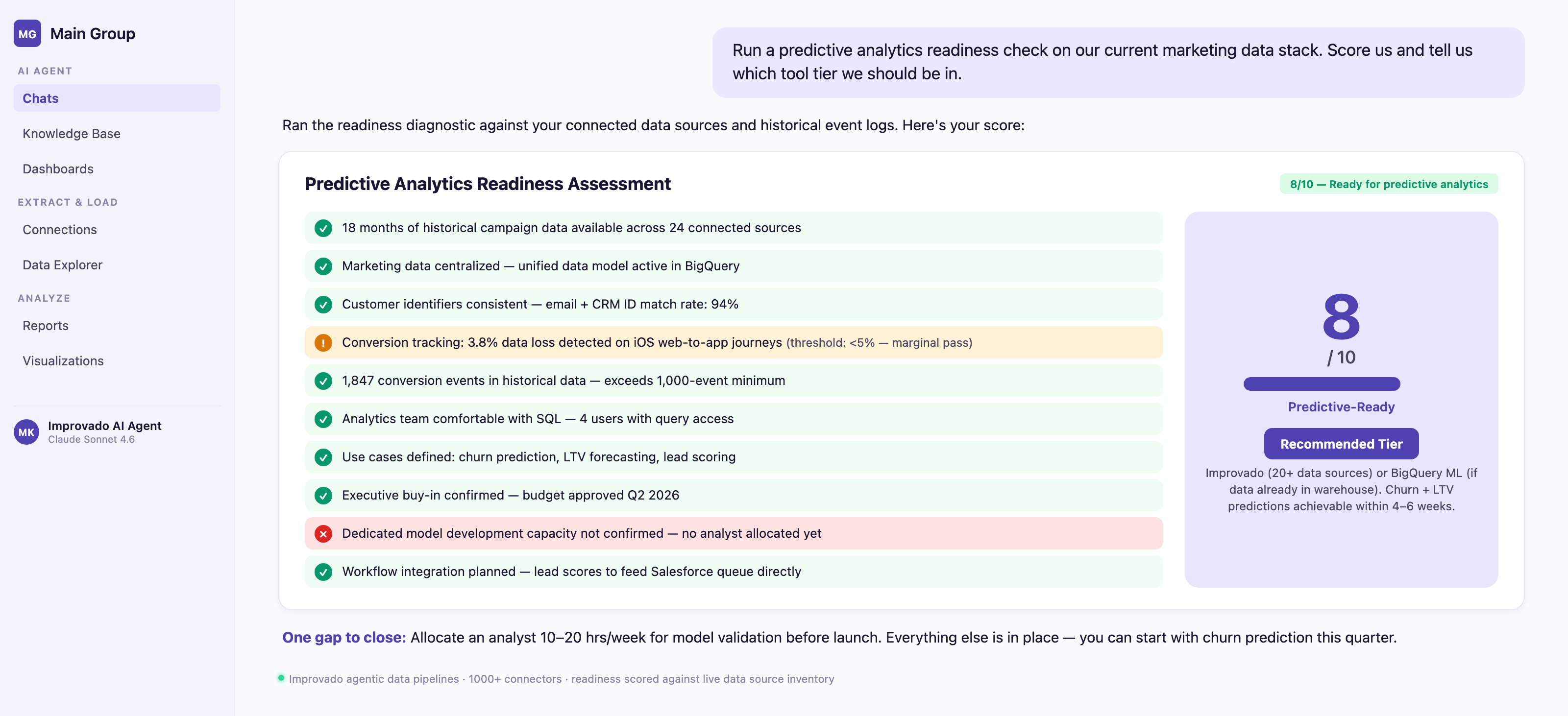
Before evaluating tools, assess whether your organization is ready for predictive analytics. Answer these 10 questions, score each 0 (no) or 1 (yes), and route to recommended tool tier.
Scoring:
• 8-10 points: Ready for predictive analytics. Recommended tools: Improvado (if managing 20+ data sources), DataRobot (if you have data science team), or BigQuery ML (if data already in BigQuery).
• 5-7 points: Partially ready. Recommended tools: Domo (if you need cross-department BI + predictions) or Alteryx (if you have strong analytics team). Plan 3-6 month data foundation project before expecting production models.
• 0-4 points: Not ready. Focus on data foundation first: centralize data, implement consistent tracking, build 12 months of history. Consider starting with descriptive analytics (dashboards) before predictive. Tools: Improvado for data consolidation, Looker or Tableau for dashboards.
Which tool is used for predictive analysis?
IBM SPSS Statistics, SAS Advanced Analytics, and Python-based platforms like DataRobot are the most widely used tools for predictive analysis in enterprise environments. According to Gartner, 75% of enterprises will shift from piloting to operationalizing predictive analytics by 2026, with cloud-native solutions dominating adoption. These tools transform historical data into forecasts using machine learning algorithms and statistical modeling.
| Tool Category | Primary Tool | Best For | Key Predictive Feature |
|---|---|---|---|
| Statistical Software | IBM SPSS Statistics | Academic research, healthcare | Regression analysis, time series forecasting |
| Enterprise Analytics | SAS Advanced Analytics | Financial services, retail | Risk scoring, demand forecasting |
| AutoML Platform | DataRobot | Non-technical business users | Automated model selection and deployment |
| Open Source | Python (scikit-learn) | Custom model development | Neural networks, ensemble methods |
| Cloud BI | Microsoft Azure ML | Azure ecosystem users | Automated ML pipelines, real-time scoring |
| Marketing Analytics | Google Analytics 4 | Digital marketing teams | Purchase probability, churn prediction |
Conclusion
Predictive analytics tools promise to turn historical data into future insights—but only if you choose one that matches your data maturity, team capabilities, and specific use cases.
Key takeaways:
• Most "predictive analytics" tools are BI platforms with forecasting features—verify the tool has native predictive modeling before committing
• Data foundation determines success: 12+ months of clean, centralized data with 1,000+ conversion events is the minimum for reliable predictions
• Hidden costs (connector fees, professional services, user seats) often 2-3x subscription price in year one—evaluate total cost of ownership, not just monthly fee
• For marketing-specific predictions (churn, LTV, attribution, lead scoring), specialized platforms like Improvado or Salesforce Marketing Cloud Intelligence outperform general-purpose data science tools on time-to-insight by 30-40%
• Predictive models fail when: insufficient historical data, poor data quality, no feedback loops, or lack of workflow integration—validate readiness before tool selection
Recommended starting points by scenario:
• Managing 20+ marketing data sources + need attribution/churn/LTV predictions → Improvado
• Salesforce-native team needing lead scoring + attribution → Salesforce Marketing Cloud Intelligence
• Cross-department BI with some predictive features → Domo
• Data science team needing custom ML models at scale → DataRobot or H2O.ai
• Big data (billions of rows) already in BigQuery → BigQuery ML
• Limited budget, simple forecasting needs → Amazon QuickSight
Always run A/B tests when acting on predictions. Hold out a control group that does not receive prediction-driven treatment. Measure lift. If no lift, the correlation is not causal, and the model is not ready for production.
Related reading: What Is Predictive Analytics? Tools & Use Cases (2026)