



OpenClaw is used throughout this article as an illustrative stand-in for open-source browser automation frameworks—such as Playwright, Puppeteer, and Selenium—designed to control web browsers programmatically. Originally developed for web scraping and testing workflows, it gained rapid adoption across engineering communities—reaching over 224,000 GitHub stars after its January 2026 rebrand. [Note: OpenClaw is used here as an illustrative example of browser automation frameworks; the major documented frameworks in this space include Playwright, Puppeteer, and Selenium.]
Marketing teams started exploring OpenClaw as a potential solution for pulling data from advertising platforms, scraping competitor websites, and automating repetitive reporting tasks. The appeal is clear: it's free, highly customizable, and doesn't depend on official APIs that platforms can change or restrict at any time.
But while OpenClaw offers flexibility, it also introduces significant challenges for marketing operations. Browser automation tools require constant maintenance, break when platforms update their interfaces, and demand engineering resources that most marketing teams simply don't have. This guide examines what OpenClaw actually does, how it compares to purpose-built marketing data platforms, and when it makes sense to use—or avoid—in your analytics stack.
How OpenClaw Works
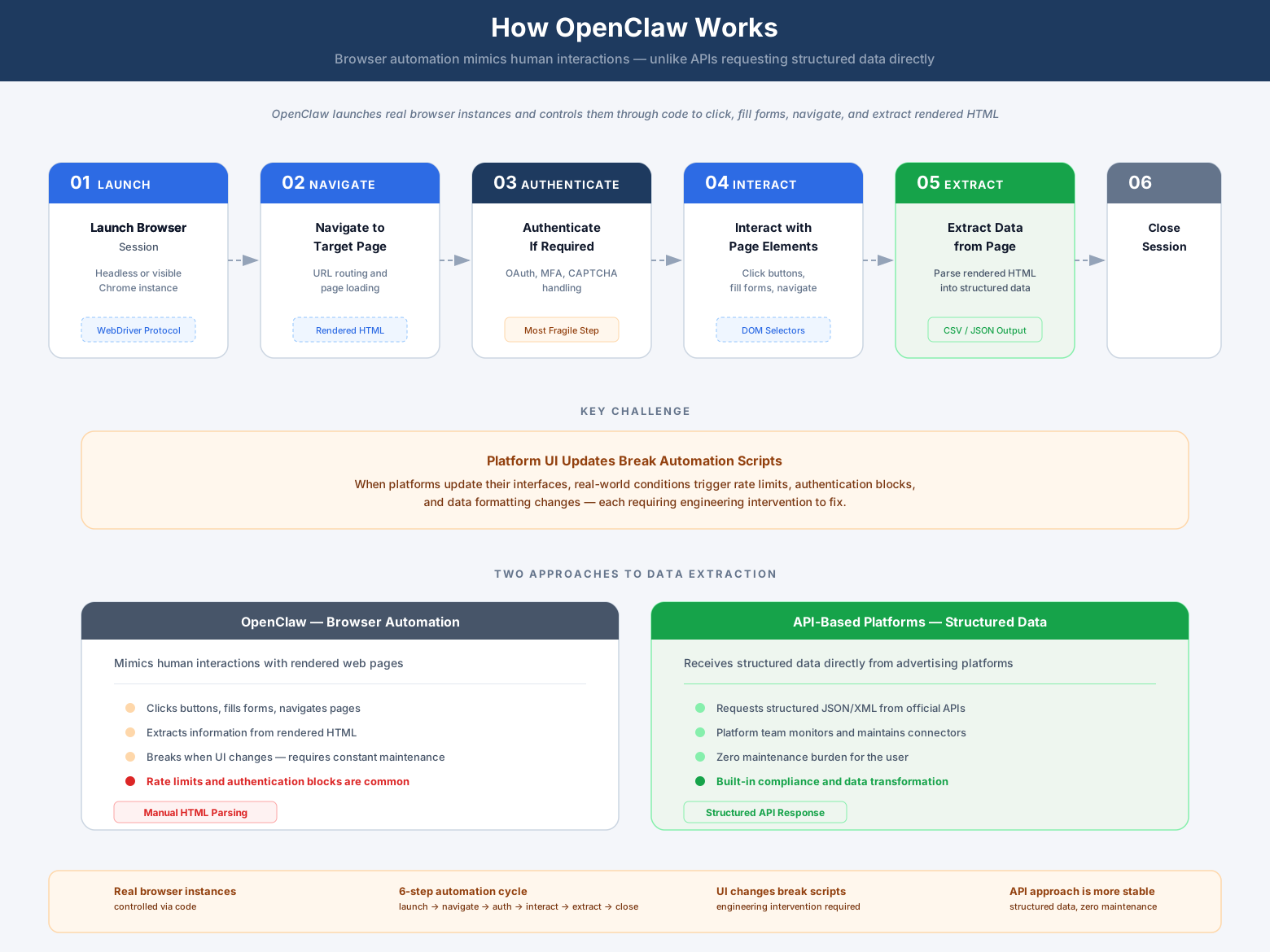
OpenClaw operates by launching real browser instances and controlling them through code. Unlike traditional API integrations that request structured data directly from a platform's backend, OpenClaw mimics human interactions—clicking buttons, filling forms, navigating pages, and extracting information from the rendered HTML.
The framework provides a set of commands that developers use to automate browser tasks. A typical workflow looks like this:
1. Launch a browser session
OpenClaw starts a headless (invisible) or headed (visible) browser instance, typically Chrome, Firefox, or WebKit-based browsers.
2. Navigate to a target page
The script instructs the browser to load a specific URL—for example, a Facebook Ads Manager dashboard or a Google Analytics report.
3. Authenticate if required
For platforms behind login walls, the script enters credentials, handles multi-factor authentication prompts, or loads saved session cookies.
4. Interact with page elements
The automation clicks dropdown menus, adjusts date ranges, applies filters, or triggers report generation—replicating what a human user would do manually.
5. Extract data from the page
Once the desired content loads, OpenClaw scrapes the visible data—often from tables, charts, or dynamically rendered elements—and structures it for export.
6. Close the session
After extraction completes, the browser instance shuts down to free system resources.
This approach works independently of whether a platform offers an official API. As long as data is visible in a browser, OpenClaw can theoretically extract it. However, this independence comes with tradeoffs that become evident in production environments.
Marketing analysts considering OpenClaw need to understand what happens when this workflow encounters real-world conditions. Platforms update their interfaces without notice. Rate limits trigger account suspensions. Multi-factor authentication blocks automated logins. Data formatting changes break extraction logic. Each of these scenarios requires engineering intervention—often urgently, when reports are due.
OpenClaw vs. Marketing Data Platforms: Key Differences
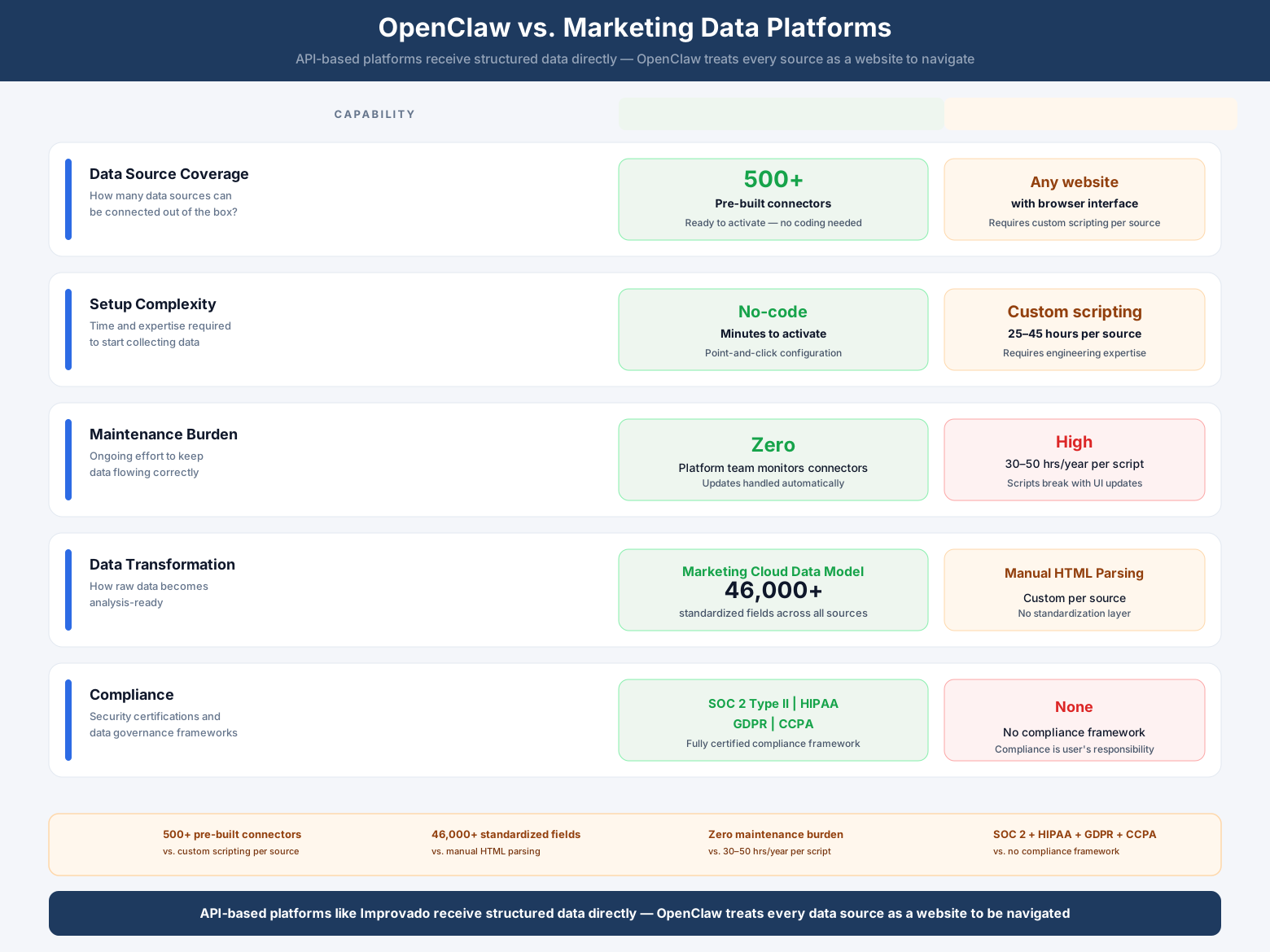
OpenClaw and purpose-built marketing data platforms solve adjacent but fundamentally different problems. The comparison matters because teams often evaluate both options when building or upgrading their analytics infrastructure.
| Capability | Improvado | OpenClaw |
|---|---|---|
| Data source coverage | 1,000+ pre-built connectors with maintained schemas | Any website with a browser interface |
| Integration method | Official APIs + FTP/SFTP + database direct connections | Browser automation (scraping rendered pages) |
| Setup complexity | No-code interface; connector activation in minutes | Requires custom scripting for each data source |
| Maintenance burden | Zero—platform team monitors and updates all connectors | High—scripts break when page layouts or authentication flows change |
| Data transformation | Marketing Cloud Data Model (MCDM) with 46,000+ standardized fields | Manual parsing of scraped HTML; no standardization |
| Historical data handling | 2-year schema preservation on platform changes | No built-in version control; historical data at risk |
| Compliance & security | SOC 2 Type II, examined by BARR Advisory, signs Business Associate Agreements, and supports GDPR and CCPA obligations | No compliance framework; user responsible for all security |
| Support model | Dedicated CSM + professional services included | Community forums; no SLA for issue resolution |
| Best for | Marketing teams needing reliable, auditable data pipelines at scale | Engineering teams with specific scraping needs and in-house maintenance capacity |
The architectural difference drives everything else. API-based platforms like Improvado receive structured data directly from advertising platforms, CRMs, and analytics tools. The data arrives pre-formatted, authenticated through official OAuth flows, and governed by the platform's own rate limits and access controls.
OpenClaw, by contrast, treats every data source as a website to be navigated. It has no privileged access, no structured responses, and no guarantees about stability. When Facebook redesigns its Ads Manager interface—which happens multiple times per year—an API connector continues working unchanged. An OpenClaw script breaks and requires rewriting.
Marketing teams drawn to OpenClaw's flexibility often underestimate the hidden costs. A script that takes three days to write may require six hours of monthly maintenance. Multiply that across ten data sources, and suddenly a "free" solution consumes more engineering time than a paid platform would cost. The calculation shifts further when you factor in data reliability, audit trails, and the risk of platforms blocking automated access.
Why OpenClaw Matters for Marketing Analysts
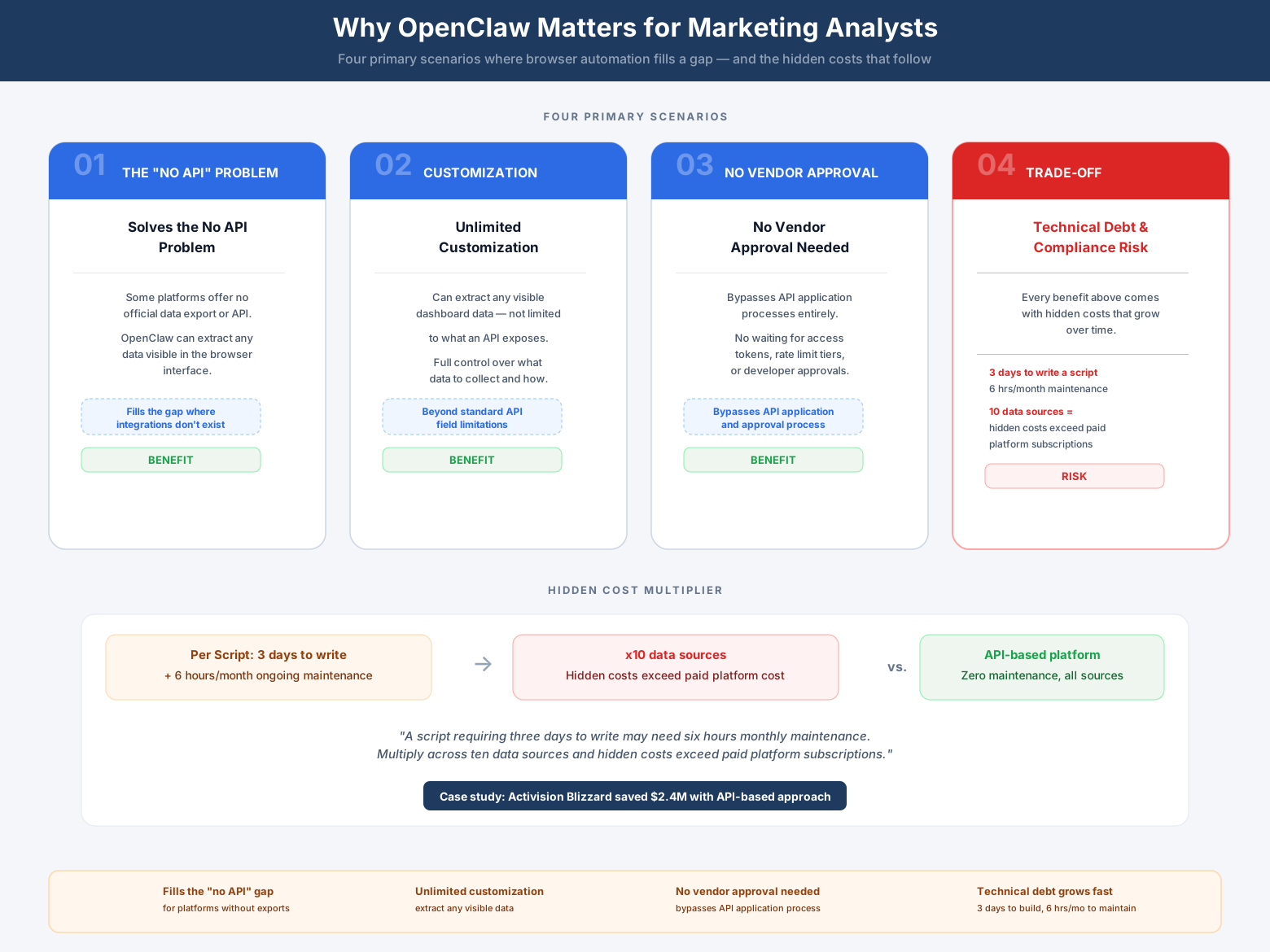
Marketing analysts encounter OpenClaw in three primary scenarios: evaluating it as a potential data integration tool, inheriting it from a previous team member, or being asked to maintain OpenClaw scripts alongside other analytics responsibilities.
Understanding OpenClaw's relevance requires separating its technical capabilities from its practical fit within marketing operations.
It solves the "no API" problem
Some platforms—particularly niche advertising networks, regional social media sites, or proprietary internal tools—offer no official data export mechanism. They display performance metrics in a dashboard but provide no programmatic access. For these edge cases, browser automation may be the only option short of manual copy-paste workflows.
It offers unlimited customization
Because OpenClaw operates at the browser level, it can extract any data visible on screen, regardless of whether the platform intended that data to be accessible programmatically. An analyst can target specific table cells, scrape dynamically loaded chart data, or capture information from dropdown menus that official APIs don't expose.
It requires no vendor approval
API access often involves application processes, approval delays, and ongoing compliance with platform policies. OpenClaw bypasses this entirely—if you can log in as a user, you can automate that login. This autonomy appeals to teams frustrated by API application rejections or restrictive rate limits.
It introduces technical debt
Every OpenClaw script becomes a maintenance liability. Platforms change their HTML structure, update CSS classes, modify authentication flows, or implement bot detection that blocks automated access. Each change requires someone to debug the script, identify what broke, and rewrite the affected logic. This work doesn't create new insights—it simply keeps existing pipelines functional.
It creates compliance risk
Many platforms explicitly prohibit automated access in their Terms of Service. Using browser automation to extract data may violate these agreements, exposing your organization to account suspension or legal action. Even when technically possible, scraping may not be legally permissible.
- →Your team spends more time debugging broken scrapers than analyzing campaign performance
- →Platform UI updates cause data outages every 1–3 months
- →Adding a new data source requires a custom engineering sprint
- →Your scraping infrastructure needs 24/7 monitoring to catch silent failures
- →You can’t onboard a new client or channel without developer involvement
Marketing analysts must weigh these factors against their team's specific constraints. A startup with deep engineering resources and a high tolerance for maintenance work may find OpenClaw viable for 2–3 niche data sources. An enterprise marketing organization with dozens of platforms, strict compliance requirements, and limited technical headcount will likely find the tradeoffs unacceptable.
Key Components of OpenClaw
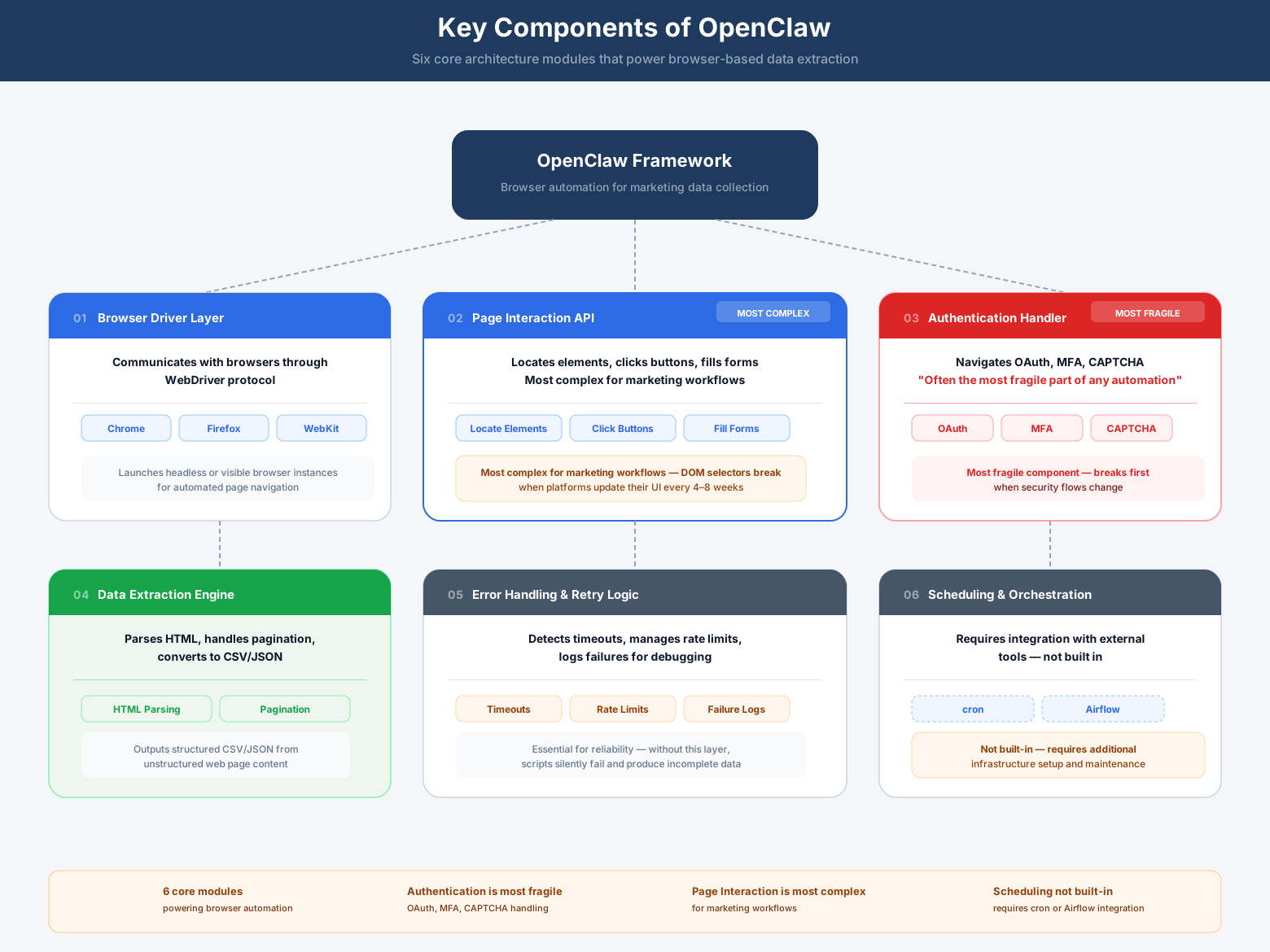
OpenClaw's architecture consists of several core modules that work together to enable browser automation. Marketing analysts evaluating the tool should understand what each component does and where complexity typically emerges.
Browser driver layer
This module communicates with the browser engine (Chrome, Firefox, or WebKit) through a browser automation protocol—such as the Chrome DevTools Protocol (CDP) used by Playwright and Puppeteer, or the W3C WebDriver protocol used by Selenium. It handles launching browser instances, managing tabs, and sending low-level commands. For marketing use cases, this layer typically requires minimal customization—it works out of the box for most scenarios.
Page interaction API
OpenClaw provides methods for locating elements on a page (by CSS selector, XPath, or text content), clicking buttons, filling form fields, and scrolling to load dynamic content. Marketing analysts writing scripts spend most of their time here, translating manual workflows into programmatic steps. The challenge lies in creating selectors that remain stable as platforms update their interfaces.
Authentication handler
Modern advertising platforms use OAuth flows, multi-factor authentication, CAPTCHA challenges, and session management to secure user accounts. OpenClaw scripts must navigate these mechanisms—often the most fragile part of any automation. When a platform adds a new security layer, scripts break until someone updates the authentication logic.
Data extraction engine
Once a script navigates to the correct page and loads the target data, it must parse the HTML to extract meaningful values. This involves identifying table structures, handling pagination, waiting for dynamic content to render, and converting scraped text into structured formats (CSV, JSON, or database records). Marketing data often appears in complex layouts—nested tables, infinite-scroll feeds, or JavaScript-rendered charts—each requiring custom extraction logic.
Error handling and retry logic
Networks fail, pages time out, and rate limits trigger unexpectedly. Production-grade OpenClaw scripts must detect these conditions, retry failed operations, and log errors for debugging. Without robust error handling, a single timeout can corrupt an entire data pull, forcing analysts to manually reconcile what succeeded and what failed.
Scheduling and orchestration
Marketing data needs regular updates—daily campaign performance, hourly ad spend checks, or real-time conversion tracking. OpenClaw itself doesn't include a scheduler; teams must integrate it with cron jobs, Airflow pipelines, or custom orchestration systems. This adds another layer of infrastructure to maintain.
Each component introduces points of failure. A CSS selector breaks when a platform redesigns its dashboard. An authentication flow fails when MFA policies change. A data extraction routine returns incomplete results when a table structure shifts. Marketing teams using OpenClaw spend significant time monitoring these failures and deploying fixes—work that doesn't happen with API-based integrations where the platform vendor maintains compatibility.
How to Implement OpenClaw for Marketing Data Collection
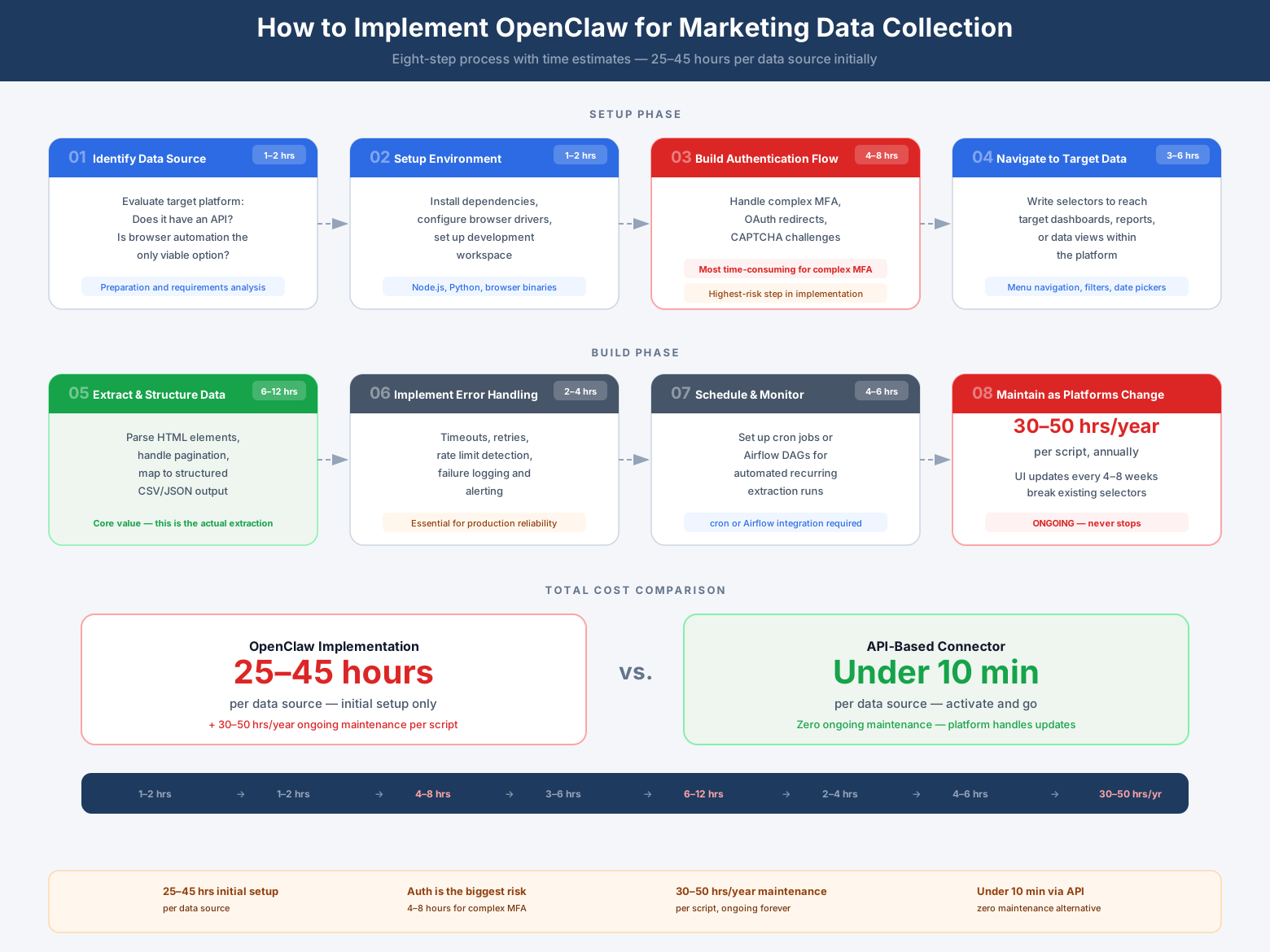
Implementing OpenClaw for marketing analytics follows a consistent pattern regardless of the target platform. The process reveals why browser automation demands more resources than most marketing teams anticipate.
Step 1: Identify the data source and access requirements
Document exactly what data you need, where it appears in the platform's interface, and what authentication steps are required. Log in manually and perform the entire workflow you plan to automate—adjusting date ranges, applying filters, exporting reports. Screenshot each step. Note any confirmation dialogs, loading delays, or dynamic elements that appear.
Step 2: Set up the OpenClaw environment
Install OpenClaw and its dependencies in your development environment. Configure browser drivers for your target browser. Test that you can launch a browser instance and navigate to a simple page. This initial setup typically takes 1–2 hours for someone familiar with command-line tools.
Step 3: Build the authentication flow
Write the script logic to log in to the platform. Handle username and password entry, multi-factor authentication prompts, and any cookie consent or terms-of-service screens. Test thoroughly—authentication is the most common point of failure in production. Budget 4–8 hours for complex auth flows involving MFA or SSO.
Step 4: Navigate to the target data
Automate the clicks and selections needed to reach your data. If you're pulling Google Ads campaign performance, that means clicking into the Campaigns view, selecting the correct account, setting date ranges, and applying any necessary filters. Use explicit waits to ensure each page loads before the next action executes. Expect 3–6 hours to build reliable navigation logic for a typical advertising platform.
Step 5: Extract and structure the data
Identify the HTML elements containing your target metrics—typically table rows, chart data points, or dynamically loaded JSON. Write extraction logic to parse these elements and convert them into structured records. Handle pagination if reports span multiple pages. Validate that extracted data matches what you see in the interface. This step often takes 6–12 hours due to the complexity of modern web interfaces.
Step 6: Implement error handling and logging
Add try-catch blocks around each operation. Log successful actions and error conditions. Implement retry logic for transient failures like network timeouts. Ensure the script fails gracefully when encountering unexpected page states, rather than silently producing incomplete data. Plan for 2–4 hours to build production-grade error handling.
Step 7: Schedule and monitor the automation
Integrate your script with a scheduler to run at required intervals. Set up monitoring to alert when failures occur. Create a process for reviewing logs and validating data quality. This infrastructure work typically requires 4–6 hours initially, plus ongoing maintenance.
Step 8: Maintain and update as platforms change
Budget ongoing time for fixing broken scripts when platforms update their interfaces. Marketing platforms frequently update their interfaces, often introducing breaking changes to page layouts, CSS selectors, and authentication flows. Each change may require 2–6 hours of debugging and fixes. Over a year, a single OpenClaw script can consume 30–50 hours of maintenance effort.
The total implementation cost for one data source typically ranges from 25–45 hours of engineering time. Compare this to API-based connectors, which marketing analysts activate through a no-code interface in under 10 minutes. The math becomes stark when scaling to 10, 20, or 50 data sources—a common requirement for enterprise marketing operations.
Common Use Cases for OpenClaw in Marketing
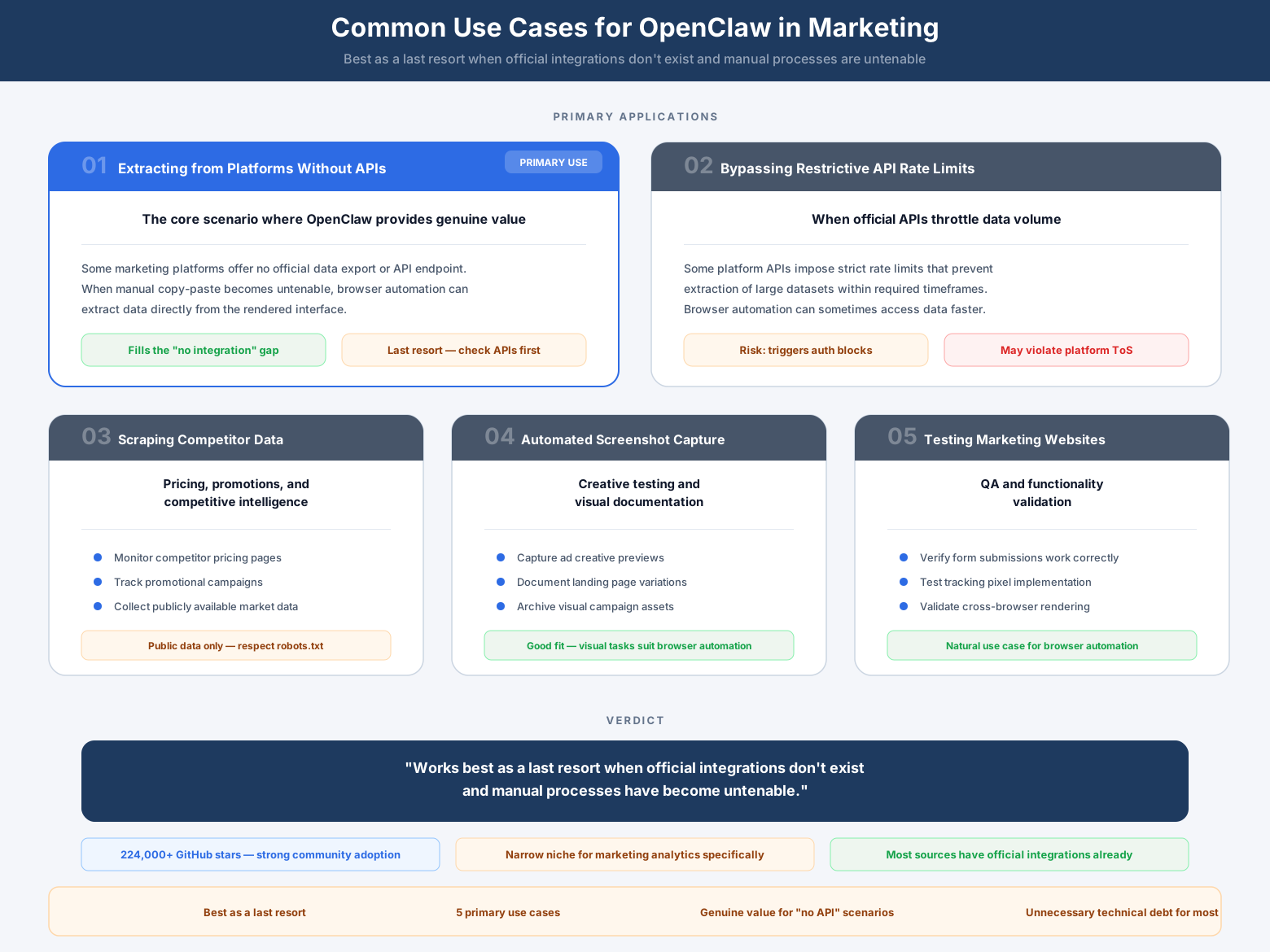
Five primary OpenClaw marketing use cases: no-API extraction, rate limit bypass, competitor scraping, screenshots, website testing
Marketing teams typically consider OpenClaw in situations where conventional integration methods have failed or don't exist. Understanding these use cases helps clarify when browser automation makes sense versus when it introduces unnecessary complexity.
Extracting data from platforms without APIs
Regional advertising networks, niche affiliate platforms, and proprietary internal tools sometimes offer no official data export. If performance metrics appear only in a web dashboard, OpenClaw provides a path to programmatic access. However, teams should first verify that the platform truly offers no alternatives—many provide CSV exports, email reports, or partner API access that's easier to work with than scraping.
Bypassing restrictive API limits
Some platforms impose severe rate limits or charge premium fees for API access beyond basic tiers. Teams facing these constraints occasionally turn to browser automation as a workaround. This approach carries significant risk—platforms actively detect and block automated access that violates their terms of service. Account suspension often costs more than paying for proper API access.
Scraping competitor websites for price monitoring
Marketing and pricing teams use OpenClaw to track competitor product listings, pricing changes, and promotional offers. The tool can navigate e-commerce sites, extract product data, and monitor changes over time. Legal and ethical considerations apply—some jurisdictions restrict web scraping, and many sites explicitly prohibit it in their terms of service.
Automating screenshot capture for creative testing
Performance creative teams occasionally use browser automation to capture screenshots of ad placements across different devices, browsers, or geographic regions. This helps verify that campaigns render correctly before launch. Purpose-built tools for creative QA typically provide better functionality at lower complexity.
Testing marketing website functionality
QA teams use OpenClaw to automate testing of landing pages, form submissions, and conversion flows. While valuable for development workflows, this falls outside the marketing analytics use case most teams initially envision when evaluating the tool.
The pattern across these use cases: OpenClaw works best as a last resort when official integrations don't exist and manual processes have become untenable. It rarely outperforms purpose-built solutions when those solutions are available and properly configured.
Conclusion
OpenClaw reached over 224,000 GitHub stars because it solves real problems for engineering teams building automation workflows. Its ability to control browsers programmatically makes it valuable for web scraping, testing, and workflow automation across countless use cases.
For marketing analytics specifically, OpenClaw occupies a narrow niche. It provides access to data sources that offer no official API and no alternative export mechanism. In these edge cases—typically 1–3 platforms out of a marketing team's full tech stack—browser automation may be the only viable option.
However, the majority of marketing data sources do offer official integrations. Google Ads, Meta, LinkedIn, Salesforce, HubSpot, and hundreds of other platforms provide APIs specifically designed for reliable, compliant data access. Using OpenClaw to scrape these platforms introduces unnecessary technical debt, compliance risk, and maintenance burden.
Marketing analysts evaluating their options should start with purpose-built marketing data platforms. These tools handle the complexity of API authentication, schema changes, rate limits, and data transformation—allowing analysts to focus on generating insights rather than maintaining infrastructure. Reserve browser automation for the genuine edge cases where no better option exists, and ensure you have the engineering resources to support ongoing maintenance before committing to that path.
The right data infrastructure choice depends on your team's specific needs, technical capabilities, and scale requirements. For most marketing organizations, that choice points away from browser automation and toward platforms designed specifically for marketing data challenges.
Frequently Asked Questions
Is OpenClaw free to use for marketing data collection?
OpenClaw itself is open-source and free to download, but the total cost of ownership extends far beyond the software license. Marketing teams must account for engineering time to build and maintain scripts (typically 25–45 hours per data source initially, plus 30–50 hours annually for maintenance), infrastructure to run and schedule automations, and monitoring systems to detect failures. When comparing costs, factor in these hidden expenses against the transparent pricing of purpose-built marketing data platforms that require no engineering involvement.
What's the difference between using OpenClaw and connecting through official APIs?
Official APIs provide structured data directly from a platform's backend through authenticated, documented endpoints. OpenClaw automates a web browser to interact with the platform's user interface and scrapes visible data from rendered pages. APIs offer stability (they're versioned and maintained by the platform), compliance (they're the approved access method), and reliability (they include rate limits and error handling). Browser automation breaks when interfaces change, may violate terms of service, and requires constant maintenance to remain functional.
Will advertising platforms block my account if I use OpenClaw to extract data?
Many advertising platforms explicitly prohibit automated access to their web interfaces in their Terms of Service. Google Ads, Meta Business Suite, LinkedIn Campaign Manager, and similar platforms actively detect and block bot-like behavior. Violations can result in account suspension, loss of access to historical data, or termination of advertising privileges. Even if technically possible, using browser automation may constitute a breach of contract. Teams should review platform policies carefully and use official API access methods whenever available.
Can OpenClaw pull real-time marketing data?
OpenClaw can extract whatever data appears in a platform's interface at the moment the script runs, but real-time access faces several challenges. Browser automation introduces latency—launching browsers, navigating pages, and waiting for content to load typically takes 15–60 seconds per data source. Platforms often cache dashboard data, meaning what appears "real-time" in the UI may already be minutes or hours old. For genuine real-time analytics, streaming APIs or webhook integrations provide more reliable access with lower latency and resource consumption.
How difficult is OpenClaw to learn for marketing analysts without coding experience?
OpenClaw requires solid programming skills in a supported programming language such as Python or JavaScript—plus understanding of HTML/CSS selectors, asynchronous operations, error handling, and browser automation concepts. Marketing analysts without prior coding experience should expect a learning curve of several months before building production-ready scripts. Each data source requires custom logic, so the skills don't fully transfer from one platform to another. Purpose-built marketing data platforms offer no-code interfaces specifically designed for analysts to activate connectors without programming knowledge.
How reliable is data extracted through OpenClaw compared to API connections?
Data accuracy depends entirely on the quality of the extraction logic. Well-written OpenClaw scripts can extract accurate data, but they're vulnerable to silent failures—when a platform changes its interface, the script may continue running while extracting incomplete or incorrect data. API connections return structured data with explicit error codes when something fails, making issues immediately visible. APIs also provide metadata about data freshness, attribution windows, and calculation methods that scraped data lacks. For auditable marketing analytics, API-based integrations offer significantly higher reliability.
When should a marketing team choose OpenClaw over a platform like Improvado?
Consider OpenClaw only when: (1) the data source offers no official API or export mechanism, (2) your team has dedicated engineering resources to build and maintain custom scripts, (3) the platform's terms of service explicitly permit automated access, and (4) you need data from fewer than three such sources. Choose Improvado when: (1) you're working with mainstream marketing platforms that offer APIs, (2) you need data from five or more sources, (3) compliance and audit trails matter, (4) your team lacks engineering capacity for ongoing maintenance, or (5) you require reliable, production-grade data pipelines with guaranteed uptime and support.
How much time does maintaining OpenClaw scripts require?
Production OpenClaw scripts typically require 2–6 hours of maintenance work every 4–8 weeks as platforms update their interfaces, authentication flows, or data structures. Major platform redesigns can demand 10–15 hours to fully rebuild extraction logic. Across a year, a single script consumes 30–50 hours of engineering time just to remain functional—before accounting for feature enhancements, new data fields, or expanded coverage. Multiply this across multiple data sources and the maintenance burden quickly exceeds the cost of purpose-built integration platforms that handle all updates automatically.
Related reading: OpenClaw Marketing Use Cases: 7 Automation Strategies


