.jpeg)

Key Takeaways
- B2B attribution is fundamentally broken — buying committees of 6-10 people and 9-12 month sales cycles exceed LinkedIn's 180-day attribution window
- Lead Gen Form data extraction is fragile — 2-5x higher conversion rates but data sync relies on webhooks that fail silently
- ROI measurement requires joining LinkedIn spend data with CRM pipeline data — there's no native way to calculate cost-per-SQL or cost-per-opportunity
- Company-level targeting data doesn't flow to analytics, making it impossible to measure account-based performance
- Conversion tracking systematically undercounts — CAPI delivers 20% lower CPA and 31% higher attributed conversions vs. pixel alone
- AI agents via MCP can join LinkedIn Ads data with your CRM for true B2B attribution at the account level

1. B2B Attribution Is Fundamentally Broken at the Lead Level
The Problem: A VP of Marketing sees your LinkedIn sponsored content on Monday. Two weeks later, a Director of Data on the same buying committee downloads your whitepaper through a Lead Gen Form. Three months later, the CFO signs the contract after a demo sourced through a Google search. LinkedIn claims credit for the lead. Google claims credit for the conversion. Neither tells you the full story.
Modern B2B buying committees average 6-10 people, with sales cycles that often extend beyond 200 days. Lead-level attribution — which is all LinkedIn natively provides — is fundamentally insufficient for B2B.
Common causes:
- Individual vs account-level tracking — LinkedIn tracks engagement at the individual level, but B2B purchase decisions happen at the account level across multiple stakeholders
- Long sales cycle decay — LinkedIn's maximum attribution window is 180 days for conversions, but many enterprise B2B deals take 9-12 months to close, meaning LinkedIn loses track before the deal is done
- Offline conversion gaps — Many B2B conversions happen offline (phone calls, in-person meetings, contract negotiations) and are never attributed back to LinkedIn
- Self-reported attribution conflicts — "How did you hear about us?" surveys frequently conflict with platform-reported attribution, creating confusion about LinkedIn's true impact

"Privacy restrictions and the impending phase-out of third-party cookies are posing obstacles to tracking, attributing, and optimizing conversions."
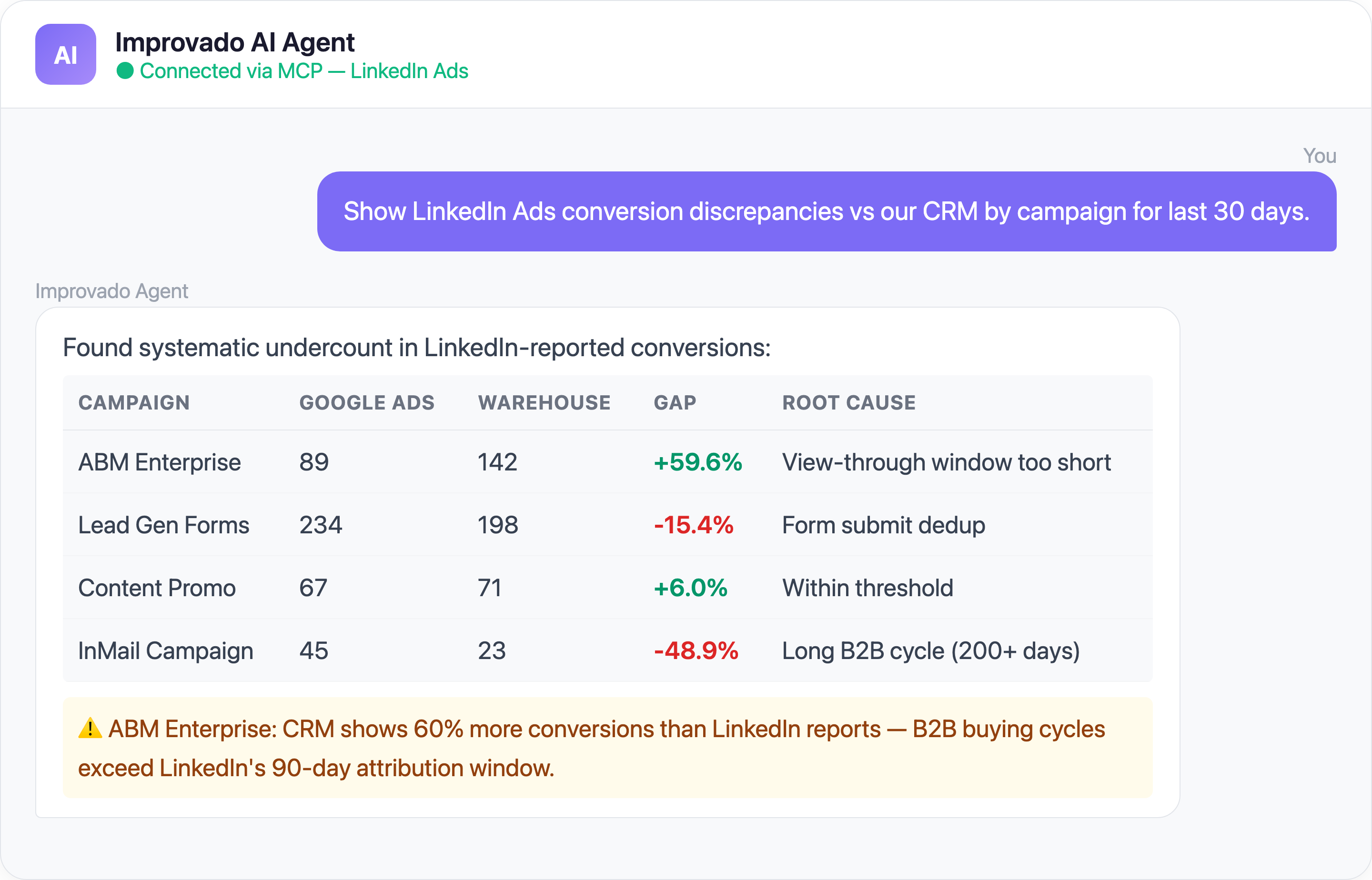
Time saved: B2B marketing teams report reducing attribution analysis from a week-long quarterly project to an always-on dashboard.
2. Lead Gen Form Data Extraction Is Fragile and Lossy
The Problem: LinkedIn Lead Gen Forms are one of the platform's most powerful features — pre-filled forms that convert at 2-5x the rate of landing page forms. But getting that lead data into your CRM reliably is where things fall apart.
Common causes:
- Field mapping mismatches — LinkedIn's pre-filled fields (company name, job title, seniority) don't always map cleanly to CRM fields, causing data loss or corruption on sync
- API rate limits and dropped leads — Permission errors, network hiccups, and API limits can delay or drop leads entirely, with no native retry mechanism
- Hidden field limitations — LinkedIn only recently (late 2025) added dynamic URL tracking parameters to Lead Gen Forms, and many teams still run forms without proper UTM tracking
- Lead quality gaps — Pre-filled data can be stale (someone changed jobs but LinkedIn profile isn't updated), leading to wasted sales follow-ups
- No native real-time sync — LinkedIn's Lead Sync API consolidates Ads and Events Lead Sync into one API, but there's still latency between form submission and CRM delivery
| LinkedIn Ads Metric | What LinkedIn Reports | What You Actually Need |
|---|---|---|
| Conversions | 90-day click, 7-day view | Consistent window across platforms |
| Engagement Rate | Clicks + social actions / impressions | Landing page clicks only / impressions |
| Cost per Lead | Based on LinkedIn-attributed leads | Based on CRM-verified leads |
| Audience Size | Estimated reach | Actual matched accounts |
3. Lead Gen ROI Measurement Is Nearly Impossible Without External Data
The Problem: LinkedIn Lead Gen Forms capture leads efficiently, but measuring the actual return on that spend requires connecting LinkedIn data to downstream revenue — and LinkedIn provides almost none of the tools you need to do this.
You know how many leads a form generated and the cost per lead. But which of those leads became SQLs? Which closed? What was the average deal size? What was the true CAC for LinkedIn-sourced revenue? LinkedIn can't tell you any of this.
Key measurement gaps:
- No revenue attribution — LinkedIn reports cost-per-lead but has no visibility into deal outcomes, making ROI calculation impossible within the platform
- Lead quality variance by form — Different Lead Gen Forms attract different quality leads, but without CRM-connected analysis, you can't distinguish a $500 CPL that generates $200K deals from a $50 CPL that generates nothing
- Time-to-close blindness — LinkedIn shows you when the lead was captured, but the 3-9 month journey from lead to closed deal happens entirely outside LinkedIn's visibility
- Multi-form attribution — The same person may submit multiple Lead Gen Forms across campaigns before converting; LinkedIn counts each as a separate lead, inflating lead counts and distorting per-form ROI
4. Company-Level Targeting Data Doesn't Flow to Analytics
The Problem: LinkedIn's biggest differentiator is company-level targeting — you can reach specific companies by name, industry, size, and technographic attributes. But the performance data you get back from LinkedIn is aggregated by campaign, not by company. You know which campaigns performed well, but not which target companies engaged.
The recently launched Company Intelligence API is starting to change this, but adoption is early and the data is limited.
Common causes:
- Creative ID confusion — Teams frequently can't find creative-level identifiers in their data exports, even when the fields are technically present under non-obvious column names. A common support pattern: analysts request creative IDs only to discover the field was already in their data table all along — just not where they expected it
- Campaign-level aggregation — LinkedIn's Ad Analytics API reports metrics at the campaign, creative, or demographic level — never at the individual company level for targeting audiences
- Company Intelligence API is new — LinkedIn's Company Intelligence API (launched 2025) surfaces company-level engagement scores, but it's only available through select partners and lacks granular conversion data
- ABM measurement gaps — Account-Based Marketing campaigns require company-level pipeline correlation, but LinkedIn's native reporting doesn't connect ad engagement to specific accounts in your CRM
- Matched Audiences opacity — When you upload an account list for targeting, LinkedIn tells you the match rate but not which specific companies matched or engaged
5. Conversion Tracking Has Systematic Limitations
The Problem: LinkedIn's Insight Tag (their conversion pixel) and Conversions API are supposed to give you accurate conversion data. In practice, B2B conversion tracking on LinkedIn has fundamental limitations that cause systematic undercounting or miscounting.
Key tracking challenges:
- Insight Tag reliability — LinkedIn's JavaScript pixel is blocked by ad blockers, corporate firewalls, and browser privacy settings at higher rates than other platforms because LinkedIn's tracking domain is widely blocklisted
- Conversions API complexity — LinkedIn's server-side Conversions API (CAPI) requires significant dev resources to implement and maintain, and teams report 20% lower CPA and 31% higher attributed conversions after implementation — meaning the pixel alone massively undercounts
- Conversion event mismatch — B2B conversion events (demo requests, free trial signups, SQL qualification) are custom and don't map to LinkedIn's pre-built event types, requiring careful custom event configuration
- Cross-device tracking loss — LinkedIn users frequently browse on mobile during commutes but convert on desktop at work; LinkedIn's cross-device matching is less robust than Google's or Meta's
6. API Migration and Versioning Creates Integration Instability
The Problem: LinkedIn's Marketing API has gone through multiple major versions over the past few years, and the migration path is rarely smooth. Endpoints get deprecated, field names change, and new authentication requirements break existing integrations without warning.
Real-world API challenges:
- Versioned API with aggressive deprecation — LinkedIn versions their API (e.g., 2025-01, 2025-10, 2026-01) and deprecates old versions on a rolling basis, requiring constant updates
- Lead Sync API consolidation — In 2025, LinkedIn merged the Ads Lead Sync API and Events Lead Sync API into a single API, breaking integrations built on the old endpoints
- Permission scope changes — OAuth permission scopes evolve with each version; integrations may silently lose access to data if scopes aren't updated during re-authentication
- Silent auth failures — OAuth tokens expire without notification, and the connector simply stops pulling data until someone manually re-authenticates
- Rate limit inconsistencies — Different API endpoints have different rate limits, and LinkedIn's documentation doesn't always reflect the actual enforced limits
Silent auth failures are particularly dangerous because they don't trigger errors — the data simply stops updating. Teams often discover the issue days or weeks later when a dashboard shows unexpectedly flat metrics.
7. Campaign Manager Data Doesn't Match Third-Party Tools
The Problem: You pull a LinkedIn Campaign Manager report showing 85 conversions and $4,200 spend. Your BI tool says 72 conversions and $4,187 spend. Your CRM shows 61 qualified leads from LinkedIn. Three different numbers, three different stories, and no easy way to reconcile.
This is the reality: LinkedIn data discrepancies are systemic, not isolated. When teams find one metric that doesn't match, investigation typically reveals the problem extends across impressions, clicks, spend, and conversions. Multiple Critical-priority engineering tickets have been filed for LinkedIn campaign-level spend mismatches alone — this is not an edge case, it's a pattern.
Common causes:
- Attribution model differences — LinkedIn uses last-touch attribution by default; your CRM may use first-touch or multi-touch, creating systematic conversion count discrepancies
- Currency and timezone misalignment — LinkedIn Campaign Manager reports in the account's currency and timezone, which may differ from your warehouse settings
- Data freshness variation — LinkedIn conversion data can take up to 48 hours to finalize; pulling reports too early captures incomplete data
- Duplicate conversion counting — Without proper deduplication, the same lead can be counted as multiple conversions if they interact with multiple campaigns
Time saved: From 15+ hours/week of reconciliation to under 15 minutes with automated cross-platform validation.
Solve LinkedIn Ads Data Challenges with Improvado MCP
Beyond traditional data pipelines, you can now interact with your LinkedIn Ads data using AI agents through Improvado's MCP (Model Context Protocol) server. Here are ready-to-use prompts:
Ready-to-Use MCP Prompts
Account-Based Attribution:
Show me LinkedIn Ads engagement by target account for Q1 2026.
Cross-reference with CRM pipeline stage to show which accounts progressed after LinkedIn touches.
Lead Gen Form Performance:
Compare LinkedIn Lead Gen Form conversion rates against landing page
conversion rates for the same campaigns. Which forms have the highest
cost per qualified lead?
Cross-Platform B2B Comparison:
Compare LinkedIn Ads vs Google Ads vs Meta Ads for B2B lead generation
this quarter. Show CPL, lead-to-SQL rate, and cost per SQL by channel.
How to Connect LinkedIn Ads Data to AI Agents
Step 1: Get your Improvado MCP credentials
Improvado provides an MCP-compatible endpoint for enterprise customers. Once onboarded, you receive:
- MCP endpoint URL — your dedicated server address
- API token — scoped to your workspace and data sources
Step 2: Connect to Claude Code, Cursor, or ChatGPT
Add the Improvado MCP server to your config:
{
  "improvado": {
    "type": "streamable-http",
    "url": "https://mcp.improvado.io/v1/your-workspace",
    "headers": {
      "Authorization": "Bearer your-api-token"
    }
  }
}
Then ask in Claude Code:
> Show me my top LinkedIn campaigns by cost per qualified lead this month
Step 3: Or connect to Cursor / Windsurf / ChatGPT
FAQ
Why does LinkedIn show different conversion numbers than my CRM?
LinkedIn uses last-touch attribution with a configurable lookback window (up to 180 days). Your CRM likely uses a different attribution model and may qualify conversions differently (e.g., only counting leads that pass a scoring threshold). Insight Tag blocking by corporate firewalls also creates systematic undercounting on LinkedIn's side.
Should I implement LinkedIn's Conversions API?
Yes. Teams implementing LinkedIn's server-side Conversions API report a 20% reduction in CPA and 31% more attributed conversions compared to pixel-only setups. The implementation requires engineering resources, but the data quality improvement is substantial for B2B campaigns with high-value conversions.
Can I get company-level performance data from LinkedIn Ads?
LinkedIn's Campaign Manager doesn't natively report at the company level. However, the new Company Intelligence API (launched 2025) provides engagement scores and aggregate metrics by company. Combining this with your CRM data through Improvado enables full account-based attribution.
How does Improvado handle LinkedIn API version changes?
Improvado maintains 1,400+ pre-built connectors with engineering teams monitoring every API change. When LinkedIn releases a new API version or deprecates endpoints, the connector is updated proactively — you experience zero downtime and zero code changes.
What's the difference between Improvado MCP and LinkedIn's native reporting?
LinkedIn Campaign Manager provides platform-specific metrics in isolation. Improvado's MCP endpoint combines LinkedIn data with all your other marketing channels and CRM data — you ask questions in plain English and get cross-platform answers. No API knowledge or manual exports needed.
Ready to stop wrestling with LinkedIn Ads data? Get your demo →
Related reading: Amazon Ads Data Challenges: 2026 Guide