

.jpeg)

It is Monday morning. GA4 says Google paid search drove 3,710 conversions last week. Google Ads says 4,200. The warehouse dashboard says 3,950. The CMO asks which is right. The Director of Marketing Analytics, who spent the weekend reconciling pacing across 340 sub-accounts in a spreadsheet that should have been automated two quarters ago, does not have a clean answer.
The discrepancy is not a bug. It is the product of three measurement systems stacked on the same raw events — Google Ads attribution, GA4 session-based deduplication, and an ungoverned warehouse layer — each making different choices about lookback windows, modeled conversions, and consent-mode fill-in. Performance Max hides channel-level attribution by design. Offline conversion import via GCLID silently drops 18–30% of records to case sensitivity and timing. Agencies running 20+ MCCs live the same reconciliation problem with client_id added as a fourth dimension.
This guide walks the ten Google Ads data problems that surface every week in enterprise analytics and agency operations — and the governance pattern that resolves each one.
Why Google Ads Data Is Harder Than It Looks for Enterprise Teams
At enterprise scale, Google Ads is not one ad platform — it is a federation of six campaign types (Search, Display, Video, Shopping, Performance Max, Demand Gen) that share an API surface but report data with different schemas, different attribution behaviors, and different freshness windows. A Director of Marketing Analytics at a Fortune 500 retailer is not pulling "Google Ads data." They are reconciling Search Terms reports (with sampling), Shopping feed performance (with inventory joins), PMAX asset-group metrics (with gaps), YouTube Video views (via a separate reporting endpoint), plus cross-account MCC hierarchy changes that happen weekly.
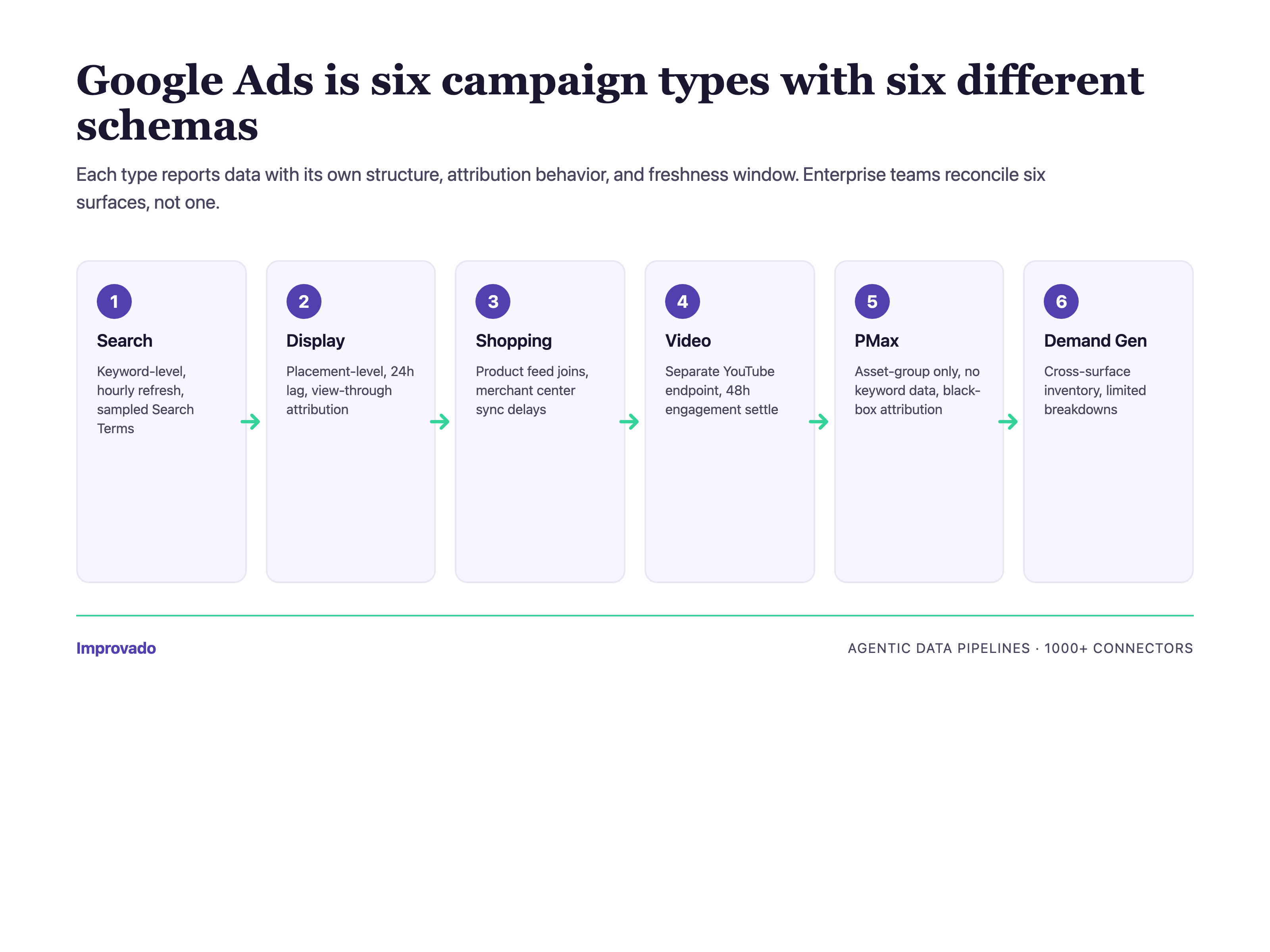
Add Enterprise B2C realities — $100K+/month spend concentrated in 10–50 sub-accounts, multi-country currency conversion, localized naming conventions, billing consolidation for finance teams, and consent-mode signal fragmentation — and the surface area exceeds what any single analyst can hold in their head.
The ten challenges below are the ones that surface repeatedly in conversations with senior analytics leaders — ranked by how often they block a Monday morning reporting review. Each section: the problem, why it happens, the governance pattern that resolves it.
Challenge #1 — Budget Pacing Optimization Across Accounts
The Problem: Pacing Is Fragmented Across 340+ Sub-Accounts
The top pain surfaced in enterprise calls is not attribution. It is pacing. When a CMO at a $100M+ brand sets a quarterly budget across 340 sub-accounts, the question "are we on pace?" requires joining yesterday's spend (refreshed 24–72 hours after conversion finalization), this month's planned budget, remaining days, and velocity trend — across every account. In Google Ads alone. Before Meta, LinkedIn, TikTok, or CTV even enter the picture.
Why It Happens: Google Ads API Has No Native Portfolio-Level Pacing
The Google Ads API exposes campaign_budget and budget resources at the campaign and account level — but no native way to roll up portfolio-level pacing across an MCC with hundreds of accounts. Pacing logic ends up hand-coded in spreadsheets or BI tools, using account-level exports refreshed overnight. By the time the pacing report surfaces an under-pace account, 24–48 hours of corrective spend has already been lost.
The Fix: Governed Pacing Layer on Unified Spend Data
The architecture that works: extract Google Ads spend to a governed warehouse via a managed connector (not a custom script), join to the pacing plan stored in a single source of truth, and layer an agentic data pipeline that flags pacing deviations before they compound. Across enterprise brands on Improvado, teams that moved pacing off spreadsheets reported reclaiming 10–20 hours/week of analyst time and reducing under-pacing incidents by the majority of pre-automation baseline.
For agencies: pacing compounds across clients. Instead of 340 sub-accounts inside one MCC, you have 20+ MCCs with separate billing, separate pacing plans, and separate client stakeholders asking the same question on Monday mornings. The governance pattern is the same — one warehouse, pacing plans per client, agentic alerts — but the identity layer has to carry client_id as a first-class dimension so cross-client reporting doesn't leak.
If your pacing plan lives in a spreadsheet owned by one analyst, we will map your MCC portfolio to a governed pacing layer in a 30-minute working session — schedule the review.
Challenge #2 — GA4 + Google Ads Conversion Deduplication
The Problem: Same Conversion, Two Systems, Two Numbers
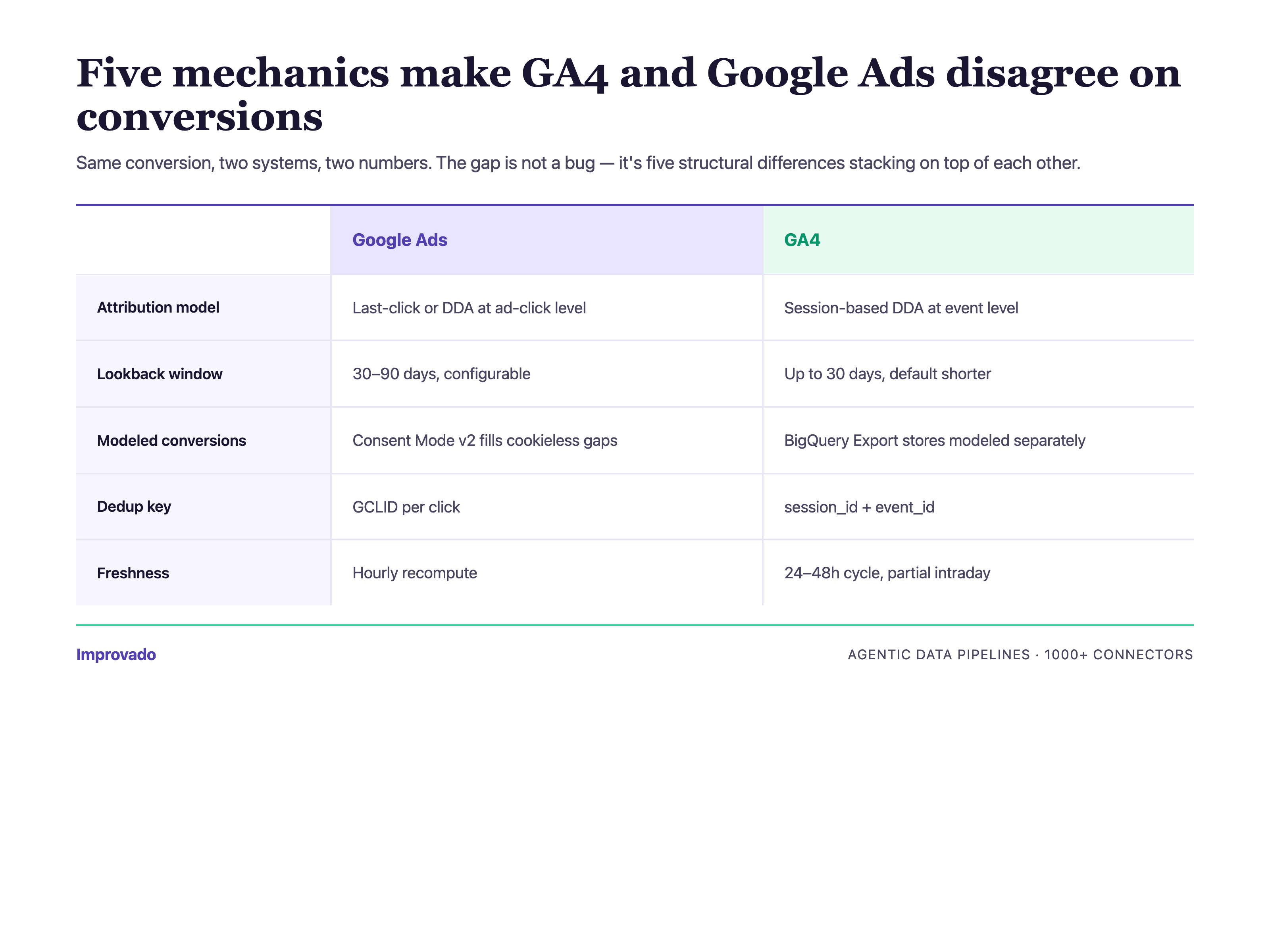
A conversion imported into GA4 via GCLID, then imported into Google Ads via the same GCLID, shows up in both platforms. When the analytics team pulls the GA4 "Google / cpc" conversion count and the ads team pulls Google Ads conversions, the numbers disagree — sometimes by 5%, sometimes by 40%. The CMO sees both on different dashboards. Trust in the numbers collapses.
Why It Happens: Attribution Windows, Consent Mode, and Modeled Conversions
Three mechanics combine. GA4 uses data-driven attribution by default with its own modeled conversion layer. Google Ads uses a separate attribution model (last-click, data-driven, or custom) with a different lookback window. Consent mode v2 adds a third layer — modeled conversions that fill the gap when users decline tracking. Stacking three models on the same raw event produces three different answers, none of them wrong, none of them reconcilable without a governed layer.
The Approach That Works: Warehouse-Level Dedup with Event ID as Primary Key
Land raw GA4 events and raw Google Ads conversions into the warehouse. Join on a stable event ID (not timestamp + user match). Resolve attribution in the warehouse, not in either platform. Across enterprise brands, teams that moved attribution to the warehouse stopped having the "which number is right" meeting — because there is now one number, computed by the rules the analytics team controls.
For agencies: GA4/Google Ads dedup gets harder when each client owns their own GA4 property and consent configuration. Agencies standardize by landing every client's raw GA4 and Google Ads events into one warehouse with client_id partitioning, then applying a shared attribution ruleset — so reporting stays consistent across clients even when client-side setups differ.
If your GA4 and Google Ads conversion numbers disagree by more than 10% on any given week, we will walk your consent-mode and attribution setup in 30 minutes and hand back a written reconciliation plan — schedule the review.
Challenge #3 — Conversion Deduplication Across Platforms
The Problem: Every Platform Claims the Same Conversion
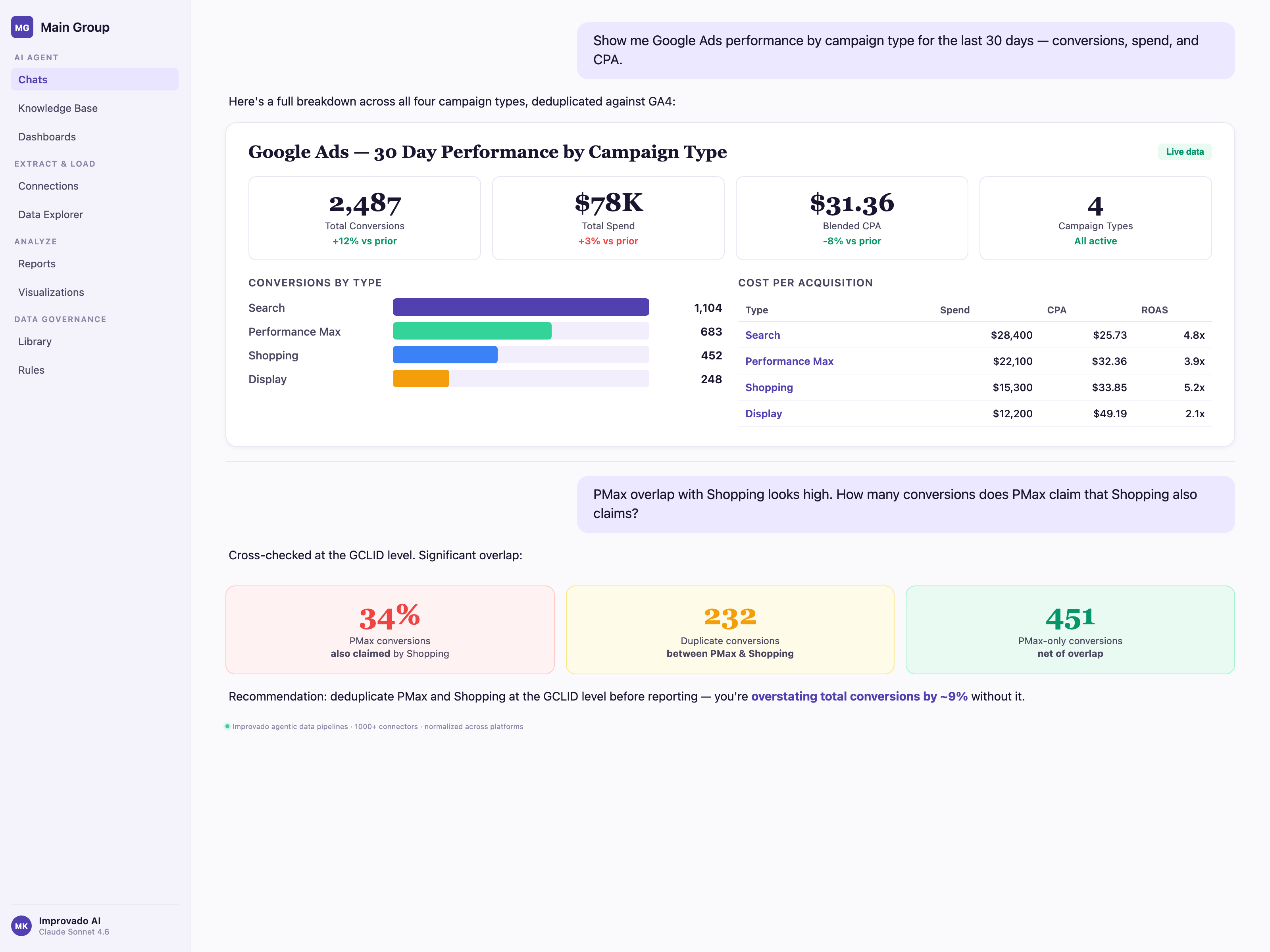
A buyer sees a display ad on Monday, clicks a Facebook retargeting ad Wednesday, searches a branded term on Google Friday, and converts. Google claims the conversion. Meta claims the conversion. LinkedIn, if it touched the journey, also claims it. Sum the platform-reported conversions and you get 2–3x the actual. Your platform-reported CAC is half your real CAC.
Why It Happens: No Cross-Platform Identity Graph Without a Warehouse
Each ad platform only knows about the touchpoints it served. Cross-platform deduplication requires a customer-level identity graph that spans every channel — which requires landing all touchpoint data in one place, stitching it to a shared identity (email, user ID, or probabilistic match), then running attribution on the unified journey. This is impossible without a governed warehouse layer.
The Fix: Unified Schema + First-Party Identity
Across enterprise brands, the pattern that works: 1,400+ connectors land Google Ads, Meta, LinkedIn, TikTok, and CTV platform data into a unified schema. A first-party identity layer stitches touchpoints to customers. Attribution runs against the unified journey — first-touch, last-touch, linear, data-driven, or custom — with all models computable from the same base data. The CMO sees one conversion number per customer, not 2–3 platform-claimed versions.
Challenge #4 — Creative Preview API Limits at Enterprise Scale
The Problem: Creative Previews Don't Scale Past 10K Assets
Enterprise B2C brands run 10K+ active ad assets across Search, Display, Video, Shopping, and PMAX. Creative operations teams need visual previews to audit brand compliance, approve localizations, and spot creative fatigue. The Google Ads creative preview API was not designed for this volume — rate limits, asset resolution variance, and incomplete coverage of PMAX asset groups make bulk creative audits painful.
Why It Happens: Preview Endpoints Are Optimized for UI, Not Audit Workflows
Google Ads creative preview endpoints return rendered images or snippets optimized for the Ads UI — not for systematic creative governance. Fetching 10K previews hits quota ceilings. Caching them requires warehouse-side infrastructure most in-house teams don't build. PMAX asset groups add another layer because Google's AI mixes creative combinations dynamically — static previews don't capture the actual served creative.
The Approach That Works: Governed Creative Metadata Alongside Preview Fetching
The pattern that works: extract creative metadata (asset IDs, approval status, policy status, creative copy, landing URLs) at scale into the warehouse. Fetch previews asynchronously with cached storage. Join creative metadata to performance data so the creative audit question — "which fatigued assets are still eating spend?" — becomes a SQL query, not a 3-day manual review.
Challenge #5 — Audience Data Access Restrictions
The Problem: Audience Insights Are Increasingly Restricted
Google has tightened audience data access across multiple surfaces — similar audiences sunset, demographic reporting thresholds raised, customer match list size requirements, and user-level reporting restrictions in GA4 BigQuery export. For Enterprise B2C brands running lookalike and retargeting strategies at scale, the restrictions compound. Audience segment reporting now requires either aggregation thresholds or first-party audience ownership.
Why It Happens: Privacy Regulation, Platform Policy, and Signal Loss
GDPR, CCPA, CPRA, and the Apple ATT framework each reduced the audience signal ad platforms could surface to advertisers. Google's own response — consent mode v2, modeled conversions, enhanced conversions — is an attempt to preserve measurement while complying with consent. The tradeoff: advertisers see less granular audience data, and the data they do see is increasingly modeled rather than observed.
The Fix: First-Party Audience Architecture + Consent-Mode Governance
The enterprise pattern: own the first-party audience in the warehouse, build lookalikes from warehouse segments, push audiences to Google Ads Customer Match via managed sync. Track consent state per event at ingestion so modeled vs observed conversions are labeled downstream. Across enterprise brands on Improvado, this is now standard architecture — not a future project.
For agencies: first-party audience architecture is harder when the first-party data belongs to the client, not the agency. The pattern that works: per-client warehouse schemas with agency-level governance templates, so each client keeps their identity graph while the agency runs the same audience-sync playbook across all of them.
Challenge #6 — YouTube Ads Reporting Integration
The Problem: YouTube Ads Lives in Two Reporting Systems
YouTube Ads performance is reported through the Google Ads API (impressions, cost, conversions tied to the ad click) but video engagement metrics (view-through rate, watch time, audience retention) live in YouTube Analytics. Enterprise video teams need to join both — a CMO cannot evaluate YouTube spend without both the performance number and the engagement signal. The integration between the two systems is manual and error-prone.
Why It Happens: Google Ads API and YouTube Analytics API Are Separate Products
The Google Ads API surfaces video campaign performance. YouTube Analytics API exposes video-level engagement. The two systems use different authentication scopes, different rate limits, different schemas, and different refresh cadences. Joining them requires extracting both, normalizing video_id as the join key, and reconciling attribution timestamps. For in-house data teams, this is a multi-week integration project per view, re-built every time the APIs change.
The Approach That Works: Managed YouTube + Google Ads Connector Pair
Treat YouTube Ads as a first-class reporting surface alongside Search and Display. Land both the Google Ads video campaign data and YouTube Analytics engagement data into the same warehouse schema, joined on video ID. The result: a CMO dashboard showing cost, conversions, and engagement depth on a single row per video.
Challenge #7 — PMAX Campaign Attribution Gaps
The Problem: Performance Max Hides Channel-Level Attribution
Performance Max consolidates Search, Display, YouTube, Discover, Gmail, and Maps into one campaign. Google's AI optimizes across surfaces. The upside is efficiency. The downside for enterprise analytics teams: you cannot easily see which surface drove the conversion, which asset group converted, or which search term triggered a Search impression. The data PMAX exposes is partial by design.
Why It Happens: PMAX Is an Automated Black Box by Policy
Google's PMAX reporting exposes asset group performance, placement reporting for Display/Video, and search category insights — but not the channel-by-channel attribution most enterprise analysts want. This is intentional. PMAX asks advertisers to trust the AI. Enterprise analytics teams, who are accountable to a CFO for $100K+/month spend, cannot operate on trust alone.
The Fix: PMAX Data Reconstruction via Warehouse Joins
The pattern that works: extract every PMAX metric the API exposes, then reconstruct channel-level attribution by joining PMAX asset group data with GA4 event data, Search Console query data, and YouTube Analytics engagement. The result is not perfect — Google's black box is still partially opaque — but enterprise teams recover 70–85% of the visibility PMAX removes.
If your CFO will not approve more Performance Max spend without channel-level attribution, we will reconstruct your PMAX asset-group-to-channel mapping on a 30-minute call using your own warehouse data — schedule the PMAX review.
Challenge #8 — Attribution Model Switching Impact on Historical Data
The Problem: Changing Attribution Model Rewrites Historical Conversions
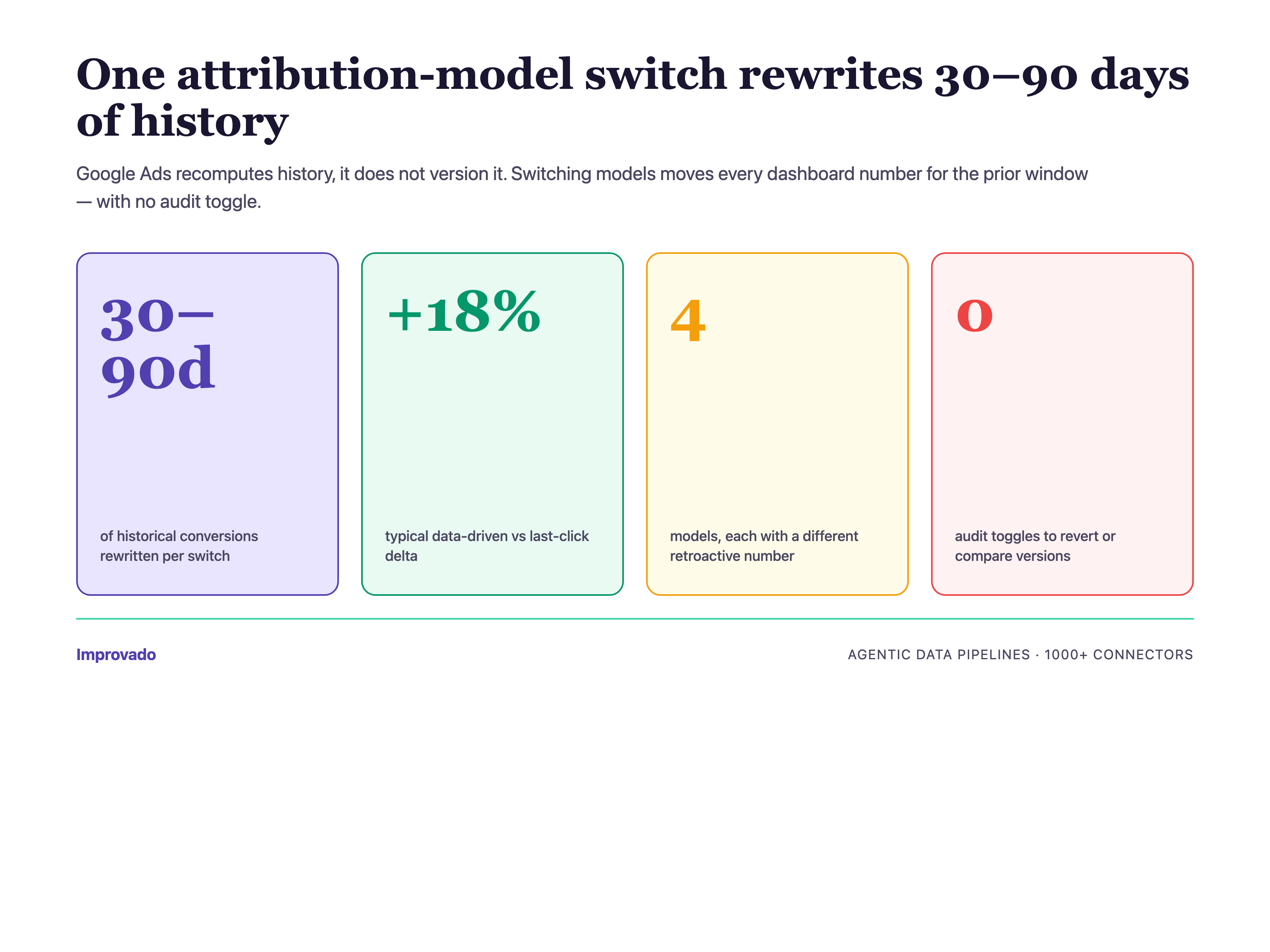
When an analytics team switches from last-click to data-driven attribution in Google Ads, the conversion numbers for the last 30–90 days change retroactively. Historical dashboards suddenly show different numbers than they did yesterday. The marketing leadership team loses faith in the reporting — "how can last month's number have changed?"
Why It Happens: Google Ads Attribution Is Recomputed, Not Versioned
Google Ads applies the current attribution model to all reportable historical conversions. There is no "show me the data under the old model" toggle. Every switch resets history. For enterprise teams with executive reporting on a weekly or monthly cadence, this is a governance problem, not a technical one — and the governance layer has to live outside Google Ads.
The Approach That Works: Warehouse-Side Attribution Versioning
Land raw conversion events. Compute attribution in the warehouse with versioned models (model_v1_last_click, model_v2_data_driven, model_v3_custom). Dashboards reference the model version explicitly. When the analytics team switches models, historical dashboards stay stable under the old model while new dashboards use the new one. The CMO sees model transitions as intentional governance, not surprise data changes.
For agencies: model switches across 20+ clients compound into a support nightmare — every client asks the same question the same week. Warehouse-side versioning lets the agency switch models client-by-client on a schedule, with old-model dashboards preserved for clients not yet transitioned. Governance becomes the agency's deliverable.
Challenge #9 — Offline Conversion Import via GCLID (Enterprise-Critical)
The Problem: 18–30% of Offline Conversions Silently Fail to Import
Enterprise B2C brands — especially those with sales teams, dealerships, or in-store conversion — rely on offline conversion import to tie CRM closed-won deals back to the Google Ads click that started the journey. The GCLID (Google Click Identifier) is the join key. In practice, 18–30% of imports silently fail because GCLIDs are case-sensitive, conversion timestamps fall outside the 90-day import window, or CRM integrations lowercase the identifier during storage.
Why It Happens: GCLID Pipelines Are Fragile and Invisibly Broken
Most offline conversion import pipelines are custom-built: CRM webhook → ETL script → Google Ads API upload. Three things go wrong. First, GCLIDs get lowercased in databases with case-insensitive string columns. Second, long sales cycles (common in enterprise B2C — auto, insurance, mortgage, subscription) exceed the 90-day import window. Third, deduplication against already-imported conversions is rarely implemented correctly, creating either duplicates or silent drops. The errors are reported in the Google Ads API response — but no one reads them.
The Fix: Governed GCLID Pipeline with Monitoring
The pattern that works: GCLID captured and preserved with case-sensitive storage from the first touch onward. Import runs as a managed operation with explicit error handling, deduplication against a warehouse ledger of already-imported conversions, and monitoring that surfaces import failures before the next weekly reporting cycle. Across enterprise brands, teams that governed their GCLID pipelines recovered 18–30% of offline conversions they previously lost.
Challenge #10 — Channel Report Discrepancies Between Google Ads, GA4, and the Warehouse
The Problem: Three Systems, Three Numbers, Zero Trust
This is the most-searched question in our GSC data for this topic — "how to reduce discrepancies between channel reports." Google Ads says 4,200 conversions last week. GA4 says 3,710. The warehouse dashboard says 3,950. The CFO asks which is right. The Director of Marketing Analytics has to explain, again, why three systems disagree.
Why It Happens: Attribution, Deduplication, and Freshness Stack Differently in Each System
Each of the three systems makes different choices. Google Ads uses its attribution model, lookback window, and modeled conversion layer. GA4 uses its own attribution model, session-based deduplication, and data-driven modeling. The warehouse — if it is not governed — applies whatever logic the analyst who built the last dashboard hard-coded. Freshness compounds the problem: Google Ads can take up to 72 hours to finalize conversion data. GA4's BigQuery export has its own lag. The warehouse is only as fresh as its last extraction run.
The Approach That Works: Pick the Warehouse as the Source of Truth — with Governance
The decision every enterprise analytics team eventually makes: the warehouse is the source of truth. Google Ads and GA4 are source systems, not reporting systems. Once that decision is made, the governance layer reconciles the three numbers with explicit rules — "this is the ad-platform-reported number, this is the GA4 number, this is the governed warehouse number, and here is the variance." The CFO sees the reconciliation, not three conflicting dashboards.
MCC Multi-Client Account Management at Scale
The Problem: MCC Hierarchies Weren't Designed for 20+ Client Agencies
Agencies running paid media for 20+ clients face an operational problem the Google Ads UI doesn't solve: cross-client reporting, per-client billing reconciliation, per-client labels and naming conventions, and client offboarding that has to cleanly remove access without breaking historical reports. MCC (Manager Account) hierarchy gives agencies access control and consolidated billing, but it does not give them a reporting layer that scales with account growth.
Why It Happens: MCC Is an Access Primitive, Not a Reporting Primitive
An MCC grants an agency login-level access to a client's Google Ads account. It does not create a cross-client reporting schema, a per-client label taxonomy, or an offboarding workflow. Agencies invariably build these in spreadsheets: client list in one tab, billing reconciliation in another, naming convention rules in a third. The spreadsheet ages faster than the client roster.
The Fix: Client_ID as a First-Class Warehouse Dimension
The pattern that works for agencies: extract every client's Google Ads data into a shared warehouse schema with client_id carried on every row. Per-client labels live in a labels dimension joined by label_id. Billing reconciliation runs as a governed transform against the warehouse, not against the Google Ads billing UI. Client offboarding becomes a governed operation — revoke MCC access, archive the client_id partition, preserve historical reporting for contractual retention periods.
The Enterprise Playbook — Unified Google Ads Data Governance
The Architecture Pattern: Warehouse-First, Platform-Second
Across Enterprise B2C brands running agentic data pipelines on Improvado, the same architecture keeps appearing. Raw platform data — Google Ads, GA4, YouTube Analytics, Search Console — lands in a unified warehouse schema via 1,400+ managed connectors. The warehouse is the source of truth. Attribution, deduplication, pacing, and reconciliation all run as governed transforms on top. Platform dashboards (Google Ads UI, GA4 UI) become operational tools, not reporting tools.
The Governance Controls: What Every Enterprise Team Enforces
- Connector SLA: 1,400+ managed connectors with versioned schemas and monitored extraction runs — no custom scripts in the critical path.
- Identity layer: first-party identity graph stitches Google Ads, GA4, CRM, and offline conversions.
- Attribution versioning: models are versioned. Switching models is an intentional event, not a surprise.
- Consent governance: consent state labeled at ingestion. Modeled vs observed conversions distinguished downstream.
- Discrepancy monitoring: agentic pipelines compare platform-reported to warehouse-governed numbers and surface variance before it reaches the CMO.
- Pacing as a governed transform: pacing plans and actuals live in the same warehouse schema. No spreadsheet orphans.
The ROI: What Brands Recovered
Aggregate patterns across Improvado customers: 15–25 hours/week of analyst time reclaimed from manual data work. 18–30% of offline conversions recovered from GCLID pipeline failures. Pacing deviations detected 24–48 hours faster. PMAX channel attribution reconstructed to 70–85% visibility. The "which number is right" meeting eliminated — because there is now one number, governed, reproducible, and owned by the analytics team.
FAQ — Google Ads Data Challenges
Why does Google Ads show different numbers than GA4?
Google Ads and GA4 use different attribution models, different lookback windows, and different deduplication logic. Google Ads counts click-based conversions; GA4 counts session-based conversions. Consent mode v2 adds modeled conversions in both systems with different modeling assumptions. The difference is not a bug — it is three measurement philosophies stacked on the same raw events.
Why does Google Ads show different numbers than my CRM?
Your CRM likely uses a different attribution model (often first-touch or last-non-direct) and different deduplication logic than Google Ads. Offline conversion import via GCLID closes some of the gap, but only if the GCLID pipeline is governed with case-sensitive storage, proper deduplication, and monitoring for the 90-day import window.
How often does the Google Ads API change?
Google deprecates major API versions roughly every 12–18 months, with breaking changes quarterly. Each change can break custom integrations. Managed connectors absorb these changes upstream so the enterprise analytics team does not rebuild pipelines every quarter.
How much time does automated Google Ads reporting save for enterprise teams?
Based on aggregate data across Enterprise B2C brands, automation reclaims 15–25 hours/week of analyst time. The reclaim is highest for teams managing 50+ sub-accounts where manual extraction and reconciliation scales linearly with account count.
Can Improvado handle 500+ Google Ads accounts?
Yes. The average Improvado customer connects 340+ Google Ads sub-accounts under a single MCC, and the platform currently manages 69K+ accounts across its customers. Multi-account extraction, naming normalization, currency conversion, and rate-limit management are handled automatically.
How does Improvado differ from Fivetran or Supermetrics for Google Ads?
Improvado is purpose-built for marketing data governance. It includes marketing-specific transforms (taxonomy normalization, cross-channel conversion deduplication, attribution versioning, pacing governance) and agentic data pipelines that detect discrepancies before they reach the dashboard.
What is 'agentic data pipelines' and why does it matter for Google Ads?
Agentic data pipelines are governed data flows where AI agents actively monitor, reconcile, and surface issues — not just move data. For Google Ads, this means pipelines that detect API schema drift, flag pacing deviations, surface PMAX attribution gaps, and reconcile platform-reported vs warehouse-governed conversions automatically.
How do I reconcile Google Ads conversions with GA4 conversions?
Land raw events from both systems into a unified warehouse schema. Deduplicate on a stable event ID. Resolve attribution in the warehouse using versioned models. The goal is not to make Google Ads and GA4 agree — it is to move the source of truth out of both systems and into a governance layer owned by the analytics team.
What is the Google Ads offline conversion import 90-day window?
Google Ads accepts offline conversion imports only for conversions that occurred within the previous 90 days of the click timestamp. Enterprise B2C brands with long sales cycles (auto, insurance, mortgage, subscription) frequently exceed this window, causing 18–30% import failures.
Why are my GCLIDs not matching in Google Ads?
The most common cause is case sensitivity. GCLIDs are case-sensitive, but CRMs and databases with case-insensitive string columns frequently store them in lowercase. The second most common cause is GCLIDs getting truncated in URL parameters. Governed GCLID pipelines capture the raw value and preserve case.
How do I get channel-level attribution from Performance Max?
PMAX does not expose full channel-level attribution by design. The enterprise pattern: extract every PMAX metric the API does expose (asset group performance, placement reports for Display/Video, search category insights), then reconstruct channel-level attribution by joining PMAX data with GA4 events, Search Console queries, and YouTube Analytics in the warehouse. Typical recovery: 70–85% of pre-PMAX visibility.
What is consent mode v2 and how does it affect Google Ads data?
Consent mode v2 is Google's framework for preserving measurement while respecting user consent. When users decline tracking, Google fills the gap with modeled conversions. Enterprise analytics teams should label consent state at ingestion and distinguish modeled vs observed conversions downstream — otherwise the CMO cannot evaluate the reliability of the conversion number.
How do I monitor Google Ads API quota exhaustion?
Google Ads API quota is shared across applications under the same developer token. Managed connectors pool and throttle requests automatically. In-house pipelines need explicit quota monitoring and retry logic with exponential backoff. Quota exhaustion errors (QuotaError.RESOURCE_EXHAUSTED) are the most common cause of missed extraction runs at enterprise scale.
What is the Search Terms report sampling limit?
Google Ads samples the Search Terms report for campaigns with >10K clicks per week. Sampled reports omit low-volume search terms — which are exactly the queries an enterprise brand needs for negative keyword management. The workaround: extract Search Terms daily (smaller per-day volume = less sampling) and aggregate in the warehouse.
How do I join Google Ads data to my warehouse?
Extract via a managed connector (1,400+ available) into the warehouse of your choice — Snowflake, BigQuery, Redshift, Databricks, or ClickHouse. Use campaign_id, account_id, and date as the primary join keys. The governance layer should version the schema so downstream dashboards remain stable when Google changes the API.
Why is my Google Ads cost different in the warehouse than in the UI?
Three common causes: currency conversion (the UI shows account currency, the warehouse may be normalized), time zone (account time zone vs warehouse time zone), and billing adjustments (invalid click credits, refunds) that appear in the UI but not in the extraction timestamp. Governance layers normalize all three.
How do I handle multi-currency Google Ads data at enterprise scale?
Multi-country Enterprise B2C brands run sub-accounts in multiple currencies. The governance pattern: preserve the native currency at ingestion, apply a managed exchange-rate table for reporting-time conversion, and never hard-code conversion in the extraction layer. This preserves auditability for finance teams.
What is the difference between last-click and data-driven attribution in Google Ads?
Last-click attributes 100% of conversion credit to the final click before conversion. Data-driven attribution uses machine learning to distribute credit across the click path based on observed conversion patterns. Switching between them changes historical conversion numbers — which is why attribution versioning in the warehouse is an enterprise governance requirement.
How do I audit Google Ads creative at 10K+ asset scale?
Extract creative metadata (asset IDs, approval status, policy status, copy, landing URLs) at scale into the warehouse. Fetch previews asynchronously. Join creative metadata to performance data. Creative fatigue detection, localization compliance, and brand-safety audits become SQL queries instead of manual review.
How much does Google Ads data governance cost for a $100K+/month advertiser?
Governance cost is small relative to media spend — typically low-single-digit percent of monthly ad spend for managed-connector plus warehouse infrastructure at enterprise scale. The ROI comes from reclaimed analyst time (15–25 hours/week), recovered offline conversions (18–30%), pacing accuracy, and avoided reporting errors that would otherwise misinform media allocation decisions on the remaining spend. Book an architecture review for pricing specific to your account count and spend level.
Related reading: CM360 Reporting Pitfalls: 5 Data Lies to Watch For


