



Key Takeaways
- Data Feeds arrive late (6+ hours), corrupted, or missing entirely — and there's no retry mechanism built in
- Reporting API sampling kicks in silently on high-traffic report suites, returning estimates instead of actuals
- Cross-device identity stitching inflates visitor counts by 30-60% when users switch between mobile and desktop
- Ad platform integrations were deprecated with no direct replacement — leaving teams to build custom connectors
- AI agents via MCP can unify Adobe Analytics data with your ad platforms for true cross-channel attribution

1. Data Feeds Arrive Late, Corrupted, or Not at All
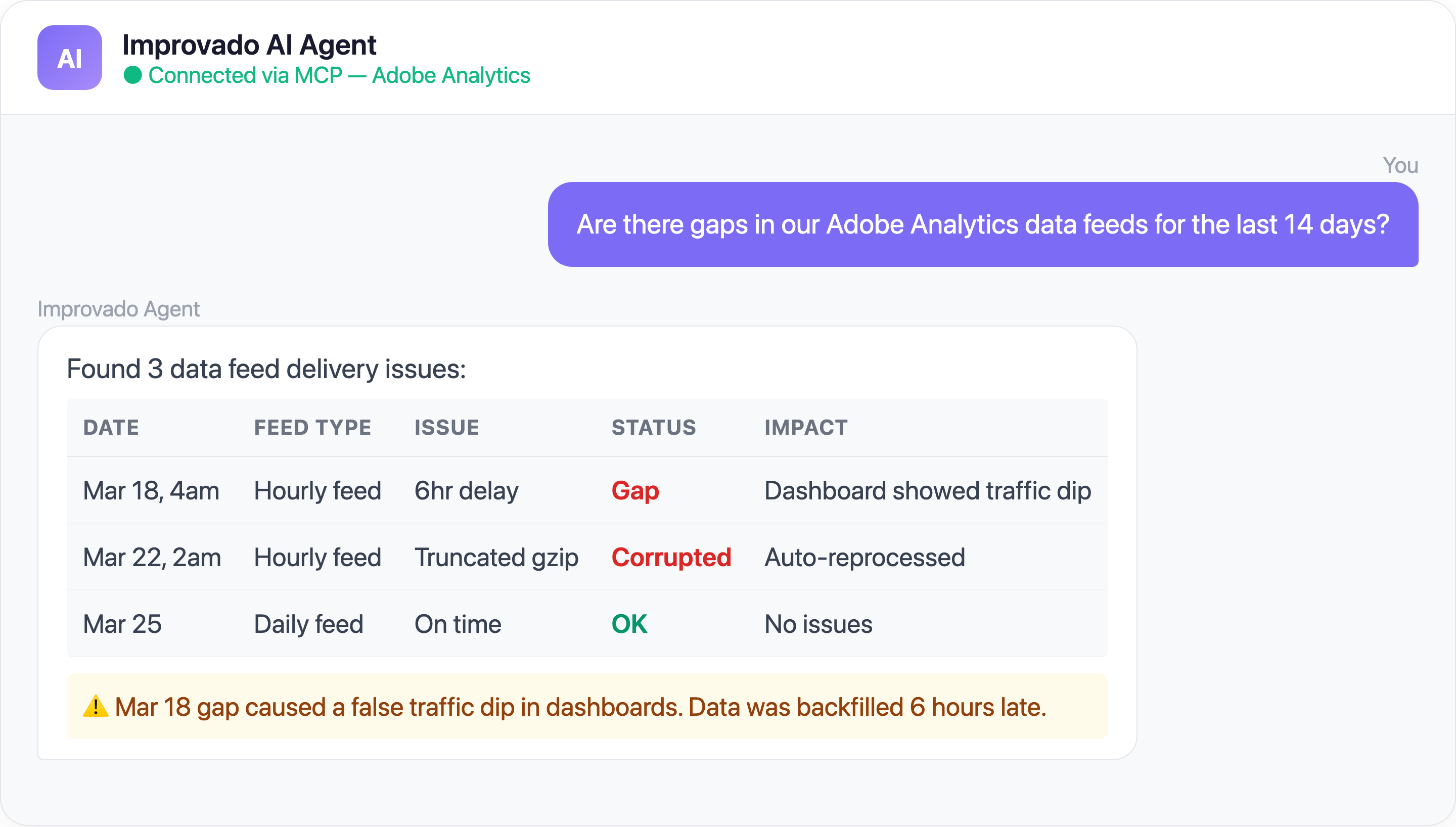
The Problem: Adobe Analytics Data Feeds (hourly or daily hit-level exports) are your primary method for getting raw clickstream data into your warehouse. The problem: they frequently arrive late, out of order, or as truncated gzip files that fail decompression.
There is no SLA guarantee on delivery timing. Adobe's internal pipeline health determines when your files show up. Some days they're on time; some days they're 6 hours late.

Time saved: Data engineering teams report eliminating 5-10 hours/week of feed monitoring and manual reprocessing.
2. The Reporting API Returns Sampled or Misclassified Data (Without Warning)
The Problem: Two separate issues conspire to make Adobe Analytics data unreliable at scale — and both fail silently.
Adobe's metric definitions also change frequently. Internal engineering teams have flagged "New Adobe Metrics" as Critical-priority work — meaning even Adobe's own partners are constantly catching up to schema changes that silently break downstream reporting.
Sampling: Adobe Analytics 2.0 Reporting API applies data sampling on high-cardinality breakdowns, especially when combined with segments. The API returns sampled data without clear warnings — you might be looking at a 10% sample thinking it's the full dataset. Pagination tokens expire mid-extraction for large datasets, row limits force multi-page extractions that can fail partway through, and API results often don't match the Workspace UI due to different sampling thresholds.
Classification (SAINT) failures: SAINT classifications enrich your tracking codes with human-readable labels — turning cid_12345_google_brand_US into "Google Brand Search - United States." When classification imports fail, your reports show raw tracking codes instead of campaign names. Common failure causes include file encoding mismatches (UTF-8 BOM vs UTF-8), import files exceeding size limits, and API-based imports (Classification API 2.0) silently dropping rows. The browser-based importer gives vague error messages. The API gives none at all.
The combined effect: you're looking at sampled data labeled with broken classifications, and nothing tells you either is happening.
| Adobe Analytics Challenge | Frequency | Impact |
|---|---|---|
| Clickstream data volume limits | Daily for high-traffic sites | Data sampling, inaccurate reports |
| eVar/prop exhaustion | Growing with each new campaign | Cannot track new dimensions |
| Cross-device identity gaps | Affects 30-50% of users | Inflated unique visitor counts |
| Classification import delays | 24-72 hours | Stale campaign categorization |
3. Cross-Device Identity Stitching Is Broken
The Problem: Adobe's Device Co-op was deprecated. Experience Cloud ID (ECID) stitching only works for authenticated users — and most website visitors never log in. The result: the same person visiting your site on their phone, laptop, and tablet appears as 3 separate visitors.
Impact on marketing:
- Unique visitor counts inflated by 30-60%
- Attribution models credit the wrong touchpoint (mobile browse → desktop conversion appears as two separate journeys)
- Audience segments exported to ad platforms contain duplicates
4. Ad Platform Integrations Were Deprecated — And Nothing Replaced Them
The Problem: Adobe deprecated legacy Data Connectors (Genesis) in August 2021. This removed native integrations with Google Ads, Facebook Ads, and other ad platforms. Overnight, automated cost and impression data stopped flowing into Adobe Analytics.
Replacement options are all painful:
- Adobe Advertising Cloud — expensive add-on
- Manual classification imports — labor-intensive, error-prone
- Custom ETL pipelines — requires engineering resources to build and maintain
The integration complexity compounds when teams try to work around these deprecations:
This is the reality for most Adobe Analytics users: they end up building fragile multi-hop architectures — Adobe to SQL Server to warehouse to BI tool — instead of having a clean, direct pipeline.
Without these integrations, Adobe Analytics becomes an isolated web analytics silo — powerful on its own, but disconnected from the ad spend data needed for true ROI analysis.
Solve Adobe Analytics Challenges with Improvado MCP
Ready-to-Use MCP Prompts
Cross-Platform Unification:
Combine my Adobe Analytics web traffic data with Google Ads
and Facebook Ads campaign data for Q1 2026.
Show a unified view of spend → traffic → conversions by channel.
Data Quality Check:
Are there any gaps in my Adobe Analytics data feeds for the
last 30 days? Show me missing hours or days with
suspiciously low hit counts.
Attribution Analysis:
Show me the top 20 conversion paths from my Adobe Analytics
data, cross-referenced with ad platform first-touch data.
Where does Adobe attribution disagree with ad platform attribution?
Audience Overlap:
How much overlap is there between my Adobe Analytics
high-value segments and my CRM customers?
Show me the match rate.
How to Connect Adobe Analytics to AI Agents
Step 1: Get your Improvado MCP credentials
Improvado provides an MCP-compatible endpoint for enterprise customers. Once onboarded, you receive an MCP endpoint URL and API token scoped to your workspace.
Step 2: Connect to Claude Code, Cursor, or ChatGPT
{
  "improvado": {
    "type": "streamable-http",
    "url": "https://report.improvado.io/experimental/agent/api/mcp-customer/v1/invoke/",
    "headers": {
      "Authorization": "Bearer your-api-token"
    }
  }
}
Query your Adobe Analytics data in plain English — alongside all your other marketing data sources.
FAQ
Why don't Adobe Analytics API numbers match the Workspace UI?
Different sampling thresholds, query-time vs processing-time segment application, and Data Warehouse limitations all contribute. Using Data Warehouse exports for large datasets avoids most sampling issues.
How do I replace deprecated Adobe Data Connectors?
Use a tool like Improvado to pull data from both Adobe Analytics and your ad platforms, unifying them in your warehouse. This replaces the Genesis connector functionality with better reliability.
Can I get unsampled data from Adobe Analytics?
Yes — Data Warehouse exports are unsampled. However, they don't support all segment types and have longer processing times. Data Feeds provide unsampled hit-level data but require significant parsing.
How often should I sync Adobe Analytics data?
Data Feeds can be hourly. Reporting API queries can run in near-real-time. Most teams use hourly feeds for the warehouse and real-time API for dashboards.
Ready to unlock your Adobe Analytics data? Get your demo →
Related reading: Adobe Analytics Data Feed: A Complete Guide to Raw Data Export


