.jpeg)

Key Takeaways
- Log-level data at 50-100 GB/day overwhelms most ETL systems and requires 20+ engineering hours/week to maintain
- Schema complexity (100+ fields) makes warehouse modeling a constant moving target
- Cross-device attribution is increasingly unreliable as cookies deprecate and identity signals fragment
- Audience match rates swing unpredictably (40-60%) quarter-to-quarter as UID2 adoption varies
- Frequency capping breaks when mixed identity signals prevent proper user deduplication
- API rate limits throttle large-scale data extraction without clear documentation of per-endpoint caps
- Cookie deprecation adds a regulatory and technical wildcard to every data pipeline decision
- AI agents via MCP can monitor pipeline health and diagnose breakages in plain English
1. Log-Level Data Files Are Too Large to Ingest Reliably
The Problem: The Trade Desk delivers log-level data (LLD) as massive gzipped files — sometimes hundreds of files per hour. A single mid-size advertiser can produce 50-100 GB of raw log data per day. The sheer file volume overwhelms most ETL orchestration systems.

That quote captures the typical experience. Teams manage a dozen ad platform integrations, and The Trade Desk is consistently the one that looks "wrong" — because its data volume and complexity are in a different league.
Common ingestion failures:
- Download timeouts — Large files fail mid-transfer, requiring restart logic that most custom pipelines don't have
- File ordering dependencies — Files must be processed in sequence to maintain event ordering; out-of-order ingestion corrupts session-level analysis
- Decompression memory spikes — Gzip decompression of 5-10 GB files can exhaust memory on standard ETL workers, causing silent failures
- Incomplete file detection — TTD occasionally delivers truncated files; without checksum validation, partial data enters your warehouse undetected
Time saved: Teams report reducing LLD pipeline maintenance from 20+ engineering hours/week to zero.
2. Log-Level Schema Complexity Breaks Your Warehouse Models
The Problem: Even after you successfully ingest TTD log files, the schema itself is a moving target. Log files contain 100+ fields with nested data structures that change across API versions. Every schema change can break your downstream dbt models, BI dashboards, and attribution logic.
Key schema challenges:
- Undocumented field additions — New fields appear in log files without changelog entries, causing "unknown column" errors in strict-schema warehouses
- Nested JSON fields — Some log-level fields contain nested JSON that requires separate parsing and flattening logic
- Version-dependent field semantics — The same field name can mean different things across API versions (e.g., bid price fields changed from gross to net in a past version)
- Storage cost explosion — Storing raw LLD in cloud warehouses without pre-aggregation can cost $5,000-$15,000/month for a single advertiser
| Data Challenge | Root Cause | Business Impact |
|---|---|---|
| Log-level data volume | Billions of impression-level events | Storage costs, processing time |
| Custom taxonomy fragmentation | Each seat uses different naming | Impossible cross-team analysis |
| Attribution model alignment | TTD attribution ≠ Google/Meta | Misleading ROAS comparisons |
3. Cross-Device Attribution Breaks in a Post-Cookie World
The Problem: The Trade Desk built Unified ID 2.0 (UID2) to solve identity in a cookieless world. But adoption is uneven — only a portion of impressions carry UID2 identifiers. The rest fall back to device graphs, probabilistic matching, or no identity at all. This means your attribution data has massive blind spots.
A user sees your CTV ad on their smart TV, researches on their phone, and converts on desktop. Without reliable cross-device identity, TTD attributes the conversion to the last trackable touchpoint — or misses it entirely.
Common causes:
- Partial UID2 adoption — Many publishers and SSPs still don't pass UID2 in bid requests, leaving gaps in deterministic matching
- CTV identity fragmentation — Smart TV device IDs, household IPs, and app-level identifiers don't map cleanly to individual users
- Probabilistic matching decay — Google's evolving cookie policies and browser privacy changes reduce the accuracy of probabilistic graphs over time
- Measurement discrepancies — TTD's attributed conversions rarely match what your MMP, GA4, or CRM reports
4. Cookie Deprecation Creates Unpredictable Audience Match Rates
The Problem: Google Chrome's evolving approach to cookie deprecation — from full phase-out to a "user choice" model — has created uncertainty across the programmatic ecosystem. The Trade Desk has bet heavily on UID2, but the transition period means your first-party data segments match at wildly different rates depending on when and where they're activated.
5. Mixed Identity Signals Make Frequency Capping and Deduplication Impossible
The Problem: Some impressions carry UID2, others use third-party cookies, others have no user-level identifier at all. This mixed-signal environment makes frequency capping unreliable and audience deduplication nearly impossible within TTD alone.
Key issues:
- Frequency cap failures — Without consistent identity, the same user can be counted as multiple uniques, and frequency caps become unreliable across devices and browsers
- Conversion attribution gaps — View-through conversions are the first to degrade when identity signals weaken, making upper-funnel campaigns look artificially underperforming
- Cross-channel frequency invisibility — You set a frequency cap of 5 impressions per user in TTD, but the same user also sees ads through DV360, Meta, and direct publisher deals — true cross-channel frequency is invisible
Cross-verification with third-party measurement is a common client need — teams frequently require Trade Desk data to be reconciled against verification vendors like DoubleVerify or IAS, adding yet another data source to an already complex pipeline.
Time saved: Media teams report reducing wasted overexposure spend by 15-25% within the first quarter.
6. API Rate Limits Throttle Large-Scale Data Extraction
The Problem: The Trade Desk's API enforces strict rate limits — and when you're managing dozens of advertisers with thousands of campaigns each, you hit those limits fast. Failed requests, incomplete data pulls, and silent throttling are common for teams running custom integrations.
Common causes:
- Concurrent request caps — TTD limits the number of simultaneous API calls per partner seat, which compounds when pulling data for multiple advertisers
- Report generation queues — Custom report requests are queued server-side; large reports can take 30+ minutes to generate before you can even download them
- Retry logic gaps — Without proper exponential backoff and retry handling, a single 429 error can cascade into incomplete daily data pulls
- Pagination complexity — Large result sets require careful pagination handling; off-by-one errors silently skip data
- API field gaps vs GUI — The fields available through the API don't always match what's visible in the TTD interface
This is a recurring pattern: clients need to replicate their Trade Desk UI reports programmatically, only to discover that certain fields (like DSP-level budget allocations) aren't available through the API at all. TTD campaigns missing DSP budgets is a known issue type that forces manual workarounds.
7. CTV and Audio Impressions Lack Measurable Identity Signals
The Problem: Connected TV and podcast/audio impressions are growing fast on The Trade Desk, but they carry the weakest identity signals of any channel. Smart TV device IDs don't map to individual users, household IP matching is coarse, and audio impressions often have no user-level identifier at all.
This creates specific pipeline problems:
- Household vs individual counting — TTD may cap frequency at the household level on CTV but at the individual level on display, creating inconsistent delivery metrics
- Delayed frequency reporting — Frequency data in TTD reports can lag 24-48 hours, meaning your real-time pacing decisions are based on stale data
- Unmeasurable conversion paths — CTV ad → mobile search → desktop conversion is a common path, but without identity stitching, the CTV impression gets zero credit
8. Multi-Advertiser Account Management Creates Data Chaos
The Problem: Agencies and holding companies running 20-50+ advertiser seats on The Trade Desk face a combinatorial explosion of data. Different naming conventions, currency settings, timezone configurations, and campaign structures across seats make aggregated reporting extremely painful.
Common multi-account challenges:
- Inconsistent taxonomy — Each advertiser seat may use different campaign naming conventions, making cross-seat analysis impossible without manual mapping
- Currency normalization — Global advertisers run campaigns in USD, EUR, GBP, and JPY simultaneously; TTD reports each in the seat's local currency
- Timezone misalignment — Advertiser seats in different timezones create date-boundary discrepancies when aggregating daily metrics
- Partner permission complexity — Different team members have access to different seats, creating fragmented views and manual export workflows
Solve The Trade Desk Data Challenges with Improvado MCP
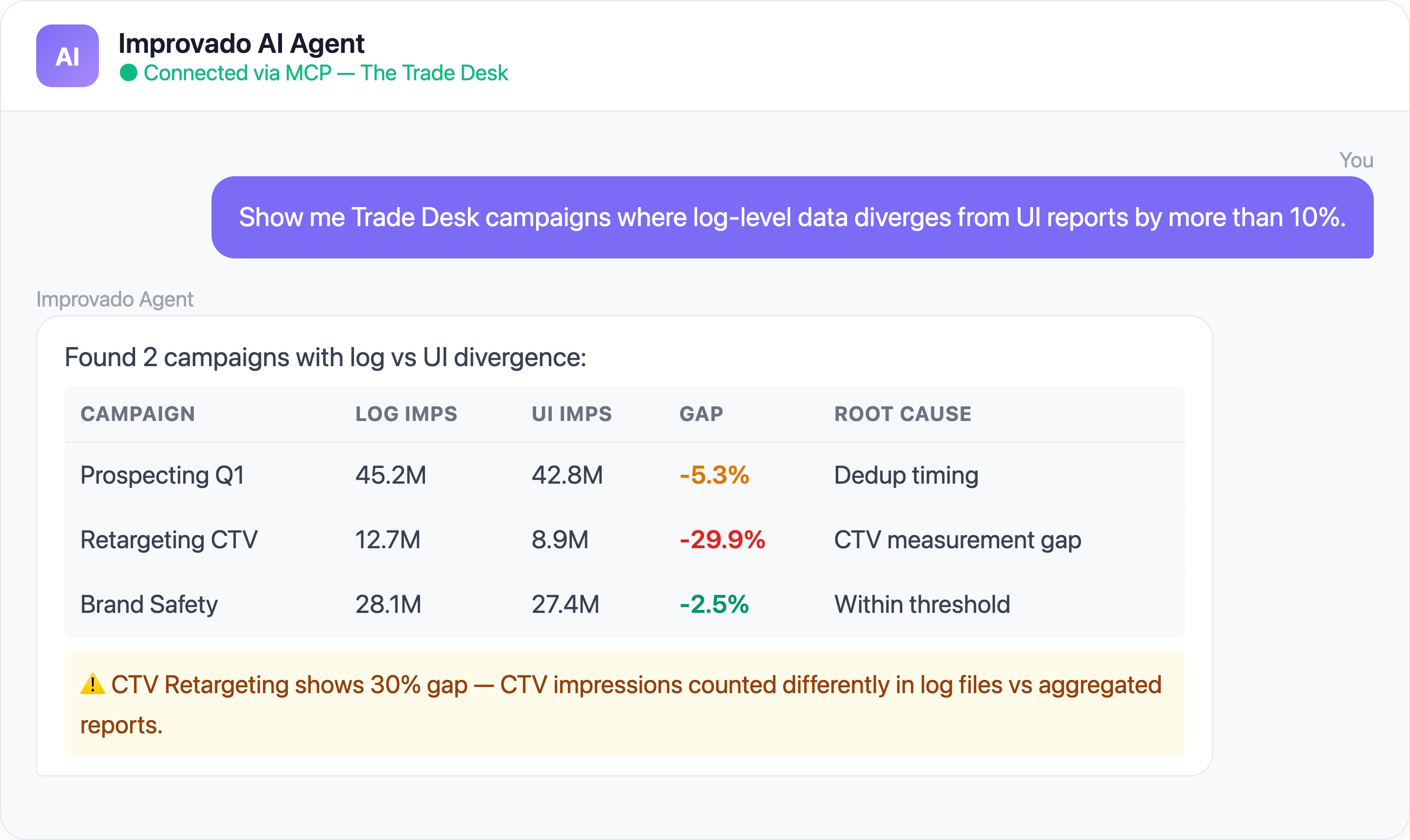
Beyond traditional data pipelines, you can now interact with your Trade Desk data using AI agents through Improvado's MCP (Model Context Protocol) server. Here are ready-to-use prompts:
Ready-to-Use MCP Prompts
Cross-Device Attribution Check:
Show me The Trade Desk attributed conversions vs GA4 conversions
for the last 30 days. Highlight campaigns where TTD overcounts by more than 20%.
Frequency Analysis:
What is the average frequency per user across my Trade Desk campaigns
this month? Flag any campaigns exceeding 8 impressions per user per week.
Log-Level Data Quality:
Are there any gaps in my Trade Desk log-level data ingestion
for the past 7 days? Show me hours with missing or incomplete data files.
How to Connect The Trade Desk Data to AI Agents
Step 1: Get your Improvado MCP credentials
Improvado provides an MCP-compatible endpoint for enterprise customers. Once onboarded, you receive:
- MCP endpoint URL — your dedicated server address
- API token — scoped to your workspace and data sources
Step 2: Connect to Claude Code, Cursor, or ChatGPT
Add the Improvado MCP server to your config:
{
  "improvado": {
    "type": "streamable-http",
    "url": "https://mcp.improvado.io/v1/your-workspace",
    "headers": {
      "Authorization": "Bearer your-api-token"
    }
  }
}
Then ask in Claude Code:
> Show me my top Trade Desk campaigns by ROAS this month
Step 3: Or connect to Cursor / Windsurf / ChatGPT
FAQ
Why do The Trade Desk conversion numbers not match my CRM?
The Trade Desk uses its own attribution model with configurable lookback windows (default 14 days for clicks, 1 day for views). Your CRM likely uses a different model and may deduplicate conversions differently. Identity resolution gaps (especially post-cookie) and timezone differences also contribute to discrepancies.
How does Unified ID 2.0 affect my Trade Desk data quality?
UID2 improves deterministic matching when adopted by both publishers and advertisers, but coverage is still partial. Impressions without UID2 fall back to probabilistic matching or go unmatched entirely, creating gaps in frequency capping, audience targeting, and conversion attribution. Monitor your match rates regularly.
Can I extract log-level data from The Trade Desk without custom engineering?
Yes. Improvado handles log-level data extraction, parsing, and loading automatically — no custom pipelines required. You choose the granularity (impression-level, hourly aggregates, daily rollups), and Improvado delivers it to your warehouse on schedule.
How does Improvado handle The Trade Desk API rate limits?
Improvado maintains 1,400+ pre-built connectors with built-in rate limit management. For The Trade Desk specifically, this means intelligent request queuing, automatic retry with exponential backoff, and parallel extraction across advertiser seats — all handled transparently.
What's the difference between Improvado MCP and pulling data directly from The Trade Desk API?
The Trade Desk API requires partner-level authentication, GAQL-like query syntax, and custom pagination logic. Improvado's MCP endpoint wraps all this complexity — you ask questions in plain English and get formatted answers with data from TTD and all your other platforms combined.
Ready to stop wrestling with The Trade Desk data? Get your demo →