



Key Takeaways
- Governor limits (100K API calls/day for Enterprise) throttle data extraction — especially during backfills or when multiple tools share the quota
- Field mapping drift from admin customizations silently breaks downstream pipelines without any error surfaced
- Custom object relationships (polymorphic lookups, junction objects) create extraction nightmares that standard ETL tools can't handle
- Sync failures and record merges leave silent data gaps — replay IDs expire in 72 hours, and merged records redirect without warning
- Sandbox-production divergence means integrations that pass QA can fail in production due to schema differences
- AI agents via MCP can query your Salesforce pipeline health and cross-reference CRM data with ad platform metrics
1. API Governor Limits Throttle Your Data Extraction
The Problem: Salesforce enforces strict API call limits per 24-hour period based on your edition and license count. Enterprise Edition gets 100,000 calls/day; Professional gets 15,000. Sounds like a lot — until your integration needs to sync Accounts, Contacts, Opportunities, Activities, Custom Objects, and their relationships.

Bulk API 2.0 helps but introduces its own limits: 15,000 batches per rolling 24 hours and 10-minute query timeouts. A single complex SOQL query can timeout and return partial results.
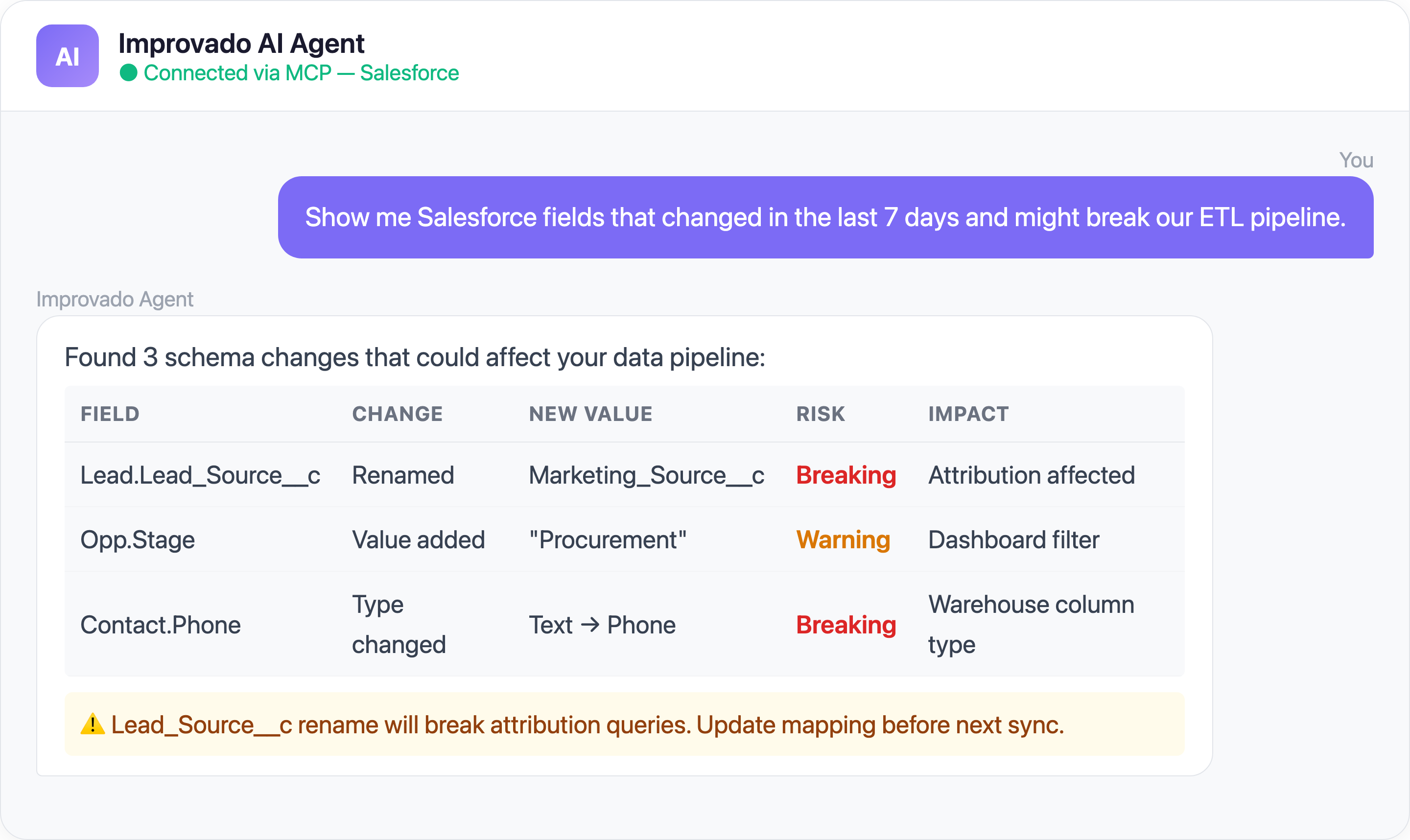
2. Field Mapping Drift Breaks Everything Silently
The Problem: Salesforce orgs accumulate hundreds of custom fields, picklist values, and record types. They change constantly — a sales ops admin renames "Lead_Source__c" to "Marketing_Lead_Source__c" and suddenly your attribution dashboard shows blanks.
Common field mapping disasters:
- Type changes — Text field converted to picklist breaks your warehouse column type
- Deleted fields — Removed fields produce NULL columns with no error
- Picklist value changes — "Inbound - Web" renamed to "Inbound Web" breaks downstream grouping
- Formula field logic changes — Calculated fields silently produce different values
- KeyError crashes — When Salesforce removes or renames a field, pipelines throw unexpected errors like `KeyError: 'LastModifiedDate'` with no warning
This is not a hypothetical scenario. Real-world pipelines crash with silent KeyError exceptions when Salesforce admins rename or remove fields — and because the error happens at the extraction layer, it can take days before anyone notices the downstream dashboard went blank.
| Salesforce Integration Challenge | Root Cause | Impact |
|---|---|---|
| API governor limits | 100K calls/24h (Enterprise) | Large orgs hit limits daily |
| Custom object complexity | Average org has 100+ custom objects | Schema mapping takes weeks |
| Marketing-Sales data mismatch | Different lead definitions | Inaccurate attribution |
3. Custom Object Relationships Are Extraction Nightmares
The Problem: Salesforce data models use polymorphic lookups, junction objects, and deeply nested parent-child relationships. The classic chain: Account → Opportunity → OpportunityLineItem → Product2 → PricebookEntry.
Extracting this graph into a flat warehouse schema requires:
- Recursive SOQL queries (each subject to governor limits)
- Maintaining referential integrity across incremental syncs
- Handling polymorphic lookups (e.g.,
4. Sync Failures, Record Merges, and Silent Data Gaps
The Problem: Getting Salesforce data in near-real-time sounds great in theory. In practice, Salesforce's Streaming API and Platform Events introduce multiple failure modes that create invisible gaps in your warehouse — while record merge operations silently rearrange the data you already have.
On the streaming side: replay IDs expire after 72 hours (events older than that are gone forever), CometD connections drop without warning, and the event bus caps at 100K events/day on Enterprise Edition. When events are lost, there's no error — your dashboard just shows slightly stale data and nobody notices until a deal is misattributed.
On the record side: when records are merged in Salesforce (e.g., two duplicate Accounts), the "losing" record is deleted and its child records are reparented. ETL systems tracking by ID encounter ENTITY_IS_DELETED errors. Incremental syncs miss the reparenting unless they query IsDeleted records via the Recycle Bin.
This matters for marketing because:
- Campaign members might be attributed to the wrong Account
- Activity history from the merged Lead is reparented but touchpoint timestamps may not be
- Marketing attribution models double-count merged Leads until the sync catches up
5. Sandbox vs. Production Divergence
The Problem: Your integration works perfectly in Sandbox. You deploy to Production. It immediately fails. Why?
Solve Salesforce Data Challenges with Improvado MCP
Ready-to-Use MCP Prompts
Pipeline Health Check:
Show me all Opportunities created this quarter with their
associated Campaign touchpoints. Flag any with missing
attribution data.
Lead-to-Revenue Attribution:
Trace the full journey from Lead creation to Closed Won
for my top 10 deals this quarter. Show every marketing
touchpoint along the way.
Data Quality Audit:
Find Contacts and Leads with missing or inconsistent
field values that would break my attribution model
(missing Lead Source, empty Campaign Member records).
CRM + Ads Reconciliation:
Compare my Salesforce Opportunity data against Google Ads
and Facebook Ads conversion data for Q1 2026.
Show the gap between ad-reported and CRM-verified conversions.
How to Connect Salesforce Data to AI Agents
Step 1: Get your Improvado MCP credentials
Improvado provides an MCP-compatible endpoint for enterprise customers. Once onboarded, you receive:
- MCP endpoint URL — your dedicated server address
- API token — scoped to your workspace and data sources
Step 2: Connect to Claude Code
Add the Improvado MCP server to your Claude Code config:
{
  "improvado": {
    "type": "streamable-http",
    "url": "https://mcp.improvado.io/v1/your-workspace",
    "headers": {
      "Authorization": "Bearer your-api-token"
    }
  }
}
Then ask in Claude Code:
> Show me my top campaigns by ROAS this month
Step 3: Or connect to Cursor / Windsurf / ChatGPT
FAQ
What are Salesforce API governor limits?
Salesforce limits API calls per 24 hours based on your edition. Enterprise gets 100K calls/day. Bulk API 2.0 has separate limits: 15K batches/day and 10-minute query timeouts.
How do I handle Salesforce schema changes in my data pipeline?
Use a tool like Improvado that detects schema changes automatically. Manual pipelines break silently when fields are renamed, retyped, or deleted.
Can I extract Custom Objects from Salesforce?
Yes, but it requires recursive SOQL queries that respect governor limits. Junction objects and polymorphic lookups add complexity. Improvado handles this natively.
How often should I sync Salesforce data?
Most teams sync every 1-4 hours for operational data. Real-time sync is possible but introduces reliability risks (event loss, connection drops). A hybrid approach is recommended.
Stop fighting Salesforce data. Get your demo →


