



Key Takeaways
- Tiered API rate limits (110-190 requests/10 seconds depending on plan) throttle every data operation — backfills and multi-integration setups hit the wall fast
- Object associations between contacts, companies, deals, and tickets create a 30-40% incomplete-data problem when relationships aren't traversed correctly
- Custom object extraction is engineering-intensive with a 10,000 record limit per request and no straightforward schema discovery
- Marketing-sales data alignment is constantly off — lifecycle stage transitions, lead scoring, and attribution timestamps don't sync cleanly between Marketing Hub and Sales Hub
- Workflow and automation data is hard to extract for analysis — no bulk export for workflow enrollment history or automation performance
- OAuth token expiration and API version deprecations cause silent pipeline failures that go unnoticed for days
- AI agents via MCP can monitor your HubSpot data health and join CRM data with ad platform metrics automatically

1. API Rate Limits Throttle Every Data Operation
The Problem: HubSpot enforces some of the most restrictive API rate limits in the SaaS ecosystem. Public and marketplace OAuth apps get 110 requests per 10 seconds, while private apps on Pro/Enterprise plans get up to 190 requests per 10 seconds (250 with the API Limit Increase add-on). When you're trying to sync thousands of contacts, deals, and engagement events, you hit the wall fast.
Common causes:
- 110-190 requests per 10 seconds (depending on app type and plan) — This sounds reasonable until you realize that extracting 50,000 contacts with their associated deals, companies, and engagement history requires thousands of API calls
- Rate limit scope is per-app — If you have multiple integrations calling HubSpot (your BI tool, your enrichment tool, your custom scripts), they all share the same rate limit pool
- Inconsistent enforcement — Different API endpoints have different actual limits that don't always match documentation; teams report being throttled below the documented threshold during peak hours
- No batch endpoint for all objects — While HubSpot has batch APIs for some objects, not all object types support batch operations, forcing sequential per-record API calls for certain data types
- OAuth token expiration — HubSpot OAuth tokens expire and must be refreshed; when the refresh mechanism fails, the entire integration silently stops pulling data. This has been flagged as a Critical bug causing order processing failures in production systems
- API migration requirements — HubSpot periodically deprecates API versions, forcing teams to rewrite integrations. These migrations are not optional — old endpoints simply stop working

Time saved: Teams report reducing HubSpot data sync failures from multiple per week to zero after switching from custom integrations.
2. Object Associations Create a Data Modeling Nightmare
The Problem: HubSpot's data model is built on associations — contacts are associated with companies, companies with deals, deals with line items, and everything with engagement events. Extracting this relational data through the API requires multiple sequential calls and careful join logic that breaks when associations are missing or misconfigured.
Common causes:
- Many-to-many associations — A contact can be associated with multiple companies, and a deal can be associated with multiple contacts, creating complex join paths that simple ETL tools can't handle
- Association labels — HubSpot introduced association labels (e.g., "primary contact" vs "billing contact") that add semantic meaning but also add complexity to extraction queries
- Missing associations — Sales reps frequently create deals or contacts without properly associating them, creating orphaned records that break your analytics (30-40% of records in typical HubSpot instances have incomplete associations)
- Association API pagination — Retrieving all associations for large datasets requires paginated API calls that compound with the rate limit problem
This quote captures the typical HubSpot data journey: teams start by just trying to get the raw tables out, only to discover that the real challenge is reconstructing the joins and associations that HubSpot handles internally but doesn't expose cleanly through the API.
| HubSpot API Limit | Tier | Impact on Reporting |
|---|---|---|
| Private apps | 110-190 req/10s (by hub level) | Large data pulls timeout |
| Search API | 4 req/s, 10K results max | Cannot export full contact lists |
| Custom objects | 10 req/s | Complex data models bottleneck |
| Associations API | 15 req/s | Relationship mapping is slow |
3. Custom Object Extraction Is Engineering-Intensive
The Problem: Enterprise HubSpot users rely heavily on custom objects — invoices, subscriptions, contracts, product configurations, or any domain-specific entity that doesn't fit HubSpot's standard contact/company/deal model. But extracting custom objects through the API is significantly more complex than standard objects, and most off-the-shelf integrations don't support them at all.
Common causes:
- Schema discovery complexity — Custom object schemas must be discovered at runtime via the API; there's no pre-built field mapping, so your integration must dynamically handle unknown field types
- 10,000 record limits — HubSpot's CRM API limits search results to 10,000 objects, designed for performance but a hard ceiling for organizations with larger custom object datasets
- Association graph extension — Custom objects have their own association relationships that must be extracted separately and joined with standard object data
- Property history extraction — Getting historical values for custom object properties (e.g., tracking when a subscription status changed) requires additional API calls per property per record
- Native integration gaps — Most third-party HubSpot connectors (Fivetran, Airbyte, etc.) have limited or no support for custom objects, leaving teams to build and maintain custom extraction scripts
4. Marketing and Sales Data Alignment Is Constantly Off
The Problem: HubSpot is often the system of record for both marketing (campaigns, email engagement, form submissions) and sales (deals, pipeline, revenue). But getting these two datasets to tell a consistent story is one of the most common frustrations we hear from revenue teams.
Common causes:
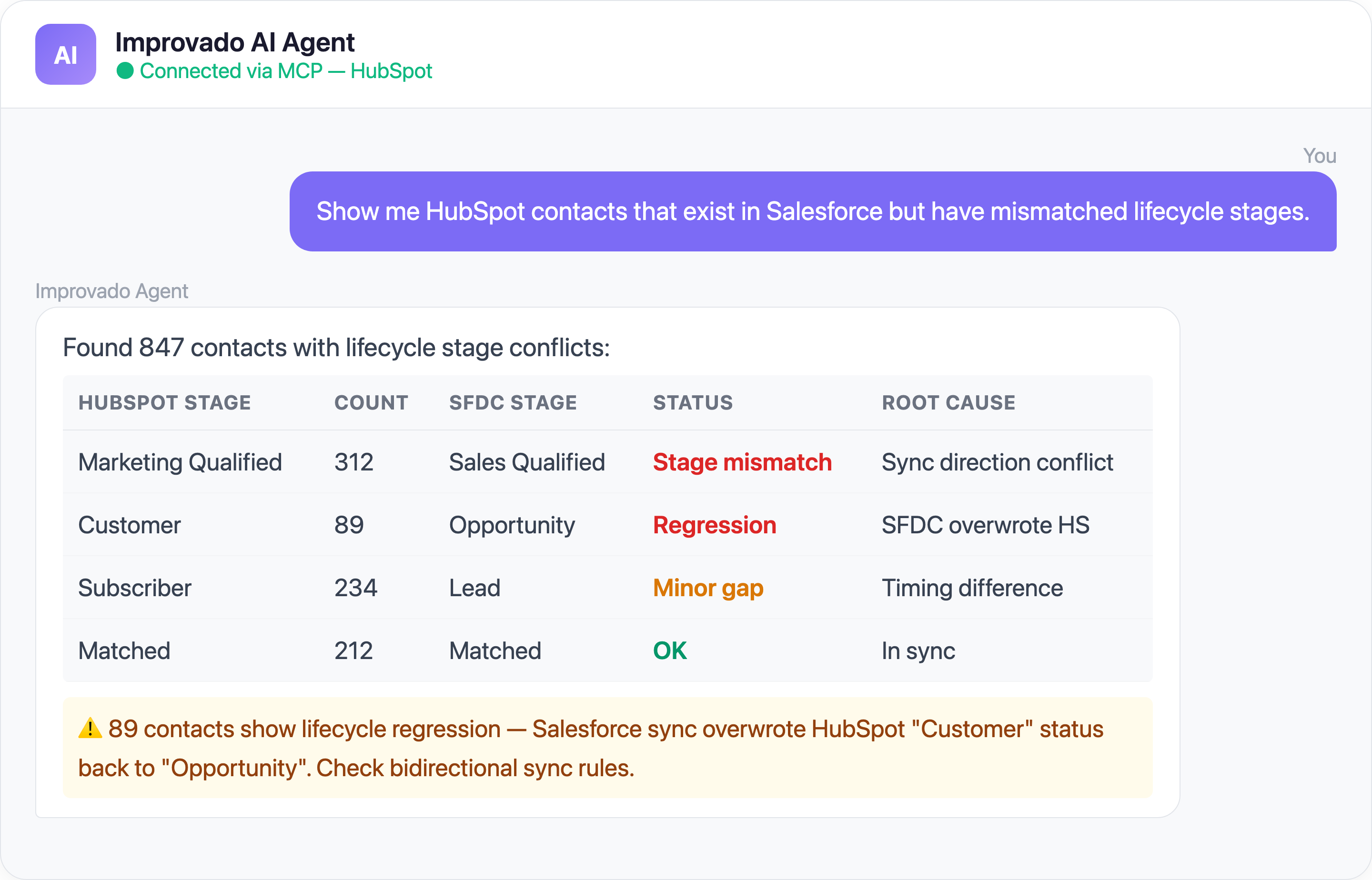
- Lifecycle stage conflicts — Marketing considers a contact an MQL based on engagement scoring, but sales may have already disqualified them — and the lifecycle stage property may reflect either state depending on workflow timing
- Campaign attribution vs deal attribution — HubSpot's campaign influence reporting uses its own attribution model that rarely matches how sales attributes revenue to marketing efforts
- Form submission data fragmentation — Marketing forms, pop-ups, and chatbot conversations all create engagement records in different formats, making it hard to build a unified lead source report
- Workflow data opacity — HubSpot workflows automate lead routing, lifecycle changes, and task creation, but the workflow execution data (which contacts went through which workflows, when, and why) is difficult to extract for analysis
- Reporting API limitations — HubSpot's native reporting tools have dashboard and report limits by tier, and the API doesn't expose all the same aggregations available in the UI
Time saved: Revenue teams report eliminating the 5-8 hours/week previously spent manually reconciling marketing and sales reports.
5. Workflow and Automation Data Is Hard to Extract for Analysis
The Problem: HubSpot workflows are the backbone of marketing and sales automation — nurture sequences, lead scoring updates, deal stage transitions, task assignments, and notification triggers. But analyzing workflow performance at scale (which workflows convert best? where do contacts drop off?) requires extracting data that HubSpot doesn't make easily accessible.
Common causes:
- No workflow analytics API — HubSpot provides basic workflow performance metrics in the UI, but there's no dedicated API endpoint for extracting workflow execution logs with full contact-level detail
- Timeline event complexity — Contact timeline events (which record workflow enrollments) are spread across multiple event types and require complex filtering to isolate workflow-specific actions
- Branch logic opacity — Workflows with if/then branching create multiple paths, but the API doesn't expose which branch a specific contact took without reconstructing the logic from timeline events
- Historical workflow data limits — HubSpot retains workflow enrollment history but accessing it at scale (for thousands of contacts across dozens of workflows) is rate-limit-intensive
- Webhook-only real-time option — Getting real-time workflow data requires setting up webhook actions within each workflow, creating maintenance overhead as workflows change
6. Contact Deduplication Is a Never-Ending Battle
The Problem: Duplicate contacts are the silent data quality killer in HubSpot. The same person enters your system through a marketing form, a sales import, a trade show list, and a support ticket — each time creating a new contact record. HubSpot's built-in dedup tools catch obvious email matches, but subtle duplicates (different emails for the same person, company name variations, phone number format differences) slip through.
Common causes:
- Multiple entry points — Contacts enter HubSpot through forms, API imports, manual creation, email tracking, meeting links, chatbots, and third-party integrations — each potentially creating a new record
- Email-only matching — HubSpot's native deduplication primarily matches on email address, missing duplicates where the same person uses personal and work emails
- Company-level duplication — "Improvado", "Improvado Inc.", "Improvado, Inc.", and "improvado.io" may all create separate company records that need manual merging
- Merge data loss — When contacts are merged, some engagement history may be lost or associated incorrectly, degrading historical analytics
- List and workflow contamination — Duplicate contacts inflate list sizes, trigger duplicate workflow enrollments, and skew engagement metrics — a contact counted twice is a 2x error in your conversion rate denominator
Time saved: Teams report reducing manual dedup effort from 4-6 hours/week to automated, catch-as-they-enter quality control.
7. HubSpot-Salesforce Sync Creates a Permanent Data Trust Gap
The Problem: The HubSpot-Salesforce native integration is the most common CRM sync in B2B — and one of the most fragile. When it works, marketing and sales share a single source of truth. When it breaks (and it breaks regularly), each team looks at different numbers, blames the other's data, and nobody trusts the dashboards.
The sync is bidirectional by default, which means errors compound in both directions. A misconfigured field mapping doesn't just lose data — it can overwrite good data in Salesforce with stale HubSpot values (or vice versa).
Common causes:
- Field mapping conflicts — HubSpot lifecycle stages, lead statuses, and custom properties don't map 1:1 to Salesforce fields, causing data loss or silent overwrites during sync
- Sync direction ambiguity — Bidirectional sync means both systems can overwrite each other; a sales rep updating a field in Salesforce can be overwritten by an older HubSpot value minutes later
- Selective sync filter drift — Inclusion lists and workflow-based sync filters silently exclude records when criteria change, creating growing gaps between the two CRMs that nobody notices for weeks
- Error queue neglect — HubSpot's sync error queue flags individual record failures, but most teams don't monitor it regularly; hundreds of failed syncs accumulate before anyone investigates
- Historical data divergence — After months of sync issues, HubSpot and Salesforce contain different versions of the same records, and determining which is the "correct" version requires manual auditing
Time saved: Revenue ops teams report reducing CRM reconciliation from a quarterly multi-week project to a continuously monitored, automated process.
Solve HubSpot Data Challenges with Improvado MCP
Beyond traditional data pipelines, you can now interact with your HubSpot data using AI agents through Improvado's MCP (Model Context Protocol) server. Here are ready-to-use prompts:
Ready-to-Use MCP Prompts
Pipeline Health Check:
Show me all HubSpot deals by stage with average time in each stage
for the last 90 days. Flag any deals stuck in the same stage for over 30 days.
Marketing-Sales Alignment:
Compare HubSpot MQL-to-SQL conversion rates by lead source for Q1 2026.
Which marketing channels produce leads that sales actually converts?
Contact Quality Audit:
How many duplicate contacts exist in HubSpot based on email, company,
and name matching? Show the top 20 groups with the most duplicates
and estimated impact on our list sizes.
How to Connect HubSpot Data to AI Agents
Step 1: Get your Improvado MCP credentials
Improvado provides an MCP-compatible endpoint for enterprise customers. Once onboarded, you receive:
- MCP endpoint URL — your dedicated server address
- API token — scoped to your workspace and data sources
Step 2: Connect to Claude Code, Cursor, or ChatGPT
Add the Improvado MCP server to your config:
{
  "improvado": {
    "type": "streamable-http",
    "url": "https://mcp.improvado.io/v1/your-workspace",
    "headers": {
      "Authorization": "Bearer your-api-token"
    }
  }
}
Then ask in Claude Code:
> Show me my deal pipeline by stage with conversion rates this quarter
Step 3: Or connect to Cursor / Windsurf / ChatGPT
FAQ
Why do HubSpot reports show different numbers than my BI tool?
HubSpot's native reporting uses real-time data with its own aggregation logic, while your BI tool queries extracted data that may have different freshness (depending on sync frequency), deduplication rules, and aggregation methods. Timezone settings and deal stage transition timing also create discrepancies.
How do I handle HubSpot's 100 requests per 10 seconds API limit?
Use incremental syncs (pulling only records changed since the last sync), batch API endpoints where available, and webhook-based triggers for real-time events. A platform like Improvado handles all this automatically — rate limit management, retry logic, and intelligent scheduling are built into the connector.
Can I extract custom objects from HubSpot without custom code?
Most off-the-shelf ETL tools have limited or no support for HubSpot custom objects. Improvado's connector supports full custom object extraction including dynamic schema discovery, associations, and property history — no custom code required.
How does Improvado handle HubSpot contact deduplication?
Improvado applies deduplication during extraction using fuzzy name matching, email normalization, and company name standardization. This means your warehouse receives clean data even if your HubSpot instance has thousands of duplicates. Improvado's data governance engine also flags new duplicates as they enter the system.
What's the difference between Improvado MCP and HubSpot's native API?
HubSpot's API requires technical knowledge (authentication, pagination, rate limit handling, association resolution) and only provides HubSpot data. Improvado's MCP endpoint wraps this complexity and combines HubSpot data with all your other marketing and sales platforms — ask questions in plain English, get formatted cross-platform answers.
Ready to stop wrestling with HubSpot data? Get your demo →
Related reading: Shopify Data Challenges: Attribution & Reporting Fixes


