



Key Takeaways
- Reporting fragmentation across Instant Reporting, offline reports, API, and SDF files makes simple questions hard to answer
- SDF file parsing is a constant engineering burden with a 10,000 entry limit and frequent format changes
- Floodlight attribution creates conflicting numbers when cross-exchange deduplication logic differs from your other platforms
- Audience data restrictions (30-60% match rates) limit targeting analytics and make retargeting measurement unreliable
- API quota limits bottleneck enterprise-scale extraction and force trade-offs between data freshness and completeness
- AI agents via MCP can unify DV360 data with your full media stack for true cross-channel visibility

1. Reporting Complexity Makes Simple Questions Hard to Answer
The Problem: DV360 has one of the most fragmented reporting systems in ad tech. Performance data lives in Instant Reporting, offline reports, the API, and Structured Data Files — each with different metrics, dimensions, and freshness guarantees. Asking "how did my campaigns perform last week?" shouldn't require querying four different systems.

"Data scattered across multiple platforms across multiple teams. It's hard to tell one whole story when everything is in a different place."
Common causes:
- Metric availability varies by report type — Some metrics (like viewability) are only available in specific report templates, not in the general API
- YouTube & Partners data isolation — YouTube campaign data within DV360 uses a separate reporting pipeline with different available dimensions
- Q1 2025 reporting overhaul — Google restructured DV360 reporting in early 2025, deprecating several legacy report types and introducing new query patterns that broke existing integrations
- Cross-campaign optimization deprecation — As of September 2025, cross-campaign optimization features were removed, requiring teams to restructure how they organize and report on campaigns
Time saved: Teams report reducing DV360 reporting setup from 2-3 days per report to under 15 minutes.
2. SDF File Parsing Is a Constant Engineering Burden
The Problem: Structured Data Files (SDFs) are DV360's bulk management format — used to export and import campaign settings, targeting, creatives, and line items. In theory, SDFs enable automation. In practice, they're a fragile, version-dependent nightmare that breaks with every migration.
Real-world SDF challenges:
- Numeric ID dependencies — Most SDF columns use opaque numeric IDs that require separate API calls to resolve into human-readable names (Affinity targeting IDs, Floodlight Activity IDs, Inventory Source IDs)
- Version migrations — SDF v9 became mandatory in September 2025 for EU political advertising compliance; v7 was already deprecated, forcing teams to maintain multiple parsers during transitions
- 10,000 entry limit — SDF uploads are capped at 10,000 rows per file, requiring splitting and orchestration for large advertisers
- Reference data gaps — Certain reference IDs used by SDFs (like Affinity & In-Market targeting IDs and Conversion Floodlight Activity IDs) can't be retrieved through the DV360 API at all, requiring manual lookups
| DV360 Challenge | Scale (372K+ accounts) | Manual Effort |
|---|---|---|
| Report query limits | Capped at 5 concurrent queries | Queue management needed |
| SDF versioning changes | Affects all 55 customer setups | 10+ hrs per version update |
| Cross-partner normalization | Each partner has unique taxonomy | 20+ hrs/month mapping |
3. Floodlight Attribution and Cross-Exchange Deduplication Create Conflicting Numbers
The Problem: Two overlapping issues make DV360 conversion data unreliable — Floodlight deduplication gaps across Google products, and cross-exchange reach deduplication failures across ad exchanges. Together, they mean your conversion counts, reach metrics, and frequency data are all systematically distorted.
Floodlight cross-product conflicts: Floodlight is Google's conversion tracking system shared across DV360, Campaign Manager 360, and Search Ads 360. Conversions counted in DV360 don't automatically deduplicate against the same conversions in SA360 or CM360. Misconfigured ordinal values silently inflate conversion counts, and Floodlight categories set in CM360 don't sync modifications back to SA360 — creating configuration drift. Attribution window mismatches (DV360 defaults to 30 days click, 7 days view) add further discrepancies against GA4 or your CRM.
Cross-exchange deduplication: DV360 buys inventory across dozens of exchanges — Google Ad Manager, OpenX, PubMatic, Index Exchange, and more. When the same user is available on multiple exchanges simultaneously, DV360 may bid on (and win) multiple impressions for the same person. Each exchange uses its own identifier; matching across exchanges relies on probabilistic methods that degrade with privacy changes. DV360's frequency reports can lag 24-48 hours behind delivery, and as of July 2025, Google removed eight YouTube-specific audience metrics, reducing cross-format measurement capabilities further.
4. Audience Data Restrictions Limit Targeting Analytics
The Problem: Privacy regulations (GDPR, CCPA, Digital Markets Act) and Google's own policy changes have progressively restricted what audience data DV360 makes available for reporting and analysis. Third-party audience segments are losing signal, first-party data matching rates are declining, and the audience insights you relied on two years ago may no longer be available.
Common causes:
- Third-party cookie signal loss — Chrome's user-choice model and Safari/Firefox blocking reduce the addressable audience in DV360, shrinking segment sizes and match rates
- Google audience segment restrictions — Certain sensitive-category audiences (health, finance, politics) are no longer available for targeting or reporting in many regions
- First-party data upload match rates — Customer Match lists uploaded to DV360 typically match at 30-60% rates, and those rates have been declining as privacy changes reduce the available identifier pool
- Combined audience analysis gaps — DV360 doesn't expose granular overlap data between audience segments, making it hard to optimize targeting without external analysis
Time saved: Audience analysis that previously took a data scientist 8+ hours now completes in minutes with pre-joined, normalized datasets.
5. API Quota Limits Bottleneck Enterprise-Scale Extraction
The Problem: DV360's API enforces strict quotas on queries, report generation, and SDF operations. For agencies and brands managing 10+ advertisers with hundreds of line items each, these quotas create a bottleneck that forces teams to choose between data freshness and data completeness.
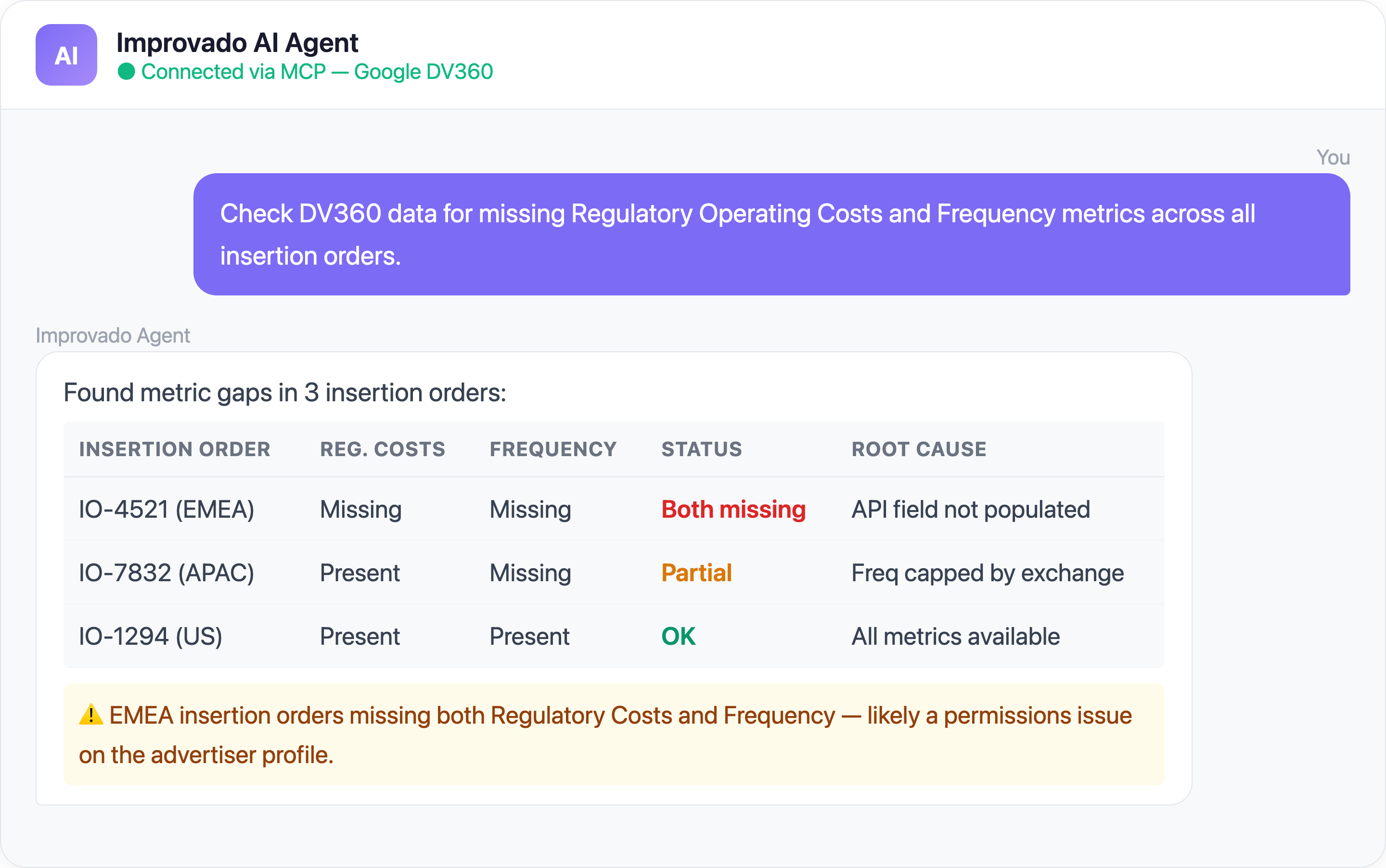
Permission complexity is one of the most frustrating DV360 issues — the connection looks healthy, but specific data sources within DV360 require additional grants that aren't obvious during initial setup.
Common quota challenges:
- Report generation limits — DV360 throttles the number of concurrent report requests per partner, creating queues during peak reporting hours
- Max simultaneous queries — DV360 enforces a limit on concurrent queries per partner, meaning large-scale extraction jobs queue behind each other and compound delays during peak reporting windows
- SDF download restrictions — Manual SDF downloads are limited to a single advertiser at a time and must be initiated from specific resource pages
- API version deprecations — Google announces API deprecations roughly every 12-18 months (DV360 API v2 → v3 transitions), requiring code changes on tight timelines
- Bid strategy and line item query caps — Certain API endpoints have lower quotas than others, making detailed bid-level analysis resource-constrained
- Missing critical metrics — Certain metrics like Regulatory Operating Costs and Frequency data have been flagged as Blocker-level issues by enterprise teams, meaning entire reporting workflows stall until the data becomes available through the API
Solve DV360 Data Challenges with Improvado MCP
Beyond traditional data pipelines, you can now interact with your DV360 data using AI agents through Improvado's MCP (Model Context Protocol) server. Here are ready-to-use prompts:
Ready-to-Use MCP Prompts
Floodlight Attribution Audit:
Compare Floodlight conversions reported in DV360 against CM360
for the last 30 days. Flag any line items where the discrepancy exceeds 15%.
Cross-Exchange Performance:
Break down my DV360 campaign performance by exchange.
Show CPM, viewability rate, and conversion rate for each exchange this quarter.
Audience Match Rate Monitoring:
What are my first-party audience match rates in DV360 this month
compared to last month? Flag any segments where match rate dropped more than 10%.
How to Connect DV360 Data to AI Agents
Step 1: Get your Improvado MCP credentials
Improvado provides an MCP-compatible endpoint for enterprise customers. Once onboarded, you receive:
- MCP endpoint URL — your dedicated server address
- API token — scoped to your workspace and data sources
Step 2: Connect to Claude Code, Cursor, or ChatGPT
Add the Improvado MCP server to your config:
{
  "improvado": {
    "type": "streamable-http",
    "url": "https://mcp.improvado.io/v1/your-workspace",
    "headers": {
      "Authorization": "Bearer your-api-token"
    }
  }
}
Then ask in Claude Code:
> Show me my top DV360 line items by viewable CPM this month
Step 3: Or connect to Cursor / Windsurf / ChatGPT
- Cursor / Windsurf — same MCP config in your IDE's settings
- ChatGPT — use Improvado's REST API as a Custom GPT Action with OAuth
FAQ
Why do DV360 conversions not match my GA4 data?
DV360 uses Floodlight for conversion tracking with its own lookback windows (default 30 days click-through, 7 days view-through). GA4 uses a different attribution model entirely. Time zones, data freshness (DV360 reports can take 24-48 hours to finalize), and view-through conversion counting methodology create systematic discrepancies.
How often does Google change the DV360 API?
Google deprecates major DV360 API versions every 12-18 months and makes incremental changes quarterly. SDF format versions are updated separately, with mandatory migration deadlines. In 2025 alone, Google overhauled DV360 reporting, deprecated cross-campaign optimization, and mandated SDF v9.
Can I get YouTube-level reporting within DV360?
YouTube inventory reporting within DV360 has become more limited over time. As of July 2025, Google removed several YouTube Audience Attribute metrics. You can still get basic YouTube performance data, but detailed audience and frequency metrics require combining DV360 data with YouTube Analytics through a tool like Improvado.
How does Improvado handle SDF version migrations?
Improvado maintains a dedicated connector engineering team that updates SDF parsers before each migration deadline. When Google releases a new SDF version, Improvado's connector handles the version detection, field mapping, and ID resolution automatically — no code changes on your end.
What's the difference between Improvado MCP and the DV360 API?
The DV360 API requires Google partner credentials, complex OAuth flows, and knowledge of specific query patterns for each report type. Improvado's MCP endpoint abstracts all this — you ask questions in plain English and get formatted answers combining DV360 data with all your other marketing platforms.
Ready to stop wrestling with DV360 data? Get your demo →


