



Key Takeaways
- Floodlight attribution uses different defaults (30-day click, 1-day view) than other platforms, creating systematic mismatches
- Data Transfer files require complex parsing of nested schemas with 2-24 hour delivery delays
- Ad blockers create a 35%+ blind spot on desktop — and deduplication logic can inflate conversions by 20-50%
- Log-level data volume (50-100 GB/day) can drive cloud storage costs to $5-15K/month without proper management
- API rate limits cap concurrent reports at 10, with 30+ minute queue waits during peak hours
- AI agents via MCP can reconcile CM360 attribution with your other ad platforms automatically
1. Floodlight Attribution Doesn't Match Your Other Platforms
The Problem: Floodlight tags in CM360 use configurable lookback windows (default: 30-day click-through, 1-day view-through). These almost never match the attribution windows used in Google Ads, SA360, or your CRM.

The same conversion counted with different windows across systems produces different numbers. And here's the kicker: changing the lookback window in CM360 is not retroactive. Historical data stays on the old window forever, creating a permanent data break.
Impact: This is why CM360 is our #1 converting integration page ($1.71M attributed ARR). The attribution problem is that painful.
2. Data Transfer Files Are a Parsing Nightmare
The Problem: CM360 Data Transfer files are gzipped CSVs delivered to Cloud Storage. Simple enough — except:
Building a reliable Data Transfer ingestion pipeline requires weeks of engineering. Maintaining it requires ongoing vigilance.
| Challenge | Impact | Manual Fix Time | With Improvado |
|---|---|---|---|
| Floodlight tag discrepancies | 10-30% conversion data gaps | 8-12 hrs/month | Automated reconciliation |
| Cross-account data silos | No unified view across 251K+ accounts | 15-20 hrs/month | Single pipeline |
| DCM-DV360 sync delays | 24-48 hour reporting lag | Manual monitoring | Auto-detected |
3. Conversion Tracking Has a 35%+ Blind Spot — And Deduplication Makes It Worse
The Problem: Two compounding issues make CM360 conversion data unreliable: tag blocking creates undercount, while cross-network deduplication failures create overcount. The net effect is data you can't trust in either direction.
The undercount: Floodlight tags rely on browser-side firing (iframe or image pixel). They're blocked by ad blockers (35%+ of desktop users), Safari ITP, Firefox ETP, and corporate firewalls. When tags don't fire, CM360 has no conversion data — but your CRM and e-commerce platform still record the transaction. Server-side Floodlight exists but requires custom development and doesn't support all activity types.
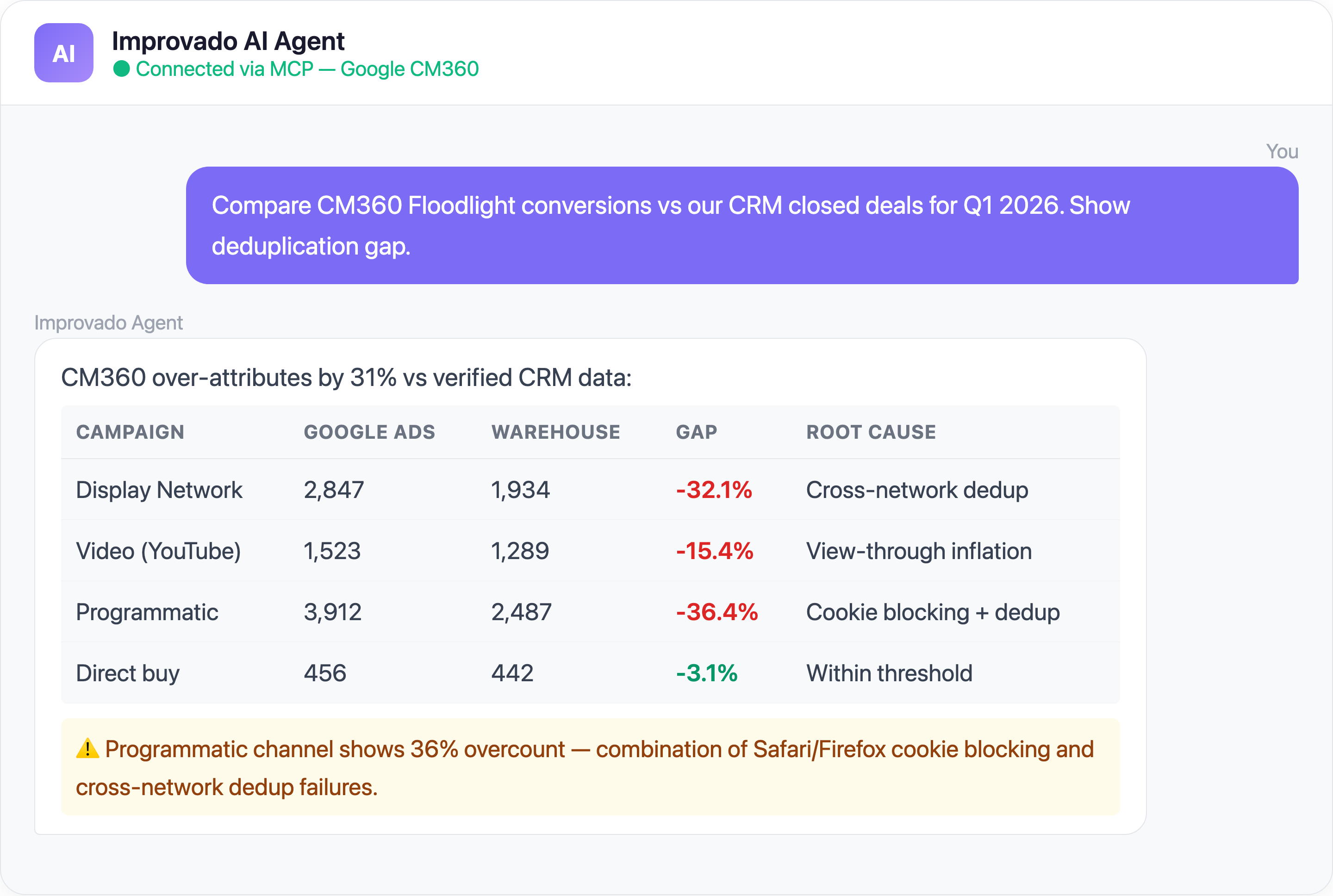
The overcount: CM360 tracks impressions and clicks across multiple ad networks. Deduplication should prevent the same conversion from being credited to multiple networks. In practice, it fails because different networks use different click redirect chains, third-party cookies are blocked in Safari and Firefox (40%+ of traffic), each network fires Floodlight in its own cookie space, and the same user generates separate conversion paths per network. Result: total attributed conversions exceed actual conversions by 20-50%.
4. Log-Level Data Volume Explodes Your Cloud Bill
The Problem: CM360 log-level data (impressions, clicks, activities, rich media) generates billions of rows per month for large advertisers. A single advertiser can produce 50-100 GB/day of raw impression logs.
Loading this into BigQuery or Snowflake creates:
- that exceed your CM360 license fee
- that make interactive analysis impossible (10+ minute queries)
Without this engineering investment, teams give up on log-level analysis entirely.
5. API Rate Limits and Report Queue Bottlenecks
The Problem: CM360 Reporting API has per-user and per-profile rate limits. Reports are queued, and large reports (cross-advertiser, long date ranges) can wait 30+ minutes before processing even begins.
Additional constraints:
- Maximum 10 concurrent report runs per user profile
- Report files expire after 10 days
- No webhook notification when reports are ready
Teams create multiple user profiles to work around concurrency limits, creating credential management overhead.
Solve CM360 Challenges with Improvado MCP
Ready-to-Use MCP Prompts
Cross-Platform Attribution:
Compare CM360 Floodlight conversions against Google Ads and
SA360 conversions for Q1 2026. Show me the deduplication gap
by campaign and network.
Conversion Reconciliation:
Match CM360 conversion data against our CRM closed-won deals.
What percentage of CM360-attributed conversions can be verified
in the CRM?
Media Mix Analysis:
Show me CM360 impressions, clicks, and conversions by publisher,
alongside cost data from our DSPs. Calculate true CPM and CPA
by publisher.
Tag Health Check:
What's the gap between CM360 Floodlight-reported conversions
and our backend transaction count by browser type?
Show me the ad-blocker / ITP impact.
How to Connect CM360 Data to AI Agents
Step 1: Get your Improvado MCP credentials
Improvado provides an MCP-compatible endpoint for enterprise customers. Once onboarded, you receive an MCP endpoint URL and API token scoped to your workspace.
Step 2: Connect to Claude Code, Cursor, or ChatGPT
{
  "improvado": {
    "type": "streamable-http",
    "url": "https://mcp.improvado.io/v1/your-workspace",
    "headers": {
      "Authorization": "Bearer your-api-token"
    }
  }
}
Query your CM360 data in plain English — no GAQL, no Data Transfer file parsing, no match-table joins.
FAQ
Why do CM360 and Google Ads show different conversion numbers?
Different attribution windows, different deduplication logic, and Floodlight vs Google Ads conversion tags firing independently. Normalizing attribution windows and deduplicating at the warehouse level solves this.
How much does CM360 log-level data cost to store?
A large advertiser can generate 50-100 GB/day of raw impression logs. In BigQuery, this translates to $1-3K/month in storage alone, plus significant query costs. Pre-aggregation reduces this by 90%+.
Can I get real-time data from CM360?
Data Transfer files have 2-24 hour delay. The Reporting API is faster but subject to queue times. True real-time CM360 reporting requires log streaming, which most teams find cost-prohibitive.
How do I handle Floodlight tag blocking?
Combine browser-side Floodlight data with server-side conversion API and CRM/backend transaction data. Improvado unifies all three sources to fill the gaps.
Ready to tame your CM360 data? Get your demo →
Related reading: DV360 Data Blind Spots in Programmatic Reports


