

Create Dashboards with Detailed Prompts
Dashboard Prompt Examples
Below are three ready-to-use prompts that show how detailed instructions help the AI Agent generate more accurate, actionable dashboards. Each example targets a different use cases — adapt them to your own data and goals.
CMO Cross-Channel
This dashboard gives marketing leadership a high-level view of performance across all channels in one place. It focuses on strategic metrics like total spend, revenue, ROAS, and cost per acquisition — broken down by channel and time period. Use this when you need a single view for executive reporting, budget allocation decisions, or board-level updates.
Prompt Template
CMO Cross-Channel Performance Dashboard
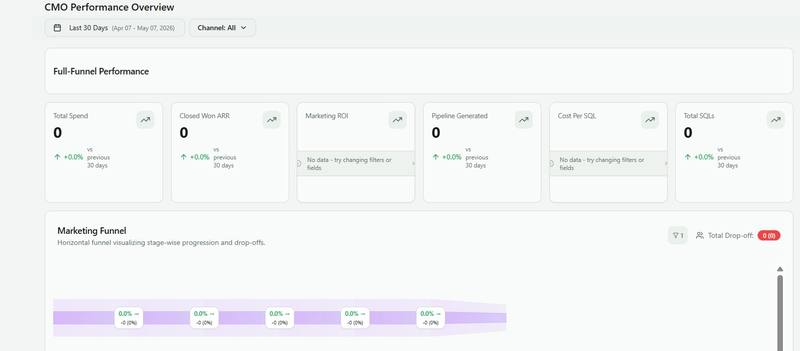
Create a CMO-level Cross-Channel Performance Dashboard — a single source of truth for marketing leadership. It must answer three questions at a glance: 1. How is our full-funnel performing vs. target and vs. last period? 2. Which channels are generating pipeline and closed revenue most efficiently? 3. Where should we shift budget to improve ROI? Executive-ready: no ad-level detail, no raw numbers without context. Every metric must have a benchmark, a trend, and a delta vs. prior period.
━━━━━━━━━━━━━━━━━━━━━━━━━━━━━━━━━━━━━━━━ DATA & METRICS ━━━━━━━━━━━━━━━━━━━━━━━━━━━━━━━━━━━━━━━━
Attribution model: Linear (linear_weight as-is, no toggle) Funnel metrics: Website Users, Lead, Disco Lead, MQL, SQL, Opportunity Created, Demo Completed, Closed Won Revenue metrics: SQL ARR = sumIf(linear_weight * opportunity_amount, metrics_name = 'SQL') Closed Won ARR= sumIf(linear_weight * opportunity_amount, metrics_name = 'Closed Won') Spend (two modes, toggle-controlled): Marketing Only = ads spend + Marketing Payroll + Event Cost + Other Marketing Costs Marketing+Sales= above + Sales Payroll + Other Sales Costs Efficiency metrics: Cost Per SQL = Total Budget / SQL count Cost Per Lead = Marketing Spend / Lead count Marketing ROI = (Closed Won ARR - Total Budget) / Total Budget × 100% Channel override: If medium = 'referral' AND source IN (chatgpt.com, perplexity.ai, gemini.google.com) → channel_type = 'Organic AI' Standard channels: Paid Search | Paid Social | Organic | Email | Events | Direct | Organic AI
━━━━━━━━━━━━━━━━━━━━━━━━━━━━━━━━━━━━━━━━ FILTERS (always visible, top bar) ━━━━━━━━━━━━━━━━━━━━━━━━━━━━━━━━━━━━━━━━ Date Range — default: Last 30 days — presets: 7d / 30d / Last Quarter / YTD / Custom — prior period auto-calculated from selected range Spend Toggle — prominent, near date range — "Marketing Only" (default) or "Marketing + Sales" — affects ALL spend metrics and ROI globally Channel Filter — multi-select, All by default ━━━━━━━━━━━━━━━━━━━━━━━━━━━━━━━━━━━━━━━━ LAYOUT ━━━━━━━━━━━━━━━━━━━━━━━━━━━━━━━━━━━━━━━━
HEADER "CMO Performance Overview" | Active date range | Spend scope badge | Last refresh timestamp ROW 1 — 6 KPI CARDS Each card: current value (large/bold) + delta vs prior period (↑↓ %) + target line + sparkline 1. Total Spend (respects spend toggle) 2. Closed Won ARR (marketing-attributed revenue) 3. Marketing ROI (%, color-coded vs. target) 4. Pipeline Generated (Opportunity Created ARR) 5. Cost Per SQL (efficiency signal) 6. Total SQLs (volume signal) Color coding: Green = at/above target | Yellow = within 10% below | Red = >10% below ROW 2 — FULL-FUNNEL VISUALIZATION Horizontal funnel, configurable stages. All possible stages: Website Users → Lead → Disco Lead → MQL → Demo Completed → SQL → Opportunity Created → Technical Validation → Proposal Delivered → Partner Selection → Security/Legal Review → Closed Won Default (if not configured): Website Users → Lead → MQL → SQL → Opportunity Created → Closed Won Per stage: absolute count | conversion rate to next stage (%) | period-over-period delta Color: gradient light (top) → dark brand (bottom) Configuration: gear icon (top-right of widget) opens inline settings panel with toggles for each stage. Selection persists to config table as JSON array. Funnel re-renders immediately — no page reload. ROW 3 — CHANNEL PERFORMANCE TABLE Ranked by Closed Won ARR descending. Columns: Channel | Spend | Leads | MQLs | SQLs | Opp. Created | Closed Won ARR | ROI | vs. Target - Top 3 rows: green left border - Bottom row (worst ROI): red left border - Channel: color-coded badge - ROI: progress bar vs. target - vs. Target: ↑↓ indicator - Totals row pinned at bottom - Export to CSV button ROW 4 — SPEND vs. PIPELINE TREND Dual-axis combo chart over selected date range. Bars (left axis): Total Spend per period Line 1 (right axis): Opportunity Created ARR Line 2 (right axis): Closed Won ARR Dashed line: Target Closed Won ARR (from config) Granularity: Daily / Weekly (default) / Monthly Hover tooltip: period | spend | pipeline | revenue | ROI for that period ROW 5 — AI EXECUTIVE INSIGHTS [PRIORITY — load from pre-computed table] Four blocks, rendered in order: PERFORMANCE SUMMARY "This period, marketing generated [X] SQLs and [Y] Closed Won ARR on [Z] spend, delivering a [ROI%] return — [above/below] the [target%] target by [delta%]." TOP CHANNEL "[Channel] is your most efficient channel at $[CPS] per SQL, [X%] better than the portfolio average." RISK FLAG "[Channel] spend is up [X%] but SQLs are down [Y%] — efficiency is declining. Review budget allocation before next planning cycle." BUDGET RECOMMENDATION "Based on current efficiency signals, shifting [X%] of budget from [Channel A] to [Channel B] could generate ~[N] additional SQLs." Display: highlighted card, light background Show: "Insights computed [date] at 02:00 UTC" Include: "How was this calculated?" expandable section Button: "Recompute now" (admins only) Implementation: nightly job writes to cmo_dashboard_insights table. Dashboard reads latest row per insight_type on load — no LLM call at render time. ROW 6 — TOP CAMPAIGNS TABLE Top 15 campaigns across all channels, ranked by Closed Won ARR. Columns: Channel | Campaign | Spend | Leads | SQLs | Closed Won ARR | CPS | ROI - Channel: color-coded badge - Campaign name: always a clickable link to native ad platform (Facebook Ads Manager / Google Ads / TikTok Ads / Microsoft Ads) - Sortable columns | Pagination (15 per page) ━━━━━━━━━━━━━━━━━━━━━━━━━━━━━━━━━━━━━━━━ BENCHMARKS ━━━━━━━━━━━━━━━━━━━━━━━━━━━━━━━━━━━━━━━━
All targets pulled dynamically from config table — never hardcoded. Config keys: benchmark_marketing_roi (percent) benchmark_cost_per_sql (USD) benchmark_cost_per_lead (USD) benchmark_pipeline_cov (ratio, e.g. 3× spend) benchmark_closed_won_arr (USD per period) benchmark_sql_count (count per period) funnel_stages (JSON array of active stage names) If config table doesn't exist: seed it with placeholder values, hide target lines, show "(No target set)" tooltip. Missing individual keys hide only that metric's target.
━━━━━━━━━━━━━━━━━━━━━━━━━━━━━━━━━━━━━━━━ DESIGN ━━━━━━━━━━━━━━━━━━━━━━━━━━━━━━━━━━━━━━━━
Style: Dark navy sidebar / white content (Improvado brand) One accent color per channel, consistent across all widgets Inter or system sans-serif | KPI numbers 32px+ 8px grid, consistent spacing Interactions: - Click channel in table → filters ALL charts to that channel - Click funnel stage → drills into channel breakdown for that stage - Date range or spend toggle change → full dashboard reload States: - Loading: skeleton per widget (not spinners) - Empty: "No data for this period and channel selection" - Error: message + retry button Performance: - All queries run in parallel - Cache results 1 hour - Data freshness timestamp per widget ━━━━━━━━━━━━━━━━━━━━━━━━━━━━━━━━━━━━━━━━ WHAT THIS DASHBOARD IS NOT ━━━━━━━━━━━━━━━━━━━━━━━━━━━━━━━━━━━━━━━━
- Not a campaign manager (no ad-level breakdown)
- Not real-time (daily refresh is sufficient) - Not a channel deep-dive (link out to channel-specific dashboards)
- Not an attribution model comparison (Linear is the only model shown)
━━━━━━━━━━━━━━━━━━━━━━━━━━━━━━━━━━━━━━━━ CLIENT SETUP CHECKLIST ━━━━━━━━━━━━━━━━━━━━━━━━━━━━━━━━━━━━━━━━
1. Seed the config table with benchmark targets for all 6 KPIs + funnel_stages JSON 2. Set up nightly insights computation job (writes to cmo_dashboard_insights at 02:00 UTC) 3. Confirm active funnel stages via the in-dashboard settings panel 4. Confirm spend scope default (Marketing Only vs. Marketing + Sales) 5. Verify all 7 standard channels appear in the attribution table 6. Spot-check that __account_id and campaign_id are populated for platform links
What the dashboard looks like when the prompt is implemented.
Daily Performance Dashboard
This dashboard is built for day-to-day campaign management. It tracks key operational metrics like impressions, clicks, CTR, CPC, and conversions — updated daily across active campaigns. Use this to spot trends early, catch underperforming campaigns, and make quick optimization decisions without digging through individual platforms.
Prompt Template
Daily Performance Dashboard
Create a Daily Performance Dashboard for marketing operations teams. It must answer four questions in under 60 seconds every morning: 1. Are we on pace to hit our monthly budget and pipeline targets? 2. What changed significantly since yesterday — and since last week? 3. Is anything broken, spiking, or dropping that needs action today? 4. Which campaigns are over- or under-delivering right now? Operational dashboard only — not executive, not strategic. Speed over depth. Opens at 9am, tells you exactly what to do.

━━━━━━━━━━━━━━━━━━━━━━━━━━━━━━━━━━━━━━━━ TECHNICAL CONSTRAINTS (read before writing any code) ━━━━━━━━━━━━━━━━━━━━━━━━━━━━━━━━━━━━━━━━

Data source: All widgets query internal_analytics.cmo_dashboard_view — a pre-aggregated view. Never query biz_multitouch_all_attribution_metrics_model directly. Always use the fully qualified name; do not use the {table} placeholder.

Spend columns: Use marketing_spend for Marketing Only mode and total_spend for Marketing+Sales mode. Do NOT use linear_weight for spend — the spend column holds actual values; linear_weight is always 0 for spend metrics. Use linear_weight-derived columns (leads, sqls, website_users, etc.) only for funnel metrics.

Days-in-month calculation: Use dateDiff('day', toStartOfMonth(today()), toStartOfMonth(today() + toIntervalMonth(1))). The function daysInMonth() does not exist in ClickHouse.

Days elapsed: dateDiff('day', toStartOfMonth(today()), today()) + 1

Date references: today(), today() - 1 (yesterday), today() - 7 (same weekday last week), toStartOfMonth(today()) (first of month). Never use daysInMonth(). No semicolons at end of queries.

SQL filter placeholders: Append {where_filters} to every query. Do NOT use {where_date} — all date ranges are hardcoded using ClickHouse date functions.

React component rules: No JSX. Use ctx.createElement aliased as var h = ctx.createElement. No object spread operators — {…styleObj, extra: val} causes "unexpected token" errors in the sandbox. Use Object.assign() instead: var s = Object.assign({}, baseStyle, {extra: val}). Never wrap sibling elements in an array as a child argument — pass them as individual arguments or wrap in a container element. Always verify paren balance before saving: count of ( must equal count of ) in the full component string. Available on ctx: ctx.data, ctx.isLoading, ctx.createElement, ctx.formatCurrency.

Data grain: The attribution table stores event_date as Date type (not DateTime). Hourly data does not exist. All time-based analysis uses daily grain only. Do not build hourly charts.

━━━━━━━━━━━━━━━━━━━━━━━━━━━━━━━━━━━━━━━━ DATA & METRICS ━━━━━━━━━━━━━━━━━━━━━━━━━━━━━━━━━━━━━━━━

Attribution: Linear (linear_weight already represents fractional credit per event — use as-is, no toggle needed).

View columns available: website_users, leads, disco_leads, mqls, sqls, opp_created, demo_completed, closed_won, sql_arr, closed_won_arr, pipeline_arr, marketing_spend, sales_spend, total_spend, channel, campaign_name, campaign_id, event_datasource_name, date.

Channel override is already applied in the view. medium = 'referral' AND source IN (chatgpt.com, perplexity.ai, gemini.google.com) maps to channel = 'Organic AI'. No CASE WHEN needed at widget level.

Spend toggle: Marketing Only = marketing_spend column. Marketing+Sales = total_spend column. Default: Marketing Only.

Pacing: Spend to Date = SUM(marketing_spend) WHERE date >= toStartOfMonth(today()) AND date <= today(). Expected Spend to Date = monthly_budget_target × (days_elapsed / days_in_month). Pacing % = Spend to Date / Expected Spend to Date × 100. Projected Month-End = Spend to Date / days_elapsed × days_in_month.

Efficiency metrics (computed in SQL or component): CPL = marketing_spend / leads. CPS = marketing_spend / sqls. MQL Rate = mqls / leads × 100.

Comparison periods — always shown together: Today | Yesterday | Same weekday last week | MTD vs prior MTD.

━━━━━━━━━━━━━━━━━━━━━━━━━━━━━━━━━━━━━━━━ FILTERS (always visible, top bar) ━━━━━━━━━━━━━━━━━━━━━━━━━━━━━━━━━━━━━━━━

Date Mode — single toggle, two options only, no custom range picker: "Today" (default) shows today vs yesterday vs same day last week. "MTD" shows month-to-date vs same MTD prior month. Spend Toggle — "Marketing Only" (default) or "Marketing + Sales". Channel Filter — multi-select from the channel column, All by default.

━━━━━━━━━━━━━━━━━━━━━━━━━━━━━━━━━━━━━━━━ LAYOUT ━━━━━━━━━━━━━━━━━━━━━━━━━━━━━━━━━━━━━━━━

ROW 1 — BUDGET PACING STRIP (full width, custom-component)

SQL: SELECT sumIf(marketing_spend, date >= toStartOfMonth(today()) AND date <= today()) AS spend_mtd, dateDiff('day', toStartOfMonth(today()), today()) + 1 AS days_elapsed, dateDiff('day', toStartOfMonth(today()), toStartOfMonth(today() + toIntervalMonth(1))) AS days_in_month FROM internal_analytics.cmo_dashboard_view WHERE date >= toStartOfMonth(today()) AND date <= today(){where_filters} LIMIT 1

Displays: month label | status badge ON PACE (±10%) / OVERPACING / UNDERPACING. Progress bar filled to spend_mtd as % of projected EOM, with a tick mark at days_elapsed / days_in_month position. Text line: $X spent | $Y remaining | Proj. EOM: $Z | N days left. Colors: green #16a34a (90–110%) | amber #d97706 (>110%) | red #dc2626 (<90%). If monthly_budget_target is not in config, show spend and projection only — omit pacing % and badge, do not break the widget.

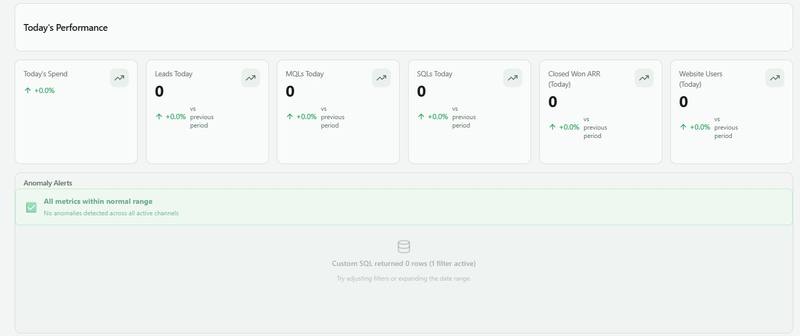
ROW 2 — DAILY KPI CARDS (6 cards, kpi-widget or custom-component)

SQL pattern: SELECT sumIf(marketing_spend, date = today()) AS val_today, sumIf(marketing_spend, date = today() - 1) AS val_yesterday, sumIf(marketing_spend, date = today() - 7) AS val_last_week FROM internal_analytics.cmo_dashboard_view WHERE date >= today() - 7 AND date <= today(){where_filters} LIMIT 1

Card 1: Today's Spend — secondary: pacing % vs daily budget target. Card 2: Leads — secondary: CPL today. Card 3: MQLs — secondary: MQL Rate %. Card 4: SQLs — secondary: CPS today. Card 5: Closed Won ARR — revenue closed today. Card 6: Website Users — top-of-funnel health.

Each card shows: today's value | Δ vs yesterday | Δ vs same weekday last week. Delta color: Spend = green if underpacing, red if overpacing. All others = green if up, red if down, grey if change <3%. KPI numbers at 24px font size. Use explicit style objects — no spread operators.

ROW 3 — ANOMALY ALERT PANEL (custom-component)

SQL: SELECT channel, sumIf(marketing_spend, date = today()) AS spend_today, sumIf(marketing_spend, date >= today() - 7 AND date < today()) / 7.0 AS avg_spend_7d, sumIf(leads, date = today()) AS leads_today, sumIf(leads, date >= today() - 7 AND date < today()) / 7.0 AS avg_leads_7d, sumIf(marketing_spend, date = today() - 1) AS spend_yesterday FROM internal_analytics.cmo_dashboard_view WHERE date >= today() - 7 AND date <= today(){where_filters} GROUP BY channel ORDER BY spend_today DESC LIMIT 20

Alert types auto-detected in component logic: Spend spike — spend_today > avg_spend_7d × 1.30 (threshold from config key alert_spend_spike_pct, default 30). Spend drop — spend_today < avg_spend_7d × 0.70 and avg_spend_7d > 10. Zero spend — spend_today = 0 and spend_yesterday > 10. Lead drop — leads_today < avg_leads_7d × 0.50 and avg_leads_7d > 1 (threshold from alert_lead_drop_pct, default 50). No leads with spend — leads_today = 0 and spend_today > 100.

If no alerts: show green card "All metrics within normal range." If alerts: amber (#fffbeb) or red (#fef2f2) tinted cards, one per alert, with channel name | current vs average | one-line recommended action. Each alert card uses explicit style variables — no spread operators.

ROW 4 — CHANNEL DAILY PERFORMANCE TABLE (custom-component)

SQL: SELECT channel, sumIf(marketing_spend, date = today()) AS spend_today, sumIf(marketing_spend, date = today() - 1) AS spend_yesterday, sumIf(marketing_spend, date = today() - 7) AS spend_last_week, sumIf(leads, date = today()) AS leads_today, sumIf(leads, date = today() - 1) AS leads_yesterday, sumIf(sqls, date = today()) AS sqls_today, sumIf(marketing_spend, date >= toStartOfMonth(today()) AND date <= today()) AS mtd_spend FROM internal_analytics.cmo_dashboard_view WHERE date >= today() - 7 AND date <= today(){where_filters} GROUP BY channel ORDER BY spend_today DESC LIMIT 20

Columns: Channel | Spend Today | vs Yesterday (Δ + %) | vs Last Week (Δ + %) | Leads | vs Yesterday | SQLs | MTD Spend. Active channels (spend_today > 0 or leads_today > 0) shown at full opacity, sorted by spend descending. Inactive channels dimmed to 45% opacity, pinned to bottom. Totals row passed as a direct child of tbody — do NOT wrap in an array. Header style objects defined as named variables (e.g. var hs = {…}; var hsl = {…};) — do not use spread in style props. Delta display uses explicit style objects: var upStyle = {color: '#16a34a', fontWeight: 600}; var downStyle = {color: '#dc2626', fontWeight: 600};

ROW 5 — MTD DAILY SPEND TREND (chart widget)

NOTE: Hourly data does not exist — event_date is Date type, not DateTime. Use daily grain only.

SQL: SELECT date, SUM(marketing_spend) AS spend FROM internal_analytics.cmo_dashboard_view WHERE date >= toStartOfMonth(today()) AND date <= today(){where_filters} GROUP BY date ORDER BY date ASC LIMIT 31

Chart type: bar or line. X-axis: date. Series: spend. Title: "MTD Daily Spend." inheritGroupingFromDashboard: false. dateField: "date".

ROW 6 — TOP CAMPAIGN MOVERS (custom-component)

SQL: SELECT campaign_name, channel, campaign_id, event_datasource_name, sumIf(marketing_spend, date = today()) AS spend_today, sumIf(marketing_spend, date = today() - 1) AS spend_yesterday, sumIf(leads, date = today()) AS leads_today, sumIf(leads, date = today() - 1) AS leads_yesterday FROM internal_analytics.cmo_dashboard_view WHERE date >= today() - 1 AND date <= today() AND campaign_name != ''{where_filters} GROUP BY campaign_name, channel, campaign_id, event_datasource_name HAVING spend_today > 0 OR spend_yesterday > 0 ORDER BY abs(spend_today - spend_yesterday) DESC LIMIT 30

Two side-by-side panels: BIGGEST GAINS (top 5) | BIGGEST DROPS (top 5). Threshold: ≥10% change AND spend > $10 on either day. Include only campaigns active on both today and yesterday. Campaign name as clickable link using campaign_id and event_datasource_name: facebook/meta → adsmanager.facebook.com, google_ads/google_ads_ql → ads.google.com/aw, tiktok_ads → ads.tiktok.com/i18n/campaign, microsoft_ads/bing_ads → ui.ads.microsoft.com/campaign/vnext. Panels rendered as flex row — pass each panel as a separate child argument to the container h() call, not as an array.

ROW 7 — MTD FUNNEL PROGRESS (custom-component)

SQL: SELECT ROUND(SUM(website_users)) AS website_users_mtd, ROUND(SUM(leads)) AS leads_mtd, ROUND(SUM(mqls)) AS mqls_mtd, ROUND(SUM(sqls)) AS sqls_mtd, ROUND(SUM(opp_created)) AS opp_created_mtd, ROUND(SUM(closed_won)) AS closed_won_mtd, dateDiff('day', toStartOfMonth(today()), today()) + 1 AS days_elapsed, dateDiff('day', toStartOfMonth(today()), toStartOfMonth(today() + toIntervalMonth(1))) AS days_in_month FROM internal_analytics.cmo_dashboard_view WHERE date >= toStartOfMonth(today()) AND date <= today(){where_filters} LIMIT 1

Horizontal progress bar per funnel stage. Per bar: stage name | MTD count | Proj. month-end | status badge. Pace % = (mtd_value / days_elapsed × days_in_month) / monthly_target × 100. Status: ON PACE (±15%) | AHEAD | BEHIND. Colors: green / amber / red. If monthly_target not in config: show MTD count and projection only, omit % and badge — do not break the widget. Footer text passed as a direct element child — do NOT wrap in an array: h('div', {key: 'footer', style: {…}}, 'Grey tick = day N of M. Projected = current daily run rate × remaining days.')

ROW 8 — DAILY BRIEFING (custom-component)

SQL: SELECT sumIf(marketing_spend, date = today() - 1) AS spend_yesterday, sumIf(marketing_spend, date = today() - 7) AS spend_last_week, ROUND(sumIf(leads, date = today() - 1)) AS leads_yesterday, ROUND(sumIf(sqls, date = today() - 1)) AS sqls_yesterday, sumIf(marketing_spend, date >= toStartOfMonth(today()) AND date <= today()) AS mtd_spend, ROUND(sumIf(leads, date >= toStartOfMonth(today()) AND date <= today())) AS mtd_leads FROM internal_analytics.cmo_dashboard_view WHERE date >= today() - 7{where_filters} LIMIT 1

Two panels side by side using flex row (each panel passed as a separate child argument — not an array): Panel 1 (blue left-border, #f0f9ff background) — Morning Briefing: yesterday spend + trend vs same weekday | leads + CPL | SQLs + CPS | MTD totals. Panel 2 (green or red left-border) — Status: auto-generated flag logic in the component, no LLM call at render time. Flag conditions: spend = 0 → "Zero spend recorded — check campaign status." leads = 0 and spend > 100 → "No leads despite spend — check conversion tracking." abs(spendVsWeek) > 40% → "Spend spike/drop vs same weekday — investigate pacing." Green panel if no flags. Red panel (#fef2f2) if any flags. Footer string passed as a plain child to its parent element — not wrapped in an array or bracket.

━━━━━━━━━━━━━━━━━━━━━━━━━━━━━━━━━━━━━━━━ BENCHMARKS & CONFIG ━━━━━━━━━━━━━━━━━━━━━━━━━━━━━━━━━━━━━━━━

Config table: internal_analytics.cmo_dashboard_config (shared with CMO dashboard). Keys used by this dashboard: monthly_budget_target (USD/month), daily_budget_target (USD/day), benchmark_cpl (USD per Lead), benchmark_cps (USD per SQL), benchmark_lead_day (leads/day target), benchmark_sql_day (SQLs/day target), alert_spend_spike_pct (default 30), alert_lead_drop_pct (default 50), funnel_stages (shared JSON array). Missing key behavior: hide that metric's target only — do not break other widgets.

━━━━━━━━━━━━━━━━━━━━━━━━━━━━━━━━━━━━━━━━ DESIGN ━━━━━━━━━━━━━━━━━━━━━━━━━━━━━━━━━━━━━━━━

Denser than CMO dashboard — more data per pixel. KPI card numbers 24px. Alert panel background amber (#fffbeb) or red (#fef2f2) when active. Pacing bar traffic-light colors green #16a34a / amber #d97706 / red #dc2626. Active channel indicator: green dot (#22c55e). Inactive channel indicator: grey dot (#cbd5e1). Loading state: "Loading…" text per widget — not full-page spinners.

━━━━━━━━━━━━━━━━━━━━━━━━━━━━━━━━━━━━━━━━ WHAT THIS DASHBOARD IS NOT ━━━━━━━━━━━━━━━━━━━━━━━━━━━━━━━━━━━━━━━━

Not a campaign editor. Not a historical reporting tool (use CMO dashboard for trends). Not an attribution model comparison (Linear is fixed). Not a creative performance view. Not an hourly delivery monitor (data is daily grain only).

━━━━━━━━━━━━━━━━━━━━━━━━━━━━━━━━━━━━━━━━ CLIENT SETUP CHECKLIST ━━━━━━━━━━━━━━━━━━━━━━━━━━━━━━━━━━━━━━━━

Confirm internal_analytics.cmo_dashboard_view exists — recreate from biz_multitouch_all_attribution_metrics_model if dropped. 2. Seed cmo_dashboard_config with daily benchmark keys listed above. 3. Set up nightly briefing job at 06:00 UTC writing to cmo_dashboard_insights with insight_type = 'daily_summary'. 4. Confirm active funnel stages (shared with CMO dashboard config). 5. Confirm default spend scope (Marketing Only vs Marketing+Sales). 6. Set alert thresholds — defaults 30% spike / 50% drop — tune per client. 7. Do not build hourly charts — attribution table is daily grain only, Row 5 is MTD daily trend.
What the dashboard looks like when the prompt is implemented.
Creative Dashboard
This dashboard connects creative attributes to performance outcomes. It shows which ad formats, visuals, and messaging styles drive the best results — broken down by metrics like CPP, ROAS, and engagement rate. Use this to identify winning creative patterns, flag fatigue, and inform your next round of creative production.
Prompt Template
Creative Performance Dashboard
Create a Creative Performance Dashboard for performance marketers and creative strategists. It must answer five questions without manual analysis: 1. Which creatives are driving the most conversions at the lowest cost? 2. Which creatives are fatiguing — high frequency, declining CTR? 3. What creative formats, themes, and hooks perform best by channel? 4. Which creatives should get more budget, and which should be paused today? 5. What patterns from winners should inform the next planning session? Creative strategy dashboard — not for CMO, built for the team that makes and optimizes ads. Connect performance data to creative attributes so patterns emerge.
━━━━━━━━━━━━━━━━━━━━━━━━━━━━━━━━━━━━━━━━ DATA & METRICS ━━━━━━━━━━━━━━━━━━━━━━━━━━━━━━━━━━━━━━━━
Attribution: Linear (linear_weight as-is) Volume: Impressions | Clicks | Lead | MQL | SQL | Closed Won ARR Spend: Ad Spend = sumIf(linear_weight, metrics_name = 'ads spend') Efficiency: CTR = Clicks / Impressions × 100 CPC = Ad Spend / Clicks CPM = Ad Spend / Impressions × 1000 CPL = Ad Spend / Lead CPS = Ad Spend / SQL CVR = Lead / Clicks × 100 (click-to-lead) Video (where available): Hook Rate = 3s_video_views / Impressions × 100 Hold Rate = video_watches_at_50pct / 3s_video_views × 100 Completion Rate = video_completions / Impressions × 100 Engagement Rate = (likes + comments + shares + saves) / Impressions × 100 Fatigue (dual signal system): Signal A — Frequency: Impressions / Reach (Meta, TikTok, LinkedIn — platforms that expose reach) Signal B — CTR Decay: CTR this week / CTR in launch week (works on ALL platforms including Google, Microsoft) Flagged as FATIGUING when EITHER signal crosses its threshold. For search platforms without reach: fall back to CTR Decay only. Do not show N/A — just omit the Frequency column for those rows. Creative dimensions (pull where available): ad_name | ad_id | ad_format | creative_id | creative_url campaign_id | adset_id / ad_group_id | __account_id Channel override: medium = 'referral' AND source IN (chatgpt.com, perplexity.ai, gemini.google.com) → channel_type = 'Organic AI'
━━━━━━━━━━━━━━━━━━━━━━━━━━━━━━━━━━━━━━━━ FILTERS (always visible, top bar) ━━━━━━━━━━━━━━━━━━━━━━━━━━━━━━━━━━━━━━━━
Date Range — default: Last 30 days | presets: 7d / 14d / 30d / Last Quarter / Custom Channel — multi-select, All by default Format — multi-select: All / Image / Video / Carousel / Collection / Responsive Primary KPI — single-select: Lead (default) / MQL / SQL / Closed Won ARR Drives all ranking + efficiency column calculations Status — All / Active only / Fatiguing / Top performers (top 20% by KPI)
━━━━━━━━━━━━━━━━━━━━━━━━━━━━━━━━━━━━━━━━ LAYOUT ━━━━━━━━━━━━━━━━━━━━━━━━━━━━━━━━━━━━━━━━
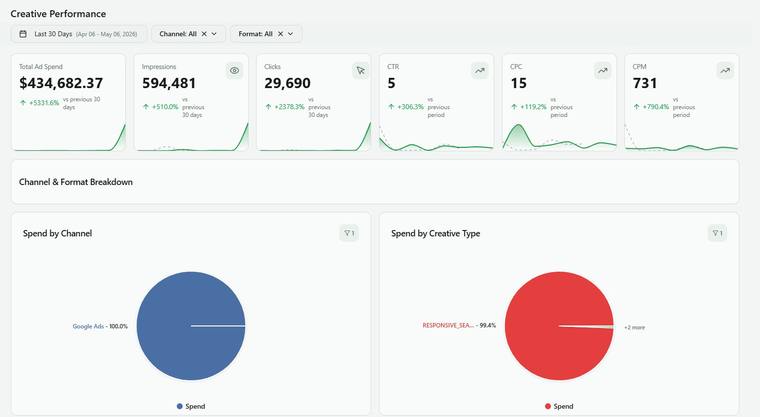
HEADER "Creative Performance" | Active date range | "Optimizing for: Lead" badge | Last refresh ROW 1 — CREATIVE HEALTH SUMMARY (4 stat cards) 1. Active Creatives — count with spend in period Sub: "[X] new launched vs. prior period" 2. Top Performer Rate — % of creatives driving 80% of conversions (Pareto signal) Lower % = higher concentration risk Sub: "[N] creatives driving 80% of Leads" 3. Fatigue Alert — count fatigued by EITHER signal (Frequency OR CTR Decay) Red if >20% of active creatives flagged Sub: "[N] creatives need refresh" 4. Avg Creative Lifespan — median days from launch to first fatigue flag Sub: "vs. [X] days last period" ROW 2 — FORMAT BREAKDOWN (two charts, side by side) Chart A — Spend by Format (donut) Image | Video | Carousel | Collection | Responsive Spend share % + absolute spend per format Chart B — Conversion Efficiency by Format (horizontal bars, ranked by CPL) One bar per format | CPL | CTR | CVR Most efficient: green | Least efficient: red Auto-insight below: "[Format] delivers [X%] lower CPL than portfolio average at comparable spend." ROW 3 — TOP CREATIVES TABLE (primary widget) Ranked by selected KPI (default: Leads). | Thumbnail | Ad Name | Format | Channel | Spend | Impressions | CTR | CPL | Leads | SQLs | CPS | Frequency | CTR Decay | Status | - Thumbnail: rendered inline when creative_url is available. Default expectation: most rows show format icon + ad name text. Thumbnails are enhancement only — table fully functional without them. - Ad Name: always clickable link to native platform Facebook: adsmanager.facebook.com (__account_id + ad_id) Google: ads.google.com (customer_id + ad_id) TikTok: ads.tiktok.com (__account_id + ad_id) Microsoft:ui.ads.microsoft.com (__account_id + ad_id) - Format: icon badge (camera / play / grid) - Frequency column: value or "—" for platforms without reach data - CTR Decay column: always shown for all platforms - Status (auto-assigned): STAR — top 20% CPL + no fatigue signal (green) SCALING — CPL within 20% of avg + spend up WoW (blue) FATIGUING — either Frequency >5 OR CTR Decay <0.7 (orange) PAUSED — no spend in last 7 days (grey) - Sort: primary KPI descending (default), all columns sortable - Top 25 rows, paginated | Export to CSV ROW 4 — FATIGUE TRACKER Scatter plot: X-axis: Frequency | Y-axis: CTR | Bubble size: Spend | Color: Channel Quadrants: Top-left (low freq, high CTR) → Fresh & performing — scale these Top-right (high freq, high CTR) → Resilient — monitor, keep running Bottom-left (low freq, low CTR) → Weak creative — test or kill Bottom-right (high freq, low CTR) → FATIGUED — pause immediately Reference lines: Vertical: Frequency = 5 (from config) Horizontal: portfolio average CTR Click bubble → slide-out creative detail panel Below chart — Fatigue Alert List: | Ad Name | Channel | Frequency | CTR Decay | CTR now | CTR week 1 | Days running | Trigger | Action | - Frequency: value or "—" for search platforms - CTR Decay: always shown - Trigger: "Freq" / "Decay" / "Both" — what flagged this creative - Action: "PAUSE" link to platform | "REFRESH" tag ROW 5 — CREATIVE PERFORMANCE TIMELINE Line chart — how CTR evolves over a creative's lifetime. Searchable dropdown, multi-select up to 5 creatives. X-axis: Day since launch (Day 1 → Day N) Y-axis: CTR % (line, left) | Spend (bar, right) Three phases shown: Ramp (days 1–3): CTR climbing as algorithm optimizes Peak (days 4–10): stable high performance Decay (day 10+): CTR declining as frequency builds Reference line: portfolio average CTR for that channel + format Purpose: tell the creative team WHEN to refresh — before decay, not after. ROW 6 — VIDEO CREATIVE METRICS Shown by default — always visible. Auto-hides ONLY when zero video spend exists in the selected period. Not hidden based on format filter — if video data exists, keep this section. Four metric cards: 1. Hook Rate — % who watched first 3s | Benchmark: >30% 2. Hold Rate — % who watched past 50% | Benchmark: >40% 3. Completion Rate — % who watched to end | Benchmark: >15% 4. Engagement Rate — engagements/impressions | Benchmark: >3% Video Drop-off Funnel: Impression → 3s View → 50% View → Completion → Click → Lead Per-creative comparison (select up to 3 from dropdown) ROW 7 — HOOK / CONCEPT ANALYSIS Primary, always-on feature. Clients have structured naming conventions. Parse ad_name and group by creative attribute. Naming convention format (clients use this): [Channel]-[Format]-[Hook Type]-[Theme]-[Audience]-[Variant] Example: FB-VID-Question-ROI-PMM-v2 Three tabs: Tab A — By Hook Type | Hook Type | Creatives | Avg CTR | Avg CPL | Avg SQLs | Best Creative | Types: Question / Stat / Story / Demo / Testimonial / UGC / Offer Tab B — By Theme | Theme | Creatives | Avg CTR | Avg CPL | Total Leads | Best Creative | Themes: ROI / Feature / Pain Point / Social Proof / Comparison / Brand Tab C — By Audience Tag | Audience | Creatives | Avg CTR | Avg CPL | SQLs | If some ad names can't be parsed (partial convention adoption): Show parsed rows normally. Note at bottom: "[N] ads had unrecognized naming format and are excluded from this view." Do NOT hide the entire section — show what can be parsed. ROW 8 — AI CREATIVE INTELLIGENCE [PRIORITY — pre-computed, instant load] Nightly job at 02:00 UTC → internal_analytics.cmo_dashboard_insights insight_type IN ('creative_winner', 'creative_fatigue', 'creative_brief') No LLM call at render time. Three blocks (directional signals for strategist, not a designer brief): CREATIVE WINNER THIS PERIOD "[Ad Name] on [Channel] is your top creative: [CTR]% CTR, $[CPL] CPL, [X] leads. Attributes: [format], [theme from naming convention]. Recommend: increase budget before frequency exceeds [threshold]." FATIGUE WARNING "[N] creatives are showing fatigue signals — [X] by frequency, [Y] by CTR decay. Top priority to pause: [Ad Name] on [Channel] ([trigger signal])." WHAT'S WORKING (DIRECTIONAL) "Your strongest pattern this period: Format → [type] outperforming by [X%] CPL Hook → [type] has [X%] higher CTR than other hooks Theme → [type] generating most leads at lowest cost Use these signals to guide your next creative planning session." Show: "Intelligence updated [date] at 02:00 UTC" | "Recompute now" (admins only)
━━━━━━━━━━━━━━━━━━━━━━━━━━━━━━━━━━━━━━━━ BENCHMARKS & CONFIG ━━━━━━━━━━━━━━━━━━━━━━━━━━━━━━━━━━━━━━━━
Config table: internal_analytics.cmo_dashboard_config (shared) Creative-specific keys: benchmark_ctr_image — % per format (default: 1.5) benchmark_ctr_video — % per format (default: 1.0) benchmark_ctr_carousel — % per format (default: 1.2) benchmark_cpl — USD per Lead benchmark_cps — USD per SQL benchmark_hook_rate — % (default: 30) benchmark_hold_rate — % (default: 40) benchmark_completion_rate — % (default: 15) benchmark_engagement_rate — % (default: 3) fatigue_frequency_threshold — avg frequency before flag (default: 5) fatigue_ctr_decay_threshold — ratio vs. launch CTR (default: 0.7) creative_naming_convention — delimiter + segment order (get exact format from client) Missing key: hide that metric's benchmark only, do not break dashboard.
━━━━━━━━━━━━━━━━━━━━━━━━━━━━━━━━━━━━━━━━ DESIGN ━━━━━━━━━━━━━━━━━━━━━━━━━━━━━━━━━━━━━━━━
Style: Thumbnail-forward where available — format icon is the standard fallback Status badges: green (STAR) / blue (SCALING) / orange (FATIGUING) / grey (PAUSED) Scatter quadrant labels: subtle light-grey background per quadrant Video section: distinct background to separate from standard metric rows Channel accent colors: consistent across all three dashboards Interactions: - Click creative row or scatter bubble → slide-out detail panel (thumbnail if available | all metrics | timeline | platform link) - Format filter → re-ranks Top Creatives table instantly - Primary KPI toggle → recalculates all efficiency columns + re-sorts table - Hook analysis tabs → instant switch, no query reload States: - Loading: skeleton with thumbnail placeholder boxes - No thumbnail: format icon + ad name text (expected default) - No video data: video section auto-hides - Partial naming convention: show parsed rows, note count of unparsed at bottom - No spend in period: "No creative activity — try a wider date range" Performance: - Thumbnails: lazy-loaded, cached - All queries parallel | Cache 1 hour - Scatter: up to 200 bubbles, clusters beyond that
━━━━━━━━━━━━━━━━━━━━━━━━━━━━━━━━━━━━━━━━ WHAT THIS DASHBOARD IS NOT ━━━━━━━━━━━━━━━━━━━━━━━━━━━━━━━━━━━━━━━━
- Not a creative asset library or DAM
- Not a campaign or bid manager
- Not a channel strategy tool (use CMO dashboard)
- Not a statistically rigorous A/B test tool (signal, not significance)
- Not real-time (daily refresh sufficient)
━━━━━━━━━━━━━━━━━━━━━━━━━━━━━━━━━━━━━━━━ CLIENT SETUP CHECKLIST ━━━━━━━━━━━━━━━━━━━━━━━━━━━━━━━━━━━━━━━━
1. Seed cmo_dashboard_config with creative benchmark keys (CTR by format, fatigue thresholds, video benchmarks) 2. Get exact naming convention format from client (delimiter + segment order) so parsing is accurate 3. Confirm primary KPI for creative ranking (Lead default — some use SQL or Closed Won ARR) 4. Verify ad_id + __account_id present for all active ad platforms (platform deeplinks) 5. Confirm active ad formats — note which have video so section visibility is correct 6. Schedule nightly AI creative intelligence job at 02:00 UTC 7. Identify which platforms expose reach/frequency (Meta, TikTok, LinkedIn = yes; Google Search, Microsoft Search = no → fatigue via CTR Decay only)
What the dashboard looks like when the prompt is implemented.
Was this article helpful?
Thanks for the feedback!
Questions? The Improvado team is always happy to help. Send us an email, contact your Customer Success Manager, or raise a request in the Improvado Service Desk.