

Available Recipe Templates
Cross-Channel
Learn about Cross-Channel Recipe, its tables, schema types, and report types
Paid Ads Google Analytics
Learn about Paid Ads Google Analytics Recipe, its tables, schema types, and report types
Paid Search
Learn about Paid Search Recipe, its tables, schema types, and report types
eCommerce
Learn about eCommerce Recipe, its tables, schema types, and report types
Paid Social
Learn about Paid Social Recipe, its tables, schema types, and report types
SEO
Learn about SEO Recipe, its tables, schema types, and report types
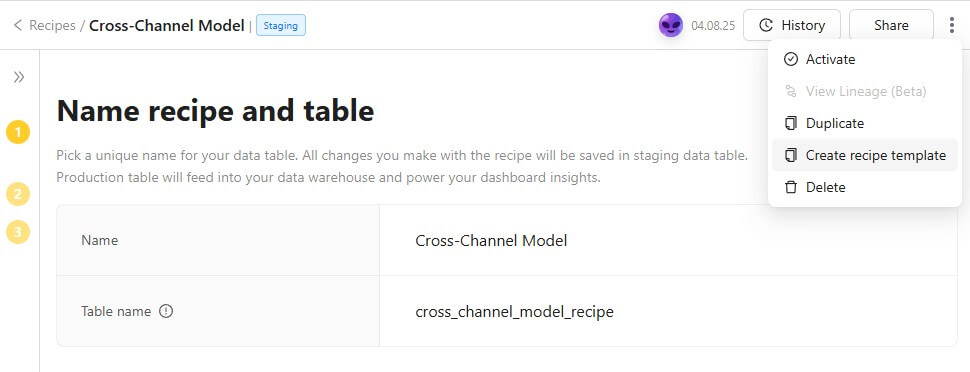
You can turn any recipe into a reusable template — available across all workspaces — to save time, maintain consistency, and avoid rebuilding from scratch.
- Open your recipe (e.g., Cross-Channel Model).
- Click the three-dot menu in the top-right corner.
- Select "Create recipe template".
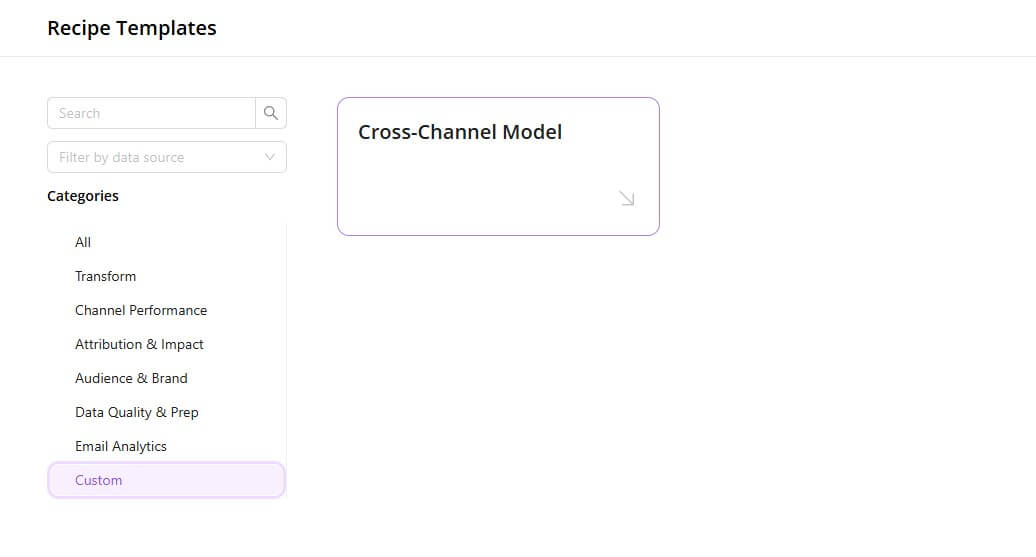
- Once created, your template will appear under the "Custom" category on the Recipe Templates page.
Was this article helpful?
Thanks for the feedback!
Questions? The Improvado team is always happy to help. Send us an email, contact your Customer Success Manager, or raise a request in the Improvado Service Desk.