1. Decide what the viewer needs to understand
Write the question before choosing the format or length. A software buyer may need to see an action and its result. A shopper may need to understand movement or controls. A service buyer may need to know what happens after booking.
| Brief field | Your answer |
|---|---|
| Page and source version | URL, saved text and date |
| Viewer and question | Role, situation and one unanswered question |
| What must be shown | A task, mechanism or service process |
| Next action | One action, also available without watching |
| Evidence allowed | Approved claims, images, footage and permissions |
| Final reviewer | Owner of factual and visual approval |
| Worked example | Buyer question | Material to prepare |
|---|---|---|
| Scheduling software | How does a booking reach the calendar? | Available times, details, review and confirmation states |
| Desk lamp | How do I position it and use the controls? | Actual product views or labeled drawings of the joints and controls |
| Home-energy visit | What happens before, during and after? | Approved scope, process visuals and a sample deliverable |
A product demo needs product evidence. An illustration can simplify a mechanism but cannot prove physical performance. A testimonial needs a real person's account and permission. A VSL needs an offer-specific argument and substantiated proof.
Finished when: you can name the question, the visual that answers it and the next action.
2. Build an inspiration library you can explain
Save references for a specific reason: an opening, camera angle, interface focus, pacing, caption treatment or CTA placement. A folder of attractive videos is not a production brief.
Choose a few contrasting references. Record the URL, creator, date viewed and useful timecode. A public reference is inspiration; public access does not grant permission to reuse its footage, music, logo or voice.
| Reference | Useful moment | Instruction for this project |
|---|---|---|
| [URL and creator] | [Timecode] | Show the input before the result |
| [Second reference] | [Timecode] | Hold the assembled product in view |
| [Third reference] | [Timecode] | Show the service deliverable before asking for a booking |
Use inspiration-log.csv from the starter kit. Record the transferable technique, assets you would need and reuse status. Keep rejected references with a short reason so the same suggestion does not return at every revision.
Prompt: turn references into direction
Viewer and question: [brief]
References: [URL, creator, timecode and your observation for each]

Identify the useful technique and production decision for each reference.
Separate inspiration from assets we have permission to reuse.
Propose a direction without copying another brand's identity.
List the captures, footage or illustrations we must supply ourselves.
If you cannot inspect a video, use only the supplied observations.
State what remains unverified; do not claim to have watched it.
Finished when: each saved reference leads to a specific instruction or is marked rejected.
3. Build your asset library before production
Separate inspiration links from files you can use in the final video. A screenshot, product photograph, diagram and music track have different source and permission requirements.
my-video/
  brief/             approved page, question and claim log
  inspiration/       reference links and notes
  assets/originals/  untouched approved files
  assets/working/    crops, masks and production derivatives
  audio/             script, voice takes and pronunciation notes
  project/           editable scenes and timing
  exports/           versioned video, poster and captions
  review/            contact sheets, corrections and approvals
Register each asset's ID, local path, source URL or owner, type, dimensions, capture date, permission record, visible personal/customer information and review status. The kit includes asset-register.csv and asset-register-template.json.
Use explicit statuses: reference only, permission pending, approved for this project, needs refresh, or do not use. Downloading a file does not approve it. Preserve originals and make working copies for production.
For software, capture starting, action and result states from a sanitized demo account. Record the release or interface date. For products, collect the actual angles, controls and movements you need. For services, collect scope, process and sample deliverables without inventing a customer's experience.
Prompt: inspect the inventory
Brief: [question and next action]
Asset register: [source, permission and review status for each file]

Choose only assets approved for this project. Return IDs and proposed uses.
Flag unreadable images, old UI, personal/customer information,
missing permissions and missing starting/action/result states.
Mark gaps CAPTURE NEEDED. Do not invent images or approve them yourself.
Preserve originals; propose crops and focus regions separately.
Finished when: each planned scene has usable material or a named capture task with an owner.
4. Choose tools and record the cost
Use tools your team can maintain. A writing assistant drafts, an editor or code renderer assembles scenes, and a voice tool supplies narration. They do not need to come from the same vendor.
| Job | Example | Check before production |
|---|---|---|
| Script and storyboard | Approved AI assistant | Data handling and human review |
| Motion and assembly | Remotion or your video editor | Skills, portability and license eligibility |
| Narration | Local Kokoro or approved voice service | Terms, pronunciation and permitted use |
| Hosting and captions | Existing video platform | Player behavior and reporting |
| Music and imagery | Owned or licensed files | Commercial use and redistribution rights |
The teaching samples use code-based motion, local narration and original illustrations. Their palettes vary by subject. Use your own brand kit; every industry does not need the same dark background and text cards.
Record subscriptions allocated to the job, generation/rendering usage, hosting, licensed assets and human time. Local generation does not make production cost-free. Check software, model, voice, music and font terms separately.
If you do not write code, hand the approved brief, script and shot list to an editor or developer. You can still own source review and final approval.
Sources: Remotion licensing, Kokoro model card.
5. Draft the script from approved material
Explain the buyer's question, show the process that answers it and end with one next action. Remove a scene that repeats the preceding point without showing anything new.
Prompt: script and claim log
Viewer and question: [brief]
Next action: [one action]
Approved source: [versioned text]
Supporting evidence: [verified excerpts and URLs]
Approved asset IDs: [register entries]

Return spoken line / proposed visual / asset ID / short instruction /
source reference / estimated timing for each scene.
Then return a claim log: exact wording / source / qualification / decision.
Preserve dates, populations, limits and offer conditions.
Do not invent capabilities, results, reviews or comparative benefits.
Use NEEDS SOURCE for unsupported wording and CAPTURE NEEDED for missing assets.
Write natural speech. Do not repeat a page paragraph on screen.
Read every factual line against its source. Keep fictional practice material clearly labeled and separate from real product claims.
The scheduling script follows a booking to confirmation. The lamp script describes position and controls without promising measured brightness or eye comfort. The service script describes the visit and summary without promising energy savings.
Finished when: the script reads naturally and every claim has evidence or a clear fictional-example label.
6. Turn the script into shots
Choose the representation by what the viewer needs to see. Captures show interface states, diagrams explain relationships, and footage shows physical behavior. Do not use an illustration to imply a live test.
Worked shot plan: scheduling software
| Shot | Visual action | Material and instruction |
|---|---|---|
| Available times | Establish the appointment screen | Show the complete fictional interface before focusing the slots |
| Selection | Highlight Thursday at 10:00 and add details | Use an example address; retain the selected time |
| Review | Put details beside the confirmation control | Hold the state while narration asks the viewer to check it |
| Result | Show the confirmed appointment | Retain the same time and contact details |
This example is a reconstruction. A real demo needs matching product captures. Screenshots from unrelated accounts are not one continuous recording.
Show enough context to locate a control, then zoom in. Dim surrounding content only when the control and result remain readable. Keep instructions and captions outside the active area. Set the hold against final narration and a readability check.
For the lamp, show the arm and shade moving rather than listing features. For the service, advance through the rooms, discussion and written summary.
Prompt: review the shot plan
Review the brief, script, shot list and approved asset register.
For each shot, say what the image teaches that narration alone does not.
Return starting state / action / visible result / asset ID / focus area /
spoken line / short instruction / evidence reference.
Flag decorative scenes, duplicate ideas, unreadable text, caption collisions,
unsupported UI and mismatched before/after states.
Do not fabricate clicks, results or customer quotes.
Finished when: settled frames explain the sequence at desktop and phone player sizes.
7. Build narration, captions and a first render
Approve the script before generating speech. Keep a pronunciation list and listen to names and acronyms. Use a voice you have permission to use; a reference recording does not authorize cloning its speaker.
A practical starting export is a 16:9 MP4 at 1920 x 1080, with a poster and WebVTT captions. A vertical version needs its own framing and safe-area review. Reframe the active control rather than shrinking a whole desktop interface.
The teaching samples are short 1280 x 720 examples. Duration follows their scenes and narration; it is not an optimal-length benchmark.
Generate captions from final audio timing and the approved script. Check names, synchronization, line breaks and wording changes. Provide a caption track where supported, even when social edits also have burned-in text.
Music is optional. Check speech clarity and clipping in the final mix. A house loudness target is a production setting, not a universal platform specification.
Finished when: narration, visuals and captions tell the same story and remain legible in the intended player.
8. Review the exact export
| Pass | Check | Output |
|---|---|---|
| Script | Facts, scope, permissions and action | Approved script version |
| Stills | Settled frames at desktop and phone size | Annotated contact sheet |
| Playback | Entire video with sound, then muted | Time-coded corrections |
On mute, can a reviewer identify the action and result? With sound, does the visual appear when named? Check focus boxes, interface labels, caption overlap, accidental personal details and the CTA.
Record time / issue / requested change / reviewer / resolved version. Script edits require evidence and timing checks. Visual-only edits still need final playback.
Prompt: specific corrections
Inputs: [brief], [script], [claim log], [shot list], [source excerpts],
[actual frames or video available to you].
List specific problems: unsupported wording, unclear action/result,
unreadable text, repeated point, missing permission or mismatched CTA.
Give time/shot, evidence, fix and priority. State what you could not inspect.
Do not claim playback review when given only stills. Human approval remains required.
Finished when: the owner approves the exported version, poster and captions together.
9. Package and place the video
Deliver versioned MP4, poster, captions, accessible summary, editable source, claim log and asset register. Add the placement mockup, event configuration, owner and rollback instructions.
Keep offer details and the next action readable without watching. Place the player beside the question it answers. Pick a poster that represents the content and reads clearly at its display size.
Test play/pause, captions, keyboard access, loading and the form or booking route on mobile and desktop. Replace matching media versions together to avoid old captions on a new film.
Test page performance before and after adding a player. An embed does not guarantee video-search visibility. Google's guidance distinguishes watch pages from pages where video supplements other content.
Sources: video performance, Google video guidance.
10. Measure the page outcome, not just viewing
Define eligible visitors, player loads, starts, a viewing threshold, the next action and a qualified outcome. A load, start and person watching are different records; use the platform's definitions.
Week | page/video version | assigned group | eligible visitors | starts |
threshold reached | valid actions | qualified outcomes | mature cohort size |
linked records | link-eligible records | missing-data notes
Show weekly rows before pooled totals; separate incomplete follow-up. Check duplicate events, missing identifiers by channel/device/consent, and player-definition changes. Inspect shifts between pages and videos before claiming that the same video became less effective.
Watching is self-selected. A watcher/nonwatcher comparison does not establish lift. A suitable randomized comparison includes skippers and direct bookers, uses the same outcome window and follows an agreed decision rule. Bayesian evaluation is a useful default.
Connecting the reporting
Improvado's Wistia integration and setup documentation provide a route for bringing supported video data into marketing reporting. Inspect actual fields and grain. Join video, web and CRM records only where compatible identifiers and permitted use support it. Report unmatched records; daily totals cannot reconstruct individual journeys.
Track search visibility separately. Google includes AI-feature traffic within Search Console Web reporting; it is not automatically attributable to a video. Google AI-feature guidance.
11. Practice with three different subjects
Open the worked videos and their example asset library.
| Example | What the visuals do | Adapt it to your project |
|---|---|---|
| Scheduling software | Follow a slot through review and confirmation | Supply approved captures of your task |
| Desk-lamp concept | Show position, movement and a control | Supply product views or labeled technical illustrations |
| Home-energy service | Explain before, during and after the visit | Supply the actual scope and an approved sample deliverable |
Software: make the task visible
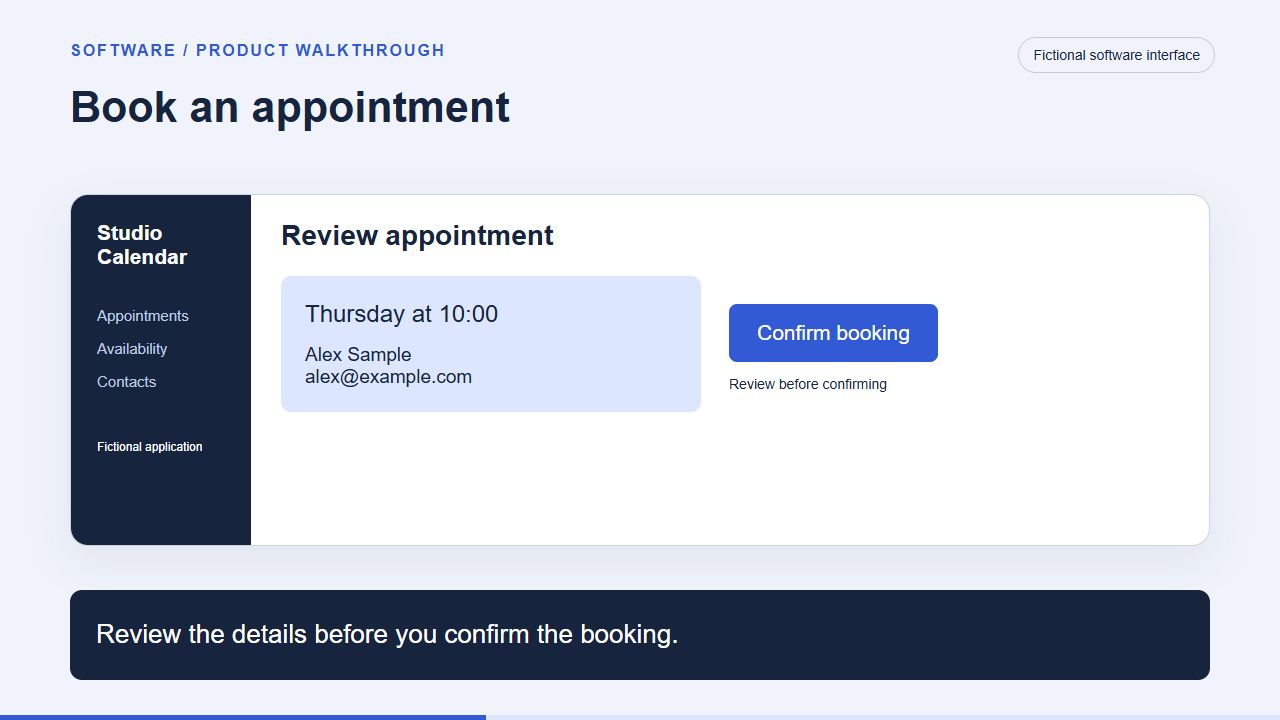
Use matching input, review and result states. This is a reconstructed interface, not a live product capture.
Product: explain the mechanism
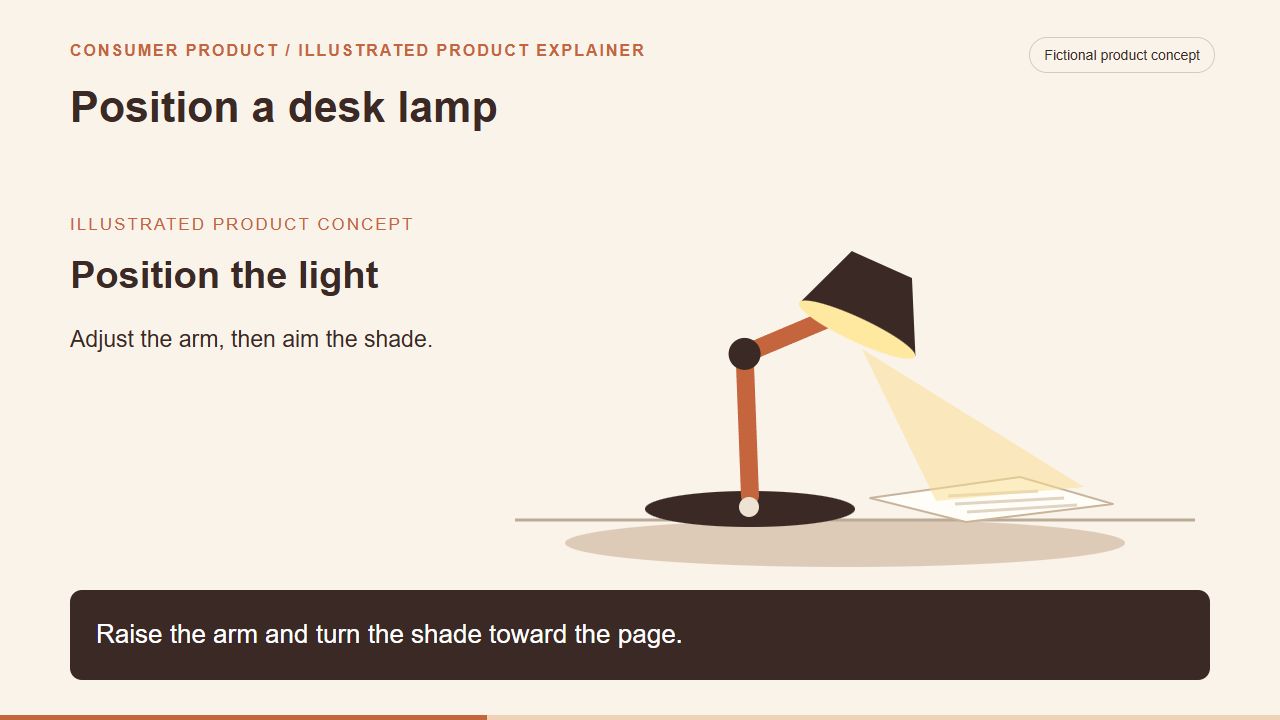
Show the part that moves and the control the user operates. Replace the concept with evidence of your actual product.
Service: show what the buyer receives
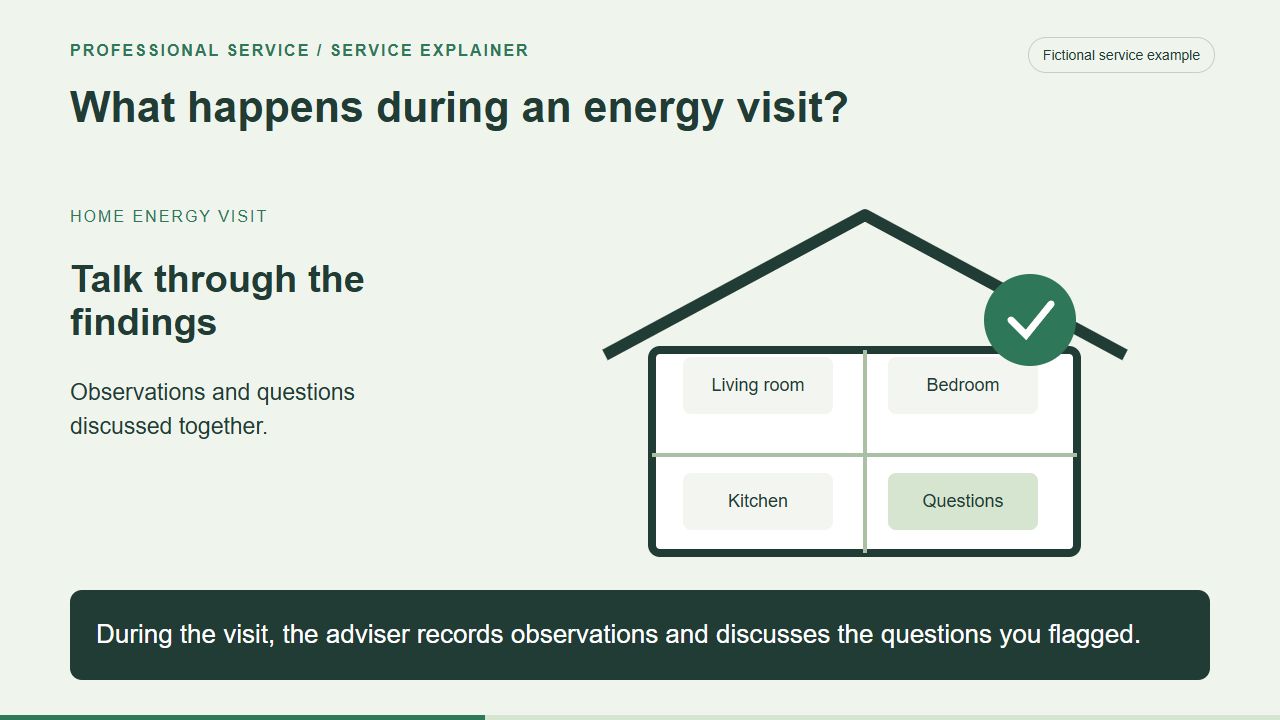
Explain the sequence and deliverable. Use real service scope; do not invent a testimonial or promise savings.
The example library includes original scene images, briefs and a register. It provides practice material, not claims about a real product. The samples avoid invented testimonials and measured business benefits.
Keep the useful technique, then replace the subject, evidence, brand settings and action. Do not carry a fictional feature into your real script.
12. Hand the project to your editor or agent
Project folder and approved brief:
Viewer, question and next action:
Saved page and approved claims:
Inspiration IDs and technique to borrow:
Approved asset IDs, paths and permission records:
Missing captures and owner:
Shot list: starting state, action and result:
Brand kit and voice/music restrictions:
Formats, captions and poster:
Reviewer, review date and publication owner:
Measurement definitions and observation window:

Use approved assets only. Preserve originals.
Mark gaps CAPTURE NEEDED and unsupported wording NEEDS SOURCE.
Produce one reviewable scene before completing the film.
Do not publish, buy assets, clone a voice or upload private material
without the relevant authorization.
Keep registers, prompts, source files and corrections together so someone else can revise the project. The kit is a supervised starting point, not a tested autonomous skill.
Need help connecting the reporting? Bring event definitions and sample fields to an Improvado conversation. The examples teach production; reporting is a separate implementation question.
Examples and templates updated November 4, 2026. Re-check tool terms and facts before production. No conversion or SEO/GEO benefit is claimed from these samples.